Best 3D modeling software for 3D printing in 2026: 8 Compared

- Tinkercad is the best starting point for beginners, since it runs in a browser and teaches solid modeling with simple shapes.
- Blender is the strongest free option for organic and artistic models, though its learning curve is steep.
- Fusion 360 is our pick for functional parts, since parametric design makes it easy to change dimensions later.
- FreeCAD and OpenSCAD suit makers who want free, precise, open tools and are comfortable with a technical workflow.
Quick comparison
| Product | Ideal for | Price from | Free version | |
|---|---|---|---|---|
 Tinkercad | Beginners | Free | Yes | Visit |
 Blender | Organic and artistic models | Free | Yes | Visit |
 Fusion 360 | Functional parts | See website | Yes | Visit |
 FreeCAD | Free precise CAD | Free | Yes | Visit |
 Onshape | Browser-based CAD teams | See website | Yes | Visit |
 SketchUp | Quick architectural and product models | See website | Yes | Visit |
 Rhino | Complex surfaces and jewellery | See website | No | Visit |
 OpenSCAD | Code-driven precise parts | Free | Yes | Visit |
The best 3d modeling software for 3d printing
We compared official feature pages, pricing pages, app store listings, privacy policies and public reviews to build this list, focusing on products that fit the topic closely and are still available in October 2026.
Tinkercad
Ideal for: Beginners

For buyers who want a clear fit, Tinkercad is aimed at beginners and classrooms. Tinkercad is a browser-based tool that builds models from simple solid shapes. It is free, needs no install, and is widely used in schools, which makes it the gentlest first step. In practice, that means the product earns its place by doing one job well for that audience, rather than trying to cover every possible use case at once. We compared its official feature page, pricing and public reviews against the other options here, and its best-for label reflects where it looked strongest, not where its marketing claims are loudest.
The trade-off is worth naming plainly. It struggles with complex or highly precise parts, so makers soon move to CAD for functional work. On price, the starting point listed above is free, and the free plan entry is Yes. If that combination fits your budget and your main use case, Tinkercad is a sensible shortlist choice. If the catch above is a deal breaker, move to another entry in this list whose strength matches your priority instead.
- Runs in a browser
- Very easy to learn
- Free
- Limited for complex or precise parts
- Needs internet
Blender
Ideal for: Organic and artistic models

If that use case sounds familiar, Blender is aimed at artists and hobbyists. Blender is a free, open source 3D suite with sculpting, modelling and mesh tools. Its community produces many tutorials, and its 3D print toolbox helps check meshes before export. In practice, that means the product earns its place by doing one job well for that audience, rather than trying to cover every possible use case at once. We compared its official feature page, pricing and public reviews against the other options here, and its best-for label reflects where it looked strongest, not where its marketing claims are loudest.
On the other side of that strength, The interface is dense, and precise mechanical dimensions are harder to control than in CAD. On price, the starting point listed above is free, and the free plan entry is Yes. If that combination fits your budget and your main use case, Blender is a sensible shortlist choice. If the catch above is a deal breaker, move to another entry in this list whose strength matches your priority instead.
- Free and open source
- Powerful sculpting
- Large community
- Steep learning curve
- Not a parametric CAD tool
Fusion 360
Ideal for: Functional parts
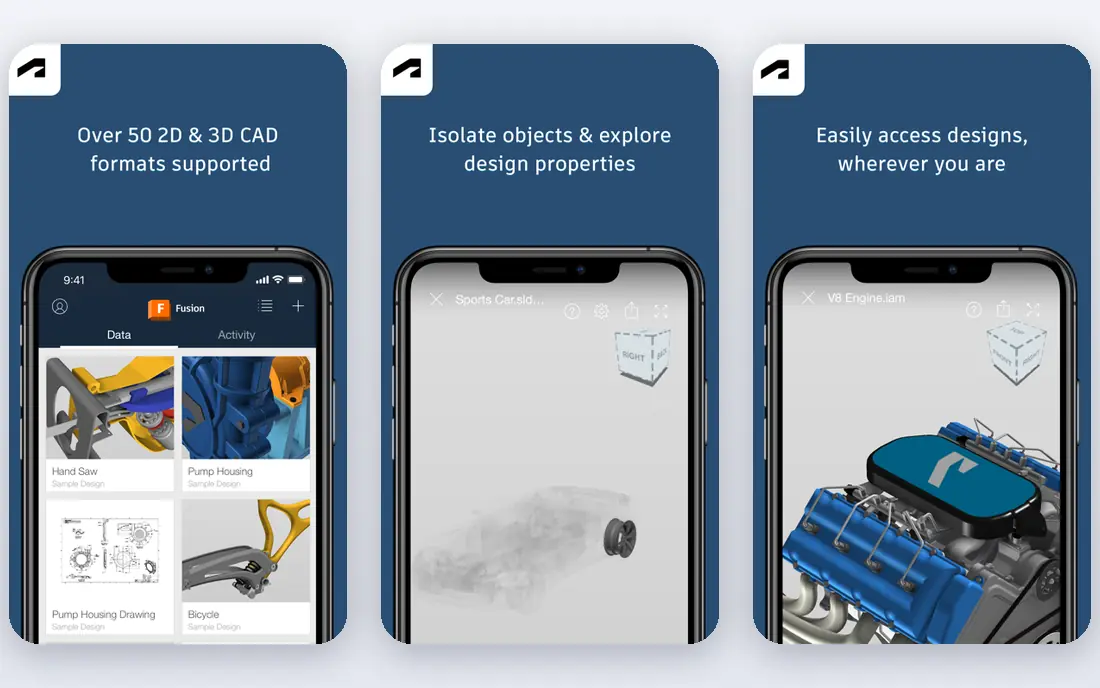
Among the options here, Fusion 360 is aimed at makers and engineers. Fusion 360 is Autodesk parametric CAD for functional parts, assemblies and manufacturing. Changing a dimension updates the model, which is a major advantage for parts that need several test prints. In practice, that means the product earns its place by doing one job well for that audience, rather than trying to cover every possible use case at once. We compared its official feature page, pricing and public reviews against the other options here, and its best-for label reflects where it looked strongest, not where its marketing claims are loudest.
Before you commit, weigh this part. Personal use is limited, and commercial users need a subscription, so check the current terms before committing. On price, the starting point listed above is not published clearly, so check the vendor site, and the free plan entry is Yes. If that combination fits your budget and your main use case, Fusion 360 is a sensible shortlist choice. If the catch above is a deal breaker, move to another entry in this list whose strength matches your priority instead.
- Parametric design
- Assemblies
- CAM and slicing links
- Free personal use has limits
- Subscription for commercial use
FreeCAD
Ideal for: Free precise CAD
For a team or household weighing this choice, FreeCAD is aimed at makers who want free CAD. FreeCAD is a free, open source parametric CAD tool with workbenches for parts, assemblies and meshes. It gives precise control without a subscription, which suits makers and small workshops. In practice, that means the product earns its place by doing one job well for that audience, rather than trying to cover every possible use case at once. We compared its official feature page, pricing and public reviews against the other options here, and its best-for label reflects where it looked strongest, not where its marketing claims are loudest.
The honest catch comes next. Its interface is less polished than commercial CAD, and some workflows need community add-ons. On price, the starting point listed above is free, and the free plan entry is Yes. If that combination fits your budget and your main use case, FreeCAD is a sensible shortlist choice. If the catch above is a deal breaker, move to another entry in this list whose strength matches your priority instead.
- Free and open source
- Parametric
- Many workbenches
- Interface is less polished
- Learning curve
Onshape
Ideal for: Browser-based CAD teams
When the main need is the one above, Onshape is aimed at teams and students. Onshape is professional CAD that runs in a browser, with collaboration and version control built in. Teams can work on the same model at once, and version history makes it easy to roll back a change. In practice, that means the product earns its place by doing one job well for that audience, rather than trying to cover every possible use case at once. We compared its official feature page, pricing and public reviews against the other options here, and its best-for label reflects where it looked strongest, not where its marketing claims are loudest.
Pricing and limits deserve a second look. The free plan makes designs public, so private commercial work needs a paid plan. On price, the starting point listed above is not published clearly, so check the vendor site, and the free plan entry is Yes. If that combination fits your budget and your main use case, Onshape is a sensible shortlist choice. If the catch above is a deal breaker, move to another entry in this list whose strength matches your priority instead.
- Runs in a browser
- Real-time collaboration
- Version control
- Free plan makes designs public
- Paid plans for private work
SketchUp
Ideal for: Quick architectural and product models
For readers who put this factor first, SketchUp is aimed at beginners moving beyond Tinkercad. SketchUp is known for fast, approachable modelling, especially for buildings and product concepts. Its 3D Warehouse offers ready-made components, and the browser version lowers the barrier to start. In practice, that means the product earns its place by doing one job well for that audience, rather than trying to cover every possible use case at once. We compared its official feature page, pricing and public reviews against the other options here, and its best-for label reflects where it looked strongest, not where its marketing claims are loudest.
A smaller drawback can still matter. The free version lacks some export and precision tools, and serious engineering work usually needs a paid plan. On price, the starting point listed above is not published clearly, so check the vendor site, and the free plan entry is Yes. If that combination fits your budget and your main use case, SketchUp is a sensible shortlist choice. If the catch above is a deal breaker, move to another entry in this list whose strength matches your priority instead.
- Easy to learn
- Large 3D warehouse
- Browser version
- Free version is limited
- Precision tools need paid plan
Rhino
Ideal for: Complex surfaces and jewellery
In a crowded field, Rhino is aimed at designers and jewellers. Rhino is a surface modeller used for jewellery, product design and architecture. Grasshopper adds parametric design, so complex patterns can be driven by rules rather than manual edits. In practice, that means the product earns its place by doing one job well for that audience, rather than trying to cover every possible use case at once. We compared its official feature page, pricing and public reviews against the other options here, and its best-for label reflects where it looked strongest, not where its marketing claims are loudest.
What to check before paying is simple. It is a paid licence, and Grasshopper takes time to learn, so it suits committed designers. On price, the starting point listed above is not published clearly, so check the vendor site, and the free plan entry is No. If that combination fits your budget and your main use case, Rhino is a sensible shortlist choice. If the catch above is a deal breaker, move to another entry in this list whose strength matches your priority instead.
- Strong surface modelling
- Grasshopper for parametric design
- Wide file support
- Paid licence
- Learning curve for Grasshopper
OpenSCAD
Ideal for: Code-driven precise parts
For a first purchase in this category, OpenSCAD is aimed at programmers and engineers. OpenSCAD builds models from code, which gives exact, repeatable dimensions. A part can be shared as a short script, and changing a parameter rebuilds it cleanly. In practice, that means the product earns its place by doing one job well for that audience, rather than trying to cover every possible use case at once. We compared its official feature page, pricing and public reviews against the other options here, and its best-for label reflects where it looked strongest, not where its marketing claims are loudest.
The limit to keep in mind is this. There is no visual drag-and-drop modelling, so it is a poor fit for organic or artistic shapes. On price, the starting point listed above is free, and the free plan entry is Yes. If that combination fits your budget and your main use case, OpenSCAD is a sensible shortlist choice. If the catch above is a deal breaker, move to another entry in this list whose strength matches your priority instead.
- Free
- Models defined by code
- Exact dimensions
- No visual dragging
- Slow for organic shapes
How we picked these
We compared official feature pages, pricing pages, app store listings, privacy policies and public reviews for each product, and we kept only products that are still available in October 2026 and that fit the topic closely. Where a vendor did not publish a clear starting price on its own site, we wrote See website rather than guessing. Prices can change, so check the vendor page linked in each product block before you buy.
Making a model that actually prints well
Design with your printer in mind. Wall thickness, overhangs and orientation decide whether a model prints cleanly, whatever the software. Export as STL or 3MF and check the mesh for holes or flipped faces before slicing. For functional parts, parametric CAD beats sculpting, since you can change one dimension and the part updates. For figures and organic shapes, sculpting tools give more freedom. Print a small test of a tricky section before committing to a long print.
Frequently asked questions
What is the best free 3D modeling software for 3D printing?
Tinkercad is best for beginners, Blender is best for organic models, and FreeCAD is best for precise functional parts. All three are free, so the choice depends on the kind of model you want.
Do I need CAD software to 3D print?
For functional parts, yes, CAD helps a lot. For decorative models, you can also download ready-made files, but designing your own needs a modeling tool.
What file format should I export for 3D printing?
STL is the most widely supported format, and 3MF preserves more detail such as colour and material data. Check what your slicer supports before you export.
Is Blender good for 3D printing?
Blender is strong for organic and artistic models, and it has mesh tools for checking prints. It is less convenient than CAD for precise mechanical parts with exact dimensions.
Can I design 3D prints on a Chromebook or tablet?
Tinkercad and Onshape run in a browser, so they work on many devices. Desktop CAD tools such as Fusion 360 and SolidWorks need a Windows or Mac computer.