6 Best AI Analysis Software for Enterprise Teams for 2026

- 1
 TableauTeams prioritizing visual analytics depth with AI assistanceVisit
- 2
 ThoughtSpotBusiness users who want search-driven answers from dataVisit
- 3
 Microsoft Power BIEnterprises standardized on Microsoft 365 and AzureVisit
- 4
 DomoExecutives and operations teams needing live cloud analyticsVisit
- 5
 QlikTeams needing associative exploration with AI-augmented discoveryVisit
- The list opens with Tableau, aimed at teams prioritizing visual analytics depth with AI assistance.
- No starting price is shown for any of the 6 tools, Tableau and DataRobot included, so plan time for sales calls.
- DataRobot is the one to check for teams needing automatic, repeatable machine learning predictions.
- Microsoft Power BI stands alone as the one tool in this list with a free plan.
Direct answer
If you need teams prioritizing visual analytics depth with AI assistance, Tableau is the first tool to look at here. ThoughtSpot is the stronger choice for business users who want search-driven answers from data, while Microsoft Power BI suits enterprises standardized on Microsoft 365 and Azure. The remaining 3 options are covered below with prices and limits.
Quick comparison
| Product | Ideal for | Price from | Free version | |
|---|---|---|---|---|
| Tableau | Teams prioritizing visual analytics depth with AI assistance | See website | Free trial | Visit |
| ThoughtSpot | Business users who want search-driven answers from data | See website | Free trial | Visit |
| Microsoft Power BI | Enterprises standardized on Microsoft 365 and Azure | See website | Yes | Visit |
| Domo | Executives and operations teams needing live cloud analytics | See website | Free trial | Visit |
| Qlik | Teams needing associative exploration with AI-augmented discovery | See website | Free trial | Visit |
 DataRobot | Teams needing automatic, repeatable machine learning predictions | See website | Free trial | Visit |
Our 6 AI analysis software for enterprise teams
This Ainotely guide covers 6 AI analysis software for enterprise teams. Each profile lists a starting price, free plan details, strengths and drawbacks, so you can drop poor fits quickly.
Tableau
Ideal for: Teams prioritizing visual analytics depth with AI assistance
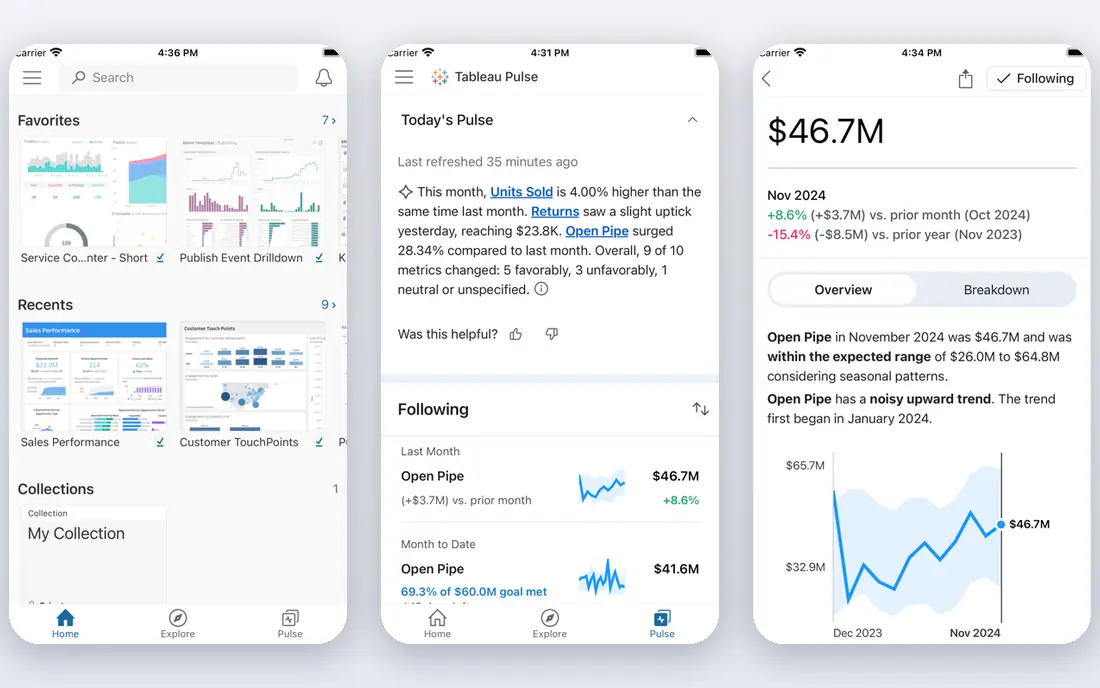
Tableau was built for teams prioritizing visual analytics depth with AI assistance. Tableau remains the visualization leader, and the AI additions address its historical weakness: getting insights to people who never open dashboards. As for the details, the community, training resources and connector library are unmatched.
Beyond that, per-user pricing scales steeply for large deployments, and the Salesforce ownership shapes the roadmap. But for visual analytics with a real AI layer, Tableau is the craft choice. Also, Tableau Pulse proactively gives personalized KPI insights to Slack, email and mobile, whereas Einstein AI assists with natural-language queries and automatic analysis. This comparison lists no price for Tableau; ask the vendor. Free options: Free trial.
Where it is weaker: Pricing per user layers on up.
- Best-in-class visualization
- Tableau Pulse for proactive insights
- Advanced AI needs higher levels
ThoughtSpot
Ideal for: Business users who want search-driven answers from data
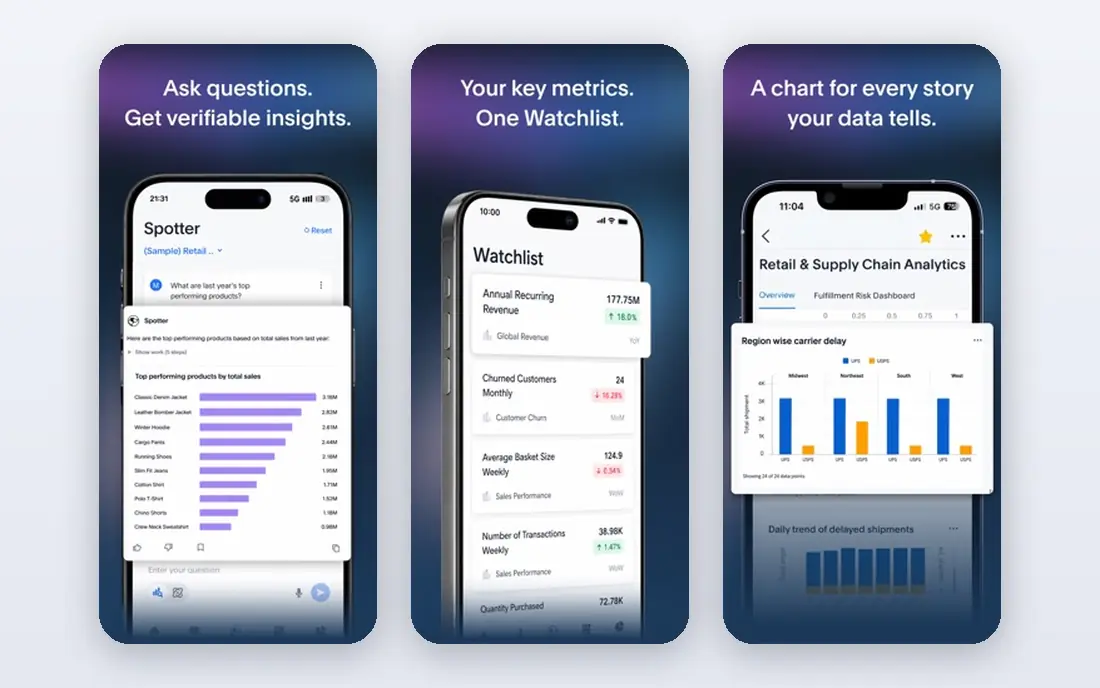
In short, ThoughtSpot is for business users who want search-driven answers from data. ThoughtSpot reimagined BI as search: type a business question in plain language and get an answer with visualizations, drill-downs and explanations. On top of that, pricing is premium and the value relies on data modeling quality; garbage in, search out.
Points against: Less dashboard tradition than Tableau.
For business users who never learned BI tools, the search metaphor removes the whole ramp-up time. Spotter, the AI analyst, takes care of follow-up questions conversationally. ThoughtSpot does not show a starting price in this comparison, so check the vendor site for current pricing. Trial and free access: Free trial.
- Fast trustworthy answers
- Capable enterprise data handling
- Premium pricing
Microsoft Power BI
Ideal for: Enterprises standardized on Microsoft 365 and Azure

Microsoft Power BI is built with enterprises standardized on Microsoft 365 and Azure in mind. Power BI is the enterprise BI default for Microsoft shops, and Copilot layers on the AI layer: natural-language questions answered from your data, DAX measures generated from prompts, and report summaries written automatically. Worth adding: DAX remains a genuine skill to learn.
What works well: Deep Microsoft ecosystem integration.
In practice, anomaly detection and forecasting run natively, and integration with Fabric, Teams and Excel keeps analysis inside the workflows people already use. The economics favor Microsoft enterprises: licensing bundles with 365, existing Azure data infrastructure, and IT teams that already manage the stack. Check the vendor site for Microsoft Power BI pricing; none is listed in this comparison. You can start on Microsoft Power BI without paying. Where it falls short: DAX ramp-up time.
- Solid anomaly detection and forecasting
- Enormous user base
- Advanced AI needs premium capacity
Domo
Ideal for: Executives and operations teams needing live cloud analytics
Think of Domo for executives and operations teams needing live cloud analytics. Executive adoption is the historical strength; CEOs actually open Domo.
Watch-outs: Pricing quote-based.
For everyday use, pricing is quote-based and scales with usage; large deployments get pricey. But for live operational analytics with AI assistance, Domo is purpose-built. Check the vendor site for Domo pricing; none is listed in this comparison. Free access: Free trial.
- End-to-end cloud system
- Executive-friendly
- Less analyst depth than specialists
Qlik
Ideal for: Teams needing associative exploration with AI-augmented discovery
Qlik targets teams needing associative exploration with AI-augmented discovery. Qlik's associative engine lets users explore data without predefined query paths: every selection recalculates the whole dataset, revealing relationships hierarchical BI misses. In practice, Unstructured data handling extends analytics beyond clean tables.
Beyond that, the interface takes learning, and the community is smaller than Tableau or Power BI. But for discovery-driven analytics with AI assistance, Qlik's engine remains distinctive. For analysts who explore instead of report, the associative model is liberating; for governed enterprises, the data management and security features satisfy IT. Qlik does not show a starting price in this comparison, so check the vendor site for current pricing. Trial and free access: Free trial.
Points against: Smaller community than leaders.
- Associative engine for unscripted exploration
- Solid governance
- Enterprise pricing
DataRobot
Ideal for: Teams needing automatic, repeatable machine learning predictions
DataRobot is aimed squarely at teams needing automatic, repeatable machine learning predictions. DataRobot pioneered automatic machine learning: upload data, and the system builds, tunes and ranks hundreds of models, deploying the winners with monitoring. In practice, for business teams with prediction needs but restricted data science staff, the automation is transformative.
Drawbacks to consider: Less BI reporting depth.
More specifically, enterprise pricing applies and the automatic approach needs governance to satisfy model-risk functions. But for repeatable ML predictions, DataRobot is the specialist. Beyond that, for prediction problems like churn, demand forecasting and risk scoring, it compresses months of data science into days. DataRobot shows no starting price here, so confirm the cost on the vendor site. Free options: Free trial.
- Leading AutoML
- Decent MLOps
- Enterprise pricing
AI Analysis Software for Enterprise Teams: more detail
AI analysis software lets enterprise teams ask questions of data in plain language and get trustworthy answers: automatic insights, anomaly detection, forecasting, natural-language querying and AI-generated summaries. From a buyer's view, the right choice relies on your ecosystem, your users' skills and whether the job is reporting, exploration or prediction.
What went into this list
For each of the 6 tools we noted price, free plan or trial, fit for AI analysis software for enterprise teams and the main limit, using vendor pages and documentation. Where a vendor does not publish a price, the entry says quote. Where a price depends on seats or billing term, the entry says so. The ranking is editorial: typical fit first, then clear pricing, then free access. If your needs are unusual, read the profiles rather than relying on position.
A buyer's checklist
- Request quotes from Tableau, DataRobot and the others; the list shows no fixed prices.
- Test the free plan from Microsoft Power BI against your real workload before relying on it.
- Take the trial from Tableau, ThoughtSpot, Domo and others and push a live task through it before you pay.
- Read the limits listed for Tableau first: pricing per user brings up.
- Price Microsoft Power BI for your actual team size; headline prices rarely include add-ons or overage.
- Check whether Domo bills monthly or annually, and what cancelling early costs.
Frequently asked questions
Can AI analytics replace our data team?
No. AI multiplies analyst productivity and democratizes entry-level analysis, but data modeling, governance, validation and strategic interpretation remain human work. Teams that treat AI as augmentation outperform those treating it as replacement.
Which options for AI analysis software for enterprise teams have a free plan?
Microsoft Power BI is the only tool in this list with a free plan. Free plans usually cap users, projects or features, so check the limits on the vendor page. Several others offer a trial instead.
How are the tools for AI analysis software for enterprise teams ordered?
Tableau sits first and DataRobot last because the order follows typical fit for AI analysis software for enterprise teams, then price clarity and free access. It is a judgement call, so read each profile for fit and limits.
How is this different from traditional BI?
Traditional BI needs users to build dashboards and write queries. AI analysis lets users ask questions in plain language, proactively surfaces insights and automates prediction. The shift is from self-service reporting to assisted analysis.
Can I try these tools before paying?
Often, yes. Microsoft Power BI has a free plan and Tableau, ThoughtSpot, Domo and others offer a free trial. Use your own data and a real task during the test, and check what the free tier or trial limits before you rely on it.
How much does enterprise AI analytics cost?
From around $14 per user monthly for Power BI Pro to quote-based enterprise systems reaching six figures annually. AI features at times need premium levels.