8 Best AI Tools to Animate Still Photos for 2026

- 1
 MyHeritage Deep NostalgiaAnimating old family photos with realistic face movementVisit
- 2
 D-IDTalking portraits from a single photoVisit
- 3
 HeyGenTalking avatars and image-to-video for creators and teamsVisit
- 4
 RunwayImage-to-video with motion and style controlVisit
- 5
 PikaImage-to-video for creators and social contentVisit
- AI photo animation tools turn a single still image into a moving video, from subtle motion to talking portraits.
- MyHeritage Deep Nostalgia and D-ID suit realistic face animation and talking portraits.
- HeyGen, Runway, and Pika suit creators who want image-to-video with speech, motion, and style control.
- Kaiber, CapCut, and Motionleap suit music videos, social clips, and easy photo motion effects.
- Only animate photos you own or have permission to use, and never create a realistic video of a real person without their consent.
Quick comparison
| Product | Ideal for | Price from | Free version | |
|---|---|---|---|---|
| MyHeritage Deep Nostalgia | Animating old family photos with realistic face movement | See website | No | Visit |
| D-ID | Talking portraits from a single photo | See website | Yes | Visit |
| HeyGen | Talking avatars and image-to-video for creators and teams | See website | Yes | Visit |
| Runway | Image-to-video with motion and style control | See website | Yes | Visit |
| Pika | Image-to-video for creators and social content | See website | Yes | Visit |
 Kaiber | Music-synced video from images and ideas | See website | No | Visit |
 CapCut | Easy photo animation inside a full video editor | Free | Yes | Visit |
 Motionleap | Photo motion effects on mobile, such as moving skies and water | See website | Yes | Visit |
The best AI tools to animate still photos
MyHeritage Deep Nostalgia
Ideal for: Animating old family photos with realistic face movement
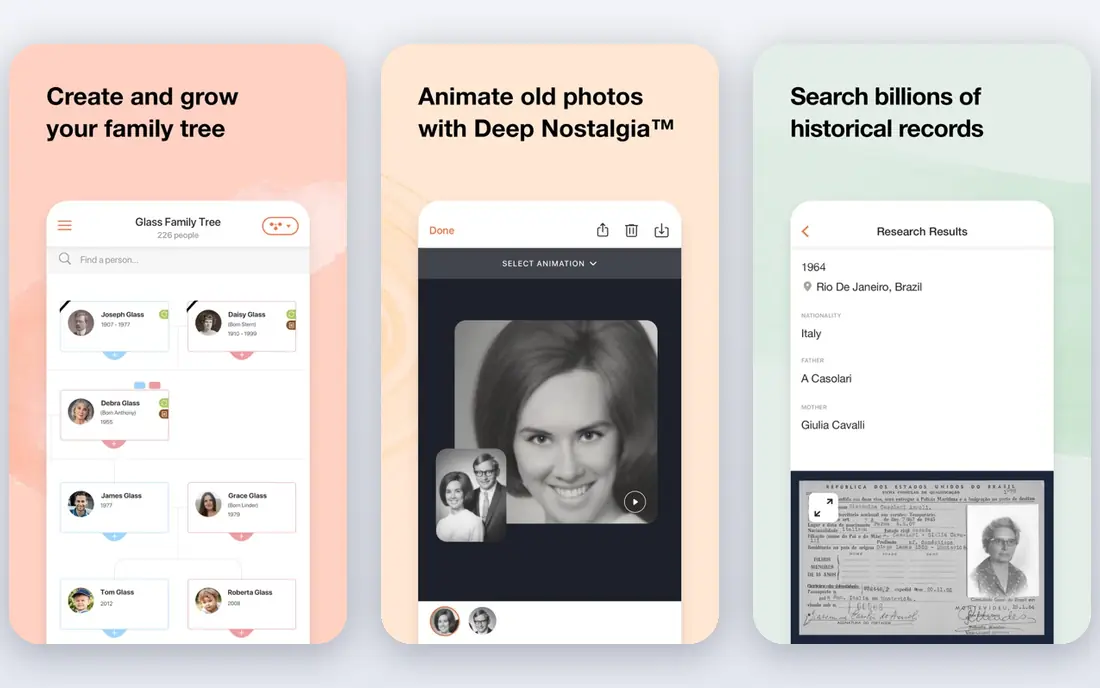
MyHeritage Deep Nostalgia animates the faces in historical photos, producing short videos where the person blinks, smiles, turns their head, and looks around. It was built for family history, and its results on old portraits are often strikingly lifelike, which is why it went viral when it launched. Deep Nostalgia works inside MyHeritage, so users upload or select photos from their family tree and generate animations from there. It is face-focused rather than a general video generator, and creative control is limited compared with Runway or Pika. For anyone who wants to see an ancestor's portrait move, it remains the most emotionally effective tool in this list.
- Realistic face animation, built for old photos, family history context
- Face-focused, needs a MyHeritage account, limited creative control
D-ID
Ideal for: Talking portraits from a single photo

D-ID turns a still photo into a talking video, with lip movement synced to speech or a script in many languages. Its Creative Reality Studio lets users upload a photo, type or record audio, and generate a presenter-style video, while its API lets developers build talking avatars into apps and training tools. D-ID offers a free tier with limited credits, and paid plans are credit-based. Results are best with front-facing, well-lit portraits, and quality varies with the source photo. For training videos, marketing presenters, and talking portraits, D-ID is a proven and widely used choice.
- Realistic talking heads, API for developers, many languages
- Face-focused, credit-based pricing, realism varies by photo
HeyGen
Ideal for: Talking avatars and image-to-video for creators and teams

HeyGen's image-to-video feature transforms any image into a dynamic video in seconds, with script-driven lip-sync, natural speech timing, and expressive voices, alongside its broader avatar video platform. Its Avatar V technology emphasizes character consistency across angles and expressions, and its verification requirements for custom avatars reflect a serious approach to misuse prevention. HeyGen offers a free plan for text-to-video and AI video creation, with paid plans adding advanced features. For creators and teams who want talking photo animation plus a full video platform, HeyGen is one of the strongest options.
- Lifelike avatars, image-to-video, many languages, verified identity
- Credit-based pricing, best results need good source images
Runway
Ideal for: Image-to-video with motion and style control
Runway is a creative AI video platform whose image-to-video tools animate a still photo with controllable motion, camera movement, and style. Users upload an image, describe the motion they want, and generate a short clip, with options for camera control and further editing in Runway's suite. Runway's models are among the strongest for general image-to-video quality, and its free tier lets new users experiment before paying. Pricing is credit-based, and advanced features take time to learn. For creators who want more than a talking head, and who care about cinematic motion from a single image, Runway is a leading choice.
- Strong motion quality, camera control, creative tools, free tier
- Credit-based pricing, learning curve for advanced features
Pika
Ideal for: Image-to-video for creators and social content
Pika is an AI video platform that turns images and text into short videos, with a creator-friendly interface and effects suited to social content. Users upload a still photo, add a prompt describing the motion, and generate a clip, with options for style and movement. Pika's free tier lets users try image-to-video before paying, and its paid plans add credits and higher limits. Clip lengths are short, especially on lower tiers, so Pika suits social clips and experiments rather than long-form video. For creators who want fast, fun photo animation with minimal setup, Pika is an easy recommendation.
- Easy image-to-video, creative effects, social-friendly clips
- Credit-based pricing, short clip lengths on lower tiers
Kaiber
Ideal for: Music-synced video from images and ideas
Kaiber is a video platform built around music-synced visuals, with canvas, beat sync, and editor tools that turn images and ideas into videos matched to a soundtrack. Its strength is the music connection: visuals move with the beat, which suits music videos, artist content, and social clips where sound drives the edit. Kaiber's interface is built for creators who think in songs and sequences rather than single prompts. Pricing is subscription-based and should be checked on its site, since plans change. For musicians and creators making music-led video from still images, Kaiber is a distinctive choice.
- Music-synced visuals, canvas and editor tools, beat sync
- Music-video focus, pricing requires checking the site
CapCut
Ideal for: Easy photo animation inside a full video editor
CapCut is a popular video editor with photo animation effects that bring still images to life inside a full editing workflow. Users can animate photos with motion effects, transitions, and AI features, then edit the result with text, music, and effects for social platforms. CapCut's free tier is generous, and its mobile and desktop apps make it accessible to creators who already edit on their phones. Animation quality varies by effect, and the most advanced AI features may need a paid plan. For creators who want photo animation as part of everyday video editing rather than a standalone tool, CapCut is the most practical choice.
- Free tier, photo animation effects, full editing suite, mobile and desktop
- Animation quality varies by effect, some features need a paid plan
Motionleap
Ideal for: Photo motion effects on mobile, such as moving skies and water
Motionleap, from Lightricks, is a mobile app that animates still photos with motion effects: moving skies, flowing water, drifting clouds, and subtle camera movement, applied by drawing motion paths on the image. It is effect-based rather than a generative video tool, which makes it fast and predictable for social posts and creative edits. Motionleap offers a free tier with in-app purchases and subscriptions for full features. For photographers and social creators who want a photo to move without generating a whole new video, Motionleap is a simple and effective tool.
- Easy motion effects, sky and water animation, mobile-first
- Effect-based rather than full video generation, app subscription
How we picked these
We looked for tools that genuinely animate a still photo, whether by face animation, talking portraits, generative image-to-video, or motion effects, and we balanced specialist face tools, general video platforms, and easy mobile editors. We compared official feature pages, pricing pages, app-store listings, and public reviews, and we left out tools that only edit photos or only generate video from text. Where a vendor did not publish a current price, we wrote "See website" rather than repeat a third-party figure. We also dropped tools whose current homepages no longer present a photo animation product, because a list should reflect what works in October 2026.
How to get a good animation from a still photo
Start with a high-quality source photo: sharp, well-lit, and front-facing for face animation, with clear subjects for general motion. For talking portraits, write a short, natural script and test with a few seconds before generating a long clip. For image-to-video, describe one clear motion rather than five at once, because models handle a single action better than a complex sequence. Check the result frame by frame for warped faces, extra fingers, or background distortion, and regenerate with a simpler prompt if the first attempt fails. Finally, respect consent and copyright: only animate photos you own or have permission to use, and never present an animated video of a real person as if it were real footage.
Frequently asked questions
What is the best AI tool to animate a still photo?
It depends on the result you want. MyHeritage Deep Nostalgia and D-ID lead for faces and talking portraits, Runway and Pika lead for general image-to-video, and CapCut and Motionleap lead for easy social effects.
Can AI animate any photo?
Most photos can be animated, but quality depends on resolution, lighting, and subject. Front-facing portraits animate best for face tools, while outdoor scenes suit motion-effect tools.
How long are AI-animated photo videos?
Most tools produce short clips, from a few seconds to under a minute, depending on the plan and tool. Longer videos usually require chaining clips or using a full video editor.
Is it legal to animate a photo of someone else?
You need permission from the person depicted, especially for realistic talking videos. Animating someone without consent can violate privacy and publicity rights and enable misuse.
Are these tools free?
Several offer free tiers with limited credits, including D-ID, HeyGen, Runway, Pika, CapCut, and Motionleap. Paid plans add credits, resolution, and features.
Can I use animated photos commercially?
Check each tool's terms for commercial use, and confirm you own or license the source photo. Commercial use of a real person's likeness needs their permission.