Best App To Trade Stocks in 2026: 8 Options Compared

- Fidelity and Schwab lead for beginners who want research and guidance alongside low costs.
- Robinhood and Webull suit active traders who want a fast mobile app and low minimums.
- Public and SoFi appeal to people who want to start small and learn as they go.
- Check fees, order types, and account protection before you fund any account.
Quick comparison
| Product | Ideal for | Price from | Free version | |
|---|---|---|---|---|
 Fidelity | Beginners and long term investors | See website | Yes | Visit |
 Charles Schwab | Investors who want research and support | See website | Yes | Visit |
 Robinhood | Simple mobile-first trading | See website | Yes | Visit |
 Webull | Active traders who want charts and data | See website | Yes | Visit |
 Public | New investors who want to learn socially | See website | Yes | Visit |
 SoFi Invest | Beginners who want an all in one finance app | See website | Yes | Visit |
 E*TRADE from Morgan Stanley | Investors who want two platforms in one | See website | Yes | Visit |
 Moomoo | Data hungry mobile traders | See website | Yes | Visit |
The best best app to trade stocks
Stock trading apps have lowered the cost of getting started, but they differ in research, order tools, and support. The apps below cover beginners, active traders, and long term investors, so compare them on more than the headline commission.
Fidelity
Ideal for: Beginners and long term investors
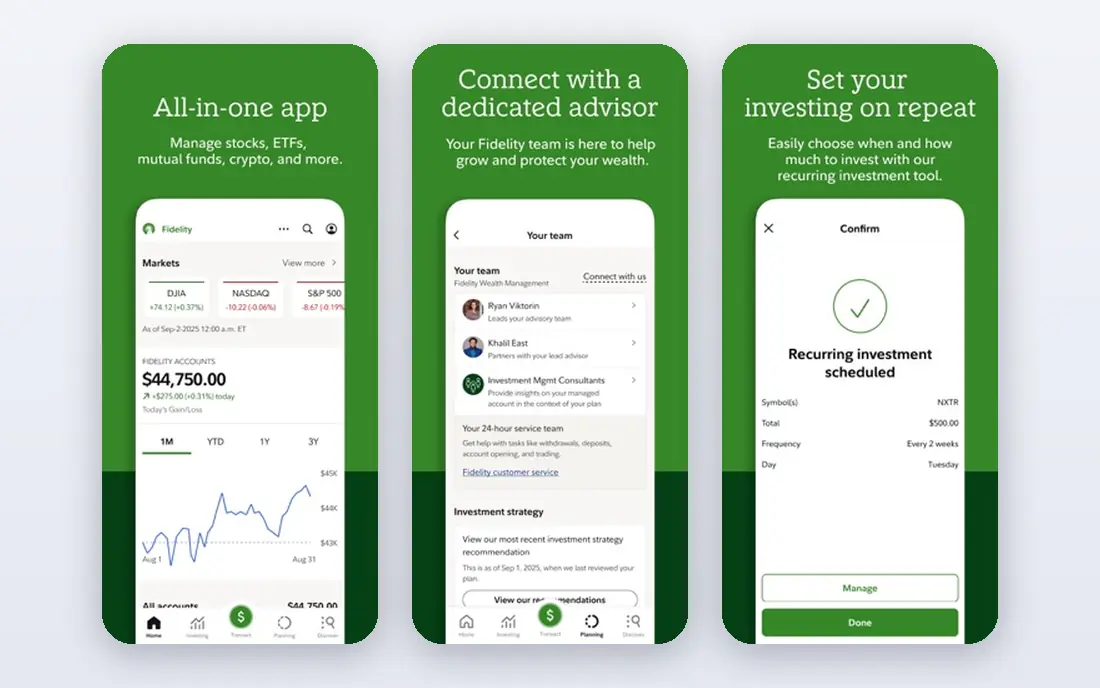
Fidelity pairs no commission stock and ETF trades with research that beginners can actually use. Company profiles, screeners, and educational articles sit alongside fractional share trading, so you can start small and learn as you go. Retirement accounts and a wide fund selection make it a solid long term home.
The app packs in a lot, and new investors may find it busy at first. Active options traders may prefer a platform built mainly for speed. For most people starting out or investing steadily, Fidelity is our pick.
- No commission stock and ETF trades
- Strong research
- Fractional shares
- App can feel dense
- Options tools suit experienced traders more
Charles Schwab
Ideal for: Investors who want research and support
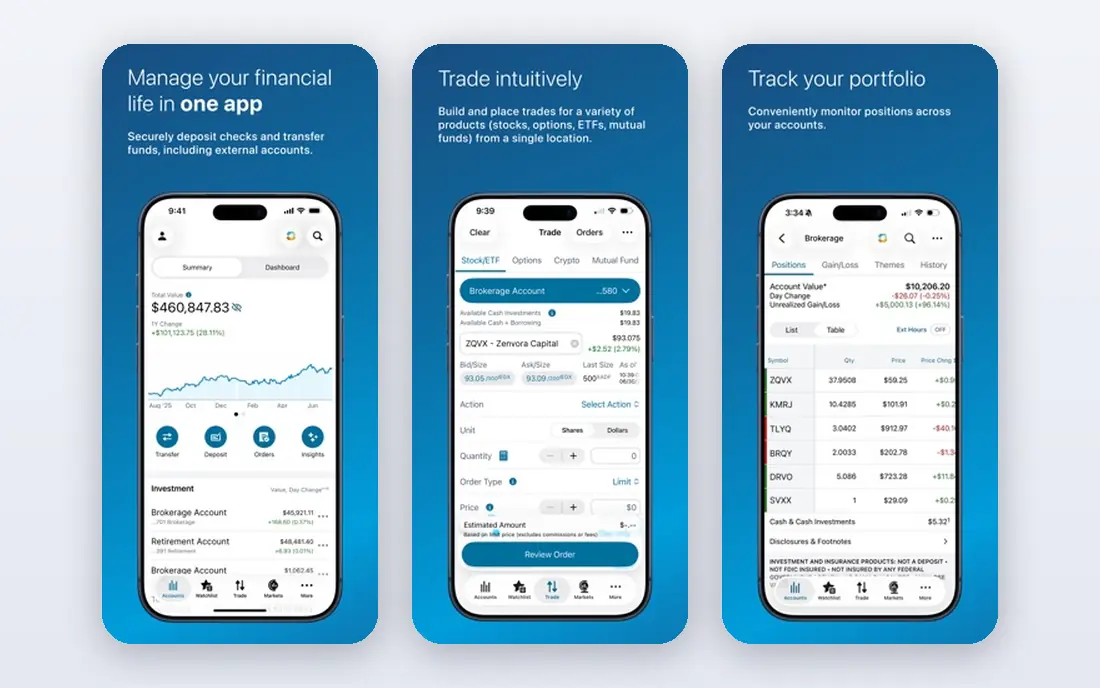
Schwab combines no commission trading with research from its own analysts and third parties, plus phone and branch support for questions. Fractional share trading, retirement accounts, and a large ETF lineup make it flexible for different goals. Its thinkorswim platform serves more active traders.
Moving between the main app and thinkorswim can feel disjointed. Beginners may need time to find the tools that matter. If human support and research matter to you, Schwab is a strong choice.
- No commission stock and ETF trades
- Broad research
- Branch and phone support
- Interface varies across platforms
- Some tools take learning
Robinhood
Ideal for: Simple mobile-first trading

Robinhood made mobile trading simple, with a clean app, fractional shares, and no commission stock trades. It suits people who want to place trades quickly and track a small portfolio without wading through dense screens. Retirement accounts and a cash card add to the package.
Research and education are thinner than at Fidelity or Schwab, so self directed learners need outside sources. Read its disclosures and fee schedule before deciding. For simple mobile trading, it remains popular for a reason.
- Easy mobile app
- Fractional shares
- No commission stock trades
- Research is lighter than rivals
- Past regulatory issues worth reading about
Webull
Ideal for: Active traders who want charts and data
Webull aims at traders who live in charts. It offers detailed technical indicators, extended hours trading, and a desktop platform alongside the mobile app, with no commission on stock trades. Paper trading lets newcomers practice without risking money.
Support is mostly digital, and retirement planning tools are thinner than at full service brokers. Beginners may find the data heavy. If charting and active trading drive your choice, Webull is a strong fit.
- Advanced charts
- Extended hours trading
- No commission stock trades
- Limited human support
- Fewer long term planning tools
Public
Ideal for: New investors who want to learn socially
Public frames investing as a learning experience, with company profiles, town hall style events, and community discussion alongside fractional share trading. It suits people who want context with their trades and prefer a calmer interface than trader focused apps.
Its research depth and order types lag behind larger brokers, and active traders may miss advanced tools. If you are starting out and want guidance built in, Public is a friendly place to begin.
- Fractional shares
- Educational content
- Community features
- Smaller research library
- Limited order types for advanced traders
SoFi Invest
Ideal for: Beginners who want an all in one finance app
SoFi Invest fits people who want investing next to banking, loans, and budgeting in one app. Fractional shares and automated investing options lower the barrier to starting, and the interface stays simple. It works well for steady, hands off investors.
Research and charting are basic compared with Fidelity or Schwab, and active traders will feel limited. If simplicity and an all in one account matter most, SoFi is a good match.
- Fractional shares
- Simple interface
- Linked banking and lending products
- Research is basic
- Active trading tools are limited
E*TRADE from Morgan Stanley
Ideal for: Investors who want two platforms in one
ETRADE offers a straightforward app for everyday investing plus Power ETRADE for options and active trading. Education, screeners, and retirement accounts round out a package backed by Morgan Stanley. It suits investors who may grow into more active trading over time.
Having two platforms can confuse beginners who just want one app. Some service fees still apply, so read the schedule. For a broker that scales with you, E*TRADE is a solid choice.
- No commission stock trades
- Power E*TRADE for active traders
- Strong education
- Two apps can confuse newcomers
- Some fees still apply to services
Moomoo
Ideal for: Data hungry mobile traders
Moomoo packs market data, screeners, and charting into a mobile app aimed at traders who want detail. Paper trading helps newcomers practice, and no commission stock trades keep costs low. It also offers extended hours trading for active users.
The data heavy design can overwhelm beginners, and education is thinner than at larger brokers. If you want depth on your phone and can handle the density, Moomoo is worth a look.
- Rich market data
- Paper trading
- No commission stock trades
- Support and education are thinner
- Interface is data dense
How we picked these
We compared official pricing pages, feature lists, and account terms for each app, looking at commissions, available order types, research tools, and whether fractional shares are offered. We favored apps with clear fee schedules and investor education. This is not financial advice; trading carries risk, and you can lose money, so read each provider terms before you invest.
We also checked whether each option is still offered and supported, and we left out products with unclear pricing, broken pages, or a poor fit for the topic. Where a price or free tier could not be confirmed from the vendor site, we wrote See website rather than guessing. Readers should still check the vendor page before buying, since prices and plans change.
How to choose a stock trading app
Start with cost, but read the full fee schedule. Many apps charge no commission on stock trades yet still charge for options contracts, transfers, or account services. If you trade options or use margin, those fees matter more than the stock commission. Check whether the app offers fractional shares, since that decides whether you can start with a small amount.
Look at research and learning tools if you are new. Company profiles, earnings data, and plain language explainers help you make steadier decisions than a fast order button alone. Apps with strong research suit beginners, while active traders may care more about charts, order types, and execution speed.
Check what you can actually trade. Some apps focus on stocks and ETFs, while others add options, crypto, or bonds. Make sure the app covers the investments you want, and confirm whether it offers retirement accounts if you plan to invest for the long term.
Test the app with a small amount before committing larger sums. Place a small trade, try the deposit and withdrawal process, and see how quickly support answers a question. A smooth funding and withdrawal experience matters as much as a polished chart.
Before you pay, confirm the total cost for the first year, including any add ons, renewal prices, and fees that only appear at checkout. A low starting price can hide a higher renewal rate, and a free tier can limit the feature you need most. Write down the features you will use weekly, and pay only for those.
After you choose, give the option a fair trial with your real workload, not just a quick tour. Set a reminder to review it after two to four weeks, and note what worked, what annoyed you, and what you never used. That review tells you whether to keep, upgrade, or switch before a renewal locks you in.
If the option disappoints, switch sooner rather than later. Export your data first, check whether you can keep your account history or settings, and confirm any cancellation terms. A good provider makes leaving straightforward, and a difficult exit is itself useful information about the service.
Talk to people who already use the option before you commit, especially for a business purchase. A short conversation with a current user reveals support quality, setup effort, and daily friction that marketing pages omit. Ask what surprised them after the first month, since early impressions often differ from longer use.
Keep a simple record of why you chose the option, including the price you were quoted and the features that mattered. That note makes renewal talks easier and helps a colleague or future you understand the decision. If the price rises or a key feature changes, the note shows whether the original reasons still hold.
Finally, plan the first week of use before you pay. List the setup steps, the data you need to move, and the people who need access. A clear first week plan turns a promising choice into a working routine, and it exposes missing features while you can still change your mind.
Save the vendor support page and the cancellation instructions in the same place as your receipt. When something goes wrong, you will want support details at hand rather than searching for them under pressure. A tidy record saves time and keeps a small problem from becoming a long one.
Keep notes on the first month of use, including any issues and how support handled them. Those notes give you clear evidence if you need a refund, an upgrade, or a switch, and they help you advise a friend or colleague who asks about the same choice later.
Frequently asked questions
What is the best app to trade stocks for beginners?
Fidelity and Schwab are strong beginner picks because they pair low costs with research, education, and human support. Robinhood and SoFi are simpler to start with, but offer less depth. Pick the one whose learning tools you will actually use.
Can I trade stocks with no commission?
Many major apps now charge no commission on online stock and ETF trades, including Fidelity, Schwab, Robinhood, and Webull. Other fees can still apply, such as options contract fees or transfer charges, so read the full fee schedule.
What is the best app for stock trading on a small budget?
Apps with fractional shares, such as Fidelity, Schwab, Robinhood, and Public, let you buy part of an expensive share with a small amount. That makes it easier to diversify with limited money, though investing always carries risk.
Do stock trading apps offer retirement accounts?
Yes, several do. Fidelity, Schwab, and SoFi offer IRAs alongside taxable accounts, which suits long term investors. Robinhood also offers an IRA with a match on some plans. Check contribution rules and fees before opening one.
Is my money safe in a trading app?
Reputable US brokers are members of SIPC, which protects securities in a brokerage account up to certain limits if the firm fails. That protection does not cover market losses. Confirm the broker SIPC membership and read its disclosures before funding an account.
How often should I review my choice?
Review it at least once a year, and sooner if your needs, budget, or team size change. Prices, features, and policies shift over time, and a better fit may appear. A short yearly check, comparing your current option with two alternatives, keeps you from paying for features you no longer use.