Best Apps for Athan in 2026: 7 Apps Compared

- 1
 IslamicFinder AthanMost usersVisit
- 2
 Salaat FirstFree ad-free useVisit
- 3
 Al-MoazinSimple prayer displayVisit
- 4
 Athan ProWeb and app timesVisit
- 5
 NamazPrayer times by cityVisit
- IslamicFinder Athan is our pick for most users, with wide location coverage and a choice of calculation methods.
- Salaat First suits users who want a free, ad-free app that works offline with a Qibla compass.
- Athan Pro and Namaz are strong for users who want prayer times on the web as well as in an app.
- Al-Moazin fits users who mainly want a simple prayer time display with Qibla direction.
- Always check the calculation method for your city, since methods differ and that choice changes prayer times.
Quick comparison
| Product | Ideal for | Price from | Free version | |
|---|---|---|---|---|
| IslamicFinder Athan | Most users | Free | Yes | Visit |
| Salaat First | Free ad-free use | Free | Yes | Visit |
| Al-Moazin | Simple prayer display | Free | Yes | Visit |
| Athan Pro | Web and app times | Free | Yes | Visit |
| Namaz | Prayer times by city | Free | Yes | Visit |
 Muslim App | All-in-one Islamic tools | Free | Yes | Visit |
 Muslim Muna | Quran plus prayer times | Free | Yes | Visit |
The best apps for athan
A good athan app does one job reliably: it tells you the right prayer time for your location and plays the athan when that time arrives. We compared official app pages, feature lists, and app-store listings for the apps below, looking at calculation methods, athan sound choices, Qibla tools, offline use, and ads. Most athan apps are free, with optional paid features, so we note pricing as listed by each vendor.
IslamicFinder Athan
Ideal for: Most users

IslamicFinder Athan is our pick for most users because it covers so many cities and lets you pick the calculation method used by your local community. That choice matters, since methods from different authorities give slightly different times. The app also includes a Qibla compass and Quran reading, so it can replace several separate tools.
The breadth means the interface carries more content than a minimal prayer app. If you only want times and an athan sound, you may prefer a simpler option below. For most households, though, IslamicFinder's coverage and method choices make it the safest default.
- Very wide city coverage
- Several calculation methods
- Qibla direction and Quran content included
- Extra content can feel busy
- Some features require an account
Salaat First
Ideal for: Free ad-free use

Salaat First takes a refreshingly simple approach. It is free, it shows no ads, and it works without an internet connection, which helps when you travel or have a weak signal. You get the five daily prayer times with a countdown to the next prayer, a customizable athan for each prayer, a Qibla compass, and a nearby mosque finder.
It does not try to be a full Islamic library, and its plain design will not impress anyone looking for polish. If your priority is a dependable, private, ad-free athan app, Salaat First is an excellent choice.
- Free with no ads
- Works offline
- Qibla compass and nearby mosques included
- Smaller feature set than larger apps
- Design is plain
Al-Moazin
Ideal for: Simple prayer display
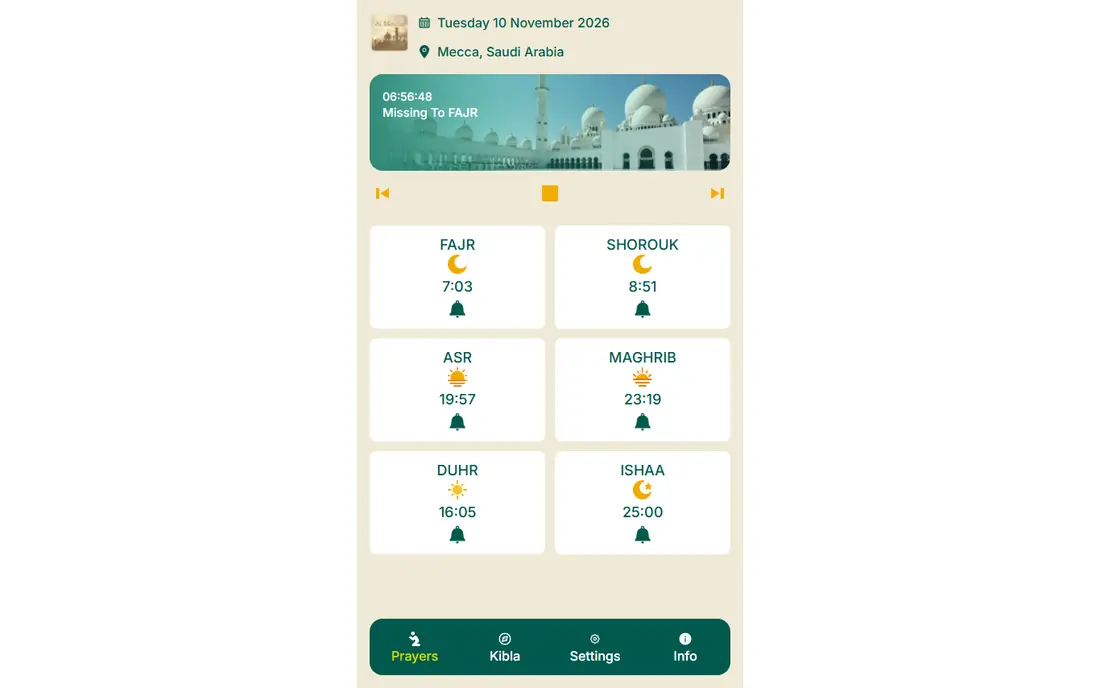
Al-Moazin keeps the focus on the essentials. Its site shows current prayer times with a countdown to the next prayer, plus Qibla direction and settings for location and method. That simplicity suits users who open the app, check the time, and move on with their day.
You will not find Quran libraries or community features here, and that is the point. For an older phone or a user who dislikes cluttered apps, Al-Moazin's light footprint is a genuine advantage.
- Clear prayer time display
- Qibla finder included
- Lightweight and easy to use
- Fewer extra features
- Web page is simpler than a full app store listing
Athan Pro
Ideal for: Web and app times
Athan Pro works well for people who check prayer times on a computer as well as on a phone. Its website shows times for a chosen location with the Hijri date, and its app carries the same times with athan alerts. A daily hadith adds a small moment of reading to the routine.
The site mixes tools with articles, so finding a setting can take a moment. If you want prayer times that are easy to check from any device, Athan Pro covers that need nicely.
- Prayer times on the web and in the app
- Hijri calendar included
- Daily hadith content
- Some content is in a blog style that not everyone wants
- Paid options are not clearly separated
Namaz
Ideal for: Prayer times by city
Namaz presents prayer times in a clean, city-first way. Pick a city such as Istanbul, London, or New York and you get the day's times at a glance, with app links for alerts on your phone. App-store users rate it highly, which matches its focused, no-fuss design.
It is not the app for someone who wants Quran study tools or a mosque directory built in. For the core job of checking accurate prayer times quickly, Namaz does it with little friction.
- Simple city-based prayer times
- Clean web page
- Highly rated by users on app stores
- Fewer features than larger apps
- Coverage is strongest for listed cities
Muslim App
Ideal for: All-in-one Islamic tools
Muslim App, formerly Muslim Assistant, bundles prayer times with Quran reading, duas, a Qibla compass, and an Islamic events calendar for 2026. It supports many languages, which helps families who prefer to read in their own language. The event calendar is handy for tracking Ramadan, Eid, and other dates.
All that content makes the app larger and busier than a single-purpose athan app. If you want one app for daily practice rather than several, Muslim App is a strong all-in-one pick.
- Prayer times plus Quran, duas, and Qibla
- Available in many languages
- Islamic event calendar
- Larger app with more content to navigate
- Some features need an internet connection
Muslim Muna
Ideal for: Quran plus prayer times
Muslim Muna combines accurate prayer times with a good Quran section. You can pick from many athan sounds, read or listen to the Quran offline, and check Qibla direction from the same app. That combination suits users who want prayer and reading in one place without paying.
The website itself is less polished than some rivals, but the app's core features are solid. If offline Quran access matters to you alongside reliable athan alerts, Muslim Muna is worth trying.
- Prayer times with many athan choices
- Quran reading and listening, including offline
- Qibla compass
- Website text is less polished
- Some features are more basic than larger rivals
How we picked these
We compared official app websites, feature pages, and app-store listings, checking calculation methods, athan options, Qibla tools, offline support, ads, and pricing. We only listed apps whose official homepage loaded and clearly belonged to that app in October 2026. Two well-known names were left out because their homepages could not be confirmed: one domain now shows a for-sale page, and another returned only an automated verification page.
How to set up your athan app correctly
Start by checking the calculation method. Open the app's settings and compare its times with your local mosque or a trusted local timetable for a few days. If the times differ, try another method in the settings until they match. This single step prevents most complaints about wrong prayer times.
Next, set the athan sound and volume for each prayer, and test the Fajr alert in particular, since phone battery and do-not-disturb settings often silence early morning alerts. Give the app permission to run in the background and to override do-not-disturb if your phone allows it. Finally, check that your location is set correctly when you travel, since times change with every city.
If you pray in congregation, compare your app with your mosque timetable for a full week, not just one day, since small differences can appear on certain days. Some apps also let you adjust times by a few minutes, which helps when your local mosque follows a slightly different schedule. Keep a second app installed as a backup while you travel, so a missing download or a wrong location setting never leaves you guessing. A calm, reliable setup beats a feature-packed app that you do not fully trust. Review your settings again after any major phone update, since updates sometimes reset notification permissions without warning.
Frequently asked questions
What is the best athan app?
IslamicFinder Athan is our pick for most users because of its wide coverage and choice of calculation methods. Salaat First is the best free, ad-free alternative, and Muslim App suits users who want Quran and duas in the same app.
Why do athan apps show different prayer times?
Apps use different calculation methods from different Islamic authorities, and those methods give slightly different times, especially for Fajr and Isha. Check the method setting in your app and match it to your local mosque's timetable.
Can I use an athan app offline?
Yes, with the right app. Salaat First works offline, and Muslim Muna offers offline Quran reading. Most apps need an internet connection at least once to download times for your location.
Are athan apps free?
Most athan apps are free for core prayer times and athan alerts. Some offer optional paid features, such as removing ads or adding extra content, but the basic athan function is usually free.
Do athan apps work with do-not-disturb mode?
Many apps can play the athan during do-not-disturb if you grant the right permission, but phone settings vary. Check your phone's notification settings and test the Fajr alert before relying on it.
How accurate is the Qibla direction in these apps?
Qibla accuracy depends on your phone's compass calibration and on whether the app uses your GPS location correctly. Calibrate the compass by moving your phone in a figure-eight motion, and compare the result with a known mosque direction when you can. If two apps disagree, trust the one that matches your local mosque and check for magnetic interference from cases or nearby metal.