Best Apps for Productivity Tips in 2026: 8 Apps Compared

- Forest and Freedom help you focus by blocking distractions, while Todoist and TickTick turn tips into daily tasks you can track.
- Habitica makes habit tips fun with game rewards, while RescueTime shows where your time actually goes.
- A tip only helps if it becomes a routine. Pick one app, use it for two weeks, and add another only if the first sticks.
- Free tiers cover most of these tips. Pay only for blocking, detailed reports, or team features you use weekly.
Quick comparison
| Product | Ideal for | Price from | Free version | |
|---|---|---|---|---|
 Forest | Focus timer that grows a virtual tree | See website | Yes | Visit |
 Freedom | Block distracting sites and apps | See website | No | Visit |
 Todoist | Turn tips into trackable tasks | $5 per month | Yes | Visit |
 TickTick | Tasks, habits, and Pomodoro in one app | $35.99 per year | Yes | Visit |
 Habitica | Gamified habits and daily tasks | See website | Yes | Visit |
 RescueTime | See where your time actually goes | See website | No | Visit |
 Toggl Track | Simple time tracking for tasks | See website | Yes | Visit |
 Notion | Build a personal productivity system | $10 per month | Yes | Visit |
The best apps for productivity tips
We compared official feature pages, pricing pages, app store listings, privacy policies and public reviews to build this list, focusing on products that fit the topic closely and are still available in October 2026.
Forest
Ideal for: Focus timer that grows a virtual tree

Forest turns a common productivity tip, work in focused bursts, into a simple game. Plant a virtual tree, stay off your phone until the timer ends, and watch a forest grow over days and weeks. Friends can plant together, which adds gentle accountability without a complex system.
Forest does not manage tasks, so you still need a list app for what to do during focus time. The reward can also lose novelty after a while. Forest suits readers who get distracted by their phone and need a light, visual reason to stay focused for 25 or 50 minutes at a time.
- Focus timer with a growing tree reward
- Friends can plant together
- Simple and motivating
- No task management
- Paid features on some platforms
- Tree reward may lose novelty
Freedom
Ideal for: Block distracting sites and apps
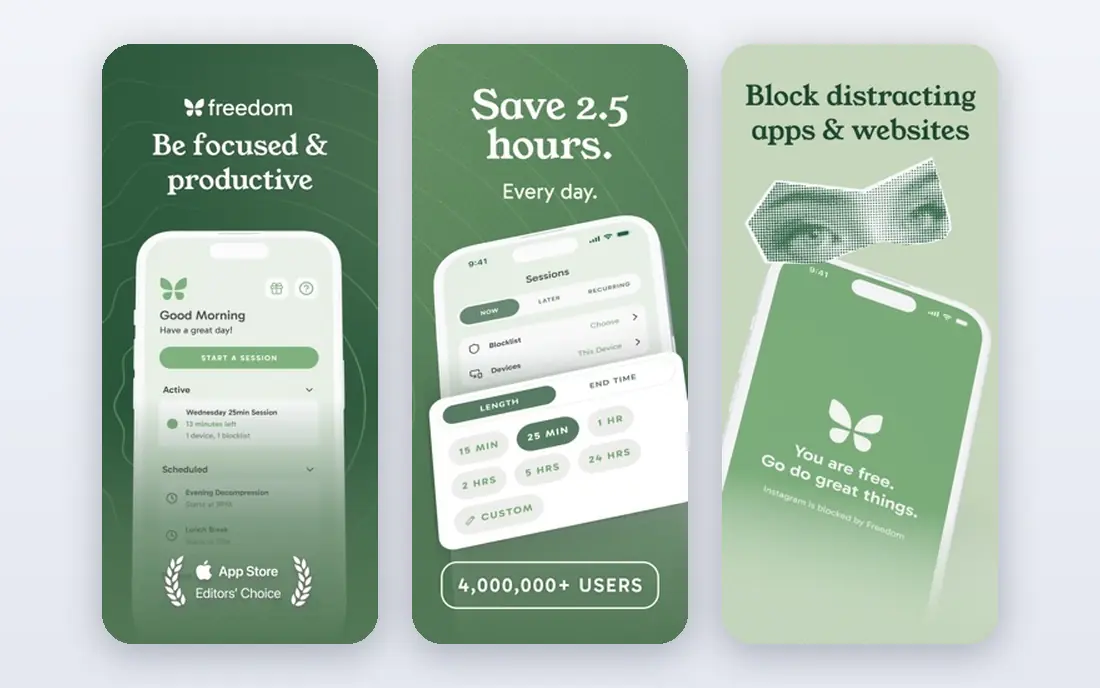
Freedom implements the tip to remove distractions before you need willpower. Create blocklists for social media, news, and shopping sites, schedule focus sessions, and block them across phone and computer at once. Locked mode prevents ending a session early, which helps when temptation is strong.
Freedom is paid, and setting up good blocklists takes time. It can also feel strict if you block a site you suddenly need for work. Freedom suits readers who know their distraction sites and want a firm barrier during work hours, especially writers, students, and remote workers.
- Blocks sites and apps across devices
- Scheduled sessions
- Locked mode for strong focus
- Paid subscription needed
- Setup takes time to choose blocklists
- Can feel strict
Todoist
Ideal for: Turn tips into trackable tasks

Todoist helps you turn productivity tips into actions you can check off. A tip like plan tomorrow tonight becomes a recurring task, and a tip like break a project into steps becomes a project with subtasks. Natural language dates make adding tasks fast, and reminders keep them visible.
Todoist does not include a focus timer or distraction blocking, so pair it with Forest or Freedom if those tips help you. Board view and advanced filters are paid. Todoist suits readers who want a simple system for turning advice into a daily list they actually follow.
- Task lists with projects and reminders
- Natural language dates
- Good free tier
- Board view and filters are paid
- No built-in focus timer
TickTick
Ideal for: Tasks, habits, and Pomodoro in one app
TickTick combines several productivity tips in one app: task lists, habit tracking, a calendar, and a Pomodoro timer for focused work intervals. That combination means you can plan the day, track a habit, and run a focus session without switching apps. Premium is priced yearly, which keeps the annual cost low.
Collaboration is thinner than team tools, so TickTick is best for personal productivity. The desktop app is also simpler than some rivals. TickTick suits individuals who want one app for tips on planning, habits, and focus, rather than a set of separate tools.
- Tasks, habits, calendar, and Pomodoro timer together
- Affordable Premium
- Good mobile app
- Team features are thinner than Asana
- Desktop app is simpler than rivals
Habitica
Ideal for: Gamified habits and daily tasks
Habitica turns the tip to make habits fun into a game. Complete habits and daily tasks to earn rewards for a character, join a party for accountability, and take damage in the game when you miss a daily task. That playful pressure helps some people stick to routines that felt boring in a plain list.
The game style will not suit everyone, and task management is simpler than Todoist or TickTick. Habitica suits readers who like games, need accountability, and struggle with plain habit trackers. If you prefer a calm, professional app, TickTick or Todoist will feel better.
- Turns habits and tasks into a role-playing game
- Parties and accountability
- Free to start
- Game style is not for everyone
- Task features are simpler than Todoist
- Paid gems add extras
RescueTime
Ideal for: See where your time actually goes
RescueTime implements the tip to measure before you improve. It tracks time automatically across apps and websites, categorises it as productive or distracting, and sends weekly reports. Seeing that social media took two hours a day is often more persuasive than any tip article.
Full reports are paid, and automatic tracking raises privacy questions, so check what data is stored and how to delete it. RescueTime also needs a week or two of data before patterns are clear. It suits knowledge workers who want honest data about their time and are comfortable with tracking to get it.
- Automatic time tracking across apps and sites
- Weekly reports
- Focus sessions
- Paid for full reports
- Tracking raises privacy questions
- Needs time to interpret data
Toggl Track
Ideal for: Simple time tracking for tasks
Toggl Track supports the tip to time-box work and track estimates against reality. Start a timer for a task, stop it when you finish, and review reports by project or client. That habit reveals which tasks take longer than expected and where your day goes, which helps planning.
Manual tracking needs discipline, since you must remember to start and stop timers. Toggl Track also does not manage tasks in depth, so pair it with Todoist or TickTick. It suits freelancers and small teams who bill by time or want to improve estimates, with a free tier for small use.
- Easy timer for tasks and projects
- Reports by client or project
- Free tier for small teams
- Manual tracking needs discipline
- Advanced reports are paid
- No task management depth
Notion
Ideal for: Build a personal productivity system
Notion lets you build a productivity system from tips you like, such as a habit tracker, a weekly review page, or a goal dashboard, using pages and databases. Templates for habit tracking, journaling, and planning help you start, and everything lives in one workspace you can shape over time.
Setup can take hours, and it is easy to build a system instead of doing the work. Notion suits readers who enjoy designing a personal system and will maintain it weekly. If you want a ready-made habit or focus app, Forest, Habitica, or TickTick will get you started faster.
- Pages and databases for habit trackers, journals, and planners
- Many templates
- Setup takes time
- Offline use is limited
- Can become a project itself
How we picked these
We compared official feature pages, pricing pages, app store listings, privacy policies and public reviews for each option in this guide. We checked that each product is still offered in October 2026, that its homepage loads, and that its price or free tier could be confirmed or marked as See website when it could not. We did not claim hands-on testing. We favoured products that fit the topic closely, explain their limits clearly, and give readers a practical way to try them before paying. Where prices change often, we say so and point readers to the vendor page for the current figure.
How to use productivity tips with apps
Pick one tip at a time, not five at once. A good starting set is: plan tomorrow tonight in Todoist or TickTick, work in focused bursts with Forest, and block your top distraction with Freedom during work hours. After two weeks, check what actually helped, keep that routine, and only then add a habit tracker or time report.
Before you pay,try the free tier or trial first and check the exact limits that matter to you, such as device support, export options, or cancellation terms. Read the privacy policy for any app that handles personal, financial, or health data, and check whether your data can be exported or deleted. The cheapest option is not always the best value if it lacks a feature you will use every week, and the most expensive option is rarely worth it if you only need the basics.
Frequently asked questions
What is the best app for productivity tips?
Forest is best for focus, Freedom is best for blocking distractions, and TickTick is best for combining tasks, habits, and a Pomodoro timer. Todoist is best if you mainly need to turn tips into a daily task list.
How can I stay focused while working from home?
Block distracting sites with Freedom, work in timed bursts with Forest or TickTick, and keep your phone in another room during focus sessions. A clear daily plan in Todoist also reduces the urge to check messages for direction.
What is the Pomodoro technique?
The Pomodoro technique means working for a focused interval, often 25 minutes, then taking a short break, and repeating. TickTick and Forest both support timed focus sessions, and the breaks help you sustain attention without burnout.
Do habit tracker apps work?
Habit trackers help when the habit is specific, small, and tracked daily, such as drinking water, reading ten pages, or exercising for twenty minutes. Habitica and TickTick both track streaks, which give a visible reason to keep going.
How do I avoid spending too much time on productivity apps?
Set a limit: one task app, one focus app, and a weekly review of ten minutes. If setting up the app takes longer than the work it organises, simplify the system or switch to a simpler tool.