Auto Dialer Software Buyer's Guide: 7 Tools for 2026

- This list starts with CloudTalk, which is built for international sales teams.
- What to know about CallHippo first: feature depth less than leaders.
- PhoneBurner is the one to check for solo and team prospecting at high volume.
- A permanent free plan is missing from all 7 tools, CloudTalk and PhoneBurner included; plan for a trial or a premium start.
Direct answer
CloudTalk comes first here, mainly for international sales teams. Dialpad is better for AI-enhanced business calling, and Aircall is better for modern teams wanting a polished cloud phone. Details, prices and limits for the rest of the 7 tools are below.
Quick comparison
| Product | Ideal for | Price from | Free version | |
|---|---|---|---|---|
 CloudTalk | International sales teams | See website | Free trial | Visit |
 Dialpad | AI-enhanced business calling | See website | Free trial | Visit |
 Aircall | Modern teams wanting a refined cloud phone | $30/user/month | Free trial | Visit |
 CallHippo | Small teams needing virtual numbers quick | See website | Free trial | Visit |
 JustCall | Budget-friendly cloud phone with dialing | $19/user/month | Free trial | Visit |
 Kixie | Sales teams that want more conversations per hour | See website | Free trial | Visit |
 PhoneBurner | Solo and team prospecting at high volume | See website | Free trial | Visit |
7 options for auto dialer software in detail
This Ainotely guide covers 7 options for auto dialer software. Each profile lists a starting price, free plan details, strengths and drawbacks, so you can drop poor fits quickly.
CloudTalk
Ideal for: International sales teams
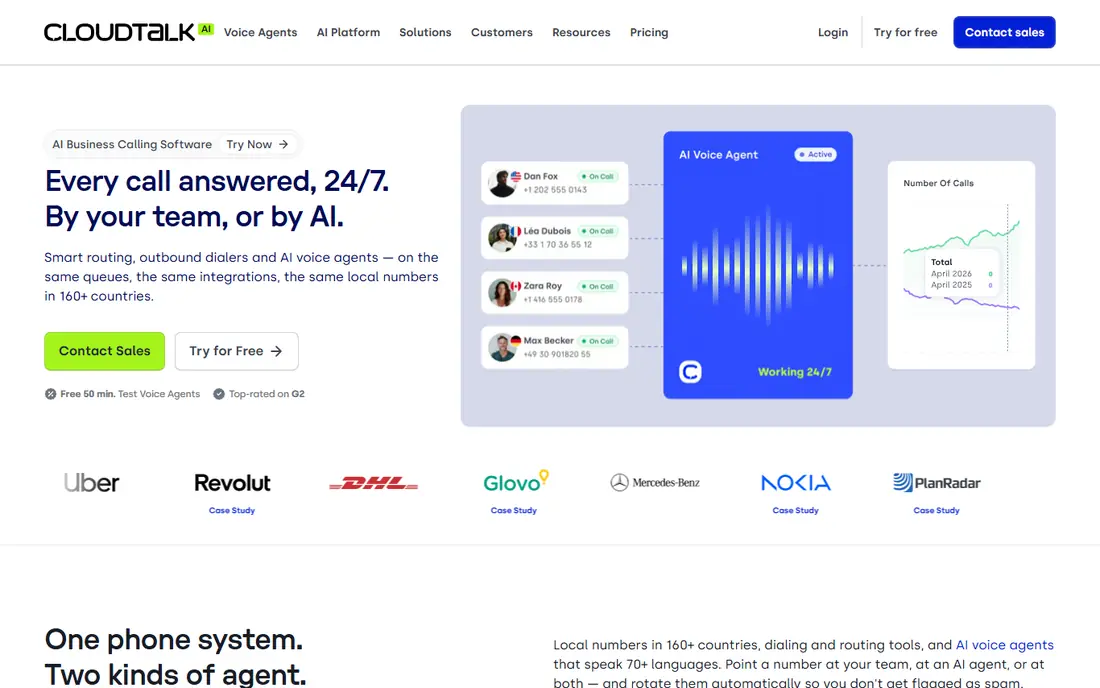
Pick CloudTalk if this describes you: international sales teams. US-centric buyers may prefer domestic vendors' support hours.
Where it falls short: Smaller US presence.
The power dialer and CRM integrations include standard outbound needs. European and distributed sales teams get a product aimed at their reality. This comparison lists no price for CloudTalk; ask the vendor. Trial and free access: Free trial.
- Decent call quality
- 160+ countries with local numbers
- Pricing not published
Dialpad
Ideal for: AI-enhanced business calling

Where Dialpad fits: AI-enhanced business calling. Dialpad bakes AI into every call: live transcription, automatic summaries, sentiment analysis and coaching prompts. The unified product spans voice, video and messaging.
Honest limits: Pricing levels confusing.
Worth adding: for teams that want AI doing the note-taking and follow-up drafting, it leads. In daily use, the pricing levels take study. Check the vendor site for Dialpad pricing; none is listed in this comparison. Free options: Free trial.
- Capable AI (transcription, summaries, coaching)
- Unified communications
- AI accuracy varies
Aircall
Ideal for: Modern teams wanting a refined cloud phone

Aircall makes the most sense for modern teams wanting a refined cloud phone. The power dialer, call routing and analytics include standard sales and support needs elegantly. At $30 per user, bigger teams pay substantially.
Beyond that, for firms that value design, reliability and ease alongside solid dialing, it is the premium accessible choice. Aircall modernized the business phone: set up in minutes, gorgeous apps, integrations with every major CRM and helpdesk. Entry price for Aircall: $30/user/month. Free options: Free trial.
Where it falls short: $30/user layers on up.
- Capable integrations
- Steady call quality
- Dialer features less advanced than pure plays
CallHippo
Ideal for: Small teams needing virtual numbers quick
For small teams needing virtual numbers quick, CallHippo is a natural candidate. CallHippo gets small teams calling quick: virtual numbers in 50+ countries, power dialer, call recording and entry-level analytics without enterprise process.
Where it is weaker: Support inconsistent.
More specifically, the pricing undercuts larger names, and setup takes minutes. As for the details, advanced features (predictive dialing, deep AI) are absent. CallHippo does not show a starting price in this comparison, so check the vendor site for current pricing. On free options: Free trial.
- Budget-friendly levels
- 50+ countries
- Feature depth less than leaders
JustCall
Ideal for: Budget-friendly cloud phone with dialing
JustCall targets budget-friendly cloud phone with dialing. Small sales teams get professional calling, texting and automation without enterprise budgets. From a buyer's view, the AI features (call scoring, summaries) punch above the price.
Points against: Advanced dialer features thinner than specialists.
Support quality varies by plan. For everyday use, for startups and small teams that require a complete calling option affordably, it is the value leader. Predictive dialing and advanced outbound features trail the specialists. JustCall pricing: $19/user/month. As for free access: Free trial.
- Low $19 entry price
- SMS and dialer included
- Support varies
Kixie
Ideal for: Sales teams that want more conversations per hour
Kixie makes the most sense for sales teams that want more conversations per hour. Kixie is designed for one metric: conversations per rep per hour. More specifically, pricing needs a conversation.
Teams whose pipeline relies on call volume see the ROI in weeks: more dials, more links, more meetings. Deep integrations with HubSpot, Salesforce and Pipedrive log everything automatically. It is unapologetically a sales tool: support and inbound features are thinner. This comparison lists no price for Kixie; ask the vendor. Trial and free access: Free trial.
Drawbacks to consider: Centred on outbound sales.
- Power dialer and local presence
- Very good CRM integrations
- Pricing not published
PhoneBurner
Ideal for: Solo and team prospecting at high volume
PhoneBurner was built for solo and team prospecting at high volume. Bigger operations may outgrow it toward full contact center products.
Beyond that, PhoneBurner strips dialing to the essentials: import contacts, dial through them quick, drop voicemails, send follow-up emails, repeat. Pricing for PhoneBurner is not stated here, so ask the vendor for current figures. Trial and free access: Free trial.
Points against: Pricing not transparent.
- No hardware needed
- Simplified power dialing
- Less full-featured than CCaaS
How we chose
Selection started from tools commonly considered for auto dialer software, then narrowed to 7 that have clear pricing information or a clear quote process. Where a vendor does not publish a price, the entry says quote. Where a price depends on seats or billing term, the entry says so. The sequence is a judgement call: typical use case first, then pricing transparency, then free access. Use the profiles to check fit.
Things to verify first
- Get a written quote from CloudTalk, Dialpad, CallHippo and others; the list shows no starting price for them.
- Use real work to test the free trial from CloudTalk, Dialpad, Aircall and others, rather than a demo project.
- Before choosing CloudTalk, weigh its main limit: pricing not published.
- Find out whether the entry plan of Dialpad covers your must-haves or only a trimmed-down version.
- Check how data leaves CallHippo: formats, limits and whether exports are available on every plan.
Frequently asked questions
Can auto dialers connect with my CRM?
Verify the depth during a trial: automatic logging, click-to-call, screen pops and disposition syncing separate decent integrations from nominal ones.
Can I try these options before paying?
Often, yes. CloudTalk, Dialpad, Aircall and others offer a free trial. Use your own data and a real task during the test, and check what the free tier or trial limits before you rely on it.
How are the tools for auto dialer software ordered?
The order follows typical fit for auto dialer software, with CloudTalk first and PhoneBurner last, then price clarity and free access. It is editorial judgement, not a score, so another team could rank the tools differently.
Should I use AI voice agents instead of human dialing?
Most teams use AI for the routine and humans for the revenue: the combination outperforms either alone. In practice, evaluate AI agents as a complement to your dialer, not a replacement for your team.
What is the cheapest option for auto dialer software in this list?
On published monthly entry prices, JustCall is the lowest here at $19/user/month. Entry price is only part of the cost, because seats, add-ons and billing terms can change the total.
Is CloudTalk the right pick for everyone comparing auto dialer software?
No single tool suits every team. CloudTalk comes first because it fits international sales teams, while Dialpad suits AI-enhanced business calling and Aircall suits modern teams wanting a polished cloud phone. Match the tool to your own size, budget and workflow before deciding.