Best Business Card App in 2026: 8 Picks Compared

- CamCard suits scanning and organising cards you receive.
- Sansan suits teams that need shared card management and CRM sync.
- Haystack suits digital card sharing and simple design.
- Canva and Adobe Express suit designing printable and digital cards.
- Vistaprint and Moo suit ordering printed cards.
Quick comparison
| Product | Ideal for | Price from | Free version | |
|---|---|---|---|---|
 CamCard | scanning cards you receive | See website | Yes | Visit |
 Sansan | team card management | See website | Free trial | Visit |
 Haystack | digital cards and sharing | See website | Yes | Visit |
 Canva | designing business cards | See website | Yes | Visit |
 Adobe Express | quick branded card design | See website | Yes | Visit |
 Vistaprint | ordering printed cards | See website | No | Visit |
 Moo | premium printed cards | See website | No | Visit |
 ABBYY Business Card Reader | accurate card scanning | See website | Yes | Visit |
The best business card apps
We compared card scanning accuracy, contact sync, design tools and pricing from official pages and app store listings. Business card apps fall into two groups: scanning cards you receive, and designing cards you give out. The lists below cover both, so check which job you need first.
CamCard
Ideal for: scanning cards you receive

CamCard is our pick for scanning cards you receive. CamCard is the straightforward scanning pick for individuals. We looked at its official feature page, pricing page and public reviews, and the overall picture was consistent with that strength.
What stood out to us was card scanning. That matters in daily use, because a tool that is strong on paper still has to feel good when you use it every week. Teams needing shared management should look at Sansan. Check the official pricing page before you pay, since plans, limits and included features change over time.
The catch is free tier limits. If that trade-off is acceptable for your needs, CamCard is a solid choice. If it is not, another option in this list may fit better, so compare the next two entries before you decide.
- Card scanning
- Contact sync
- Cloud backup
- Free tier limits
- Accuracy varies on complex cards
Sansan
Ideal for: team card management

For team card management, Sansan is a strong choice. Sansan turns scanned cards into a shared company contact base. We looked at its official feature page, pricing page and public reviews, and the overall picture was consistent with that strength.
What stood out to us was team card sharing. That matters in daily use, because a tool that is strong on paper still has to feel good when you use it every week. Solo users may find CamCard simpler and cheaper. Check the official pricing page before you pay, since plans, limits and included features change over time.
The catch is pricing is business-focused. If that trade-off is acceptable for your needs, Sansan is a solid choice. If it is not, another option in this list may fit better, so compare the next two entries before you decide.
- Team card sharing
- CRM sync
- Scanning services
- Pricing is business-focused
- Setup for teams takes time
Haystack
Ideal for: digital cards and sharing
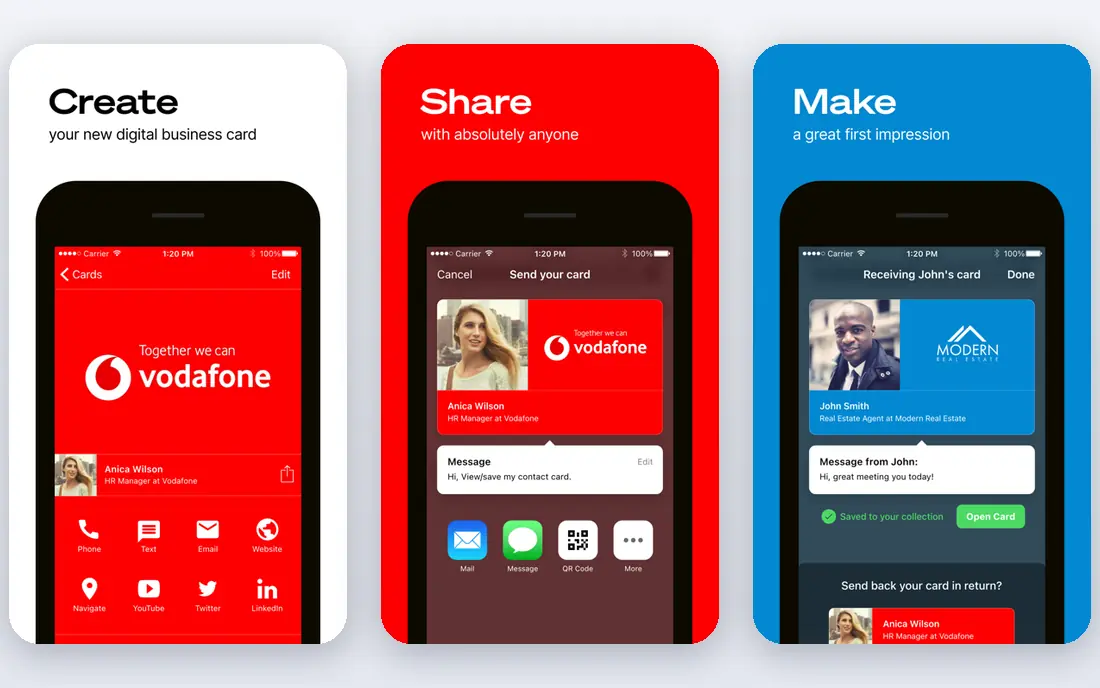
Haystack stands out for digital cards and sharing. Haystack suits professionals who mainly share cards digitally. We looked at its official feature page, pricing page and public reviews, and the overall picture was consistent with that strength.
What stood out to us was digital card design. That matters in daily use, because a tool that is strong on paper still has to feel good when you use it every week. Print-first users should use Canva plus Vistaprint or Moo. Check the official pricing page before you pay, since plans, limits and included features change over time.
The catch is print options are lighter than Vistaprint or Moo. If that trade-off is acceptable for your needs, Haystack is a solid choice. If it is not, another option in this list may fit better, so compare the next two entries before you decide.
- Digital card design
- Sharing links
- Contact capture
- Print options are lighter than Vistaprint or Moo
Canva
Ideal for: designing business cards
If you need designing business cards, start with Canva. Canva makes card design easy for non-designers. We looked at its official feature page, pricing page and public reviews, and the overall picture was consistent with that strength.
What stood out to us was templates. That matters in daily use, because a tool that is strong on paper still has to feel good when you use it every week. For premium paper and finishes, Moo is a strong print partner. Check the official pricing page before you pay, since plans, limits and included features change over time.
The catch is free assets limited. If that trade-off is acceptable for your needs, Canva is a solid choice. If it is not, another option in this list may fit better, so compare the next two entries before you decide.
- Templates
- Logo upload
- Print ordering
- Free assets limited
- Print quality depends on paper choice
Adobe Express
Ideal for: quick branded card design
Adobe Express fits readers who want quick branded card design. Adobe Express suits teams already using Adobe brand tools. We looked at its official feature page, pricing page and public reviews, and the overall picture was consistent with that strength.
What stood out to us was templates. That matters in daily use, because a tool that is strong on paper still has to feel good when you use it every week. Casual designers may find Canva simpler. Check the official pricing page before you pay, since plans, limits and included features change over time.
The catch is premium features need a plan. If that trade-off is acceptable for your needs, Adobe Express is a solid choice. If it is not, another option in this list may fit better, so compare the next two entries before you decide.
- Templates
- Brand tools
- Photo editing
- Premium features need a plan
- Print ordering is via partners
Vistaprint
Ideal for: ordering printed cards
For many readers, Vistaprint is the practical pick for ordering printed cards. Vistaprint is a practical bulk print option. We looked at its official feature page, pricing page and public reviews, and the overall picture was consistent with that strength.
What stood out to us was many card stocks. That matters in daily use, because a tool that is strong on paper still has to feel good when you use it every week. Design-first users should design in Canva, then print here or at Moo. Check the official pricing page before you pay, since plans, limits and included features change over time.
The catch is design tools are simpler than Canva. If that trade-off is acceptable for your needs, Vistaprint is a solid choice. If it is not, another option in this list may fit better, so compare the next two entries before you decide.
- Many card stocks
- Templates
- Bulk ordering
- Design tools are simpler than Canva
- Shipping times vary
Moo
Ideal for: premium printed cards
Moo earns its place here for premium printed cards. Moo suits cards where paper and finish matter. We looked at its official feature page, pricing page and public reviews, and the overall picture was consistent with that strength.
What stood out to us was premium stocks and finishes. That matters in daily use, because a tool that is strong on paper still has to feel good when you use it every week. Budget bulk orders fit Vistaprint better. Check the official pricing page before you pay, since plans, limits and included features change over time.
The catch is pricing is higher than budget printers. If that trade-off is acceptable for your needs, Moo is a solid choice. If it is not, another option in this list may fit better, so compare the next two entries before you decide.
- Premium stocks and finishes
- Design tools
- Small-batch options
- Pricing is higher than budget printers
- Delivery times vary
ABBYY Business Card Reader
Ideal for: accurate card scanning
When accurate card scanning is the priority, ABBYY Business Card Reader deserves a close look. ABBYY focuses on recognition accuracy for scanned cards. We looked at its official feature page, pricing page and public reviews, and the overall picture was consistent with that strength.
What stood out to us was text recognition. That matters in daily use, because a tool that is strong on paper still has to feel good when you use it every week. Check current availability, since ABBYY has changed consumer app offerings over time. Check the official pricing page before you pay, since plans, limits and included features change over time.
The catch is app availability and pricing vary by region. If that trade-off is acceptable for your needs, ABBYY Business Card Reader is a solid choice. If it is not, another option in this list may fit better, so compare the next two entries before you decide.
- Text recognition
- Contact export
- Multilingual support
- App availability and pricing vary by region
- Check current store listing
How we picked these
We compared official feature pages, pricing pages, app store listings, privacy policies and public reviews for each option in this list. We checked that each product exists and works in October 2026, that it truly fits the topic, and that its official homepage loads. We did not claim hands-on testing that did not happen, and we avoided products that did not fit, even when they were well known. Where a price or free tier could not be verified from the vendor own site, we wrote See website rather than guessing.
How to pick a business card app
Decide whether you scan, design or both. Scanning accuracy matters most for received cards: test with a real card, including a logo-heavy design, before you pay. Check contact sync to your phone and CRM, since a scanned card that stays only in the app is less useful. For design, check templates, logo upload and print quality, and order a small test batch before a large print run. Finally, check data handling for scanned contacts, since cards contain personal business details.
Frequently asked questions
What is the best free business card scanner app?
CamCard and Haystack offer free starting tiers, with limits on scans and features. Test accuracy on your real cards before committing.
What is the best app for scanning business cards?
CamCard is a common pick for individual scanning, while Sansan suits teams that need shared access and CRM sync.
Can I design a business card on my phone?
Yes, Canva, Adobe Express and Haystack all offer mobile design tools, with print ordering through Canva, Vistaprint or Moo.
Do digital business cards replace printed cards?
For many meetings, a digital card with a link or QR code is enough, but printed cards still help at trade shows and in-person events. Many professionals use both.
How accurate is business card scanning?
Accuracy is high for clean, standard cards, but lower for unusual fonts, dark backgrounds or handwritten notes. Always check scanned details before syncing.