Best Calendar App in 2026: 8 Apps Compared

- 1
 Google CalendarMost people and Google usersVisit
- 2
 Apple CalendarApple device usersVisit
- 3
 Outlook CalendarMicrosoft and work calendarsVisit
- 4
 FantasticalNatural language event entry on AppleVisit
- 5
 CalendlyScheduling meetings without back and forthVisit
- Prices and free plans vary widely, so check the current plan page before you pay.
- The best choice depends on how much you will actually use each week, not on the longest feature list.
- Start with a free plan or trial where one exists, then upgrade only when you hit a real limit.
- Read the privacy and cancellation terms, especially for subscriptions that renew automatically.
Quick comparison
| Product | Ideal for | Price from | Free version | |
|---|---|---|---|---|
| Google Calendar | Most people and Google users | Free | Yes | Visit |
| Apple Calendar | Apple device users | Free | Yes | Visit |
| Outlook Calendar | Microsoft and work calendars | Free | Yes | Visit |
| Fantastical | Natural language event entry on Apple | See website | Free trial | Visit |
| Calendly | Scheduling meetings without back and forth | Free | Yes | Visit |
 Reclaim.ai | Automatic time blocking for work | See website | Free trial | Visit |
 Motion | AI scheduling and task planning | See website | Free trial | Visit |
 Timepage | Beautiful calendar with weather and tasks | See website | No | Visit |
The best calendar apps
We compared official feature pages, pricing pages, app store listings, privacy policies and public reviews to build this list. Our pick for most people is the option that gives the clearest value for its price, but the right choice for you depends on your budget, your devices and how often you will use it.
Google Calendar
Ideal for: Most people and Google users

Google Calendar fits most people and google users. Its free sharing and Google links suit most personal and team use. That focus shows in day to day use, where the main tools are easy to find and the extras do not get in the way. The catch is worth knowing before you commit. Power schedulers may want a dedicated scheduling app. Check the current price, the renewal terms and what is included on the plan you actually want, since entry plans often leave out the features shown in marketing. If that trade off still works for your routine, this is an easy option to recommend.
- Free
- Sharing
- Google app integration
- Design is plain
- Advanced scheduling needs add ons
Apple Calendar
Ideal for: Apple device users

For apple device users, Apple Calendar is a strong place to start. Apple owners get a clean calendar across devices. It is a practical choice when you want results without a long setup process. The catch is worth knowing before you commit. Android and Windows users get a thinner experience. Check the current price, the renewal terms and what is included on the plan you actually want, since entry plans often leave out the features shown in marketing. If that trade off still works for your routine, this is an easy option to recommend.
- Apple device integration
- Clean design
- ICloud sync
- Best on Apple devices
- Fewer power features
Outlook Calendar
Ideal for: Microsoft and work calendars
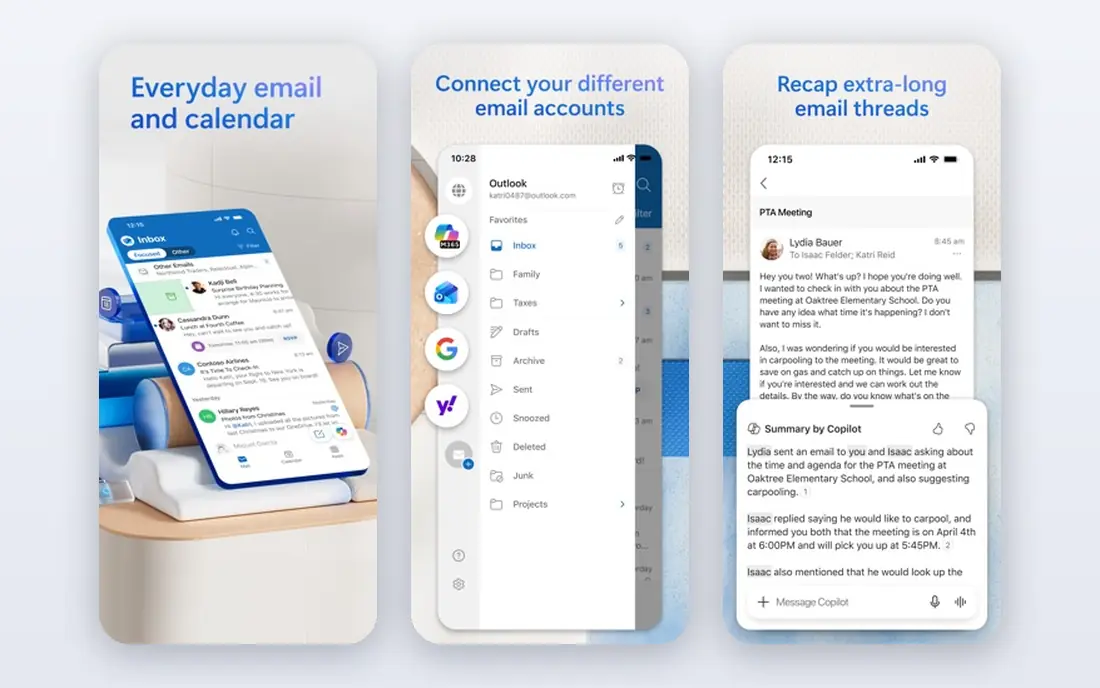
If microsoft and work calendars is your main need, Outlook Calendar deserves a close look. Work users get email, calendar and meetings in one place. The design keeps the core job front and centre. The catch is worth knowing before you commit. Personal users may prefer a simpler app. Check the current price, the renewal terms and what is included on the plan you actually want, since entry plans often leave out the features shown in marketing. If that trade off still works for your routine, this is an easy option to recommend.
- Microsoft 365 integration
- Work scheduling
- Teams links
- Ads on free plan
- Interface can feel busy
Fantastical
Ideal for: Natural language event entry on Apple
Fantastical fits natural language event entry on apple. Apple users who enter many events love fast natural language entry. That focus shows in day to day use, where the main tools are easy to find and the extras do not get in the way. The catch is worth knowing before you commit. Android users cannot use it. Check the current price, the renewal terms and what is included on the plan you actually want, since entry plans often leave out the features shown in marketing. If that trade off still works for your routine, this is an easy option to recommend.
- Natural language entry
- Calendar sets
- Widgets
- Apple focused
- Subscription for full features
Calendly
Ideal for: Scheduling meetings without back and forth
For scheduling meetings without back and forth, Calendly is a strong place to start. Its booking links suit professionals who schedule many meetings. It is a practical choice when you want results without a long setup process. The catch is worth knowing before you commit. Personal calendar users need a different app. Check the current price, the renewal terms and what is included on the plan you actually want, since entry plans often leave out the features shown in marketing. If that trade off still works for your routine, this is an easy option to recommend.
- Booking links
- Availability
- Integrations
- Free plan limits event types
- Mainly for scheduling, not personal planning
Reclaim.ai
Ideal for: Automatic time blocking for work
If automatic time blocking for work is your main need, Reclaim.ai deserves a close look. Busy professionals get automatic protection for focus and habits. The design keeps the core job front and centre. The catch is worth knowing before you commit. Personal users may find it more than they need. Check the current price, the renewal terms and what is included on the plan you actually want, since entry plans often leave out the features shown in marketing. If that trade off still works for your routine, this is an easy option to recommend.
- Auto time blocking
- Habits
- Focus time
- Needs Google Calendar
- Learning curve
Motion
Ideal for: AI scheduling and task planning
Motion fits ai scheduling and task planning. Its auto scheduling suits people with packed, changing days. That focus shows in day to day use, where the main tools are easy to find and the extras do not get in the way. The catch is worth knowing before you commit. Simple calendar users will find it costly. Check the current price, the renewal terms and what is included on the plan you actually want, since entry plans often leave out the features shown in marketing. If that trade off still works for your routine, this is an easy option to recommend.
- Auto scheduling
- Tasks and calendar together
- Project views
- Higher price
- No free plan
Timepage
Ideal for: Beautiful calendar with weather and tasks
For beautiful calendar with weather and tasks, Timepage is a strong place to start. Design lovers get a calendar that is pleasant to open daily. It is a practical choice when you want results without a long setup process. The catch is worth knowing before you commit. Android users and budget buyers should look elsewhere. Check the current price, the renewal terms and what is included on the plan you actually want, since entry plans often leave out the features shown in marketing. If that trade off still works for your routine, this is an easy option to recommend.
- Beautiful design
- Weather
- Task integration
- Apple focused
- Subscription needed
How we picked these
We started with the products that appear most often in this category, then kept only the ones that exist and work today, with a clear official homepage and a plan structure we could describe honestly. We compared official feature pages, pricing pages, app store listings, privacy policies and public reviews, and we left out products whose prices or homepages we could not verify. We did not claim hands on testing that did not happen, and we favoured products with clear terms over products that hide limits in fine print. We also weighed fit over fame. A well known name can be the wrong pick if its plan is built for a different kind of user, while a smaller option can be better when it matches your daily routine. That is why each write up names who the product suits, one concrete strength and one honest weakness, so you can judge the trade off for yourself.
Choose a calendar you will check every morning
Keep one calendar of truth
Multiple calendars create double bookings. Sync work and personal calendars into one view, even if you keep separate calendars underneath.
Use booking links for meetings
Booking links cut scheduling emails. Use them for external meetings and keep personal planning in your main calendar.
Protect focus time first
Block focus, exercise and family time before meetings fill the week. A calendar that only holds meetings will always feel full. Before you decide, shortlist two options and test them side by side for a few days of normal use. Note what slows you down, what costs extra, and what you would miss if you switched. That short test usually reveals the right choice faster than reading another ten reviews, because it is based on your routine, your devices and your budget rather than on a generic ranking. Also check support and cancellation before you pay for a year in advance. A clear help centre, a reachable support team and a simple cancel button are worth more than a small discount, because they decide how painful it is to fix a billing problem or leave later. If support is hard to reach during a trial, treat that as a warning sign, not as a minor detail, and choose the option with clearer terms even if its headline price is slightly higher.
Frequently asked questions
What is the best calendar app?
Google Calendar suits most users, Apple Calendar suits Apple owners, and Outlook Calendar suits work users.
What is the best calendar app for work?
Outlook Calendar suits Microsoft workplaces, Google Calendar suits Google workplaces, and Calendly suits external scheduling.
Are there free calendar apps?
Yes, Google Calendar, Apple Calendar and Outlook Calendar offer strong free plans. Paid apps add scheduling and automation.
Can I share calendars?
Yes, most apps here support sharing with family or teams. Check permission levels before sharing a work calendar.
What is the best cross platform calendar app?
Google Calendar and Outlook Calendar work across iOS, Android and web, while Fantastical and Timepage are Apple focused.