Best Cloud-Based Procurement Software in 2026: 8 Options Compared

- Coupa, SAP Ariba, and Oracle suit large enterprises with complex spend and ERP needs.
- Precoro is the rare mid-market tool with transparent published pricing.
- Zip fixes intake and approvals without replacing your ERP.
- Ramp gives US startups a free core spend platform with paid procurement add-ons.
Quick comparison
| Product | Ideal for | Price from | Free version | |
|---|---|---|---|---|
 Coupa | large enterprises with complex spend | See website | No | Visit |
 SAP Ariba | enterprises already running SAP | See website | No | Visit |
 Oracle Procurement Cloud | large Oracle ERP customers | See website | No | Visit |
 Precoro | mid-market teams wanting tight purchase control | $499 per month | Free trial | Visit |
 Procurify | mid-sized companies needing live budget visibility | See website | No | Visit |
 Zip | companies whose bottleneck is intake and approvals | See website | No | Visit |
 Airbase | mid-market purchasing plus accounts payable | See website | No | Visit |
 Ramp | US startups wanting free core spend management | Free | Yes | Visit |
The best cloud-based procurement software
Cloud procurement software moves purchase requests, approvals, purchase orders, and supplier payments out of email and spreadsheets. Enterprise suites cover the full source-to-pay cycle, while mid-market tools focus on intake and budget control. We compared both ends, with pricing honesty front and center.
Coupa
Ideal for: large enterprises with complex spend
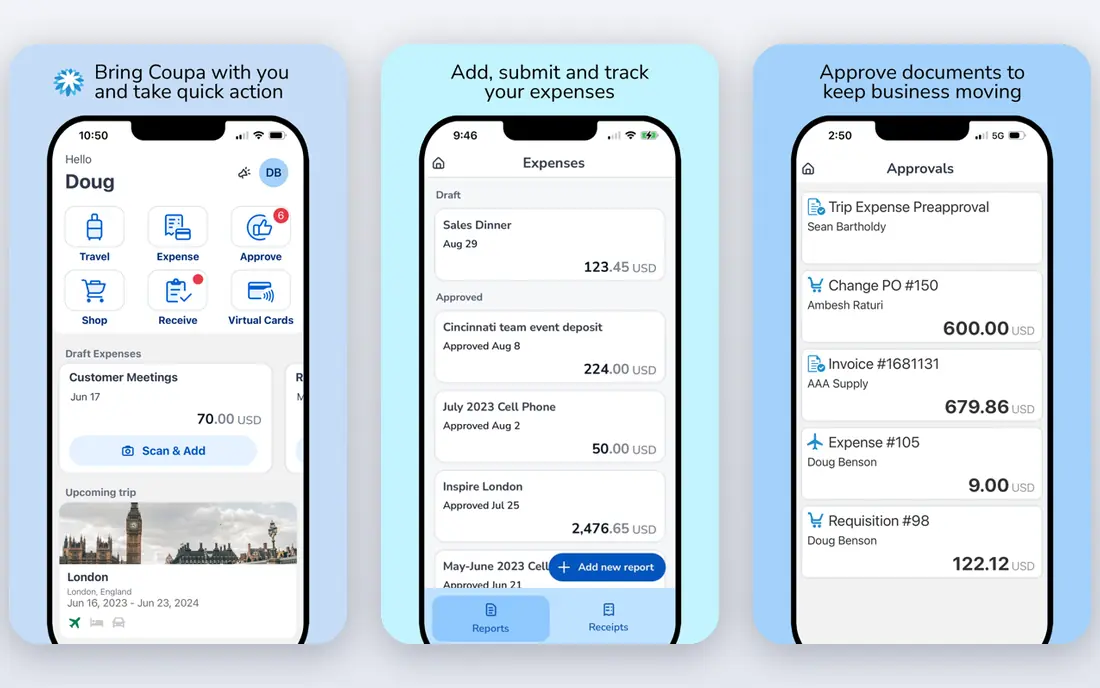
Coupa covers sourcing, procurement, invoicing, expenses, and payments in one cloud suite, with analytics that benchmark spending patterns. It suits large companies running a spend transformation program with many categories and entities. Smaller companies will find the sales process and implementation heavy. That focus makes it a practical match for large enterprises with complex spend. On pricing, the starting point is see website, and the free plan status is no. Its strengths include broad source-to-pay coverage; spend analytics; large supplier network. The trade-off to weigh is quote-based enterprise pricing; implementation takes months. We suggest checking the current plan limits on the vendor site before you commit, since tiers and trial terms change, and confirming that the plan you pick covers the seats, storage, or usage your team actually needs.
- Broad source-to-pay coverage
- Spend analytics
- Large supplier network
- Quote-based enterprise pricing
- Implementation takes months
SAP Ariba
Ideal for: enterprises already running SAP

SAP Ariba is the natural procurement choice for companies already on SAP, with sourcing, contracts, and supplier collaboration tied to the ERP. Its supplier network is a real advantage for large buying organizations. Companies outside the SAP world should weigh the implementation effort carefully. That focus makes it a practical match for enterprises already running SAP. On pricing, the starting point is see website, and the free plan status is no. Its strengths include deep sap integration; large supplier network; strong sourcing tools. The trade-off to weigh is quote-based pricing; complex to implement outside sap. We suggest checking the current plan limits on the vendor site before you commit, since tiers and trial terms change, and confirming that the plan you pick covers the seats, storage, or usage your team actually needs.
- Deep SAP integration
- Large supplier network
- Strong sourcing tools
- Quote-based pricing
- Complex to implement outside SAP
Oracle Procurement Cloud
Ideal for: large Oracle ERP customers
Oracle Procurement Cloud gives Oracle ERP customers purchasing, sourcing, supplier qualification, and payables in one cloud suite. Controls and approval rules fit large, multi-entity companies with strict audit needs. Outside Oracle, the integration case is weaker. That focus makes it a practical match for large Oracle ERP customers. On pricing, the starting point is see website, and the free plan status is no. Its strengths include tight oracle erp integration; full procure-to-pay; strong controls. The trade-off to weigh is quote-based pricing; best inside the oracle stack. We suggest checking the current plan limits on the vendor site before you commit, since tiers and trial terms change, and confirming that the plan you pick covers the seats, storage, or usage your team actually needs.
- Tight Oracle ERP integration
- Full procure-to-pay
- Strong controls
- Quote-based pricing
- Best inside the Oracle stack
Precoro
Ideal for: mid-market teams wanting tight purchase control
Precoro focuses on purchase requisitions, approvals, purchase orders, budgets, and invoice matching for growing companies. Published pricing from $499 per month billed annually is unusually transparent in this market. It suits teams that want control without an enterprise rollout. That focus makes it a practical match for mid-market teams wanting tight purchase control. On pricing, the starting point is $499 per month, and the free plan status is free trial. Its strengths include transparent published pricing; purchase orders and budgets; approval workflows. The trade-off to weigh is no free plan; advanced automation sits on higher tiers. We suggest checking the current plan limits on the vendor site before you commit, since tiers and trial terms change, and confirming that the plan you pick covers the seats, storage, or usage your team actually needs.
- Transparent published pricing
- Purchase orders and budgets
- Approval workflows
- No free plan
- Advanced automation sits on higher tiers
Procurify
Ideal for: mid-sized companies needing live budget visibility
Procurify gives finance teams live visibility into budgets as requests move through approval, with mobile approvals and spend controls. It suits mid-sized companies whose main pain is overspending against budgets rather than strategic sourcing. Pricing is modular and quoted. That focus makes it a practical match for mid-sized companies needing live budget visibility. On pricing, the starting point is see website, and the free plan status is no. Its strengths include real-time budget tracking; mobile approvals; virtual cards. The trade-off to weigh is quote-based modular pricing; implementation needs planning. We suggest checking the current plan limits on the vendor site before you commit, since tiers and trial terms change, and confirming that the plan you pick covers the seats, storage, or usage your team actually needs.
- Real-time budget tracking
- Mobile approvals
- Virtual cards
- Quote-based modular pricing
- Implementation needs planning
Zip
Ideal for: companies whose bottleneck is intake and approvals
Zip fixes the front door of procurement, turning scattered requests in email and chat into a single intake flow with approvals. It layers over your ERP and accounting tools rather than replacing them, so teams can adopt it quickly. Companies needing deep sourcing should pair it with other tools. That focus makes it a practical match for companies whose bottleneck is intake and approvals. On pricing, the starting point is see website, and the free plan status is no. Its strengths include fast purchase intake; flexible approvals; works alongside your erp. The trade-off to weigh is quote-based pricing; not a full sourcing suite. We suggest checking the current plan limits on the vendor site before you commit, since tiers and trial terms change, and confirming that the plan you pick covers the seats, storage, or usage your team actually needs.
- Fast purchase intake
- Flexible approvals
- Works alongside your ERP
- Quote-based pricing
- Not a full sourcing suite
Airbase
Ideal for: mid-market purchasing plus accounts payable
Airbase combines guided purchasing, bill payments, corporate cards, and expense management in one platform. It suits mid-market finance teams that want one approval trail from request to payment. Check coverage for your country and payment types before committing. That focus makes it a practical match for mid-market purchasing plus accounts payable. On pricing, the starting point is see website, and the free plan status is no. Its strengths include purchasing and ap in one system; approval workflows; accounting integrations. The trade-off to weigh is quote-based pricing; us focus for some payment features. We suggest checking the current plan limits on the vendor site before you commit, since tiers and trial terms change, and confirming that the plan you pick covers the seats, storage, or usage your team actually needs.
- Purchasing and AP in one system
- Approval workflows
- Accounting integrations
- Quote-based pricing
- US focus for some payment features
Ramp
Ideal for: US startups wanting free core spend management
Ramp starts with free corporate cards, expense management, and bill pay, which makes it an easy first step for startups that need spend control fast. Procurement workflows arrive as a paid add-on, so growing teams can add structure without switching platforms. Non-US companies should check availability. That focus makes it a practical match for US startups wanting free core spend management. On pricing, the starting point is free, and the free plan status is yes. Its strengths include free core plan with cards and expenses; bill pay; accounting integrations. The trade-off to weigh is procurement features are paid add-ons; some features are us-focused. We suggest checking the current plan limits on the vendor site before you commit, since tiers and trial terms change, and confirming that the plan you pick covers the seats, storage, or usage your team actually needs.
- Free core plan with cards and expenses
- Bill pay
- Accounting integrations
- Procurement features are paid add-ons
- Some features are US-focused
How we picked these
We compared official feature pages, pricing pages, app store listings, privacy policies, and public reviews for each option, and we kept only products that exist, work in October 2026, and fit the topic directly. We did not claim hands-on testing we did not do, and we left out products whose fit was weak even when they are well known in a nearby category. Price and plan details change often, so where a vendor does not publish a clear price we write See website rather than guessing. The notes below reflect what each vendor publishes about its own product, not a promise about results for any single team.
How to choose cloud procurement software
Map your buying process before you shop, including who requests, who approves, how purchase orders are raised, and how invoices are matched and paid. If intake is the bottleneck, a focused tool may beat a full suite, while global sourcing and supplier qualification point toward an enterprise platform. A tool that forces a process your team will bypass in email has failed, no matter how complete its feature list looks. Total cost includes licenses, implementation, and the time your finance team spends onboarding suppliers. Enterprise suites often take months to implement and reach six figures a year, while mid-market tools can go live in weeks. Ask for reference customers of your size, and test the approval flow with your actual approvers during the trial. Start with one spend category and a small group of requesters, and keep the approval chain as short as your controls allow. Publish a simple buying guide, connect the tool to your accounting system early, and review maverick spending monthly so the savings you expect actually show up in the accounts.
Frequently asked questions
What is cloud-based procurement software?
It is procurement software delivered over the internet, covering purchase requests, approvals, purchase orders, supplier management, invoicing, and payments. Cloud delivery means no servers to run, automatic updates, and access from any browser.
What is the difference between procure-to-pay and source-to-pay?
Procure-to-pay covers requests, approvals, orders, invoice matching, and payment. Source-to-pay adds strategic sourcing, supplier qualification, and contract management on top, which suits larger enterprises.
Do small businesses need procurement software?
Many do once spending leaves the control of one person, since approvals and budgets get messy in spreadsheets. Small teams should favor tools with published pricing and fast setup over enterprise suites.
How much does procurement software cost?
Mid-market tools such as Precoro start around $499 per month, while enterprise suites are quoted and often reach six figures a year plus implementation. Ramp offers a free core plan, with procurement as a paid add-on.
Can procurement software replace our ERP?
Usually it sits alongside the ERP, handling intake and approvals while the ERP keeps the financial record. Some suites overlap with ERP purchasing, so check integration before assuming you can drop a module.