8 Best Contact Management Software for Growing Teams

- 1
 HubSpot CRMOverall customer platformVisit
- 2
 Zoho CRMAI agents and automation at a competitive priceVisit
- 3
 PipedriveVisual sales pipelines and deal trackingVisit
- 4
 Capsule CRMSimple, budget-friendly CRM for small businessesVisit
- 5
 NimbleSmall teams and solopreneursVisit
- HubSpot CRM is the best overall pick, with customer data, marketing, sales, and service on one platform.
- Zoho CRM suits teams that want AI agents, automation, and a wide integration library at a competitive price.
- Pipedrive suits sales teams that live in their pipeline, with a visual deal flow and built-in AI.
- Capsule CRM suits small businesses that want a simple, budget-friendly CRM without bloat.
- Nimble suits small teams and solopreneurs who want contact enrichment, email marketing, and automation in one plan.
- Close suits sales teams that call, text, and email heavily, with outreach built into the CRM.
- Streak and Copper suit Gmail and Google Workspace users who want their CRM inside the inbox.
Quick comparison
| Product | Ideal for | Price from | Free version | |
|---|---|---|---|---|
| HubSpot CRM | Overall customer platform | See website | See website | Visit |
| Zoho CRM | AI agents and automation at a competitive price | See website | Yes | Visit |
| Pipedrive | Visual sales pipelines and deal tracking | See website | No | Visit |
| Capsule CRM | Simple, budget-friendly CRM for small businesses | See website | See website | Visit |
| Nimble | Small teams and solopreneurs | $24.90 per month | See website | Visit |
 Close | Sales teams that call, text, and email heavily | See website | See website | Visit |
 Streak | Gmail users who want a CRM in the inbox | See website | Yes | Visit |
 Copper | Google Workspace teams that want CRM in Gmail and Calendar | $29 per month | No | Visit |
The best contact management software
HubSpot CRM
Ideal for: Overall customer platform
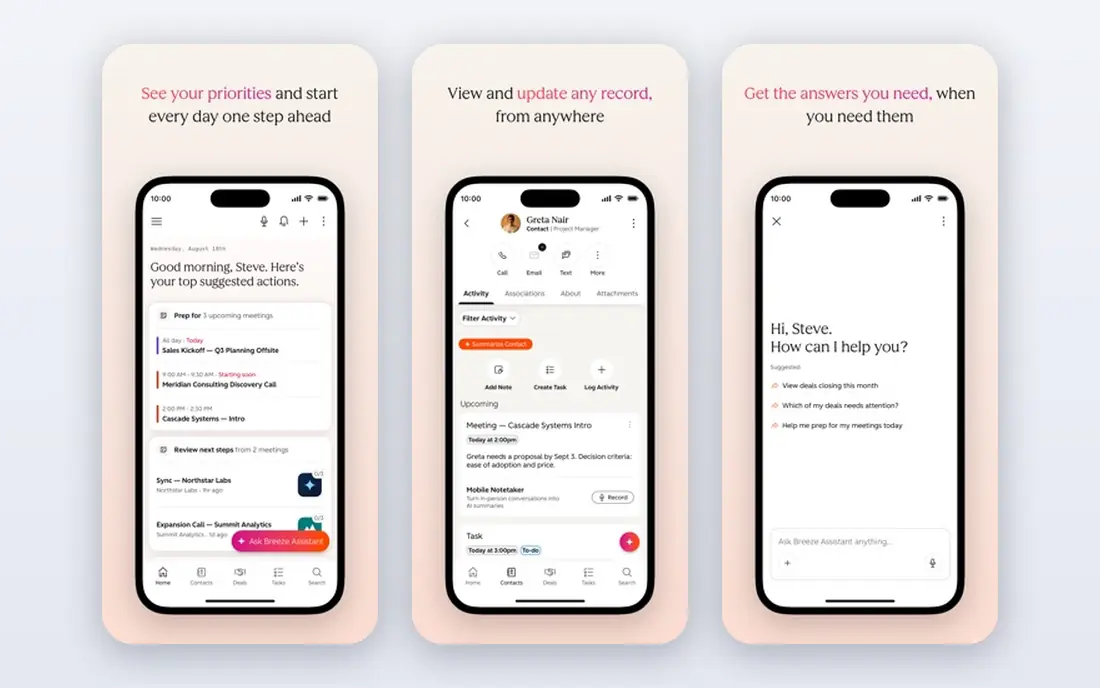
HubSpot brings marketing, sales, service, content, data, and revenue tools together on one customer platform, with its Smart CRM keeping customer data clean, connected, and actionable across teams. It reports more than 306,000 customers worldwide, and offers a small business bundle combining starter editions of each hub at one price.
HubSpot is our top pick because it grows with you: a small team can start with contacts and deals, then add marketing, service, and AI agents without switching platforms. The unified data model means sales, marketing, and support all see the same customer record.
- Smart CRM unifies customer data, marketing, sales, service, and content hubs, AI agents, large customer base, small business bundle
- Costs rise with hubs and tiers, platform breadth takes time to learn, pricing varies by bundle
Zoho CRM
Ideal for: AI agents and automation at a competitive price
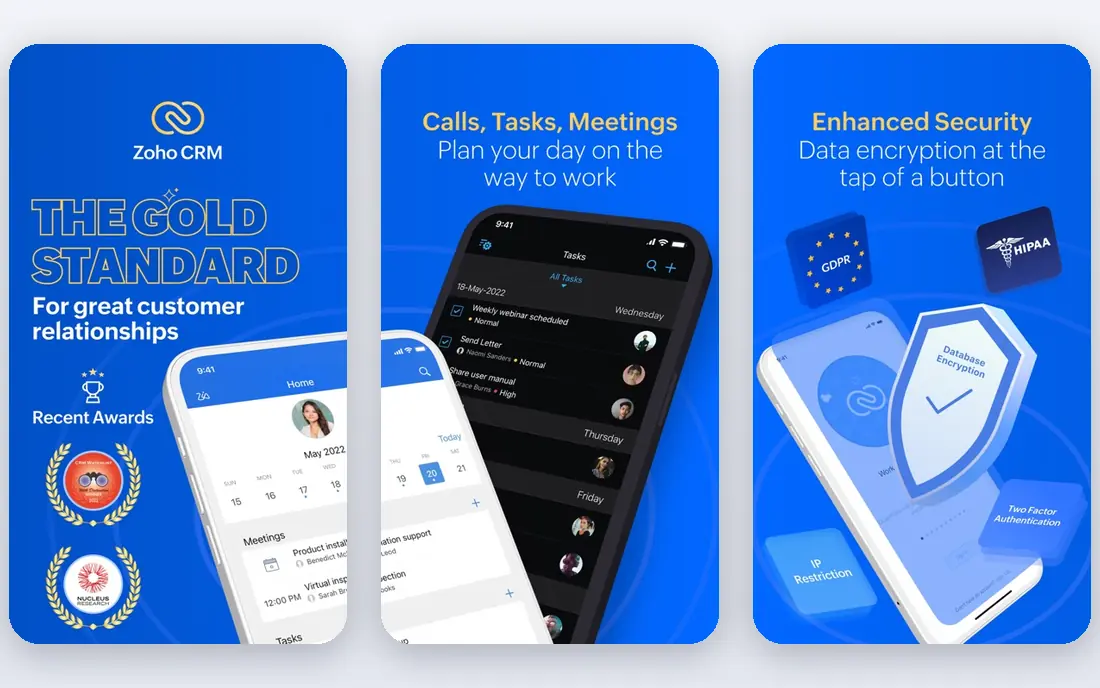
Zoho CRM is a sales platform for teams that want to respond faster to leads, close more deals, and run leaner operations, with AI agents that prospect, research, and qualify leads, plus automation for follow-ups, approvals, and quotes. It reports serving 350,000 businesses over 21 years, with more than 1,200 integrations including QuickBooks, Shopify, Mailchimp, and WhatsApp.
Zoho CRM suits teams that want depth without enterprise cost: the AI agents, pipelines, and forecasting cover serious sales work, and free migration help eases the switch from Salesforce or HubSpot. Check current US pricing on its site, since the homepage showed prices in another currency.
- Built-in AI agents, sales automation, 1,200-plus integrations, pipelines and forecasting, free start, migration help
- Interface takes time to learn, homepage pricing showed a non-US currency, advanced features need higher tiers
Pipedrive
Ideal for: Visual sales pipelines and deal tracking
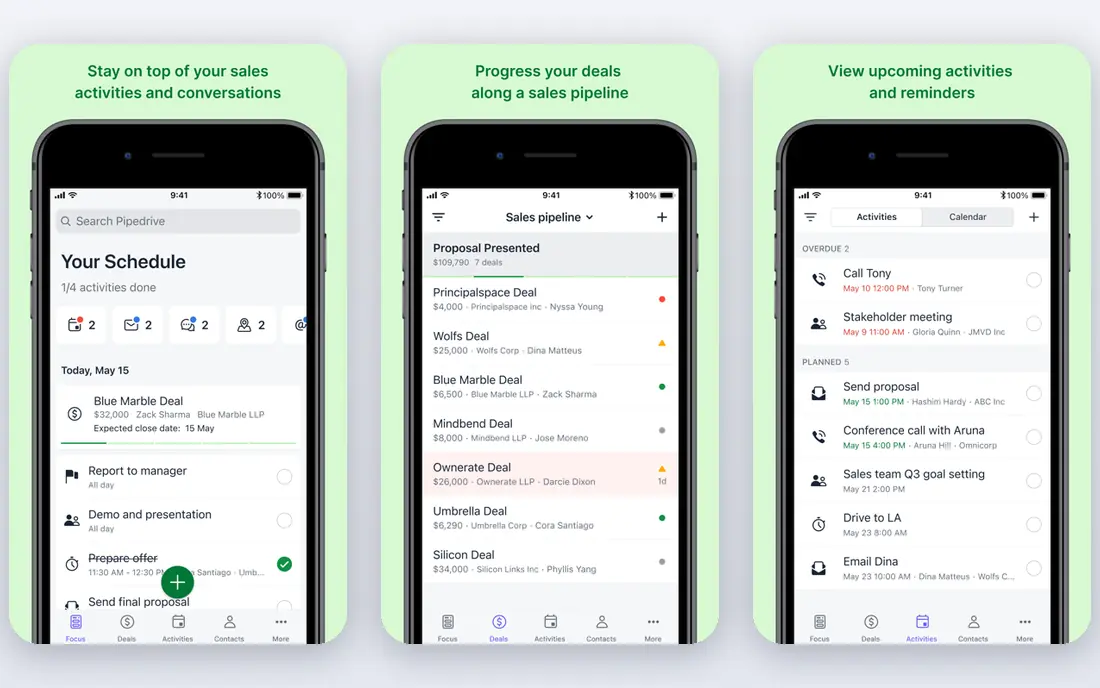
Pipedrive is a sales CRM built around the pipeline, letting teams track leads, manage deals with AI, and automate follow-ups so they can focus on selling. It reports use by more than 100,000 companies in 179 countries, with a 14-day free trial and no credit card required.
Pipedrive suits sales-driven teams: the pipeline view makes deal status obvious, automated reminders prevent follow-ups from slipping, and the Nova meeting feature captures call notes and drafts CRM updates. If your main job is contacts rather than deals, a simpler tool may fit better.
- Visual kanban pipelines, AI deal tools, automated follow-ups, 500-plus integrations, 14-day free trial, GDPR compliant
- No free plan, sales-focused rather than general contact management, advanced reporting needs higher plans
Capsule CRM
Ideal for: Simple, budget-friendly CRM for small businesses
Capsule CRM is a simple CRM for small businesses, praised by users as intuitive, easy to adopt, and well priced, with contact organization, deal tracking, and task management in a clean interface. Customer quotes on its homepage repeatedly call it the perfect CRM for managing contacts and a great tool for small businesses.
Capsule suits teams that want a CRM without a learning curve: you can be up and running on the first day, and the interface stays clean as your contact list grows. Larger teams needing deep automation may outgrow it, but for small businesses, simplicity is the point.
- Simple and intuitive, budget friendly, easy to adopt, contact and deal tracking, good support reputation
- Fewer advanced features than enterprise CRMs, pricing not shown on the homepage, smaller integration library
Nimble
Ideal for: Small teams and solopreneurs
Nimble is a small-business CRM combining contact management, email marketing, sales prospecting, and automation in one clean platform, with a Prospector tool that finds, enriches, and engages LinkedIn leads without copy-pasting. It lists a price of $24.90, includes all features in one plan, and works inside Claude and ChatGPT for AI-assisted relationship work.
Nimble suits solopreneurs, consultants, and small teams: enriched contact profiles, email sequences, and pipelines cover the whole journey from lead to deal, without the cost or complexity of an enterprise CRM. It is a strong pick if you build business through relationships and outreach.
- Contact enrichment from LinkedIn and the web, email marketing built in, sales automation, visual pipelines, one price for all features
- Small-business focus, fewer enterprise controls, pricing varies by billing period
Close
Ideal for: Sales teams that call, text, and email heavily
Close is a CRM built for selling, with calling, email, SMS, automation, and AI built in, so teams can reach more leads, follow up faster, and close more deals. It reports more than 11,500 sales teams use it, with a 4.7 rating across more than 2,000 G2 reviews, and AI agents that respond to leads even when the team is offline.
Close suits outbound sales teams: every call, text, and email lands in the contact record automatically, so reps always know where a conversation left off, and AI agents cover gaps like after-hours lead response. If you rarely call or text prospects, a quieter CRM may fit better.
- Calling, email, and SMS built in, AI agents and assistant, fast lead response, 100-plus integrations, strong small-business ratings
- Sales-focused rather than general contacts, pricing not shown on the homepage, outreach features may exceed simple needs
Streak
Ideal for: Gmail users who want a CRM in the inbox
Streak is a CRM that lives inside Gmail, turning your inbox into the home for pipelines, contacts, and deals, with automated team-wide email logging, pipeline tags on messages, AI data entry, mail merge, and task management. Its pitch is simple: most CRMs fail because teams do not use them, and Streak works because it sits where work already happens.
Streak suits Gmail-based teams: deals, contacts, and follow-ups stay in the inbox, so adoption is high and data stays current. If your team does not use Gmail, look elsewhere, but for Gmail teams, it is the most natural fit on this list.
- Lives inside Gmail, automated email logging, pipeline tags in the inbox, AI data entry, mail merge, free plan mentioned by users
- Gmail-only, less suited to non-Gmail teams, advanced features need paid plans
Copper
Ideal for: Google Workspace teams that want CRM in Gmail and Calendar
Copper is a CRM for relationship-focused service businesses, built to run inside Google Workspace, with contacts, leads, deals, projects, and client emails in one system that works directly in Gmail and Google Calendar. Its Basic plan costs $29 per month, or $23 billed annually, with Professional at $69 and Business at $134 per month, and every plan starts with a 14-day free trial.
Copper suits service businesses that live in Google Workspace: emails, meetings, and tasks sync automatically, won deals turn into projects without handoff documents, and setup takes days rather than months. It reports use by more than 30,000 companies.
- Deep Google Workspace integration, leads, deals, and projects in one tool, templates, mobile app, 14-day free trial
- Google-focused, Basic plan costs $29 per month, free plan not offered
How we picked these
We compared official homepages, feature pages, and pricing pages for contact management software live in October 2026. We favored tools with contact records, deal pipelines, email integration, and automation, and we covered the main use cases: general platforms, sales pipelines, small businesses, and Gmail or Google Workspace teams. We kept only products whose official homepages we could load and confirm, and we wrote "See website" for prices and free plans not shown on those homepages rather than guessing. We did not claim hands-on testing, and we treated vendor claims about customer counts and results as claims, not verified results.
Choosing the right contact management software
Start with where your team already works. Gmail teams should shortlist Streak and Copper, since both live in the inbox and keep data current with little effort. Sales teams should compare Pipedrive and Close, with Pipedrive for visual pipelines and Close for heavy calling and texting. Teams that want a full customer platform should look at HubSpot and Zoho CRM.
Check the details that affect daily use: contact import, email sync, mobile apps, and permissions all matter more than a long feature list. A free plan or trial is the best test: import a real slice of contacts, run a week of follow-ups, and see whether the team actually opens the tool.
Finally, plan for clean data from day one. Agree on naming, tags, and pipeline stages before import, and assign one owner for data quality. A CRM is only as good as its records, and the best tool on this list is the one your team keeps up to date.
Frequently asked questions
What is the best contact management software?
HubSpot CRM is our top pick for most teams, thanks to its unified customer data and its marketing, sales, and service hubs. Pipedrive leads for visual pipelines, Capsule for simplicity, and Streak for Gmail-based teams.
Is there free contact management software?
Yes. Zoho CRM offers a free start, and Streak offers a free plan alongside paid plans. HubSpot, Capsule, Nimble, and Close pricing varies, so check their pricing pages for current free or trial options.
What is the difference between a CRM and contact management software?
Contact management covers storing and organizing contacts, while a CRM adds pipelines, deals, automation, and reporting around those contacts. Most tools on this list do both, with the balance shifting by product: Capsule leans toward contacts, while Pipedrive and Close lean toward sales.
Can I import contacts from a spreadsheet?
Yes. Most CRMs on this list support CSV import, and Pipedrive notes imports from spreadsheets or other pipeline tools in a few clicks. Clean your data before import, removing duplicates and standardizing fields, to avoid a messy start.
Does contact management software work with Gmail?
Yes. Streak lives inside Gmail, Copper runs in Gmail and Google Calendar, and HubSpot, Zoho CRM, Pipedrive, and Nimble all offer Gmail integration. If your team lives in Gmail, Streak and Copper offer the deepest integration.
How much does contact management software cost?
Prices range from free plans for Zoho CRM and Streak, to $24.90 per month for Nimble and $29 per month for Copper Basic. Enterprise platforms price by seat and tier, so check current pricing for your team size.