Best content management software in 2026: 7 Options Compared

- Decide first whether editors need a visual site builder or developers need an API-first system.
- Check how content is structured, since that decides reuse across pages and channels.
- Plugin and theme ecosystems affect long-term maintenance costs.
- Hosting and security responsibility differs sharply between hosted and self-hosted options.
Quick comparison
| Product | Ideal for | Price from | Free version | |
|---|---|---|---|---|
 WordPress | Most websites, blogs, and small business sites | Free | Yes | Visit |
 Drupal | Complex sites with structured content | Free | Yes | Visit |
 Contentful | Headless content for many channels | Free | Yes | Visit |
 Sanity | Headless content with flexible editing | Free | Yes | Visit |
 Strapi | Self-hosted headless CMS | Free | Yes | Visit |
 Webflow CMS | Design-led marketing sites | Free | Yes | Visit |
 Ghost | Publishing and newsletters | Free | Yes | Visit |
The best content management software
Content management software ranges from classic website platforms to headless systems that feed many channels. We compared official feature pages and pricing for systems that are actively maintained and widely used.
WordPress
Ideal for: Most websites, blogs, and small business sites
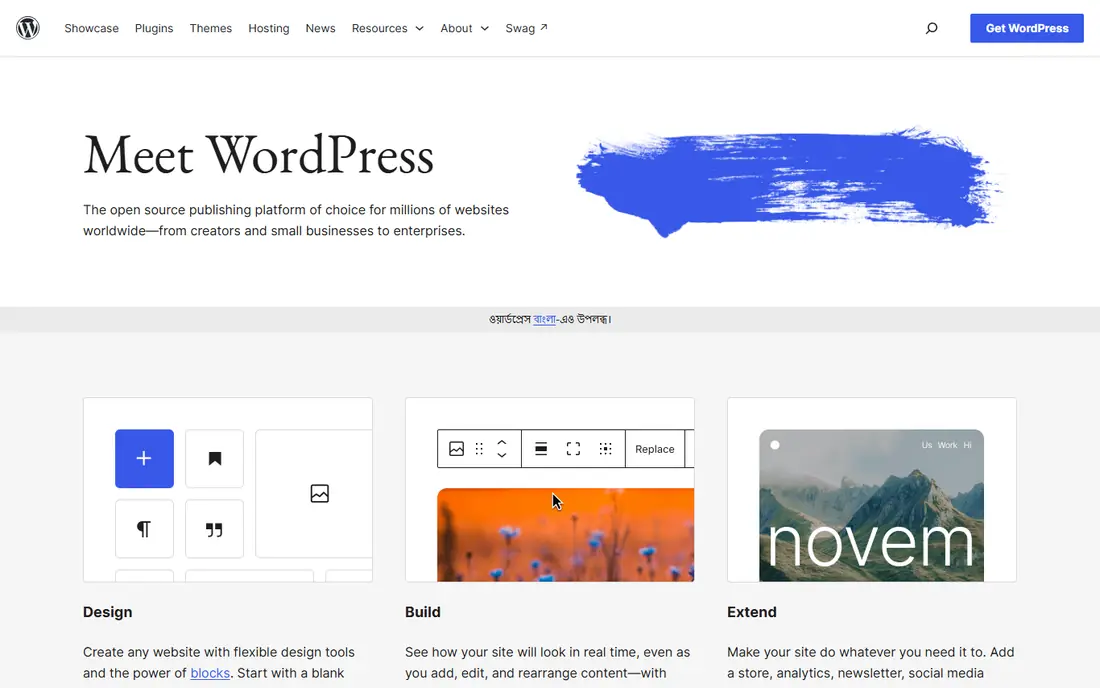
For readers weighing options, WordPress deserves a close look. WordPress fits most content sites, from blogs to small business sites, thanks to its ecosystem. Themes and plugins cover nearly every common need without custom development.
On pricing, the starting point is listed as Free, with a free plan status of Yes. That pricing picture should be checked on the vendor site before you commit, since tiers and limits change. In daily use, the strengths above are what most buyers will notice first, and they explain why this option keeps appearing in comparisons of best content management software.
The honest catch is this: The catch is maintenance: updates, plugins, and security are the site owner's job on self-hosted setups. Weigh that against the strengths before you sign up, and use a trial or free tier first when one is offered. Our pick for most people is not always the same as the best pick for you, so match the trade-off to your own budget, team size, and patience for setup.
- Huge theme and plugin ecosystem
- Easy editor
- Self-hosting control
- Plugin upkeep and security need care
- Performance depends on hosting and plugins
Drupal
Ideal for: Complex sites with structured content
Drupal is the pick to consider first if complex sites with structured content is your priority. Drupal fits complex sites with structured content, many user roles, and strict access rules. Content modeling and permissions go further than simpler platforms.
On pricing, the starting point is listed as Free, with a free plan status of Yes. That pricing picture should be checked on the vendor site before you commit, since tiers and limits change. In daily use, the strengths above are what most buyers will notice first, and they explain why this option keeps appearing in comparisons of best content management software.
The honest catch is this: The trade-off is effort: most teams need developer help for setup and customization. Weigh that against the strengths before you sign up, and use a trial or free tier first when one is offered. Our pick for most people is not always the same as the best pick for you, so match the trade-off to your own budget, team size, and patience for setup.
- Strong content modeling and access control
- Security focus
- Large community
- Learning curve is steeper
- Developer help is often needed
Contentful
Ideal for: Headless content for many channels
What sets Contentful apart is how well it handles headless content for many channels. Contentful fits teams that publish the same content to websites, apps, and other channels. Structured content and APIs make reuse across channels straightforward.
On pricing, the starting point is listed as Free, with a free plan status of Yes. That pricing picture should be checked on the vendor site before you commit, since tiers and limits change. In daily use, the strengths above are what most buyers will notice first, and they explain why this option keeps appearing in comparisons of best content management software.
The honest catch is this: The catch is front-end work: you need developers to build the sites and apps that consume the content. Weigh that against the strengths before you sign up, and use a trial or free tier first when one is offered. Our pick for most people is not always the same as the best pick for you, so match the trade-off to your own budget, team size, and patience for setup.
- API-first headless CMS
- Structured content
- Strong developer tools
- Needs a front-end build
- Editor experience is less visual than WordPress
Sanity
Ideal for: Headless content with flexible editing
If headless content with flexible editing matters most to you, Sanity belongs on your shortlist. Sanity fits teams that want a headless CMS with an editor experience developers can shape. The content studio is customizable, and real-time collaboration helps editorial teams.
On pricing, the starting point is listed as Free, with a free plan status of Yes. That pricing picture should be checked on the vendor site before you commit, since tiers and limits change. In daily use, the strengths above are what most buyers will notice first, and they explain why this option keeps appearing in comparisons of best content management software.
The honest catch is this: The trade-off is setup: developers are needed to build and maintain the front end. Weigh that against the strengths before you sign up, and use a trial or free tier first when one is offered. Our pick for most people is not always the same as the best pick for you, so match the trade-off to your own budget, team size, and patience for setup.
- Flexible content studio
- Real-time collaboration
- Generous free tier
- Needs developer setup
- Smaller plugin ecosystem than WordPress
Strapi
Ideal for: Self-hosted headless CMS
Strapi earns its place here by doing self-hosted headless cms well. Strapi fits teams that want a headless CMS they host and control themselves. Open-source code and a customizable admin panel give full control over data and deployment.
On pricing, the starting point is listed as Free, with a free plan status of Yes. That pricing picture should be checked on the vendor site before you commit, since tiers and limits change. In daily use, the strengths above are what most buyers will notice first, and they explain why this option keeps appearing in comparisons of best content management software.
The honest catch is this: The catch is operations: hosting, updates, and security are your team's responsibility. Weigh that against the strengths before you sign up, and use a trial or free tier first when one is offered. Our pick for most people is not always the same as the best pick for you, so match the trade-off to your own budget, team size, and patience for setup.
- Open-source and self-hosted
- API generation
- Customizable admin panel
- Self-hosting needs maintenance
- Enterprise features are paid
Webflow CMS
Ideal for: Design-led marketing sites
Start with Webflow CMS when design-led marketing sites is the main job to be done. Webflow CMS fits design-led marketing sites where the team wants visual control without developers. Design and content live in one visual tool, and hosting is included.
On pricing, the starting point is listed as Free, with a free plan status of Yes. That pricing picture should be checked on the vendor site before you commit, since tiers and limits change. In daily use, the strengths above are what most buyers will notice first, and they explain why this option keeps appearing in comparisons of best content management software.
The honest catch is this: The trade-off is CMS limits on lower tiers and a weaker fit for complex web applications. Weigh that against the strengths before you sign up, and use a trial or free tier first when one is offered. Our pick for most people is not always the same as the best pick for you, so match the trade-off to your own budget, team size, and patience for setup.
- Visual design plus CMS
- Hosting included
- Clean code output
- CMS limits on lower tiers
- Less suited to very complex apps
Ghost
Ideal for: Publishing and newsletters
Ghost is worth your attention for anyone focused on publishing and newsletters. Ghost fits publishers and newsletters that want a clean writing and membership experience. Memberships and newsletters are built in, which suits subscription publishing.
On pricing, the starting point is listed as Free, with a free plan status of Yes. That pricing picture should be checked on the vendor site before you commit, since tiers and limits change. In daily use, the strengths above are what most buyers will notice first, and they explain why this option keeps appearing in comparisons of best content management software.
The honest catch is this: The catch is scope: complex business sites with many content types may need a broader CMS. Weigh that against the strengths before you sign up, and use a trial or free tier first when one is offered. Our pick for most people is not always the same as the best pick for you, so match the trade-off to your own budget, team size, and patience for setup.
- Clean publishing experience
- Memberships and newsletters built in
- Fast sites
- Narrower than general CMS platforms for complex sites
- Themes are fewer
How we picked these
We compared official feature pages, pricing pages, app store listings, privacy policies, and public reviews for best content management software. We kept only products that exist and work in October 2026 and truly fit the topic, and we favored options with clear pricing, a usable free tier or trial where one is offered, and honest weaknesses we could name. We did not claim hands-on testing we did not do, and where a price could not be verified from the vendor, we wrote See website instead of guessing.
Choosing a CMS for your site and team
Start by writing down the one job this purchase must do well. For best content management software, that job decides most of the choice, since the options above trade depth for simplicity in different ways. A tool that does everything may still be the wrong pick if its everyday workflow feels heavy for your team or household.
Next, test the shortlist in real conditions. Use a free tier or trial, invite the people who will use it daily, and run one realistic task end to end. Watch for friction in setup, billing, and support, since those are the costs that show up after the first week. Also check data export and cancellation terms before you build a habit around a tool.
Finally, compare total cost, not just the starting price. Seat counts, usage limits, add-ons, and renewal rates can move the monthly total well past the advertised figure. A slightly plainer tool at a fair price often beats a feature-rich option that nobody on your team enjoys using.
Frequently asked questions
Which best content management software is best for most people?
There is no single winner for everyone, since the best pick depends on budget and needs. From this list, start with the options whose best-for notes match your main job, then test two or three on a free tier or trial before deciding. The comparison table above is a good place to narrow the field.
Is there a free best content management software option?
Yes, several options in this list offer a free tier or a free trial, and the table shows which ones. Free tiers usually limit features, usage, or seats, so check those limits against your actual use before relying on a free plan for important work.
How much does best content management software cost?
Costs vary widely across this list, from free tiers to enterprise pricing by quote. The starting price column gives the vendor position where we could state it plainly, and See website means you should check the vendor pricing page for current figures. Always check renewal rates as well as first-year prices.
Can I switch later if I pick the wrong best content management software?
In most cases yes, but switching costs time and sometimes data migration work. Before committing, check export options and contract terms, and avoid storing everything in a format only one vendor can read. A short trial first reduces the chance you need to switch at all.
What should I check before signing up?
Check pricing tiers, free limits, support hours, privacy terms, and cancellation rules on the vendor site. For team tools, also check seat pricing and permission controls. Reading those pages takes minutes and prevents most common regrets.