Best CRM Software for Consultants in 2026: 6 Tools Compared

- 1
 DubsadoSolo consultants who want automatic client onboarding workflowsVisit
- 2
 Capsule CRMRelationship-driven consultants who want a straightforward contact-first CRMVisit
- 3
 Zoho CRMBudget-conscious consulting businesses that want deep customizationVisit
- 4
 PipedriveConsultants who live in their sales pipelineVisit
- 5
 HubSpot CRMConsultants who want a free CRM that grows with themVisit
- This list starts with Dubsado, which is built for solo consultants who want automatic client onboarding workflows.
- A fair warning about Pipedrive: email sync, automations, and the meeting scheduler only start on the Growth plan at $39 per user a month.
- A free plan is available from 2 of the 6 tools: Capsule CRM, Zoho CRM.
- For consultants who run their entire practice in Gmail and Google Workspace, Copper is worth a look.
- Zoho CRM has the lowest monthly starting price in this list: $14 per user per month for Standard, billed annually.
Direct answer
This list puts Dubsado first for solo consultants who want automated client onboarding workflows. Capsule CRM is better for relationship-driven consultants who want a straightforward contact-first CRM, and Zoho CRM is better for budget-conscious consulting businesses that want deep customization. The full list of 6 tools follows, with prices and free plan facts.
Quick comparison
| Product | Ideal for | Price from | Free version | |
|---|---|---|---|---|
| Dubsado | Solo consultants who want automatic client onboarding workflows | $35 a month for Starter, billed per month, or $335 a year (about $27.92 per month) | Free trial (21 days) | Visit |
| Capsule CRM | Relationship-driven consultants who want a straightforward contact-first CRM | $18 per user a month for Starter, billed yearly ($22 billed per month) | Yes | Visit |
| Zoho CRM | Budget-conscious consulting businesses that want deep customization | $14 per user per month for Standard, billed annually ($20 billed per month) | Yes | Visit |
| Pipedrive | Consultants who live in their sales pipeline | $14 per user a month for Lite, billed yearly ($24 billed per month) | Free trial (14 days) | Visit |
| HubSpot CRM | Consultants who want a free CRM that grows with them | $20 per seat a month for Sales Hub Starter (list price); new customers currently offered $7 per seat a month billed yearly, or $10 billed per month | Free trial | Visit |
 Copper | Consultants who run their entire practice in Gmail and Google | $23 per user a month for Basic, billed annually ($29 billed per month) | Free trial (14 days) | Visit |
Tool-by-tool breakdown
This Ainotely guide covers 6 CRM software for consultants. Each profile lists a starting price, free plan details, strengths and drawbacks, so you can drop poor fits quickly.
Dubsado
Ideal for: Solo consultants who want automatic client onboarding workflows
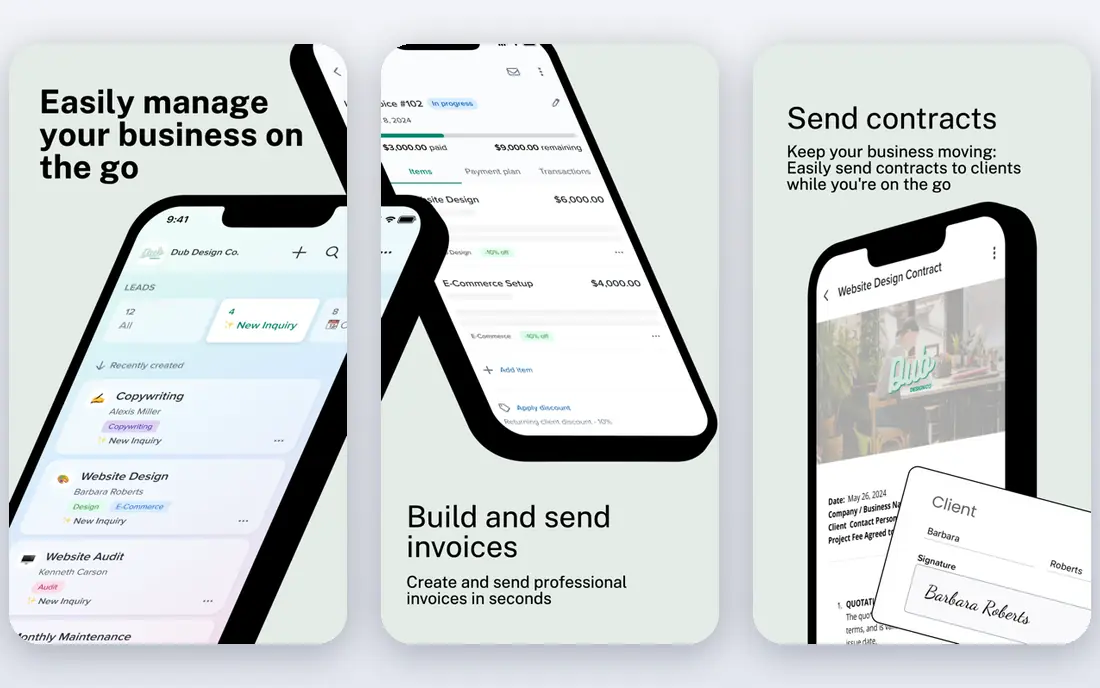
Dubsado is built with solo consultants who want automatic client onboarding workflows in mind. Both plans contain unlimited clients and projects, client portals, invoicing with payment plans, and form and email templates.
Where it falls short: Zapier only come with Premier at $55 per month ($525 a year).
On cost, Dubsado starts like this: $35 per month for Starter, billed monthly, or $335 per year. Free options: Free trial (21 days).
- Invoices in sequence without manual chasing
- Powerful workflow automation that sends forms, contracts
- Scheduling, automatic workflows, public proposals
Capsule CRM
Ideal for: Relationship-driven consultants who want a straightforward contact-first CRM

Capsule CRM works best for relationship-driven consultants who want a straightforward contact-first CRM. It is contact-first instead of deal-first, so a consultant can keep a rich history of every client, prospect, and referrer, with tasks, notes, and files attached to each person.
In daily use, the Starter plan raises the contact limit to 30,000 and layers on email templates and a shared mailbox, whereas Growth brings workflow automation, several pipelines, and project boards that track an engagement from kickoff to delivery. Capsule CRM cost at the entry level: $18 per user per month for Starter, billed annually. You can start on Capsule CRM without paying.
- Very simple to set up in an afternoon with a clean contact-first design
- Workflow automations and two-way email sync only unlock on Growth at $36 per user a month
Zoho CRM
Ideal for: Budget-conscious consulting businesses that want deep customization

Zoho CRM works best for budget-conscious consulting businesses that want deep customization. Zoho CRM gives a consulting firm enterprise-style depth at a small-business price, beginning at $14 per user a month.
What you pay to start with Zoho CRM: $14 per user per month for Standard, billed annually. Zoho CRM offers a free plan.
- Lowest-cost full-featured CRM here, with several pipelines
- Forecasting from Standard
- Interface feels dated and setup takes longer than more straightforward rivals
Pipedrive
Ideal for: Consultants who live in their sales pipeline
For consultants who live in their sales pipeline, Pipedrive is a natural candidate. Every deal sits on a visual board, so a consultant can see at a glance which proposals are waiting on a client reply and which require a nudge.
Honest limits: the meeting scheduler only start on the Growth plan at $39 per user per month.
In daily use, the Growth plan layers on full email sync with open tracking, workflow automation, and a meeting scheduler, which spans most of the follow-up work a consulting practice needs. What you pay to start with Pipedrive: $14 per user per month for Lite, billed annually. Free access: Free trial (14 days).
- 500 plus integrations including Zapier, Zoom
- Visual drag-and-drop pipeline that makes proposal follow-up obvious
- Email sync, automations
HubSpot CRM
Ideal for: Consultants who want a free CRM that grows with them
For consultants who want a free CRM that grows with them, HubSpot CRM is a natural candidate.
Where HubSpot CRM stands out: Ample free level with contact management.
The starting price for HubSpot CRM: $20 per seat per month for Sales Hub Starter. Free options: Free trial.
- Email tracking
- Deal pipelines
- Costs climb steeply once you need Professional features like sequences and forecasting, which start at $90 per seat a month plus a required $1,500 onboarding fee
Copper
Ideal for: Consultants who run their entire practice in Gmail and Google
Copper is aimed squarely at consultants who run their entire practice in Gmail and Google Workspace. Copper is the CRM for consultants who live in Gmail. Also, emails, meetings, contacts, and Drive files flow into Copper automatically.
A sidebar inside Gmail lets a consultant add a prospect to the pipeline without opening another tab. In practice, note that the vendor page confirms the $23 to $99 range and the 2,500-contact Basic cap, whereas the tier-by-tier split ($23, $59, $99 annual) comes from several sources checked in July to October 2026. What you pay to start with Copper: $23 per user per month for Basic, billed annually. Free options: Free trial (14 days).
- Files from Gmail
- Deepest Google Workspace integration of any CRM, with automatic capture of emails, contacts
- Only works properly with Google Workspace, so Outlook users should look elsewhere
Picking the right CRM software for consultants
Start with how you win work. In daily use, a consultant who wants a free start with room to grow should try HubSpot or Zoho. More specifically, then check what happens after the sale.
As for the details, check the cost ladder last, since the entry price seldom tells the full story. For everyday use, HubSpot sequences and forecasting need Professional at $90 per seat a month plus a required $1,500 onboarding fee.
CRM Software for Consultants cost breakdown
HubSpot CRM costs $0 on the free plan for up to 2 users, so a 3-person firm pays for one Starter seat at $20 per seat a month, before the new-customer promotion from $7. Zoho CRM costs $0 on the free edition for up to 3 users, and Standard at $14 per user a month costs $42 a month for 3 users. Pipedrive Lite at $14 per user a month costs $42 a month for 3 users, and Growth at $39 costs $117.
Choosing CRM software for consultants: what matters
Copper records Gmail automatically and works from a Gmail sidebar, which is why it suits Google Workspace businesses. Pipedrive Lite has no email sync at all, so most consultants really start at Growth, and Capsule layers on two-way email sync only on Growth. From a buyer's view, HubSpot syncs Gmail and Outlook on the free plan, which is a real advantage for a solo consultant.
In practice, check invoicing and payments next. In daily use, HubSpot free caps at 2 users and 1,000 contacts, Zoho free caps at 3 users, and Capsule free caps at 2 users and 250 contacts. So an expanding practice outgrows the free level rapidly.
How we built this list
Selection started from tools commonly considered for CRM software for consultants, then narrowed to 6 that have clear pricing information or a clear quote process. Treat prices as a snapshot: vendors change plans often, so check the vendor site for the figure that applies today. We ordered the tools by general fit, then by how clearly pricing is shown, then by free access. A buyer with unusual needs may reorder them.
What to confirm before you sign up
- Check the vendor page for the current price: Zoho CRM starts at $14 per user per month for Standard, billed annually here, and seats or billing terms can move it.
- Check what the free option really includes: Capsule CRM and Zoho CRM offer a free plan, and usage caps differ.
- Run a trial of Dubsado, Pipedrive, HubSpot CRM and Copper with real work before paying for a year; your own workflow is the best test.
- Before choosing Dubsado, weigh its main limit: scheduling, automatic workflows, public proposals, and Zapier only come with Premier at $55 a month ($525 a year).
- Confirm minimum seats and billing terms with HubSpot CRM before you commit to an annual plan.
- See whether Pipedrive offers onboarding or training, and whether it is included in the price.
Frequently asked questions
How are the tools for CRM software for consultants ordered?
Dubsado sits first and Copper last because the order follows typical fit for CRM software for consultants, then price clarity and free access. It is a judgement call, so read each profile for fit and limits.
Which options for CRM software for consultants have a free plan?
Capsule CRM and Zoho CRM offer a free plan in this list. Free plans usually cap users, projects or features, so check the limits on the vendor page. Several others offer a trial instead.
Can I try these tools before paying?
Often, yes. Capsule CRM and Zoho CRM have a free plan and Dubsado, Pipedrive, HubSpot CRM and Copper offer a free trial. Use your own data and a real task during the test, and check what the free tier or trial limits before you rely on it.
Can I use Copper if I do not use Google Workspace?
No, Copper is not a decent choice without Google Workspace, since it was designed for Gmail and Google apps and its primary advantage is automatic capture of emails, contacts, and files from Gmail.
Is Dubsado the right pick for everyone comparing CRM software for consultants?
No single tool suits every team. Dubsado comes first because it fits solo consultants who want automated client onboarding workflows, while Capsule CRM suits relationship-driven consultants who want a simple contact-first CRM and Zoho CRM suits budget-conscious consulting firms that want deep customization. Match the tool to your own size, budget and workflow before deciding.