Cursor AI Alternatives: 7 Tools to Consider in 2026

- 1
 OpenAI CodexOpenAI centred teamsVisit
- 2
 Devin DesktopA direct IDE switchVisit
- 3
 GitHub CopilotDevelopers in VS Code or JetBrainsVisit
- 4
 TabninePrivate and enterprise teamsVisit
- 5
 AiderGit centred terminal pairingVisit
- OpenAI Codex sits first on this list: OpenAI centred teams.
- Replit is the one to check for browser based building.
- Starting prices begin at $10 per month with GitHub Copilot.
- A free plan is available from 5 of the 7 tools: OpenAI Codex, Devin Desktop, GitHub Copilot, Aider, Replit.
Direct answer
Start with OpenAI Codex if you need OpenAI centred teams. If your case is different, Devin Desktop suits a direct IDE switch and GitHub Copilot suits developers in VS Code or JetBrains. The full list of 7 tools follows, with prices and free plan facts.
Quick comparison
| Product | Ideal for | Price from | Free version | |
|---|---|---|---|---|
| OpenAI Codex | OpenAI centred teams | $20 a month | Yes | Visit |
| Devin Desktop | A direct IDE switch | $20 a month | Yes | Visit |
| GitHub Copilot | Developers in VS Code or JetBrains | $10 a month | Yes | Visit |
| Tabnine | Private and enterprise teams | $39 per month | Free trial | Visit |
| Aider | Git centred terminal pairing | Free | Yes | Visit |
 Claude Code | Terminal first developers | $20 per month | No | Visit |
 Replit | Browser based building | See website | Yes | Visit |
Every option for Cursor AI explained
Ainotely put together this guide to Cursor AI for readers who want a clear shortlist without reading every vendor page. It compares 7 tools on starting price, free plans, who each one suits and where each one falls short.
OpenAI Codex
Ideal for: OpenAI centred teams

OpenAI Codex makes the most sense for OpenAI centred teams. What you get relies on your ChatGPT level, so check limits before you assume a feature is included.
Upsides: CLI, IDE.
In daily use, I would pick it for OpenAI shops, and look elsewhere if you want a single flat coding price. Price to start with OpenAI Codex: $20 per month. OpenAI Codex includes a free tier. Trade-offs to know: Limits vary by level.
- GitHub integration
- Cloud agents
- Best value sits inside premium ChatGPT plans
Devin Desktop
Ideal for: A direct IDE switch
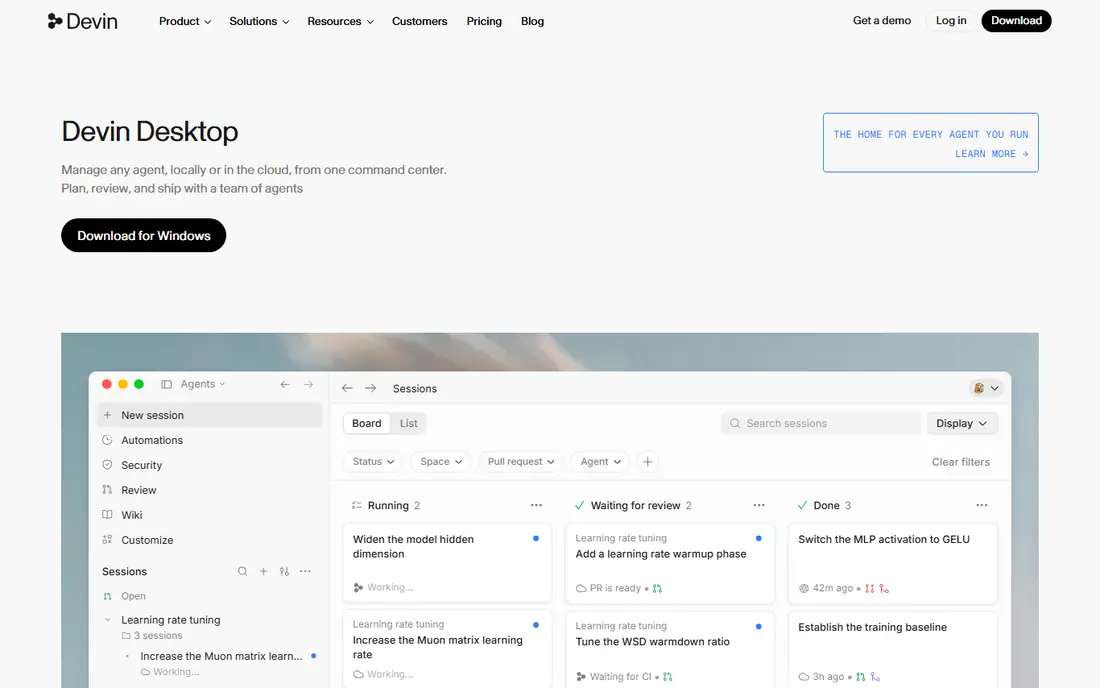
Where Devin Desktop fits: a direct IDE switch. Devin Desktop, formerly Windsurf, is the closest match for someone who wants an editor built around agents. It manages multi file changes, keeps context across a task, and previews changes before you accept them.
What to check first: Autonomous edits still need review.
That makes it feel like a real step up from a chat sidebar. On top of that, bigger edits can drift from your intent, so I would review diffs carefully and keep tasks small at first. Devin Desktop pricing: $20 per month. You can start on Devin Desktop without paying.
- Cascade style flows
- Multi file edits
- Higher levels get expensive
GitHub Copilot
Ideal for: Developers in VS Code or JetBrains
Pick GitHub Copilot if this describes you: developers in VS Code or JetBrains. GitHub Copilot wins on fit more than on novelty.
What to check first: Agent depth varies by task.
It works inside the editor you already use, so there is no migration, no new shortcuts to learn, and no reason to move a project. The trade off is that it feels less like a dedicated agent IDE and more like a solid assistant inside a familiar editor. The starting price for GitHub Copilot: $10 per month. A free plan is available with GitHub Copilot.
- Inline completions
- Broad editor support
- Heavier use may need a higher level
Tabnine
Ideal for: Private and enterprise teams
Tabnine serves private and enterprise teams. Tabnine appeals most to teams with strict privacy or deployment rules.
Where it falls short: Less agent depth than some rivals on the base level.
That focus can make it a safer enterprise choice. Tabnine cost at the entry level: $39 per month. Trial and free access: Free trial.
- Private deployment choices
- Enterprise controls
- Higher entry price
Aider
Ideal for: Git centred terminal pairing
For Git centred terminal pairing, Aider is a natural candidate. It will not suit anyone who wants a graphical editor or a managed subscription.
Watch-outs: Command line only.
In practice, I would pick Aider as a low cost, high control companion, particularly for focused edits and refactors in a repo you already know well. What you pay to start with Aider: Free. A free plan is available with Aider.
- Works with numerous models
- Open source
- You run model costs and setup
Claude Code
Ideal for: Terminal first developers
For terminal first developers, Claude Code is a natural candidate. I would choose it when you already live in a terminal, and pair it with your existing editor instead of expecting it to replace one. As for the details, Claude Code fits developers who are comfortable in a terminal and want an agent that can work across an entire codebase.
It plans, edits, runs commands, and iterates, which helps on refactors and multi step tasks that require more than a single file change. As for the details, the ramp-up time is real if you prefer clicking through an IDE. What you pay to start with Claude Code: $20 per month. Claude Code has no permanent free option.
Watch-outs: Cost scales with use.
- Capable agent reasoning
- IDE extensions
- Terminal focus can feel alien to GUI first developers
Replit
Ideal for: Browser based building
Replit was built for browser based building. I would use Replit to start something new quick, and use a local IDE tool for long term work on a mature codebase.
No starting price is listed for Replit here; confirm pricing on the vendor site. Free access exists with Replit.
What to check first: Less suited to large existing codebases.
- Instant deployment
- Full stack in the browser
- Pricing relies on usage
How to choose Cursor AI
Start with your editor, not the model. In practice, the best model in the wrong workflow still slows you down. That test reveals context limits and review burden far better than a single completion demo.
More specifically, watch usage costs beyond the headline price. In practice, some plans bundle a fixed allowance, whereas others bill by model use. A cheap entry plan can become expensive on heavy agent days, so check limits before you move a whole team.
How we compared the tools
For each of the 7 tools we noted price, free plan or trial, fit for Cursor AI and the main limit, using vendor pages and documentation. Plan names, prices and limits change often. Treat the figures here as a starting point and verify them with the vendor. Tools are placed by general fit for Cursor AI, with price clarity and free access as tie-breakers. A different team can reasonably rank them differently.
Questions to settle before buying
- Get a written quote from Replit; the list shows no starting price for them.
- Look at free plan limits closely: OpenAI Codex, Devin Desktop, GitHub Copilot and others have one, and the caps decide whether it is usable for real work.
- Take the trial from Tabnine and push a live task through it before you pay.
- Read the limits listed for OpenAI Codex first: best value sits inside premium ChatGPT plans.
- Check the integration list for Replit against the tools you run today, and note which ones need a higher plan.
- Find out whether the entry plan of OpenAI Codex covers your must-haves or only a trimmed-down version.
Frequently asked questions
Can I try these tools before paying?
Often, yes. OpenAI Codex, Devin Desktop, GitHub Copilot and others have a free plan and Tabnine offers a free trial. Use your own data and a real task during the test, and check what the free tier or trial limits before you rely on it.
How are the tools for Cursor AI ordered?
OpenAI Codex sits first and Replit last because the order follows typical fit for Cursor AI, then price clarity and free access. It is a judgement call, so read each profile for fit and limits.
Which options for Cursor AI have a free plan?
OpenAI Codex, Devin Desktop, GitHub Copilot, Aider and Replit offer a free plan in this list. Free plans usually cap users, projects or features, so check the limits on the vendor page. One other tool offers a trial instead.
Is OpenAI Codex the right pick for everyone comparing Cursor AI?
No single tool suits every team. OpenAI Codex comes first because it fits OpenAI centred teams, while Devin Desktop suits a direct IDE switch and GitHub Copilot suits developers in VS Code or JetBrains. Match the tool to your own size, budget and workflow before deciding.
What is the best alternative to Cursor AI for most developers?
Start with OpenAI Codex if you need OpenAI centred teams. Devin Desktop is the better match for a direct IDE switch, and GitHub Copilot for developers in VS Code or JetBrains. The best choice depends on budget, team size and workflow.