7 Electrician Scheduling Software Options Ranked for 2026

- 1
 simPROCommercial and project-led electrical businessesVisit
- 2
 WorkizElectrical businesses that want a built-in phone systemVisit
- 3
 Housecall ProResidential electrical teams that want route planning and flat-rate pricingVisit
- 4
 JobberSmall and expanding electrical businessesVisit
- 5
 mHelpDeskSmall electrical businesses that require offline accessVisit
- Number one here is simPRO, a fit for commercial and project-led electrical businesses.
- Kickserv fits small electrical teams on a budget.
- A fair warning about Jobber: two-way texting is not included on the Core plan, and the cost rises quick as you add users and team levels.
- None of the 7 tools, from simPRO to Kickserv, has a free plan, so budget for a subscription or use a trial.
Direct answer
Start with simPRO if you need commercial and project-led electrical businesses. Alternatives: Workiz for electrical businesses that want a built-in phone system, and Housecall Pro for residential electrical teams that want route planning and flat-rate pricing. Prices, free plans and limits for all 7 tools follow.
Quick comparison
| Product | Ideal for | Price from | Free version | |
|---|---|---|---|---|
| simPRO | Commercial and project-led electrical businesses | Quote, third-party reports 70 to 149 dollars per user a month | No | Visit |
| Workiz | Electrical businesses that want a built-in phone system | Quote, third-party reports 225 to 325 dollars a month for five users | Free trial (7 days) | Visit |
| Housecall Pro | Residential electrical teams that want route planning and flat-rate pricing | 59 dollars a month billed annually, or 79 dollars per month billed monthly, for one user | Free trial (14 days) | Visit |
| Jobber | Small and expanding electrical businesses | 49 dollars a month billed monthly, or 29 dollars a month billed yearly, for one user | Free trial (14 days) | Visit |
| mHelpDesk | Small electrical businesses that require offline access | Quote, third-party reports about 169 dollars a month | No | Visit |
 ServiceTitan | Large high-volume electrical businesses | Quote, third-party reports 245 to 500 dollars per technician a month | No | Visit |
 Kickserv | Small electrical teams on a budget | 60 dollars per month for five users | Free trial (30 days) | Visit |
Electrician Scheduling Software compared in detail
Ainotely compared 7 tools for electrician scheduling software. The goal is a practical shortlist: published prices, free plan facts, best-fit use cases and honest limits for every entry.
simPRO
Ideal for: Commercial and project-led electrical businesses
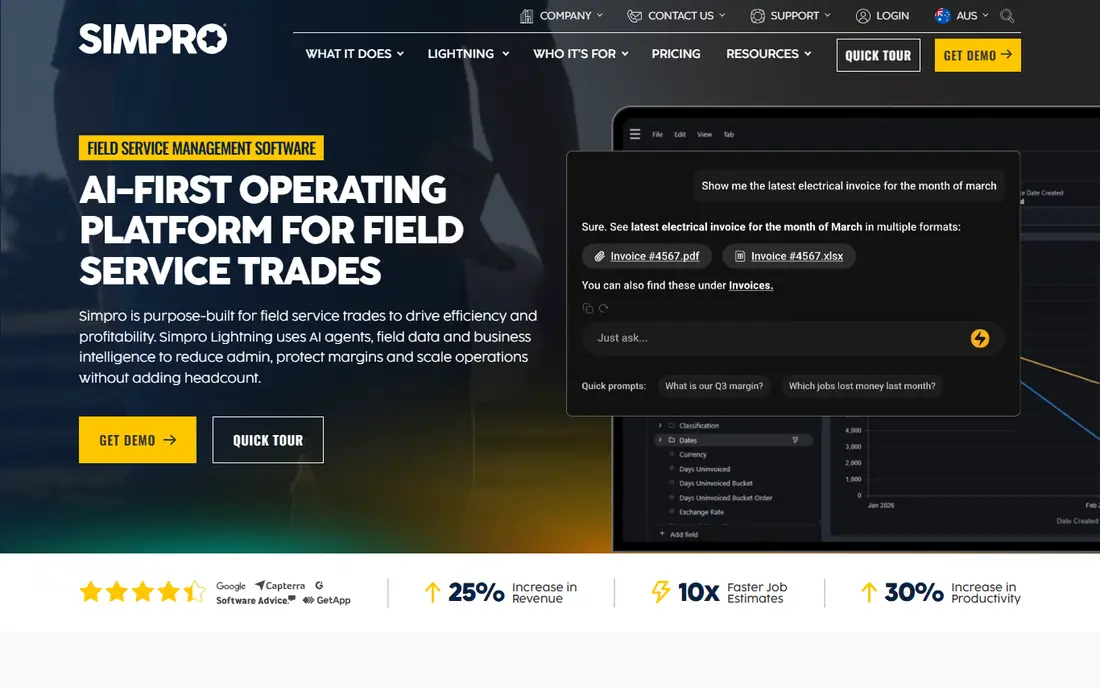
Choose simPRO for commercial and project-led electrical businesses. Job costing tracks labour, materials, contractors, and equipment against each job, so owners can see profit whereas work is still in progress. In practice, simPRO fits electrical businesses that mix small service jobs with bigger commercial projects and maintenance contracts.
Highlights: inventory and purchasing.
Honest limits: No published pricing.
In practice, inventory and purchasing help businesses track stock, order parts, and link supplier catalogues to quotes. As for the details, the maintenance planner schedules repeat visits and service agreements. Beyond that, the trade-off is complexity, since setup takes time and the price is hidden behind a demo and a quote. Price to start with simPRO: Quote, third-party reports 70 to 149 dollars per user per month. There is no free plan with simPRO.
- In-depth job costing
- Tiered quoting
- Handy features for example GPS fleet tracking sit in premium extras
Workiz
Ideal for: Electrical businesses that want a built-in phone system
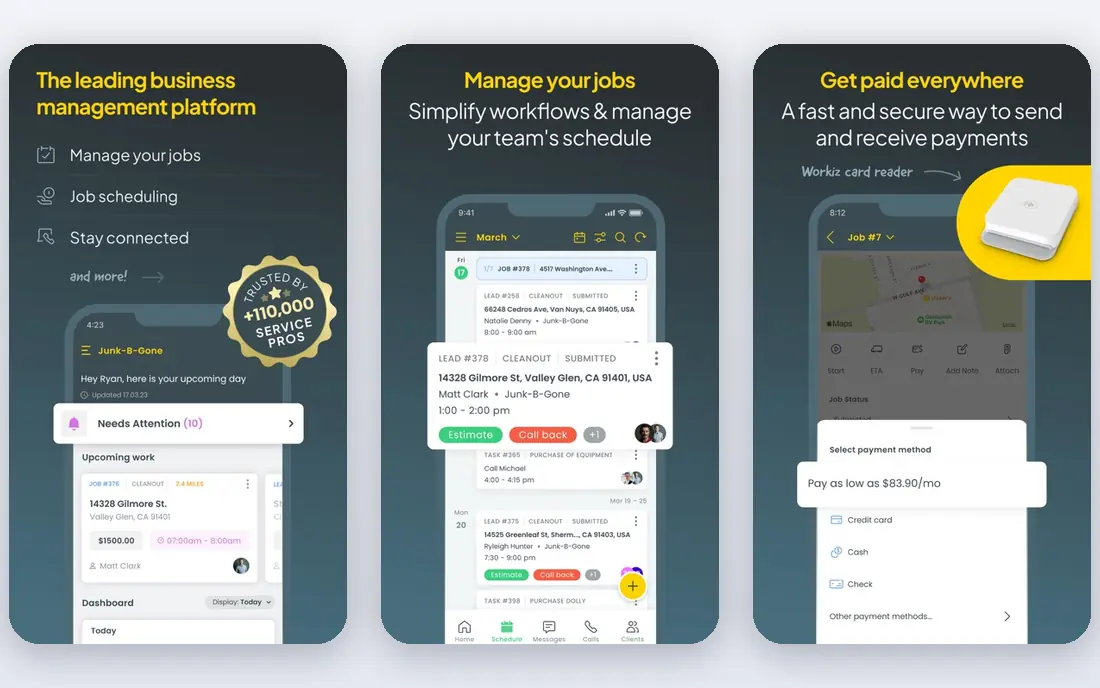
Workiz serves electrical businesses that want a built-in phone system. The primary problem is pricing, since the vendor does not publish a base rate, and the total relies on your quote.
Limits to weigh: Base price is hidden behind a quote.
Entry price for Workiz: Quote, third-party reports 225 to 325 dollars per month for five users. As for free access: Free trial (7 days).
- Built-in phone system with call tracking
- Online booking
- The phone system is now sold separately on some plans
Housecall Pro
Ideal for: Residential electrical teams that want route planning and flat-rate pricing

Housecall Pro is aimed squarely at residential electrical teams that want route planning and flat-rate pricing. The price book lets you set flat rates for typical electrical jobs, so quotes stay consistent across the team.
Honest limits: cost additional and have no published price.
Beyond that, the central drawback is the add-on cost, since multiple tools that look central are sold separately. For everyday use, estimates, invoices, and payments sit in the same flow. The starting price for Housecall Pro: 59 dollars per month billed annually, or 79 dollars per month billed. As for free access: Free trial (14 days).
Where Housecall Pro stands out: job costing in one flow.
- Online booking, payments
- A flat-rate price book
- Plenty of handy extras
Jobber
Ideal for: Small and expanding electrical businesses
In short, Jobber is for small and expanding electrical businesses. The primary limits are the level gates, since useful features for example two-way texting sit on higher plans. Quotes can bundle photos and markups, which helps for panel work and bigger installs.
The main drawbacks: the cost rises quick as you add users and team levels.
In daily use, invoices can be sent from the field, and customers can pay by card or bank transfer. In daily use, Jobber performs well for electricians since the daily schedule is simple to read and simple to change. Jobber pricing: 49 dollars per month billed monthly, or 29 dollars per month billed. Trial and free access: Free trial (14 days).
- Time tracking
- Clear drag-and-drop scheduling, quoting, invoicing
- Two-way texting is not included on the Core plan
mHelpDesk
Ideal for: Small electrical businesses that require offline access
mHelpDesk targets small electrical businesses that require offline access. mHelpDesk is one of the older field service tools, and it still fits small electrical businesses that want a straightforward system.
On top of that, the interface is dated, and there is no GPS tracking, no customer portal, and no service agreement tool, so expanding businesses may outgrow it. On cost, mHelpDesk starts like this: Quote, third-party reports about 169 dollars per month. mHelpDesk has no free tier.
- QuickBooks sync for work in poor signal areas
- Straightforward scheduling and invoicing
- Dated interface and mobile app, no GPS tracking, no customer portal, no service agreements, no published pricing
ServiceTitan
Ideal for: Large high-volume electrical businesses
ServiceTitan makes the most sense for large high-volume electrical businesses. ServiceTitan is designed for scale, and it shows in the dispatch board, the price book, and the reporting. In daily use, a large electrical firm can handle plenty of electricians and plenty of vans without losing track of who is where.
The trade-off is cost and complexity, since implementation can cost thousands of dollars and onboarding can take months. Beyond that, the price book supports tiered choices for each job, which helps electricians present an entry-level repair, a standard fix, and a premium upgrade in one quote. ServiceTitan pricing: Quote, third-party reports 245 to 500 dollars per technician per month. No free plan comes with ServiceTitan.
Honest limits: a 12-month minimum contract with no month-to-month choice.
- In-depth reporting for large teams
- Membership plans
- High quote-based cost, steep ramp-up time, long onboarding
Kickserv
Ideal for: Small electrical teams on a budget
For small electrical teams on a budget, Kickserv is a natural candidate. The Run plan brings dispatch mapping, GPS check-ins, and custom reports, which help when the team grows.
Kickserv pricing: 60 dollars per month for five users. On free options: Free trial (30 days).
Where it is weaker: mobile app ratings are low.
- QuickBooks Online sync
- Low flat rate for five users, scheduling, estimates, invoicing, reminders
- No two-way texting on any plan
Electrician Scheduling Software pricing explained
Jobber Core costs 49 dollars a month billed monthly, or 29 dollars a month billed yearly, for one user. Also, Housecall Pro Basic costs 79 dollars a month billed monthly, or 59 dollars a month billed yearly, for one user. Those headline rates do not contain card processing fees, which are normally close to 2.9 percent plus 30 cents per card payment.
Also, a five-person firm should budget for the team level, not the solo level, and ask each vendor for the monthly total for your exact crew size, the cost of additional users, and any setup fee, in writing. Beyond that, for instance, Jobber Grow for five users costs 299 dollars a month billed monthly, Housecall Pro Essentials for five users costs 189 dollars a month billed monthly, and Kickserv Run for ten users costs 149 dollars a month billed monthly.
More on electrician scheduling software
It should let electricians see job details and photos on a phone, even with a weak signal. For everyday use, two-way texting helps when a customer asks for a time change. A price book helps teams quote typical jobs at a consistent rate.
Electrician Scheduling Software: more detail
Electricians should avoid choosing scheduling software on price alone, since the cheapest plan frequently lacks the dispatch, quoting, or invoicing tools an expanding firm needs, and that results in a second purchase within per year. In daily use, a third mistake is skipping the trial, since a demo presents the sales version of the product, whereas a trial displays how it manages your real jobs. As for the details, Finally, check the cost of additional users, card processing, and extras before signing, since those extras can double the monthly bill for a small firm.
A fifth mistake is ignoring the mobile app, since electricians live on their phones. A slow or confusing app will slow every job. In daily use, Finally, check how simple it is to leave, since some tools make data export slow or restricted.
A long contract can lock you into a poor fit.
What went into this list
For each of the 7 tools we noted price, free plan or trial, fit for electrician scheduling software and the main limit, using vendor pages and documentation. Where a vendor does not publish a price, the entry says quote. Where a price depends on seats or billing term, the entry says so. Position on the page reflects fit for a typical buyer first, with price clarity and free access breaking ties. Treat it as a guide, not a ruling.
Before you commit
- Confirm the entry price on the vendor page for simPRO and the others: seat counts and billing terms change the total.
- Take the trial from Workiz, Housecall Pro, Jobber and Kickserv and push a live task through it before you pay.
- Read the limits listed for simPRO first: no published pricing, complicated setup with a steep learning curve, and handy features like GPS fleet tracking sit in premium extras.
- Look at which plan of simPRO unlocks the features you need; entry tiers are often cut down.
- A short pilot of mHelpDesk with your real workflow tells you more than a feature table.
Frequently asked questions
Do these tools publish their prices?
Yes. Every tool from simPRO to Kickserv shows a starting price, though seats, add-ons and billing terms still change the final cost.
How are the tools for electrician scheduling software ordered?
simPRO sits first and Kickserv last because the order follows typical fit for electrician scheduling software, then price clarity and free access. It is a judgement call, so read each profile for fit and limits.
Does any tool for electrician scheduling software here have a free plan?
No tool in this list, simPRO and Kickserv included, has a permanent free plan. Workiz, Housecall Pro, Jobber, Kickserv offer a trial. Trials and quotes are the usual route, so plan a short evaluation period.
Can I try these options before paying?
Often, yes. Workiz, Housecall Pro, Jobber and Kickserv offer a free trial. Use your own data and a real task during the test, and check what the free tier or trial limits before you rely on it.