Best Employee Benefits Platforms in 2026: 8 Tools Compared

- 1
 SequoiaInvestor-backed startups wanting advisor-led benefitsVisit
- 2
 bswiftEnterprises running complicated multi-carrier programsVisit
- 3
 BambooHRHR-first teams adding benefits on topVisit
- 4
 RipplingExpanding businesses unifying HR, IT and financeVisit
- 5
 JustworksSmall companies wanting a transparent PEOVisit
- This list starts with Sequoia, which is built for investor-backed startups wanting advisor-led benefits.
- The cheapest monthly starting price in the list is $8 per user/month + $40 per month base fee, offered by Rippling.
- TriNet suits SMBs wanting Fortune 500-level plan access.
- BambooHR comes with a trade-off: payroll and benefits administration are quote-only add-ons.
Direct answer
This list puts Sequoia first for investor-backed startups wanting advisor-led benefits. bswift fits enterprises running complicated multi-carrier programs; BambooHR fits HR-first teams adding benefits on top. Details, prices and limits for the rest of the 8 tools are below.
Quick comparison
| Product | Ideal for | Price from | Free version | |
|---|---|---|---|---|
| Sequoia | Investor-backed startups wanting advisor-led benefits | See website | No | Visit |
| bswift | Enterprises running complicated multi-carrier programs | See website | No | Visit |
| BambooHR | HR-first teams adding benefits on top | $10 per employee/month (Core plan) | Free trial | Visit |
| Rippling | Expanding businesses unifying HR, IT and finance | $8 per user/month + $40 a month base fee | No | Visit |
| Justworks | Small companies wanting a transparent PEO | $79 per employee/month (PEO Basic) | No | Visit |
 Gusto | Small companies combining payroll and benefits | $49 a month + $6 per person per month (Simple plan) | Free trial | Visit |
 Namely | Mid-size businesses needing HCM plus managed benefits | $9 per user/month (Namely Now plan) | No | Visit |
 TriNet | SMBs wanting Fortune 500-level plan access | See website | No | Visit |
The 8 tools in detail
Choosing employee benefits platforms usually comes down to price, fit and limits. This Ainotely guide sets 8 tools side by side on those three points, with the facts kept short and checkable.
Sequoia
Ideal for: Investor-backed startups wanting advisor-led benefits

Sequoia makes the most sense for investor-backed startups wanting advisor-led benefits. Sequoia does not sell software first. Also, traditional small firms outside the tech ecosystem will find better value elsewhere.
Worth adding: if your board cares about burn multiples and talent density, Sequoia speaks your language. On top of that, for a venture-backed startup that needs to look like a serious employer to candidates whereas the founders focus on product, that package is the entire point. This comparison lists no price for Sequoia; ask the vendor. Sequoia has no permanent free option.
Main advantages: Capable fit for venture-backed tech firms. What to check first: No public pricing; Engagement tends to be high-touch and high-cost.
- Advisory-first model with comp
- Integrated product plus managed PEO services
- Built around the startup lifecycle
bswift
Ideal for: Enterprises running complicated multi-carrier programs
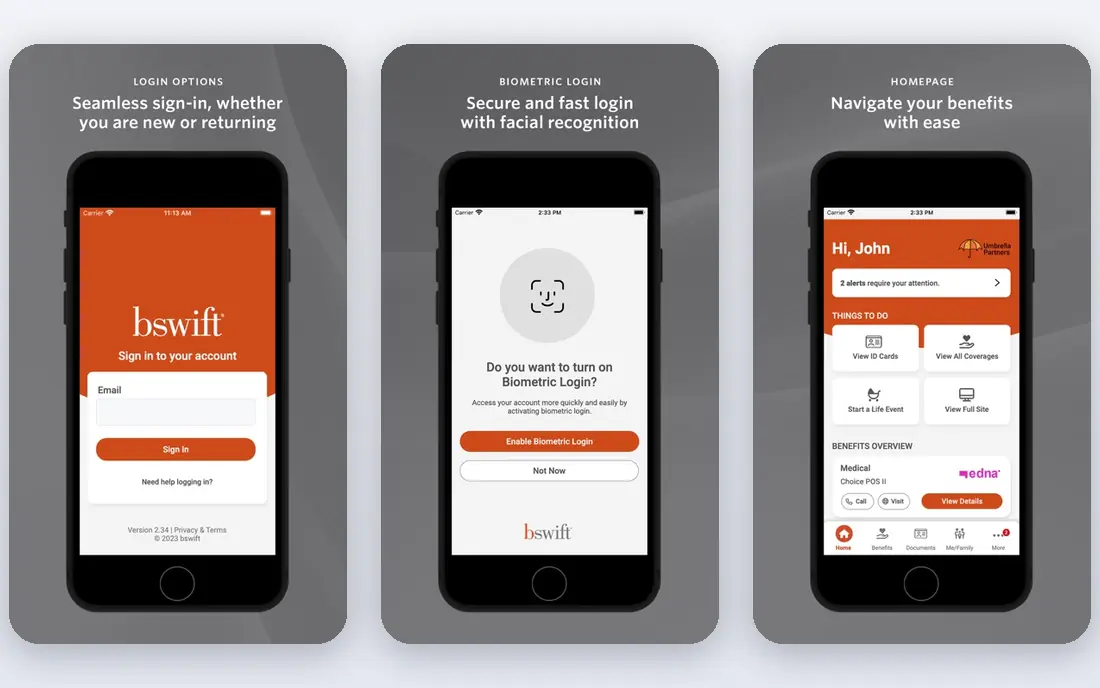
Choose bswift for enterprises running complicated multi-carrier programs. bswift, part of Inovalon, is designed for scale. It serves hundreds of enterprise clients and millions of employees, with deep configurability for multi-location, multi-union and variable workforces.
Trade-offs to know: Enterprise sales cycle with no public pricing.
Also, none of that comes cheap or quick. Pricing is quote-only, implementations are measured in months, and the system is overkill for firms under a handful of hundred employees. This comparison lists no price for bswift; ask the vendor. bswift has no free tier. Where bswift stands out: Scales to very large and complicated workforces.
- Full-service COBRA
- Billing and compliance services
- More system than small employers need
BambooHR
Ideal for: HR-first teams adding benefits on top
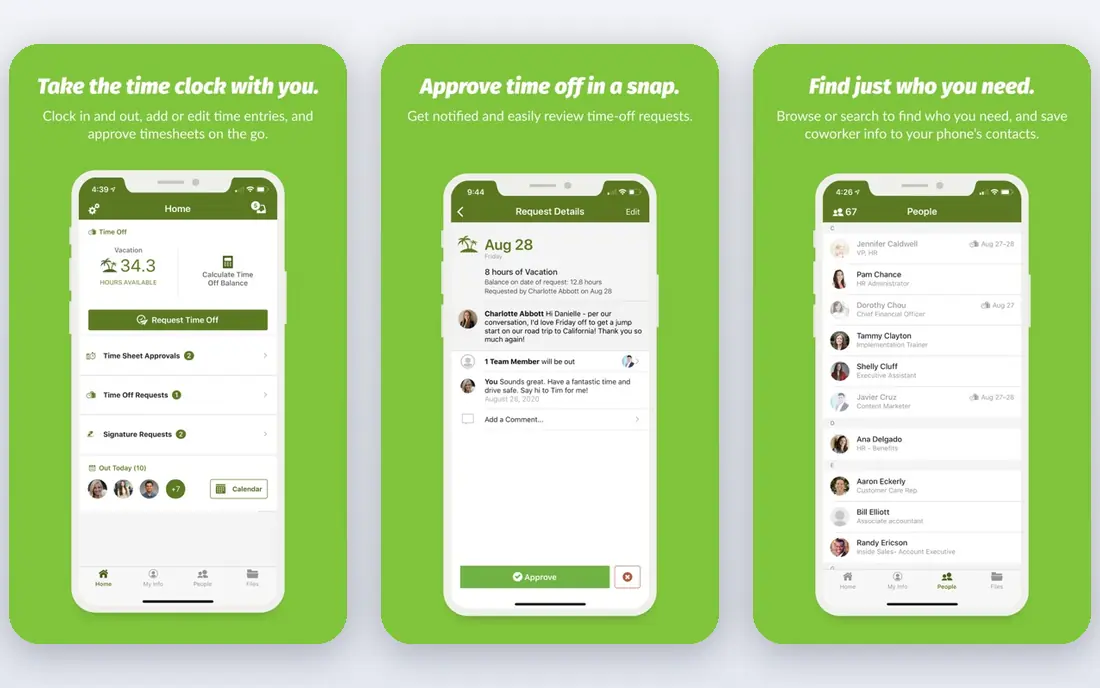
BambooHR is a good fit for HR-first teams adding benefits on top. BambooHR opens from the employee record and works outward. Worth adding: payroll and benefits administration are priced by quote, and whereas bundling them earns a discount, the final number can surprise buyers who modeled on the headline rate.
Honest limits: Payroll and benefits administration are quote-only extras.
Beyond that, the published $10 figure spans the HR system only. Budget carefully around the extras. In practice, teams that already have payroll handled elsewhere, or that want BambooHR to become the system of record whereas specialists manage the money movement, find this arrangement comfortable. From a buyer's view, firms under 25 employees pay a flat rate beginning at $250 per month rather than per head. The starting price for BambooHR: $10 per employee/month. Free plan details: Free trial.
- Published pricing with volume discounts
- 150+ integrations
- Advanced reporting sits on the top tier
Rippling
Ideal for: Expanding businesses unifying HR, IT and finance
Rippling makes the most sense for growing businesses unifying HR, IT and finance. Change someone's marital status in HR and payroll deductions update on their own. Beyond that, get a line-item quote before you fall in love with the demo.
Also, the main limit is the pricing model. Beyond that, Offboard an employee and the product can remove them from benefits, revoke app access and trigger COBRA paperwork in one motion. As for the details, businesses scaling from 30 to 300 employees get real value from that connective tissue. Rippling starts at: $8 per user/month + $40 per month base fee. Rippling has no permanent free option.
Best features of Rippling: benefits and IT provisioning. Watch-outs: Support quality gets mixed reviews at scale.
- One employee record drives HR, payroll
- 600+ integrations
- Modular pricing layers on up quick once you stack payroll, benefits and IT
Justworks
Ideal for: Small companies wanting a transparent PEO
Justworks serves small firms wanting a transparent PEO. Justworks is the PEO for buyers who refuse to sit through a sales call just to learn the price. Worth adding: a 40-person company on the Plus plan pays over $4,000 per month before premiums.
More specifically, at that size, software plus a broker frequently costs less, so compare once you pass 25 employees. The Basic and Plus plans are published, the math is per employee with no base fee games, and support is genuinely available around the clock. In daily use, for startups and small agencies that want big-company benefits without hiring an HR team, that combination is hard to beat. Entry price for Justworks: $79 per employee/month. Justworks does not include a free plan.
Upsides: rare in this category.
Where it falls short: Plus plan needed for full medical, dental and vision.
- Email and Slack
- Publishes PEO pricing online
- Per-employee PEO pricing gets pricey past 30 to 40 staff
Gusto
Ideal for: Small companies combining payroll and benefits
Gusto is designed for small companies combining payroll and benefits. You run payroll in the same account where employees pick health plans, and deductions sync automatically. For everyday use, the subscription spans the software only.
Watch-outs: Reporting is entry-level compared to enterprise tools.
Beyond that, carrier premiums, workers comp and 401(k) recordkeeping are separate line items, so budget for those before comparing Gusto against a PEO quote. Plan choice relies on your state, and in some markets the choices are restricted. In practice, the honest catch is that Gusto is a benefits administrator, not a broker with national buying power. For a company of 10 to 50 people without an HR department, that single sync is worth more than any analytics dashboard. Starting cost for Gusto: $49 per month + $6 per person per month. Free options: Free trial.
- Payroll
- Transparent published pricing
- Health plan choices vary by state and can be thin outside major metros
Namely
Ideal for: Mid-size businesses needing HCM plus managed benefits
For mid-size firms needing HCM plus managed benefits, Namely is a natural candidate. Namely aims squarely at mid-size firms that have outgrown small-business tools but are not ready for enterprise HCM. In daily use, first, the published $9 figure spans the entry level only.
Honest limits: No free trial.
In daily use, ask for a live walkthrough of a payroll-to-benefits data flow, not a slide deck. From a buyer's view, the product includes the full employee lifecycle. The managed services choice lets you hand payroll and benefits administration to Namely's own team. That matters for HR departments of one. As for the details, plus and Complete plans are custom-quoted based on modules and complexity. The starting price for Namely: $9 per user/month. There is no free plan with Namely. Strengths: All-in-one HCM including HR, payroll.
- Time and benefits
- Managed payroll and managed benefits services available
- Integration between payroll and HRIS modules draws complaints
TriNet
Ideal for: SMBs wanting Fortune 500-level plan access
TriNet is designed for SMBs wanting Fortune 500-level plan access. TriNet is one of the largest PEOs in the country, and its pitch is access. From a buyer's view, TriNet suits firms that value plan quality over price transparency.
Watch-outs: Users report annual price raises.
Expect to pay for that access and to negotiate for it. Pricing is entirely quote-based, usually landing in the low hundreds per employee a month, and renewal raises are a typical complaint. No starting price is listed for TriNet here; confirm pricing on the vendor site. No free plan comes with TriNet.
- Industry-specific PEO options with deep compliance coverage
- ESAC-accredited and IRS-certified
- Quote-only pricing with no public rate card
What went into this list
Selection started from tools commonly considered for employee benefits platforms, then narrowed to 8 that have clear pricing information or a clear quote process. Where a vendor does not publish a price, the entry says quote. Where a price depends on seats or billing term, the entry says so. We ordered the tools by general fit, then by how clearly pricing is shown, then by free access. A buyer with unusual needs may reorder them.
What to check before you buy
- Ask Sequoia, bswift and TriNet for a written quote, since no starting price is shown.
- Take the trial from BambooHR and Gusto and push a live task through it before you pay.
- Read the limits listed for Sequoia first: no public pricing.
- Check whether Gusto bills monthly or annually, and what cancelling early costs.
- Ask whether TriNet integrates with your current software, and whether that comes standard or as an add-on.
Frequently asked questions
Should a small business use a PEO or benefits software?
It relies on headcount and plan quality. Above that, benefits software plus a decent broker normally wins on price and adaptability. Get quotes from both models before deciding.
How are the tools for employee benefits platforms ordered?
Sequoia sits first and TriNet last because the order follows typical fit for employee benefits platforms, then price clarity and free access. It is a judgement call, so read each profile for fit and limits.
Does any tool for employee benefits platforms here have a free plan?
A permanent free plan is not offered by Sequoia, TriNet or the other tools here. BambooHR, Gusto offer a trial. Plan a short evaluation period instead.
Do these tools publish their prices?
Not all of them. Sequoia, bswift and TriNet publish no starting price, so expect a quote request for those. The rest, BambooHR included, show a starting price, though seats and billing terms still change the final cost.
What is the difference between benefits administration and a PEO?
A PEO becomes a co-employer, sponsors the benefit plans itself, and deals with payroll taxes under its own tax IDs. From a buyer's view, PEOs bundle more services and liability; software provides you more control.
Is Sequoia the right pick for everyone comparing employee benefits platforms?
No single tool suits every team. Sequoia comes first because it fits investor-backed startups wanting advisor-led benefits, while bswift suits enterprises running complex multi-carrier programs and BambooHR suits HR-first teams adding benefits on top. Match the tool to your own size, budget and workflow before deciding.