Best ETF App in 2026: 8 Apps Compared

- Fidelity is our pick for most ETF investors, with commission-free trades, fractional shares from $1, and deep research.
- Vanguard suits long-term index investors who want low-cost funds and a simple, steady platform.
- Robinhood and Webull fit hands-on traders who value a fast mobile app and extended-hours trading.
- M1 stands out for automatic investing into a chosen pie of ETFs on a schedule you set.
- This is not financial advice; ETF prices can fall, so check fees, fund expenses, and your own goals before investing.
Quick comparison
| Product | Ideal for | Price from | Free version | |
|---|---|---|---|---|
 Fidelity | Most ETF investors | Free | Yes | Visit |
 Schwab | Full-service brokerage | Free | Yes | Visit |
 Vanguard | Long-term index investors | Free | Yes | Visit |
 Robinhood | Simple mobile trading | Free | Yes | Visit |
 SoFi | All-in-one money app | Free | Yes | Visit |
 M1 | Automatic pie investing | Free | Yes | Visit |
 E*TRADE | Research and active traders | Free | Yes | Visit |
 Webull | Advanced charting | Free | Yes | Visit |
The best ETF app
An ETF app should make it cheap and simple to buy diversified funds, check what you own, and keep investing on a regular schedule. We compared official feature pages, pricing pages, and app listings for the platforms below, focusing on commissions, fractional shares, research, retirement accounts, and ease of use. Every app here offers commission-free US stock and ETF trades online, so the differences come down to tools and style.
Fidelity
Ideal for: Most ETF investors
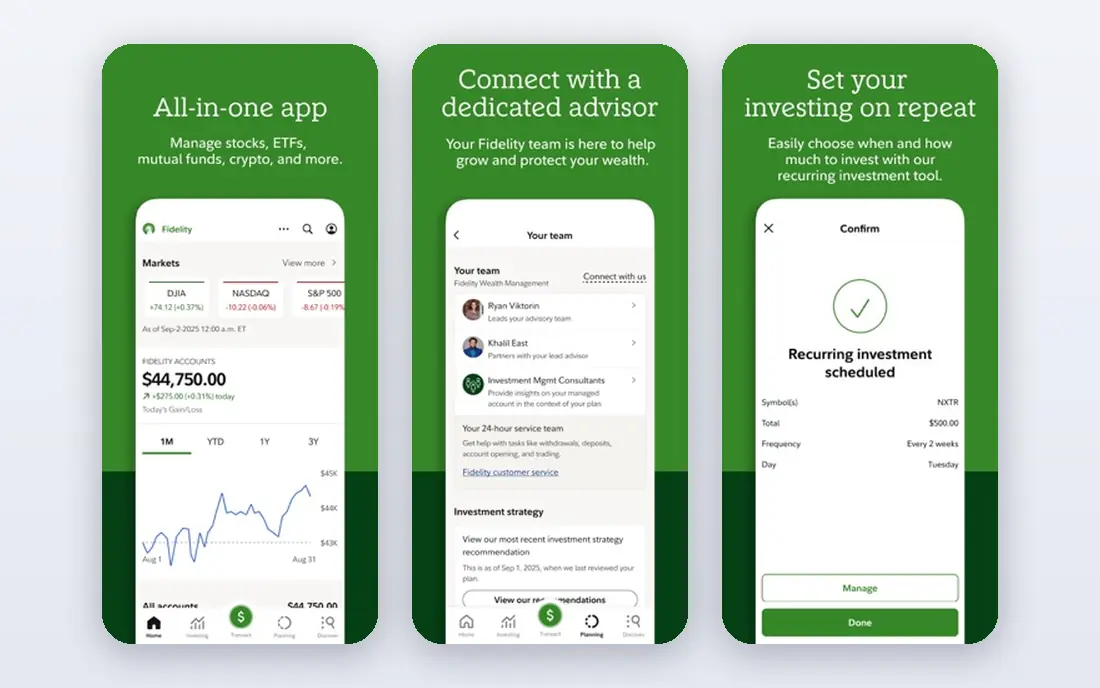
Fidelity is our pick for most people buying ETFs. You can trade US ETFs with no commission, buy fractional shares from $1, and open retirement accounts alongside a standard brokerage account. Its research covers fund expenses, holdings, and performance in plain terms, which helps a new investor compare two similar funds.
The breadth is also the drawback. The app packs in planning tools, screeners, and market news, so a first-time user may need a few sessions to find everything. If you want one account that can grow from a first ETF purchase to retirement planning, Fidelity is a solid home for it.
- Commission-free ETF trades
- Fractional shares from $1
- Strong research and planning tools
- App has many features, which can feel busy at first
- Some advanced tools take time to learn
Schwab
Ideal for: Full-service brokerage
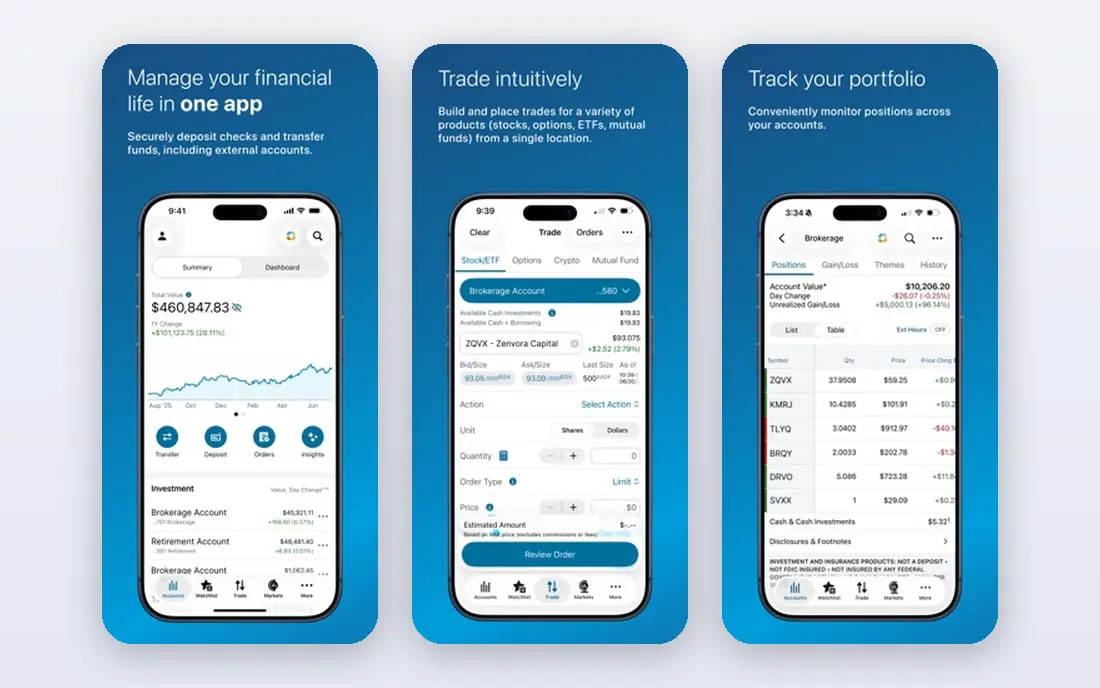
Schwab pairs a full brokerage with a long history of serving everyday investors. You get commission-free ETF trades, a large menu of Schwab and third-party funds, and retirement, education, and managed account options in one place. Its education library is genuinely useful for someone learning how ETFs differ from mutual funds.
The experience feels more traditional than Robinhood or Webull, and a few tools live in separate apps or web pages rather than one flow. Investors who value service and breadth over a flashy interface will feel comfortable here.
- Wide fund and account choice
- Helpful customer service
- Strong research and education
- App design feels more traditional than rivals
- Some features sit behind separate tools
Vanguard
Ideal for: Long-term index investors

Vanguard built its name on low-cost index investing, and its app reflects that philosophy. It keeps the focus on buying broad funds, holding them, and adding money over time, rather than on frequent trading. Investors who want an advisor-managed option can add that service without leaving the platform.
Active traders will find the charting and order tools basic compared with Webull or E*TRADE. That is a fair trade for a long-term investor, but not for someone who trades ETFs daily. If your plan is steady, low-cost index investing, Vanguard remains a natural fit.
- Low-cost index ETFs
- Simple long-term focus
- Advisor services for hands-off investors
- Trading tools are basic next to active-trader apps
- App updates arrive more slowly
Robinhood
Ideal for: Simple mobile trading
Robinhood made ETF investing feel approachable for a generation of phone-first investors. The app is clean, buying a fractional share takes seconds, and you can trade during extended hours. A Gold subscription adds features such as larger instant deposits and professional research, but the free tier covers the basics well.
The research depth does not match Fidelity or Schwab, and investors who want detailed fund analysis may need a second source. Robinhood suits someone who already knows which ETF they want and values speed and simplicity above all.
- Very easy mobile app
- Fractional shares from $1
- Extended-hours trading for many stocks and ETFs
- Research is thinner than Fidelity or Schwab
- Past regulatory fines may concern some investors
SoFi
Ideal for: All-in-one money app
SoFi appeals to people who want banking and investing in a single app. You can hold checking and savings, invest in ETFs with no commission, and set up automated investing that buys on a schedule. That combination suits someone consolidating several money apps into one login.
Specialist traders will notice simpler charts and fewer order types than Webull or E*TRADE offer. For a long-term ETF investor who also banks with SoFi, the convenience outweighs that gap.
- Banking, investing, and credit in one app
- Commission-free ETF trades
- Automated investing option
- Trading tools are simpler than specialist brokers
- Some features tie to membership tiers
M1
Ideal for: Automatic pie investing
M1 takes a different approach: you build a pie of ETFs and stocks with target percentages, then money you add is invested automatically to keep those targets in balance. That design fits investors who want a plan they set once and revisit rarely, rather than placing trades one by one.
The trade-off is control over timing. M1 invests during scheduled trading windows, so it is not the app for someone who wants to react to a price move within seconds. If your habit is regular, automatic ETF investing, M1 makes that habit easy to keep.
- Visual pie portfolios of ETFs
- Automatic investing and rebalancing
- No commission on self-directed trades
- Trading windows are scheduled, not instant all day
- Platform fee details need a careful read
E*TRADE
Ideal for: Research and active traders
E*TRADE, now part of Morgan Stanley, combines a polished mobile app with a powerful web platform for active traders. Its screeners and research help you compare ETFs by expense, sector, and performance, and commission-free trading keeps costs down. Retirement and managed accounts round out the offer.
New users may find the split between the standard app and the advanced web platform confusing at first. Once you settle on one workspace, though, E*TRADE gives ETF investors research depth that simpler apps lack.
- Commission-free ETF trades
- Strong research and screening
- Powerful web platform for active traders
- Two platforms can confuse new users
- Some bank features sit with Morgan Stanley
Webull
Ideal for: Advanced charting
Webull is the pick for ETF investors who love charts. It offers detailed technical indicators, extended-hours trading, level 2 quotes, and paper trading for testing ideas without risking money. Commission-free ETF trades and fractional shares keep the cost side simple.
Beginners may find the dense screens overwhelming, and support runs mainly through digital channels. If you already follow markets closely and want strong charting on your phone, Webull delivers more depth than most free apps.
- Commission-free ETF trades
- Detailed charts and technical tools
- Paper trading to practice
- Interface can overwhelm beginners
- Customer service options are mainly digital
How we picked these
We compared official feature pages, pricing pages, and app listings for each platform, checking commissions, fractional share minimums, retirement account options, research tools, and account fees. We favored platforms that are open to US investors in October 2026, offer commission-free ETF trades, and publish their fees clearly. Where a platform charges for an optional subscription, we note it rather than treating it as the base cost.
How to choose an ETF app for your goals
Start by deciding how you will invest. A long-term investor who buys a broad index ETF each month needs automatic investing and low fund expenses more than advanced charts. An active trader needs fast orders, extended hours, and detailed screening. Matching the app to that habit matters more than any single feature.
Next, look past the commission, which is now zero at most major brokers, and check the fund expenses themselves. Two ETFs that track the same index can carry different annual costs, and that gap compounds over years. Also check whether the app offers the account types you need, such as a Roth IRA or a taxable account, and whether fractional shares let you invest small amounts regularly.
Finally, test the app with a small amount before moving a large portfolio. Open an account, place a small ETF order, and try the research and reporting screens. An app you find clear and pleasant to open each month is one you will actually keep using, and consistency is what builds an ETF portfolio over time.
Frequently asked questions
What is the best ETF app for beginners?
Fidelity is our pick for beginners because it combines commission-free trades, fractional shares from $1, and clear research in one account. SoFi is a good alternative if you also want banking in the same app. Robinhood suits beginners who want the simplest possible mobile experience.
Can I buy ETFs with a small amount of money?
Yes. Most apps here offer fractional shares, so you can invest $1 or a similarly small amount in an ETF rather than buying a whole share. Check the app's minimum for fractional orders, since it varies by platform.
Are ETF apps free to use?
Opening an account and trading US ETFs online is commission-free at every app on this list. You still pay the ETF's own annual fund expense, and optional subscriptions such as Robinhood Gold carry a monthly fee. Check each platform's fee schedule for other charges.
What is the best ETF platform for retirement accounts?
Fidelity, Schwab, and Vanguard all offer strong retirement account options, including traditional and Roth IRAs, alongside ETF trading. Vanguard suits hands-off index investors, while Fidelity and Schwab add broader research and planning tools.
Do I need a separate app for research?
Not necessarily. Fidelity, Schwab, and E*TRADE include fund screeners and research in their apps. Webull adds strong charting for active traders. If you use Robinhood or SoFi, you may want a second source for deep fund analysis.