Best Knowledge Base Software in 2026: 8 Tools Compared

- 1
 Zendesk GuideSupport teams on ZendeskVisit
- 2
 ConfluenceInternal team wikisVisit
- 3
 NotionFlexible internal knowledge baseVisit
- 4
 Document360Dedicated branded help centersVisit
- 5
 HelpjuiceCustomizable help centersVisit
- Zendesk Guide suits support teams already on Zendesk, while Notion and Confluence suit internal wikis.
- Document360 and Helpjuice suit teams that want a dedicated, branded help center with strong search.
- Search quality decides whether a knowledge base actually deflects tickets, so test search with real customer questions.
- Most tools price per agent or per user, so count editors, agents and viewers separately.
- Our pick for customer help centers is Document360, and our pick for internal wikis is Confluence.
Quick comparison
| Product | Ideal for | Price from | Free version | |
|---|---|---|---|---|
| Zendesk Guide | Support teams on Zendesk | See website | Free trial | Visit |
| Confluence | Internal team wikis | $5 per user per month | Yes | Visit |
| Notion | Flexible internal knowledge base | $10 per month | Yes | Visit |
| Document360 | Dedicated branded help centers | $199 per month | Free trial | Visit |
| Helpjuice | Customizable help centers | $120 per month | Free trial | Visit |
 Intercom Articles | Help center inside Intercom | See website | Free trial | Visit |
 Freshdesk Knowledge Base | Help center with Freshdesk | See website | Free trial | Visit |
 Guru | Verified knowledge for support teams | See website | Free trial | Visit |
The best knowledge base software
A knowledge base should do two jobs: help customers find answers without contacting support, and help staff find trusted answers fast. The tools below split into customer help centers and internal wikis. We compared official pricing pages, feature lists and public reviews.
Zendesk Guide
Ideal for: Support teams on Zendesk

Zendesk Guide is the natural pick for a team already running support on Zendesk. Articles live beside tickets, so agents can link answers into replies, and customers can search the help center before submitting a ticket. AI search and suggested articles help deflect common questions, and themes keep the help center on brand.
Standalone value is weaker. Guide pricing ties into Zendesk plans, so a team not on Zendesk should compare Document360 or Helpjuice first. For a Zendesk shop, though, the native integration saves the sync and workflow work a separate tool would need.
- Native to Zendesk support
- AI search and deflection
- Branded help center themes
- Pricing is tied to Zendesk plans
- Best value needs the Zendesk suite
Confluence
Ideal for: Internal team wikis
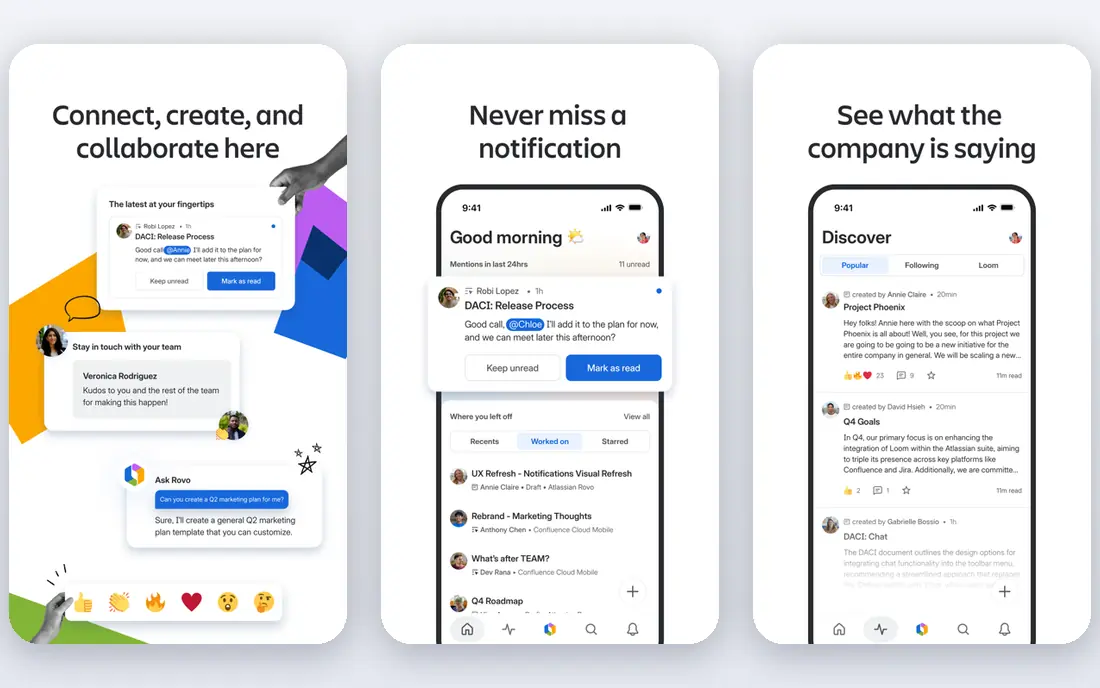
Confluence is our pick for internal knowledge bases, especially in teams already using Jira. Pages, spaces, templates and permissions organize company wikis, project docs and runbooks, and Jira links tie knowledge to work items. The entry paid plan starts around $5 per user per month, with a free tier for small teams.
As a customer help center, Confluence needs more theming and portal work than Document360. Internal teams rarely mind that, since the audience is staff. For a company wiki that engineers, product and operations all use, Confluence is the safe, scalable choice.
- Strong internal wiki structure
- Integrates with Jira
- Templates and permissions
- Customer help center needs extra work
- Search can feel basic without tuning
Notion
Ideal for: Flexible internal knowledge base

Notion suits a small team or startup that wants a knowledge base without an enterprise rollout. Pages, databases, templates and AI search make it easy to build a wiki, handbook or SOP library, and the free tier covers small teams well. Non-technical staff can edit without training.
Permissions, versioning and public publishing controls are lighter than Confluence or Document360, so a regulated or large team may outgrow it. For a fast-moving small team that values flexibility over governance, Notion is an excellent internal knowledge base.
- Very flexible pages and databases
- Strong free tier
- Easy for non-technical teams
- Permissions and publishing controls are lighter than Confluence
- Public help centers need workarounds
Document360
Ideal for: Dedicated branded help centers
Document360 is our pick for a dedicated customer help center. It offers branded portals, strong search with analytics on failed searches, article versioning, review workflows and AI-assisted search. Teams can run separate portals for products or audiences, and analytics show which articles help and which questions still lead to tickets.
The entry plan starts around $199 per month, which is steep for a tiny team. A small support team should test Zendesk Guide if already on Zendesk, or Helpjuice for a lower entry price, before committing to Document360. For a product company where self-service matters, the investment pays in deflected tickets.
- Strong search and analytics
- Branded portals
- Versioning and workflow controls
- Entry price is high for small teams
- Internal wiki use is less common
Helpjuice
Ideal for: Customizable help centers
Helpjuice suits teams that want a help center that looks and behaves exactly like their brand. Customization covers themes, layouts and behavior without heavy coding, search and analytics are solid, and plans include unlimited viewers, so customer traffic does not drive the bill. The entry plan starts around $120 per month.
Setup takes longer if you customize deeply, and a solo team may still find it pricey. For a growing SaaS or ecommerce brand that wants a polished, on-brand help center with room to scale, Helpjuice is a strong middle ground between Notion and Document360.
- Deep customization
- Good search and analytics
- Unlimited viewers on plans
- Entry price still high for solo teams
- Setup takes time to customize fully
Intercom Articles
Ideal for: Help center inside Intercom
Intercom Articles suits a team already using Intercom for chat and messaging. Articles power in-app help, chatbots can answer from them, and customers can search without leaving the product. That in-product placement often deflects more tickets than a separate help site.
As with Zendesk Guide, the value depends on already using the host platform. A team not on Intercom should compare dedicated tools first. For an Intercom shop, Articles keeps support in one system and makes AI answers grounded in your own content.
- Native to Intercom chat
- AI answers from articles
- In-app help center
- Pricing ties to Intercom plans
- Standalone help center value is lower
Freshdesk Knowledge Base
Ideal for: Help center with Freshdesk
Freshdesk includes a knowledge base that suits small support teams already on Freshdesk. Article creation is simple, categories and folders organize content, multilingual support covers global customers, and agents can link articles into tickets. For a team on Freshdesk, there is no extra vendor to manage.
Design flexibility and search analytics are thinner than Document360 or Helpjuice, so a brand that wants a standout help center may outgrow it. For a small team that wants support and self-service in one affordable suite, Freshdesk is a practical choice.
- Included with Freshdesk support
- Simple article management
- Multilingual support
- Design and search depth below Document360
- Best value needs Freshdesk
Guru
Ideal for: Verified knowledge for support teams
Guru suits support and sales teams that need trusted, verified answers inside the tools they already use. Cards carry verification dates and owners, so stale answers get flagged, and a browser extension surfaces answers in Zendesk, Slack, Salesforce and other apps. AI search helps agents find the right card fast during a live conversation.
It is built for internal team knowledge, not public help centers, so customer-facing teams still need a portal tool. Pricing is custom. For a support team struggling with outdated internal docs, Guru addresses the trust problem directly.
- Verification workflows keep answers current
- Browser extension surfaces answers in tools
- AI search
- Custom pricing
- Focused on internal team knowledge rather than public help centers
How we picked these
We compared official pricing pages, feature lists and public reviews for knowledge base software available in October 2026. We favored tools with strong search, analytics on failed searches, version or verification controls, and a working official homepage. We left out tools we could not verify as live products.
What to check before you buy
Test search with real questions first. Take 20 real customer or staff questions, run them through a trial help center, and see how many return a useful article in the top three results. A knowledge base that fails that test will not deflect tickets, however good its editor looks.
Plan ownership and freshness
Assign an owner and a review date to every article, and track failed searches monthly. Articles without owners go stale, and stale articles create more tickets than no article at all. Verification workflows in Guru, and review workflows in Document360, exist for exactly this reason.
Try before you commit to a full rollout
Most tools in this list offer a free tier or a trial, and the smartest use of that trial is a small, realistic test rather than a tour of every feature. Pick one real job, such as a single project, a single campaign, or a single workflow your team runs every week, and run it end to end in the trial. Invite the people who will actually use the tool daily, not just the person choosing it, and ask them to complete that job without help. Note where they get stuck, how long the job takes compared with your current method, and whether the result is good enough to share with a client or a manager. Check support response times during the trial too, since a fast answer during a trial often predicts the help you will get later. At the end of the trial, compare the real time saved and the real cost per user against the plan you would buy, and only then decide whether the upgrade is worth it for your team.
Frequently asked questions
What is the best knowledge base software?
Document360 is our pick for dedicated customer help centers, and Confluence is our pick for internal wikis. Zendesk Guide suits Zendesk support teams, while Notion suits small teams that want flexibility.
How much does knowledge base software cost?
Confluence starts around $5 per user per month, while dedicated help centers such as Helpjuice start around $120 and Document360 around $199 per month. Enterprise support suites use custom pricing, so get a quote for your agent and viewer counts.
Should my knowledge base be public or internal?
Most companies need both: a public help center for customers and an internal wiki for staff procedures. Some tools cover both, but many teams run a dedicated help center tool plus Confluence or Notion internally.
How does a knowledge base reduce support tickets?
It deflects common questions when customers find clear answers by search, and it helps agents answer faster with verified content. Track deflection by measuring ticket volume for topics after articles publish, and by checking failed searches.
What makes knowledge base search good?
Good search handles synonyms, ranks the most helpful article first, and shows analytics on failed searches so you know what to write next. Test it with real customer wording, not just article titles.