Best Language Translation Software in 2026: 7 Options Compared

- 1
 DeepLnatural translations for major languagesVisit
- 2
 Google Translatewidest free language coverageVisit
- 3
 Microsoft Translatortranslation for teams and meetingsVisit
- 4
 iTranslatetravel translation on mobileVisit
- 5
 Reversotranslation with context examplesVisit
- DeepL is our pick for most users because its translations read naturally for major European languages.
- Google Translate suits everyday use with the widest language coverage and free access.
- Microsoft Translator suits teams inside Microsoft tools and multilingual meetings.
- Check language coverage for your pair, since accuracy varies widely by language.
Quick comparison
| Product | Ideal for | Price from | Free version | |
|---|---|---|---|---|
| DeepL | natural translations for major languages | Free | Yes | Visit |
| Google Translate | widest free language coverage | Free | Yes | Visit |
| Microsoft Translator | translation for teams and meetings | Free | Yes | Visit |
| iTranslate | travel translation on mobile | Free | Yes | Visit |
| Reverso | translation with context examples | Free | Yes | Visit |
 SYSTRAN | business translation software | See website | Free trial | Visit |
 Papago | translation for Asian languages | Free | Yes | Visit |
The best language translation software
We compared official feature pages, pricing pages, and app store listings for translation software that works in October 2026. Our pick for most users is DeepL, because its output reads naturally for common languages, but free, business, and specialist options below suit other users.
DeepL
Ideal for: natural translations for major languages

DeepL translates text and documents with output that reads naturally for major languages. Its strength is fluency, especially for European language pairs. Support quality matters when something breaks, so read the help pages and the refund or cancellation terms before paying. Note which features sit behind higher tiers, because the headline plan rarely includes everything shown on the marketing page.
The catch is coverage, since Google supports more languages. Read the privacy policy for any product that holds personal or business data, and confirm who can see that data and how long it is kept.
Our view: if natural translations for major languages is your main need, this option deserves a trial, with the trade-offs above kept in mind. Set a reminder to review the plan after the first month, when real usage shows whether the tier you picked still fits. A clean export path matters, so confirm you can take your data out in a usable format if you later switch.
- Natural output
- Document translation
- Glossary controls
- Language coverage is narrower than Google
- Pro needed for full documents
Google Translate
Ideal for: widest free language coverage
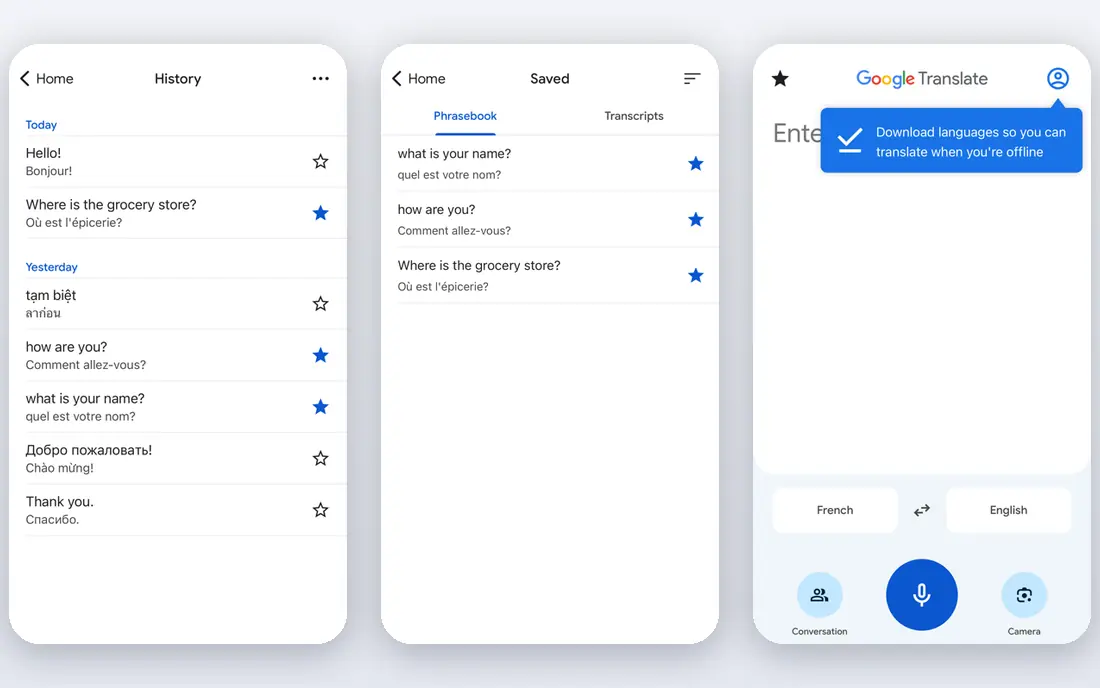
Google Translate covers many languages with text, camera, voice, and conversation modes. Its strength is coverage and free access for everyday translation. Watch for limits that only appear at scale, such as seats, projects, scans, or exports, since those decide the real monthly cost. If your team will use it daily, get one or two colleagues to try the same task in it and compare notes before you choose.
The catch is nuance, since output can sound literal for complex texts. A clean export path matters, so confirm you can take your data out in a usable format if you later switch.
Our view: this option is a strong candidate when widest free language coverage matters most, provided the limits above fit your budget. If you rely on it for work, confirm uptime, backup, and account recovery options before moving anything important into it. Check the pricing page before you commit, since plans and limits change and the page you see at signup is the one that counts.
- Huge language range
- Camera and conversation modes
- Offline packs
- Output can sound literal
- Privacy needs care for sensitive texts
Microsoft Translator
Ideal for: translation for teams and meetings

Microsoft Translator offers text, voice, and meeting translation inside Microsoft tools. Its strength is team use, since meetings and Office documents integrate well. Compare at least two options on the same task, using the same sample project or data, so the comparison stays honest. Check the pricing page before you commit, since plans and limits change and the page you see at signup is the one that counts.
The catch is depth: document translation is lighter than specialist tools. Note which features sit behind higher tiers, because the headline plan rarely includes everything shown on the marketing page.
Our view: shortlist this option if translation for teams and meetings is what you are buying for, and compare it head to head with one other option here. Look at how it handles your existing tools, because a product that fits your current setup saves more time than one with a longer feature list. If your team will use it daily, get one or two colleagues to try the same task in it and compare notes before you choose.
- Meeting translation
- Office integration
- Offline packs
- Document features are lighter than DeepL pro
- Accuracy varies by pair
iTranslate
Ideal for: travel translation on mobile
iTranslate translates voice, text, and camera input for travellers on mobile. Its strength is travel ease, with phrasebooks and conversation modes. Check the pricing page before you commit, since plans and limits change and the page you see at signup is the one that counts. A clean export path matters, so confirm you can take your data out in a usable format if you later switch.
The catch is pro gating, since full offline use needs a paid plan. A short trial or a free tier, where one exists, tells you more in a week than any feature list can.
Our view: this option earns its place here for buyers who put travel translation on mobile first, and it is worth a close look before you decide. If your team will use it daily, get one or two colleagues to try the same task in it and compare notes before you choose. Note which features sit behind higher tiers, because the headline plan rarely includes everything shown on the marketing page.
- Voice and camera translation
- Phrasebooks
- Offline modes
- Pro needed for full offline and features
- Ads on free tier
Reverso
Ideal for: translation with context examples
Reverso translates with context examples that show how words are used in real sentences. Its strength is learning, since examples help users pick the right meaning. Support quality matters when something breaks, so read the help pages and the refund or cancellation terms before paying. Look at how it handles your existing tools, because a product that fits your current setup saves more time than one with a longer feature list.
The catch is range, as it covers fewer languages than Google. Read the privacy policy for any product that holds personal or business data, and confirm who can see that data and how long it is kept.
Our view: if translation with context examples is your main need, this option deserves a trial, with the trade-offs above kept in mind. Set a reminder to review the plan after the first month, when real usage shows whether the tier you picked still fits. Support quality matters when something breaks, so read the help pages and the refund or cancellation terms before paying.
- Context examples
- Grammar help
- Conjugation tools
- Language range is narrower
- Ads on free tier
SYSTRAN
Ideal for: business translation software
SYSTRAN offers business translation with custom models and secure deployment options. Its strength is business control, since models can adapt to company terms. Watch for limits that only appear at scale, such as seats, projects, scans, or exports, since those decide the real monthly cost. Compare at least two options on the same task, using the same sample project or data, so the comparison stays honest.
The catch is audience: casual users will find it heavier than free apps. A clean export path matters, so confirm you can take your data out in a usable format if you later switch.
Our view: this option is a strong candidate when business translation software matters most, provided the limits above fit your budget. If you rely on it for work, confirm uptime, backup, and account recovery options before moving anything important into it. Set a reminder to review the plan after the first month, when real usage shows whether the tier you picked still fits.
- Business translation
- Custom models
- Secure options
- Enterprise focus
- Pricing needs a quote for larger use
Papago
Ideal for: translation for Asian languages
Papago translates Asian languages with strong Korean, Japanese, and Chinese support. Its strength is Asian language accuracy, which suits travellers and learners there. Compare at least two options on the same task, using the same sample project or data, so the comparison stays honest. Read the privacy policy for any product that holds personal or business data, and confirm who can see that data and how long it is kept.
The catch is breadth, since European pairs are less deep than DeepL. Note which features sit behind higher tiers, because the headline plan rarely includes everything shown on the marketing page.
Our view: shortlist this option if translation for Asian languages is what you are buying for, and compare it head to head with one other option here. Look at how it handles your existing tools, because a product that fits your current setup saves more time than one with a longer feature list. A short trial or a free tier, where one exists, tells you more in a week than any feature list can.
- Strong Korean, Japanese, and Chinese support
- Image translation
- European language depth is thinner
- Regional focus
How we picked these
We compared official feature pages, pricing pages, app store listings, and public reviews for each tool. We looked for language coverage, accuracy, offline use, document translation, integrations, and pricing. We did not run hands-on tests, and we note that machine translation still needs human review for important texts.
How to choose translation software
Test your language pair with real text. Translate a paragraph you know well and check tone, terms, and grammar, not just word meaning.
Decide between free and business tools. Everyday travel needs differ from contracts, where glossary and human review matter.
Check privacy for sensitive texts. Avoid pasting confidential documents into free tools without reading data policies.
Frequently asked questions
What is the best language translation software?
DeepL is best for natural European language translation, while Google Translate suits widest coverage. Microsoft Translator suits team and meeting use.
Is machine translation accurate enough for business?
It works well for drafts and everyday messages, but contracts, medical, and legal texts need human review. Use glossaries and professional translators for high-stakes work.
Can translation apps work offline?
Google Translate, Microsoft Translator, and DeepL offer offline options for some languages on mobile. Download language packs before travelling.
Are translation tools free?
Google Translate and Microsoft Translator offer strong free tiers, while DeepL and others offer free tiers plus paid plans for documents and teams.