8 Best Network Management Apps for Cloud Services

- 1
 DatadogCloud workloads, containers and logs in one placeVisit
- 2
 LogicMonitorHybrid estates mixing cloud and on premises gearVisit
- 3
 SolarWinds ObservabilityNetwork and infrastructure observability on multi year termsVisit
- 4
 ManageEngine OpManagerSmall device fleets that need a low fixed costVisit
- 5
 Paessler PRTGSensor based monitoring for small and mid size networksVisit
- Datadog leads for teams that already run cloud workloads and want host, container and log data in one place, at $15 per host per month billed annually.
- Site24x7 is the lowest priced entry at $9 per month billed annually, and Zabbix costs $0 for the software itself when you host it yourself.
- Watch the meter. Datadog bills APM separately at $31 per APM host per month, and PRTG licenses by sensor, so the headline price is rarely the full bill.
- Small teams can start free. OpManager covers 3 devices, PRTG covers 100 sensors, and Site24x7 covers 5 resources at no cost.
- Enterprise tiers are often quote only here, so confirm the final figure in writing before you sign a yearly contract.
Quick comparison
| Product | Ideal for | Price from | Free version | |
|---|---|---|---|---|
| Datadog | Cloud workloads, containers and logs in one place | $15 per host/month (billed annually) | Yes | Visit |
| LogicMonitor | Hybrid estates mixing cloud and on premises gear | $19 per Hybrid Unit/month | Free trial (14 days) | Visit |
| SolarWinds Observability | Network and infrastructure observability on multi year terms | $15.75 per node/month (billed annually) | Free trial (30 days) | Visit |
| ManageEngine OpManager | Small device fleets that need a low fixed cost | $95 per year for 10 devices (billed annually) | Yes | Visit |
| Paessler PRTG | Sensor based monitoring for small and mid size networks | $200 per month (billed annually) | Yes | Visit |
 Zabbix | Self hosted monitoring with no license cost | $0 for the software, Cloud from $50/month | Yes | Visit |
 Domotz | Multi site networks, one collector per site | $35 per Collector/month | Free trial (14 days) | Visit |
 Site24x7 | Low cost website, server and network monitoring | $9 per month (billed annually) | Yes | Visit |
The best network management apps for cloud services
Datadog
Ideal for: Cloud workloads, containers and logs in one place
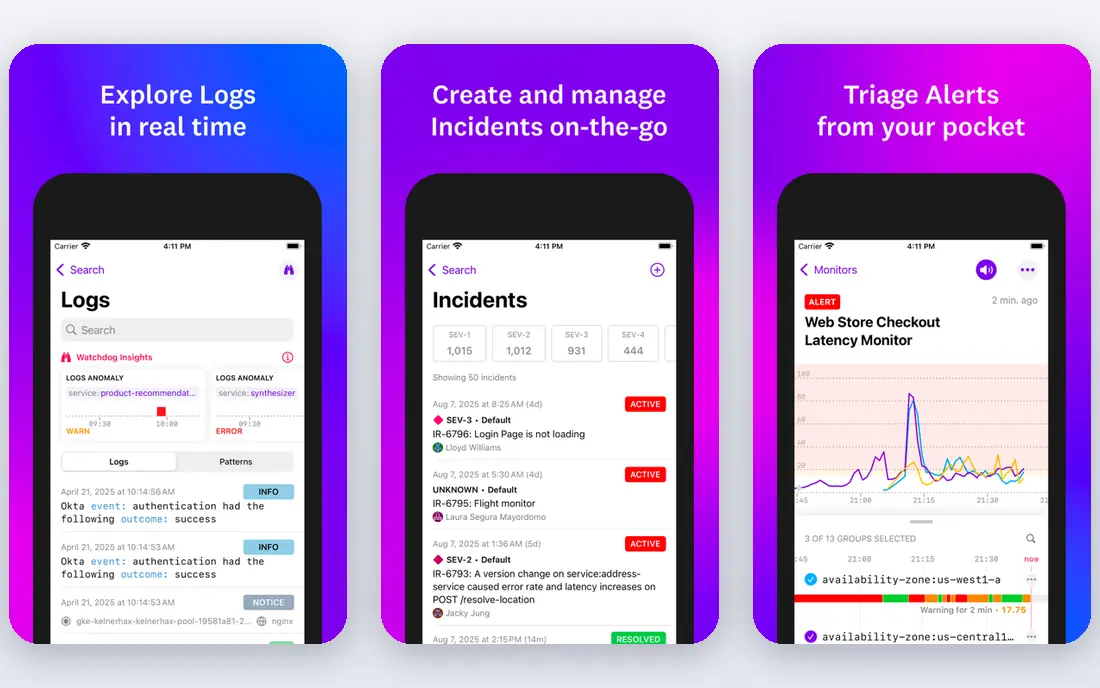
Datadog is the default choice for teams that run most of their stack in the cloud and want one screen for hosts, containers, logs and traces. The Infrastructure Pro tier starts at $15 per host per month when billed annually, or $18 per host per month on demand, and the free tier covers up to 5 hosts with 1 day of metric retention. That free tier is enough to test the agent on a small cluster and to see how the dashboards, alerts and integrations behave with real traffic before you commit to a contract.
The cost to watch is the add on meters. APM is billed separately at $31 per APM host per month billed annually, logs are priced per GB ingested, and custom metrics cost $5 per 100 per month, so a busy service can cost several times the headline host price. Check container pricing and log retention too, because both move the monthly total more than the host count does.
- Free tier covers up to 5 hosts with 1 day metric retention
- Broad integration library across cloud services and containers
- APM is billed separately at $31 per APM host per month billed annually
- Logs and custom metrics are separate meters that add to the bill
LogicMonitor
Ideal for: Hybrid estates mixing cloud and on premises gear
LogicMonitor prices by Hybrid Unit, a unit that covers a mix of devices, cloud resources and services, which suits teams that run part of their stack on premises and part in the cloud. The LM Essentials tier starts at $19 per Hybrid Unit per month, with Advanced at $37 and Signature at $50, based on the vendor package update from November 2026. Older reads that quote $16, $27 and $53 per Hybrid Unit are stale, so use the November figures when you budget. A 14 day trial is available on any plan.
The main drawback is that the list price is only a starting point. The vendor states that the actual price varies with purchase volume, contract terms, support needs and add ons, so the number you pay depends on the quote. Essentials is also capped at 999 Hybrid Units, and the Edwin AI allowance is rationed by tier, with 20 AI credits per Hybrid Unit on Essentials against 75 on Advanced and 150 on Signature.
- One platform for cloud, network and server monitoring
- 14 day trial on any plan
- Published prices are list prices only and the final figure comes by quote
- Edwin AI credits are rationed by tier, with 20 per Hybrid Unit on Essentials
SolarWinds Observability
Ideal for: Network and infrastructure observability on multi year terms
SolarWinds Observability is the SaaS successor to the older SolarWinds monitoring products, and it suits teams that want network and infrastructure data without running a server of their own. Network and Infrastructure Observability starts at $15.75 per node per month, with multi year contracts billed annually. The trial is generous: 30 days, fully functional, with no credit card required, which gives a team time to point it at a real network and test alerting, topology maps and reporting before any money changes hands.
The headline price covers only network and infrastructure. Application Observability starts at $27.50 per service per month and Log Observability at $5.00 per GB per month, and both are sold as separate modules, so a team that wants the full stack will pay more than the entry figure. The self hosted edition is a separate product starting at $8 per node per month, so check which edition you are pricing, because the two are not interchangeable.
- 30 day fully functional trial with no credit card
- Network, infrastructure, application and log observability in one SaaS product
- No free tier
- Application observability starts at $27.50 per service per month and log observability at $5.00 per GB per month, sold as separate modules
ManageEngine OpManager
Ideal for: Small device fleets that need a low fixed cost
OpManager is one of the cheapest ways to monitor a small fleet, because the Standard edition starts at $95 per year for 10 devices, with Professional at $145 for 10 devices and Enterprise at $4,595 for 250 devices. The free edition covers 3 devices and 2 users with basic monitoring, which is enough for a home lab or a very small office. The per device price is easy to predict, with no per sensor meter to track.
The trade off is the feature split between editions. Standard omits scheduled discovery, Layer 2 discovery, agent based monitoring, VMware and Hyper-V monitoring, the NOC view and scheduled reports, and all of those are marked absent on the vendor editions table. Standard and Professional also cap at 1,000 devices on a single server, while Enterprise scales to 50,000 devices. A growing team should price Professional from the start, because the Standard tier will force an upgrade as soon as virtualization monitoring or scheduled reports become a daily need.
- Free edition covers 3 devices and 2 users
- Standard edition starts at $95 per year for 10 devices
- Standard edition omits scheduled discovery, Layer 2 discovery, agent based monitoring and VMware and Hyper-V monitoring
- Standard and Professional cap at 1,000 devices on one server
Paessler PRTG
Ideal for: Sensor based monitoring for small and mid size networks
PRTG licenses by sensor, where one sensor is one measured value, such as CPU load, ping time or disk space on a single device. The free edition covers up to 100 sensors, about 10 devices, and the first priced tier, PRTG 500, costs $200 per month billed annually and covers 500 sensors. Larger tiers run to PRTG 1000 at $358, PRTG 2500 at $742, PRTG 5000 at $1,300 and PRTG 10000 at $1,642 per month billed annually.
The sensor model is the thing to model before you buy. Most devices need 5 to 10 sensors, so the 500 sensor tier covers only about 50 devices, and a server with several disks, interfaces and services can use 20 sensors on its own. Exceeding the licensed sensor count triggers overage billing at $2.20 per sensor per month under the Paessler Sensor Overage Policy from March 2026.
- Free edition covers up to 100 sensors, about 10 devices
- Clear sensor tiers from 500 to 10,000 sensors
- Sensor based licensing means most devices need 5 to 10 sensors, so 500 sensors cover only about 50 devices
- Exceeding the licensed sensor count triggers overage billing at $2.20 per sensor per month
Zabbix
Ideal for: Self hosted monitoring with no license cost
Zabbix is open source under the AGPLv3 license, and the software itself costs $0, with no feature paywall and no limit on hosts, users or metrics. The only cost is the server and the time to maintain it. For teams that do not want to self host, Zabbix Cloud starts from $50 per month on the Nano tier, which handles 50 new values per second, and there is a 5 day free trial for the cloud service.
The catch is support. No vendor support is included free: Silver support starts from $325 per month billed annually and covers only 1 Zabbix server, with no supported proxies, 8 support cases and 8 by 5 support with up to 1 day for the first response. Gold and Platinum are priced per server and per proxy, so a distributed setup costs more than the starting rate. Self hosting also costs engineering time, since the team owns the design, the templates, the tuning and the database. Note that the Zabbix prices here rest on three independent reads of zabbix.com from October and November 2026, because the vendor pricing page did not return a readable copy on the check date.
- Full software is free with unlimited hosts, users and metrics
- Zabbix Cloud starts from $50 per month for teams that do not want to self host
- No vendor support is included free, and Silver support covers only 1 server with up to 1 day initial response
- Self hosting costs engineering time for design, templates and database care
Domotz
Ideal for: Multi site networks, one collector per site
Domotz is built for teams that manage many small networks, such as MSPs, retail chains and offices spread across sites. The price is $35 per Collector per month, with volume pricing down to $17.50 per Collector on a 12 month commitment, and a residential option from $20 per home. The pricing was updated in September 2026.
The per site model is the cost driver. One Collector monitors one site or network, so a 10 site estate costs $350 per month at list price, before any volume discount. Domotz is also a cloud only platform, and a Collector must be installed at each site, so there is no agentless or fully remote only deployment. That is fine for an MSP that already visits sites, but a team with one large campus will get more value from a per device or per host tool such as OpManager or Datadog, where the price tracks devices rather than locations.
- 14 day trial with full platform access and no credit card
- Flat per collector price with volume pricing down to $17.50 per Collector on a 12 month commitment
- One Collector monitors one site or network, so the price multiplies per site
- Cloud only platform, so a Collector must be installed at each site
Site24x7
Ideal for: Low cost website, server and network monitoring
Site24x7 is the lowest priced entry in this guide, at $9 per month billed annually on the Starter tier, or $10 month to month, with Enterprise starting at $225 per month billed annually. The free forever plan covers uptime monitoring of up to 5 resources with instant downtime email alerts, and a 30 day trial with no credit card lets a team test the fuller feature set.
The limits are the allowances. The free plan is uptime only, with no synthetic transactions, no API monitors and no SSL checks, so teams that need those will move to a priced tier. Priced tier allowances are hard caps, not soft limits, and extra monitors are extra cost add ons, for example an additional 10 basic monitors at $15 per month or an additional 100 network interfaces at $50 per month. The $9 tier includes only 2 servers and 5 websites, based on a read of the vendor pricing page from 21 September 2026, so count your servers and sites before you pick the tier.
- Free forever plan covers uptime monitoring of up to 5 resources
- 30 day trial with no credit card
- Free plan is uptime only, with no synthetic transactions, no API monitors and no SSL checks
- Extra monitors are extra cost add ons, so the bill rises as monitored resources grow
How we chose
We compared vendor pricing pages, product docs and feature tables for eight tools that monitor networks and cloud services, and we checked each vendor homepage to confirm it loads. Prices in this guide come from the vendor pricing pages we opened on 13 November 2026, except for Zabbix, where the vendor pricing page did not return a readable copy on the check date and the figures rest on three independent reads of zabbix.com from October and November 2026. LogicMonitor prices use the vendor November 2026 package update, because older figures are stale. We did not claim hands on testing, and we did not use third party ratings to rank the tools.
What to check before you buy
Check the meter before the price. A per host price, a per sensor price and a per site price behave very differently as you grow, so model your real estate first: count hosts, count sensors per device, and count sites. Then check retention, because a free tier with 1 day of metric retention is a trial, not a monitoring history. Then check what is gated: APM, logs and AI features often sit on higher tiers or separate modules. Finally, check contract length and renewal, because several tools in this guide quote on annual or multi year terms.
| Team size and budget | Best pick | Why |
|---|---|---|
| 1 to 5 people, $0 budget | Zabbix or Site24x7 free plan | Zabbix costs $0 in license fees; Site24x7 covers 5 resources free |
| 1 to 10 people, under $50 a month | Site24x7 at $9, or OpManager at $95 a year | Both cover a small fleet for less than one lunch a week |
| 10 to 50 people, cloud first | Datadog from $15 per host | Host, container and log data in one place |
| 10 to 50 people, hybrid estate | LogicMonitor from $19 per Hybrid Unit | One unit covers cloud and on premises resources |
| MSP or multi site team | Domotz from $35 per Collector | One collector per site, with volume pricing to $17.50 |
Frequently asked questions
What is the cheapest network management app for cloud services?
Zabbix costs $0 for the software itself, since it is open source with no feature paywall, and Site24x7 starts at $9 per month billed annually. The right pick depends on your skills: Zabbix needs a team that can host and maintain it, while Site24x7 is a hosted service with a free tier for 5 resources. If you count engineering time as a cost, Site24x7 is often cheaper in practice.
Is PRTG a cloud service?
PRTG is primarily self hosted, not a cloud native SaaS product. You install it on your own server and it monitors your network from there. The free edition covers up to 100 sensors, and the first priced tier is $200 per month billed annually for 500 sensors. Teams that want a fully hosted service should compare Datadog, Site24x7 or SolarWinds Observability instead.
Can I monitor a network for free?
Yes, several tools in this guide have a free tier. Zabbix is free in full, Site24x7 covers 5 resources, PRTG covers 100 sensors and OpManager covers 3 devices. The free tiers are real, but they cap the number of resources and the history they keep. A free tier suits a home lab or a very small office, while a growing business will need a priced tier within a year.
What is a Hybrid Unit in LogicMonitor?
A Hybrid Unit is LogicMonitor billing unit for a mix of devices, cloud resources and services. LM Essentials starts at $19 per Hybrid Unit per month, with Advanced at $37 and Signature at $50, based on the vendor November 2026 package update. The published prices are list prices only, and the final figure comes by quote, so confirm it in writing before you sign.
Sources
- https://www.datadoghq.com/pricing/list/
- https://www.logicmonitor.com/pricing/additional-pricing
- https://www.solarwinds.com/solarwinds-observability/pricing
- https://www.manageengine.com/network-monitoring/opmanager-editions.html
- https://www.paessler.com/monitoring/comparison/grafana-alternative
- https://www.zabbix.com
- https://www.domotz.com/pricing.php
- https://www.site24x7.com/pricing