Best Online Will Service in 2026: 8 Options Compared

- 1
 Trust & WillSimple wills with guided setupVisit
- 2
 LegalZoomA large legal brand for willsVisit
- 3
 Rocket LawyerOngoing legal documents and adviceVisit
- 4
 Quicken WillMakerSoftware for DIY estate documentsVisit
- 5
 US Legal FormsState specific forms at low costVisit
- Trust & Will and LegalZoom lead for simple wills with guided questionnaires.
- Rocket Lawyer suits people who also want ongoing legal documents and advice.
- Online wills work best for straightforward estates; complex estates still need a lawyer.
- Check state specific rules and whether the service covers updates, witnesses, and storage.
Quick comparison
| Product | Ideal for | Price from | Free version | |
|---|---|---|---|---|
| Trust & Will | Simple wills with guided setup | See website | No | Visit |
| LegalZoom | A large legal brand for wills | See website | No | Visit |
| Rocket Lawyer | Ongoing legal documents and advice | See website | Free trial | Visit |
| Quicken WillMaker | Software for DIY estate documents | See website | No | Visit |
| US Legal Forms | State specific forms at low cost | See website | No | Visit |
 LawDepot | Flexible wills with free trial | See website | Free trial | Visit |
 FreeWill | Free basic wills for many users | Free | Yes | Visit |
 Mama Bear Legal Forms | Young families planning guardianship | See website | No | Visit |
The best best online will service
Online will services make basic estate planning faster and cheaper than a traditional lawyer visit for many people. They suit straightforward estates, but complex family or tax situations still call for professional advice.
Trust & Will
Ideal for: Simple wills with guided setup
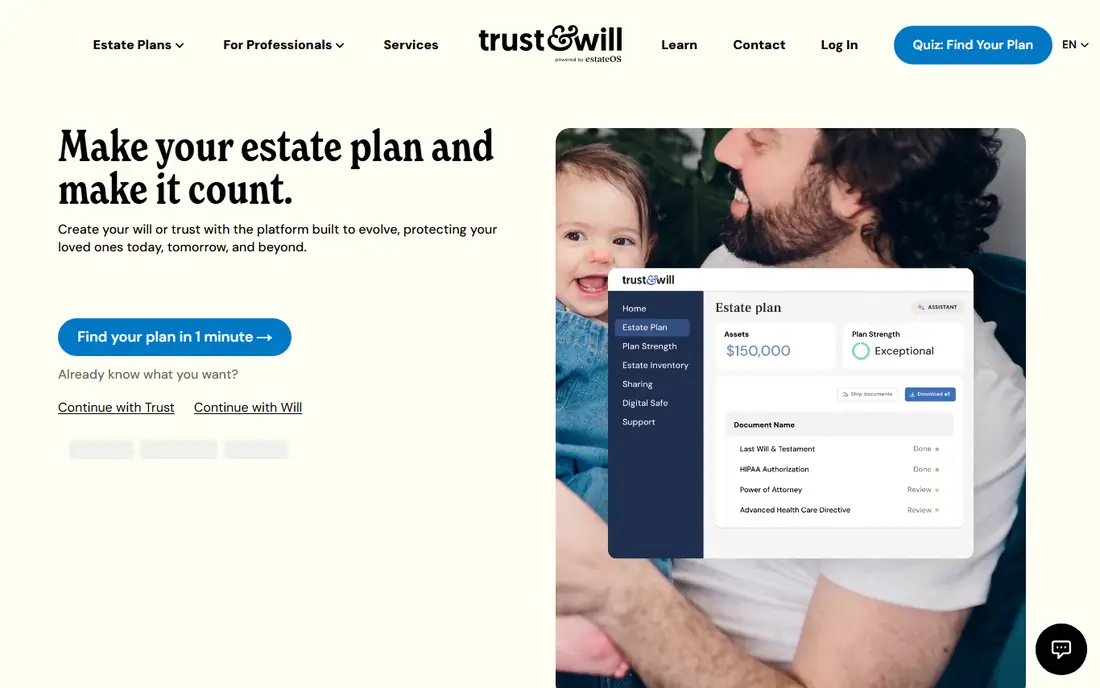
Trust & Will walks you through a will with plain questions, then adds powers of attorney and health directives in higher plans. State specific instructions cover signing and witnesses, which removes much of the guesswork. The interface stays calm and clear throughout.
Trust plans are a bigger investment, and the service does not replace legal advice for complex estates. For a straightforward will done well, it is our pick.
- Clear guided questionnaire
- Includes related documents
- State specific guidance
- Trust plans cost more
- Legal advice is limited
LegalZoom
Ideal for: A large legal brand for wills

LegalZoom is one of the best known online legal brands, offering wills alongside a wide range of other documents. Higher plans add attorney consultations, which helps people who want a professional eye on their documents. The brand scale brings steady support.
Expect upsells during checkout, and read the final price carefully. The will itself is standard, so the value lies in the brand and add ons. For a familiar name, LegalZoom is a safe choice.
- Well known brand
- Wide document range
- Attorney network access
- Upsells are common
- Pricing varies by add ons
Rocket Lawyer
Ideal for: Ongoing legal documents and advice

Rocket Lawyer suits people who need more than one document. A membership covers wills, powers of attorney, and many other legal forms, plus attorney questions. If you expect several legal needs in a year, the membership can pay for itself.
The subscription model means a single will may cost more over time than a one time purchase elsewhere. Cancel if you no longer need it. For ongoing legal help, Rocket Lawyer is strong.
- Document library plus legal advice
- Membership covers many documents
- Subscription model
- Will alone may cost more over time
Quicken WillMaker
Ideal for: Software for DIY estate documents
Quicken WillMaker, from Nolo, is software rather than a web service, with a one time purchase covering wills, trusts, and related forms. It suits people who prefer to work offline and want many documents for one price. Nolo legal guidance backs the forms.
The interface feels like software rather than a guided web app, and you get less hand holding. Updates depend on buying new versions. For DIY users, it is good value.
- One time software purchase
- Wide document range
- No subscription
- Software style interface
- Less hand holding than web services
US Legal Forms
Ideal for: State specific forms at low cost
US Legal Forms offers a large library of state specific forms, including wills, at lower prices than guided services. It suits people who know what they need and want the right form quickly. The catalog covers many legal needs beyond wills.
Guidance is thinner than at Trust & Will or LegalZoom, so beginners may feel unsure. Support quality varies. For confident buyers on a budget, it is a practical option.
- Low cost forms
- State specific library
- Large catalog
- Less guidance than guided services
- Support varies
LawDepot
Ideal for: Flexible wills with free trial
LawDepot lets you build a customized will through a questionnaire, with a free trial that covers the first document. Its library spans many legal forms, and the questionnaire adapts to your answers. It is a flexible choice for one off documents.
The trial converts to a subscription if you do not cancel, so set a reminder. The design is dated. For a low cost first document, LawDepot is worth trying.
- Free trial period
- Customizable documents
- Broad form library
- Subscription after trial
- Design is dated
FreeWill
Ideal for: Free basic wills for many users
FreeWill offers a free will for many users, funded through nonprofit partnerships, with a simple guided flow. It suits people who have delayed estate planning because of cost. The process is quick and the documents cover the basics.
Advanced features such as trusts cost more, and complex estates still need a lawyer. For a free basic will, FreeWill removes the cost barrier.
- Free will for many users
- Nonprofit partnerships
- Simple flow
- Trust and advanced features cost more
- Not for complex estates
Mama Bear Legal Forms
Ideal for: Young families planning guardianship
Mama Bear Legal Forms targets young families, with bundles covering wills, guardianship, powers of attorney, and health directives. The family focus shows in the questions and guidance. Prices stay affordable for a full bundle.
It is a smaller brand with fewer advanced estate options than larger services. Complex estates should look elsewhere. For young families, it is a thoughtful fit.
- Family focused documents
- Guardianship emphasis
- Affordable bundles
- Smaller brand
- Fewer advanced estate options
How we picked these
We compared official service pages, pricing, and plan features for each service, checking what documents are included, whether updates are free, and how signing and storage work. We favored services that explain state rules clearly and do not oversell. This is general information, not legal advice; check your state requirements before signing.
We also checked whether each option is still offered and supported, and we left out products with unclear pricing, broken pages, or a poor fit for the topic. Where a price or free tier could not be confirmed from the vendor site, we wrote See website rather than guessing. Readers should still check the vendor page before buying, since prices and plans change.
How to pick an online will service
Start with your estate complexity. A simple will that leaves assets to a spouse and children fits an online service well. Blended families, business ownership, special needs trusts, or large tax exposure call for a lawyer. Be honest about complexity, since a cheap will that misses a key issue costs more later.
Check what the plan actually includes. Some services cover a will only, while others add powers of attorney, health directives, and guardianship documents. Updates matter too: life changes such as marriage, children, and moves should prompt a revision, so favor services that make updates easy and affordable.
Read the signing and witness rules for your state. A will that is not signed and witnessed correctly may not hold up. Good services explain your state requirements step by step and provide clear instructions for witnesses and notarization where needed.
Think about storage and access. Your executor needs to find the will quickly when it matters. Services with secure storage and executor access help, but keep a printed copy in a known place as well, and tell your executor where it is.
Before you pay, confirm the total cost for the first year, including any add ons, renewal prices, and fees that only appear at checkout. A low starting price can hide a higher renewal rate, and a free tier can limit the feature you need most. Write down the features you will use weekly, and pay only for those.
After you choose, give the option a fair trial with your real workload, not just a quick tour. Set a reminder to review it after two to four weeks, and note what worked, what annoyed you, and what you never used. That review tells you whether to keep, upgrade, or switch before a renewal locks you in.
If the option disappoints, switch sooner rather than later. Export your data first, check whether you can keep your account history or settings, and confirm any cancellation terms. A good provider makes leaving straightforward, and a difficult exit is itself useful information about the service.
Talk to people who already use the option before you commit, especially for a business purchase. A short conversation with a current user reveals support quality, setup effort, and daily friction that marketing pages omit. Ask what surprised them after the first month, since early impressions often differ from longer use.
Keep a simple record of why you chose the option, including the price you were quoted and the features that mattered. That note makes renewal talks easier and helps a colleague or future you understand the decision. If the price rises or a key feature changes, the note shows whether the original reasons still hold.
Finally, plan the first week of use before you pay. List the setup steps, the data you need to move, and the people who need access. A clear first week plan turns a promising choice into a working routine, and it exposes missing features while you can still change your mind.
Save the vendor support page and the cancellation instructions in the same place as your receipt. When something goes wrong, you will want support details at hand rather than searching for them under pressure. A tidy record saves time and keeps a small problem from becoming a long one.
Keep notes on the first month of use, including any issues and how support handled them. Those notes give you clear evidence if you need a refund, an upgrade, or a switch, and they help you advise a friend or colleague who asks about the same choice later.
Frequently asked questions
What is the best online will service?
Trust & Will is our pick for most people because it guides you through a will plus related documents with clear state instructions. LegalZoom suits people who want a large legal brand, while Rocket Lawyer adds ongoing legal help. Complex estates should still use a lawyer.
Are online wills legally valid?
Yes, when they are prepared and signed according to your state rules, including witness and notarization requirements where they apply. The service should explain your state steps clearly. If your situation is complex, have a lawyer review the result.
How much does an online will cost?
Prices vary by service and plan, from a one time fee for a single will to higher bundles that include trusts and updates. Some services charge for updates after the first year. Compare the total cost over several years, not just the first price.
Do I need a trust or just a will?
A will directs how assets pass through probate, while a trust can avoid probate and add control over timing. Many people start with a will, and some add a trust for property or privacy reasons. The services below explain the difference, but a lawyer can advise on your case.
Can I update my will later?
Yes, most services let you update your will, though some charge after an initial period. Review your will after marriage, divorce, children, property purchases, and moves to a new state, since rules and wishes change.
How often should I review my choice?
Review it at least once a year, and sooner if your needs, budget, or team size change. Prices, features, and policies shift over time, and a better fit may appear. A short yearly check, comparing your current option with two alternatives, keeps you from paying for features you no longer use.