Best Payroll Software in 2026: 8 Options for Small Businesses

- 1
 Gustosmall businesses that want clear tiers and no contractsVisit
- 2
 OnPayowners who want one price with every feature includedVisit
- 3
 QuickBooks Payrollowners who want payroll and bookkeeping from the same companyVisit
- 4
 Square Payrollrestaurants, salons and shops that already run SquareVisit
- 5
 Patriot Payrollvery small teams that want a low base priceVisit
- Gusto's Simple plan costs $49 per month plus $6 per person, and OnPay charges the same $49 plus $6 per person with every feature included, so both are strong, transparent starting points.
- Square Payroll is $35 per month plus $6 per person with contractor-only payroll at $6 per person, and it syncs with Square POS timecards and tips.
- ADP RUN, Paychex Flex and Rippling do not list a full price for most plans, so expect a custom quote; Rippling says plans start at $8 per employee per month.
- QuickBooks Payroll is sold as a bundle with accounting tools, with the entry bundle at $88 plus $7 per employee before a 50% three-month promotion.
- Same-day and instant pay are extra on some plans: on Gusto they cost $90 and $100 per payroll unless you are on the Premium plan.
Quick comparison
| Product | Ideal for | Price from | Free version | |
|---|---|---|---|---|
| Gusto | small businesses that want clear tiers and no contracts | $49 per month + $6 per person | No | Visit |
| OnPay | owners who want one price with every feature included | $49 per month + $6 per person | No | Visit |
| QuickBooks Payroll | owners who want payroll and bookkeeping from the same company | $88 per month + $7 per employee | No | Visit |
| Square Payroll | restaurants, salons and shops that already run Square | $35 per month + $6 per person | No | Visit |
| Patriot Payroll | very small teams that want a low base price | $17 per month + $4 per worker | See website | Visit |
 ADP RUN | owners who want 24/7 support and an upgrade path into HR | See website | No | Visit |
 Paychex Flex | teams that want dedicated payroll support as they grow | See website | No | Visit |
 Rippling | growing companies that want payroll connected to HR and IT | From $8 per employee per month | No | Visit |
The best payroll software
This guide is general information, not tax or legal advice. Payroll rules vary by state, so ask an accountant or the software's support team about your own setup before your first pay run.
Most small businesses need the same core things: payroll that calculates and files taxes, direct deposit, year-end forms, and a way to pay contractors. The products below differ mainly in price clarity, speed of payment, and how much HR help comes with them.
Gusto
Ideal for: small businesses that want clear tiers and no contracts

Gusto is the one most owners hear about first, and its pricing page explains why. It lists three plans: Simple at $49 per month plus $6 per person, Plus at $80 plus $12 per person, and Premium at $180 plus $22 per person. It states "No contracts. Free account setup. Switch or cancel anytime."
The tiers matter. Simple handles basic payroll in one state with unlimited payrolls, tax filings and payments, and contractor payments. Plus adds time tracking and scheduling, unlimited next-day pay, multi-state payroll and contractor invoice management. Premium adds a named advisor, HR guidance and compliance tools, and unlimited same-day and instant pay.
Speed is where costs creep in. Next-day pay on Simple is an add-on at $15 per month plus $3 per person, same-day pay is $90 per payroll, and instant pay is $100 per payroll, unless you are on Premium. Price your add-ons before you choose a tier. Gusto also has a separate Solo plan for owners who pay themselves and contractors.
- Three published tiers with no contracts
- Unlimited payrolls and tax filings on every plan
- Add-ons priced on the page
- Simple plan covers one state only
- Same-day pay is $90 per payroll unless you are on Premium
OnPay
Ideal for: owners who want one price with every feature included

OnPay keeps pricing simple. Its help center says the "simple pricing structure includes all of our features" for a $49 base fee plus $6 per person. The base fee covers 24-hour platform access, unlimited pay runs, tax filings and payments in all 50 states, direct deposit, debit cards or printed checks, employee online access, and live support by phone, chat or email.
There are a few details to know. The per-person fee applies once per month to each employee or contractor included in at least one pay run, so someone left in a pay run at $0 still counts. Printing W-2s and 1099-NECs yourself is free, while OnPay's direct mail service costs $10 per form. OnPay is a good match for businesses that want predictable monthly costs and do not need advanced HR tools.
- $49 base plus $6 per person covers all features
- Unlimited pay runs
- Tax filings and payments in all 50 states
- Year-end forms mailed by OnPay cost $10 per form
- Workers paid $0 in a run still count toward the fee
QuickBooks Payroll
Ideal for: owners who want payroll and bookkeeping from the same company

QuickBooks has reshaped its payroll plans into bundles. The pricing page lists Workforce Payroll plus Simple Start at $88 plus $7 per employee, Workforce Payroll plus Essentials at $135 plus $7, and Workforce Premium plus Plus at $228 plus $13. Each shows a 50% discount for three months, which cuts the first one to $44 per month plus $7 per employee for that period.
Every bundle lists full-service payroll, auto payroll, 1099 e-file, expert product support and an employee portal. Next-day direct deposit comes with Simple Start, while Essentials and Plus list same-day direct deposit. The top bundle adds HR tools such as hiring and onboarding, time off management and automated I-9.
The catch is that you are buying accounting software too. If you already use another bookkeeping tool, you may be paying for features you will not use. The per-employee fee we saw on one load of the page was lower than on another, so confirm the price at checkout.
- Next-day direct deposit on the entry bundle and same-day on higher bundles
- Full-service payroll with tax filing
- 1099 e-filing
- Sold as bundles with accounting software, so you pay for more than payroll
- Price listed on the page changed between our checks
Square Payroll
Ideal for: restaurants, salons and shops that already run Square

Square Payroll is simple to understand. Its page lists full-service payroll at $35 per month plus $6 per person paid, and contractor-only payroll at $6 per month per person paid. There is no commitment, and pay runs are unlimited.
Its strongest feature is the link to Square's point of sale. You can import timecards and tips from Square POS and pay employees from the Square Dashboard. Federal and state tax filings and payments are handled, and W-2 and 1099-NEC forms are filed automatically at year's end. It supports multiple pay rates, commissions, bonuses, tips and multistate payroll.
For speed, the page describes next-day payroll using a Square balance or Square Checking account, plus a two-day-early submission option. To get direct deposit on payday, process payroll by 8 p.m. PT. If you do not use Square for sales, other products on this list have more HR depth.
- Syncs timecards and tips from Square POS
- Pay by direct deposit, manual check or Cash App
- Contractor-only payroll at $6 per person per month
- The page did not mention same-day direct deposit
- Best value if you already use Square
Patriot Payroll
Ideal for: very small teams that want a low base price
Patriot is the budget pick. As listed in search results from its own pricing page, Basic Payroll is $17 per month plus $4 per worker, and Full Service Payroll is $37 per month plus $5 per worker. Full Service adds federal, state and local payroll tax filings and deposits on top of the Basic features. The listing also describes a 50% discount for the first three months and billing only for workers who receive pay.
Treat these numbers with extra care. Patriot's site showed a security check that blocked our automated page view, and the figures come from search listings of the page, not a page we read ourselves. Several reviews list the Full Service worker fee as $4, which looks outdated.
Basic Payroll means you handle the tax filings yourself, which is a real responsibility. We would choose Full Service for anyone without payroll experience, and confirm the current price and trial terms on Patriot's website before you sign up.
- Basic payroll starts at a low $17 plus $4 per worker
- Full Service adds tax filing
- Billed only for workers who receive pay that month
- Full Service costs $37 plus $5 per worker
- Some older reviews list outdated prices
ADP RUN
Ideal for: owners who want 24/7 support and an upgrade path into HR

ADP is the biggest name in payroll, and RUN is its small business product. Its page lists four packages: Essential Payroll, Enhanced Payroll (labeled most popular), Complete Payroll and HR+, and HR Pro Payroll and HR. Each links to "Get pricing" rather than showing a price.
The page says ADP calculates, files and pays federal, state and local payroll taxes, prepares and e-files W-2s and 1099s, and offers AI-enabled error flagging. It lists 24/7 support from payroll and HR professionals, including help with IRS inquiries. It also mentions a promotion of up to six months of free payroll with separate terms and says a per-payroll processing fee is most common, without giving amounts.
The trade-off is transparency. You have to talk to sales to learn the cost, so ask for a full written quote, including any per-payroll fees and what happens to the price after any promotional period.
- Four packages from basic payroll up to payroll with HR
- 24/7 support from payroll and HR professionals
- Handles filing and payment of payroll taxes
- No price published
- Typically adds a per-payroll processing fee
Paychex Flex
Ideal for: teams that want dedicated payroll support as they grow

Paychex Flex has four payroll and HR packages: Basic, Foundations, Advanced and Complete. The pricing page does not state a price and directs visitors to request one. It describes automated tax calculation, filing and payment, a mobile app, employee self-service, and AI-powered compliance support.
Support comes in three levels: self-service, on-demand representatives, and dedicated assigned payroll specialists. All plans include phone, chat and online support, according to the page, but it does not map each level to each package, so ask which one you would get.
The page also advertises a "Do Not Pay Until April 2027" promotion for eligible new clients with 1 to 250 employees. It requires a one-year agreement for Foundations, Advanced or Complete signed between 12 October and 31 October 2026, and covers only the payroll component. If you are comparing quotes this week, that deadline matters, and so do the terms after the free months.
- Four packages (Basic, Foundations, Advanced, Complete)
- Phone, chat and online support on all plans
- Automated tax calculation, filing and payment
- No prices published
- Support level by package is not spelled out
Rippling
Ideal for: growing companies that want payroll connected to HR and IT
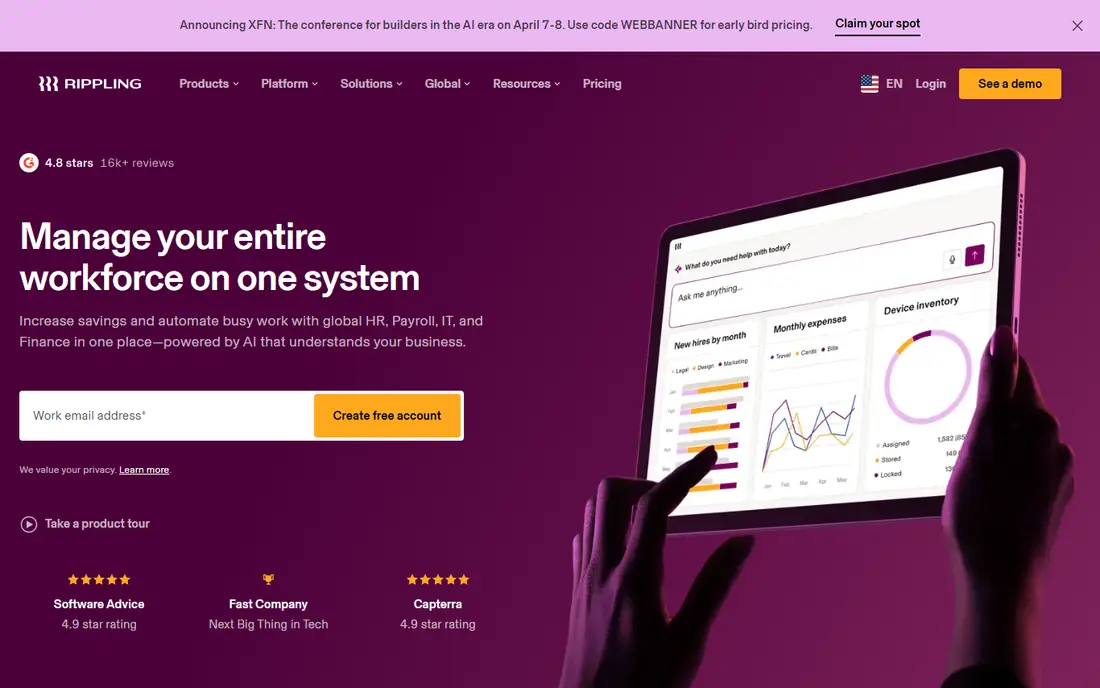
Rippling is the most expansive product here. Its pricing page says plans start at $8 per employee per month, most products are priced per employee per month, and some add a monthly base fee. Payroll pricing depends on employee count and chosen products, so you need a custom quote.
The page offers a demo request rather than a free trial. It also describes a startup program with free access for six months to eligible US venture-backed startups, subject to funding status and stage.
Rippling makes the most sense if you expect to add IT, devices or HR tools. For a five-person shop that only wants to pay people, the simpler products above will be cheaper and quicker to set up.
- Plans start at $8 per employee per month
- Payroll can sit alongside other products on one platform
- Startup program offers 6 months free for eligible VC-backed US startups
- Payroll price needs a custom quote
- Some products add a monthly base fee
How we picked these
We checked each vendor's own pricing pages, product pages and help centers for current prices, plan limits and payment speed, and kept products that serve US small businesses today. We did not run payroll in any of them, so we describe published features, not personal results. Where a vendor shows no price, we say "See website." Where a page blocked our automated check, as with Patriot and OnPay's main site, we say how we got the figure. Prices change often, so confirm them before you sign up.
How to choose payroll software
The cheapest plan is rarely the cheapest total. Add up the base fee, the per-person fee, add-ons and any charges for speed or year-end forms.
Count the hidden costs
Gusto charges extra for same-day and instant pay on lower tiers. OnPay charges $10 per form for mailed year-end forms. ADP often adds a per-payroll processing fee. Ask each vendor for a total monthly cost at your current headcount.
Check state and tax coverage
If you have employees in more than one state, confirm that your plan supports it. Gusto's Simple plan covers one state, while its Plus plan handles multi-state payroll. Also confirm who files your payroll taxes and what happens if a filing is wrong.
Think about the people side
If you need onboarding, time off tracking or compliance help, a plan that bundles HR tools can save a second subscription. QuickBooks' higher bundle, Gusto Premium, ADP's HR packages and Rippling all aim at that need.
Plan your switch
Switching providers mid-year is possible but takes planning around quarterly filings and year-end forms. Ask the new vendor how it brings in your payroll history and when they recommend starting.
Frequently asked questions
What is the best payroll software for small business?
Gusto and OnPay are our top picks for most small businesses because their prices are published and their features are clear. Square Payroll suits Square users, and ADP RUN or Paychex Flex fit owners who prefer sales-led help.
What is the best simple payroll software?
OnPay is the simplest on paper: $49 per month plus $6 per person with all features included. Gusto's Simple plan is similar in price but adds tiers for extras.
How much does payroll software cost?
Published prices here range from Patriot's $17 base fee to Gusto's $180 Premium base fee, plus a per-person fee. ADP and Paychex require quotes, and Rippling starts at $8 per employee per month.
Do I need payroll software for contractors?
Several products pay contractors. Square Payroll offers contractor-only payroll at $6 per person per month, and Gusto Simple includes domestic contractor payments. Check how each handles 1099 filing.
Can I run payroll myself without software?
You can, but you must calculate withholdings, make tax deposits and file forms on time. Mistakes can lead to penalties, so most small businesses choose software or an accountant.
Sources
- https://gusto.com/product/pricing
- https://help.onpay.com/hc/en-us/articles/200108067-OnPay-Pricing
- https://quickbooks.intuit.com/payroll/pricing/
- https://squareup.com/us/en/payroll
- https://www.patriotsoftware.com/payroll/pricing/
- https://www.adp.com/what-we-offer/payroll/small-business-payroll.aspx
- https://www.paychex.com/payroll-services
- https://www.rippling.com/pricing