How to Pick PDF Extraction Software: 7 Tools Compared

- 1
 Tungsten Power PDFDesktop PDF with extractionVisit
- 2
 DocparserTemplate-based document parsingVisit
- 3
 ParseurNo-code PDF data extractionVisit
- 4
 ABBYY FineReaderOCR accuracy for scanned PDFsVisit
- 5
 DocsumoDocument AI for operations teamsVisit
- Tungsten Power PDF is the opening pick, best for desktop PDF with extraction.
- Check the limits for Parseur before you commit: very high volumes need premium plans.
- Pricing across the list, from Tungsten Power PDF to Rossum, is by quote only.
- Rossum suits transactional document automation.
- Parseur stands alone as the one tool in this list with a free plan.
Direct answer
Tungsten Power PDF leads the list, best for desktop PDF with extraction. For a different need, Docparser covers template-based document parsing and Parseur covers no-code PDF data extraction. Prices, free plans and limits for all 7 tools follow.
Quick comparison
| Product | Ideal for | Price from | Free version | |
|---|---|---|---|---|
| Tungsten Power PDF | Desktop PDF with extraction | See website | Free trial | Visit |
| Docparser | Template-based document parsing | See website | Free trial | Visit |
| Parseur | No-code PDF data extraction | See website | Yes | Visit |
| ABBYY FineReader | OCR accuracy for scanned PDFs | See website | Free trial | Visit |
| Docsumo | Document AI for operations teams | See website | Free trial | Visit |
 Nanonets | AI document processing at scale | See website | Free trial | Visit |
 Rossum | Transactional document automation | See website | No | Visit |
Tool-by-tool breakdown
Choosing PDF extraction software usually comes down to price, fit and limits. This Ainotely guide sets 7 tools side by side on those three points, with the facts kept short and checkable.
Tungsten Power PDF
Ideal for: Desktop PDF with extraction
Tungsten Power PDF is a good fit for desktop PDF with extraction. Enterprises like the volume licensing.
Where it is weaker: Kofax rebrand may confuse buyers.
Enterprises like the deployment options for standardized rollouts. The rebrand means older reviews reference Kofax. No starting price is listed for Tungsten Power PDF here; confirm pricing on the vendor site. As for free access: Free trial.
- Less expensive than Acrobat
- Enterprise deployment choices
- Interface less refined than Acrobat
Docparser
Ideal for: Template-based document parsing

Pick Docparser if this describes you: template-based document parsing. Docparser is the veteran of template-based extraction: define parsing rules once, and every matching PDF yields structured data.
The main drawbacks: AI features thinner than newest rivals.
In practice, Docparser works best when your documents are consistent: define parsing rules on the cleanest samples first. The rule-based approach needs upfront configuration. This comparison lists no price for Docparser; ask the vendor. Free options: Free trial.
- Steady for structured documents
- Mature parsing rules
- Rule setup takes learning
Parseur
Ideal for: No-code PDF data extraction
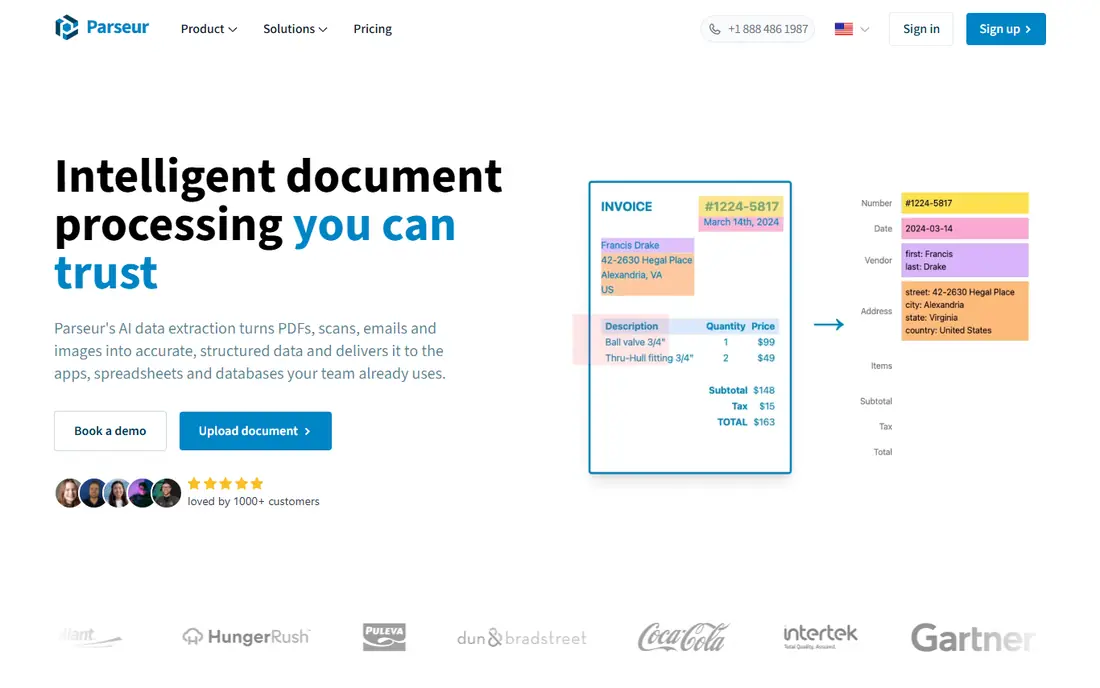
Parseur works best for no-code PDF data extraction. Invoices, receipts and orders are the classic use cases, and the free plan lets small teams automate real workflows.
Points against: Complicated layouts need template tuning.
Parseur uses AI to learn your document layouts, then extracts the fields you need into spreadsheets, databases or webhooks. Parseur shows no starting price here, so confirm the cost on the vendor site. Parseur offers a free plan.
- AI-assisted templates
- Ample free tier for getting started
- Very high volumes need premium plans
ABBYY FineReader
Ideal for: OCR accuracy for scanned PDFs
Where ABBYY FineReader fits: OCR accuracy for scanned PDFs. ABBYY FineReader remains the OCR accuracy benchmark: scanned documents, photos of documents and hard layouts convert to usable text better than most alternatives. It is the tool for making scans machine-readable.
Points against: Desktop-centric.
Worth adding: FineReader users dealing with hard scans should experiment with the OCR settings per document batch; one profile seldom suits all. For everyday use, keep the originals alongside OCR output for audit purposes. From a buyer's view, pair it with an extraction tool when you need both accuracy and automation. This comparison lists no price for ABBYY FineReader; ask the vendor. Free options: Free trial.
- Deals with hard scans
- Long track record
- Less workflow automation than cloud systems
Docsumo
Ideal for: Document AI for operations teams
Docsumo is built with document AI for operations teams in mind. Setup is quicker than training custom models. Review low-confidence extractions daily at first.
Drawbacks to consider: Customization depth varies.
On top of that, operations teams get value fastest on high-volume, standardized paperwork. Worth adding: Docsumo users should try the pre-trained models before building custom ones; the defaults handle most typical documents well. Teams wanting AI extraction without ML expertise should try it. Beyond that, as a newer vendor, the ecosystem is smaller. No starting price is listed for Docsumo here; confirm pricing on the vendor site. Trial and free access: Free trial.
- Pre-trained models for typical documents
- Operations-friendly interface
- Newer vendor
Nanonets
Ideal for: AI document processing at scale
Pick Nanonets if this describes you: AI document processing at scale. Nanonets buyers should prepare a representative training set including their document variety, including the ugly ones.
The main drawbacks: Enterprise pricing at scale.
Also, start with one document type, validate thoroughly, then expand to the next. Worth adding: for AI-grade extraction at scale, it is a leader. This comparison lists no price for Nanonets; ask the vendor. Trial and free access: Free trial.
- Capable API
- AI models trained on your documents
- Model training needs sample documents
Rossum
Ideal for: Transactional document automation
For transactional document automation, Rossum is a natural candidate. Rossum concentrates on transactional documents, invoices, purchase orders, packing slips, with AI that reads them like a human clerk. More specifically, small teams will find the enterprise framing heavy.
Watch-outs: Enterprise focus and pricing.
For everyday use, measure touchless processing rates monthly. In practice, Rossum customers in AP departments should plug into their ERP early; the value is straight-through processing, not just extraction. Rossum shows no starting price here, so confirm the cost on the vendor site. Rossum has no free tier.
- Enterprise integrations
- Purpose-built for transactional documents
- Overkill for simple extraction
Our selection method
For each of the 7 tools we noted price, free plan or trial, fit for PDF extraction software and the main limit, using vendor pages and documentation. Where a price is missing, the vendor does not list one publicly or ties it to a quote. Always confirm before budgeting. The order reflects how well each tool fits the most common buying scenario for PDF extraction software, then price clarity, then free plan access. It is a starting point, not a verdict.
Before you commit
- Request quotes from Tungsten Power PDF, Rossum and the others; the list shows no fixed prices.
- Test the free plan from Parseur against your real workload before relying on it.
- Take the trial from Tungsten Power PDF, Docparser, ABBYY FineReader and others and push a live task through it before you pay.
- Read the limits listed for Tungsten Power PDF first: Kofax rebrand may confuse buyers.
- Ask whether Parseur integrates with your current software, and whether that comes standard or as an add-on.
- Check the support hours and onboarding help Docsumo offers; smaller vendors vary a lot here.
Frequently asked questions
Can I try these options before paying?
Often, yes. Parseur has a free plan and Tungsten Power PDF, Docparser, ABBYY FineReader and others offer a free trial. Use your own data and a real task during the test, and check what the free tier or trial limits before you rely on it.
Is Tungsten Power PDF the right pick for everyone comparing PDF extraction software?
No single tool suits every team. Tungsten Power PDF comes first because it fits desktop PDF with extraction, while Docparser suits template-based document parsing and Parseur suits no-code PDF data extraction. Match the tool to your own size, budget and workflow before deciding.
Which options for PDF extraction software have a free plan?
Parseur is the only tool in this list with a free plan. Free plans usually cap users, projects or features, so check the limits on the vendor page. Several others offer a trial instead.
Is my extracted data secure?
Check each vendor's security certifications and data retention policies, notably for financial or personal documents. Enterprise tools usually offer SOC 2 compliance.
Do these tools publish their prices?
No. None of the tools, from Tungsten Power PDF to Rossum, shows a fixed starting price here, so budget time for quotes.
Do I need OCR for PDF extraction?
Only for scanned or image-based PDFs. In daily use, digitally created PDFs contain real text and extract without OCR; scans need OCR first.