Best Enterprise Database Software in 2026: 8 Options Compared

- 1
 PostgreSQLmixed enterprise workloads on open sourceVisit
- 2
 Oracle Databaselarge enterprises standardized on OracleVisit
- 3
 Microsoft SQL Serverenterprises on the Microsoft stackVisit
- 4
 MySQLhigh-volume web and transaction workloadsVisit
- 5
 Snowflakecloud analytics at scaleVisit
- PostgreSQL is the strongest open-source default for mixed enterprise workloads.
- Oracle and SQL Server suit organizations already standardized on those vendors.
- Snowflake leads for cloud analytics at scale.
- MongoDB and Cassandra suit workloads that need flexible or massively distributed data.
Quick comparison
| Product | Ideal for | Price from | Free version | |
|---|---|---|---|---|
| PostgreSQL | mixed enterprise workloads on open source | Free | Yes | Visit |
| Oracle Database | large enterprises standardized on Oracle | See website | Free trial | Visit |
| Microsoft SQL Server | enterprises on the Microsoft stack | See website | Free trial | Visit |
| MySQL | high-volume web and transaction workloads | Free | Yes | Visit |
| Snowflake | cloud analytics at scale | See website | Free trial | Visit |
 MongoDB | flexible document workloads at scale | See website | Yes | Visit |
 Apache Cassandra | massively distributed, always-on data | Free | Yes | Visit |
 CockroachDB | distributed SQL with strong consistency | See website | Yes | Visit |
The best enterprise database software
Enterprise database software must handle heavy transaction loads, large analytics queries, and strict availability and security demands at the same time. The right choice depends on workload shape, existing skills, and cloud strategy. We compared the systems large organizations actually run in production.
PostgreSQL
Ideal for: mixed enterprise workloads on open source
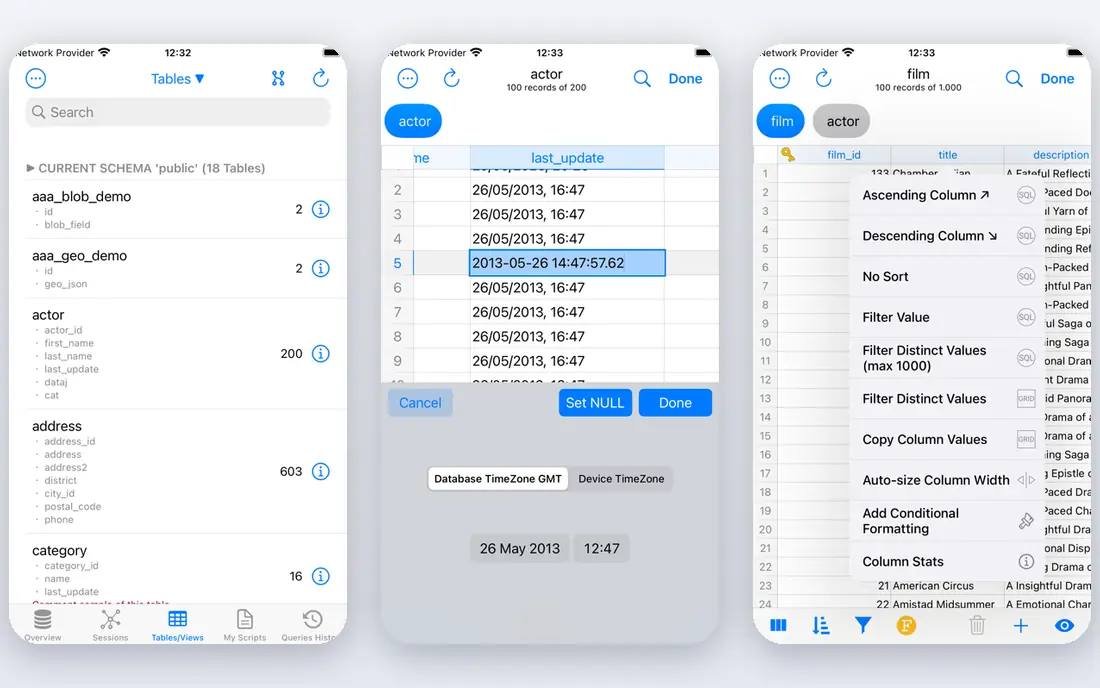
PostgreSQL handles transactions, analytics, JSON, and geospatial data in one mature open-source system, with extensions for almost every enterprise need. It is the default recommendation for teams that want power without license fees. Production support usually comes from a vendor or a skilled in-house team. That focus makes it a practical match for mixed enterprise workloads on open source. On pricing, the starting point is free, and the free plan status is yes. Its strengths include free and open source; strong reliability; rich extensions. The trade-off to weigh is support comes from vendors or community; tuning needs skill. We suggest checking the current plan limits on the vendor site before you commit, since tiers and trial terms change, and confirming that the plan you pick covers the seats, storage, or usage your team actually needs.
- Free and open source
- Strong reliability
- Rich extensions
- Support comes from vendors or community
- Tuning needs skill
Oracle Database
Ideal for: large enterprises standardized on Oracle
Oracle Database remains a mainstay for large enterprises running critical transaction systems, with mature availability, security, and performance tooling. It suits organizations already invested in Oracle applications and infrastructure. Licensing complexity is the main drawback. That focus makes it a practical match for large enterprises standardized on Oracle. On pricing, the starting point is see website, and the free plan status is free trial. Its strengths include mature enterprise features; strong availability; deep tooling. The trade-off to weigh is licensing is complex and costly; needs specialist skills. We suggest checking the current plan limits on the vendor site before you commit, since tiers and trial terms change, and confirming that the plan you pick covers the seats, storage, or usage your team actually needs.
- Mature enterprise features
- Strong availability
- Deep tooling
- Licensing is complex and costly
- Needs specialist skills
Microsoft SQL Server
Ideal for: enterprises on the Microsoft stack
SQL Server fits organizations running Windows, .NET, and Microsoft analytics tools, with strong management and reporting integration. It handles transaction and analytics workloads well for mid-sized to large deployments. License costs and edition differences need careful checking. That focus makes it a practical match for enterprises on the Microsoft stack. On pricing, the starting point is see website, and the free plan status is free trial. Its strengths include strong microsoft integration; mature tooling; good analytics options. The trade-off to weigh is windows licensing and cost; linux use is less common. We suggest checking the current plan limits on the vendor site before you commit, since tiers and trial terms change, and confirming that the plan you pick covers the seats, storage, or usage your team actually needs.
- Strong Microsoft integration
- Mature tooling
- Good analytics options
- Windows licensing and cost
- Linux use is less common
MySQL
Ideal for: high-volume web and transaction workloads
MySQL powers a large share of web applications and transaction systems, with a reputation for speed and simplicity at scale. The open-source edition covers many needs, while enterprise editions add monitoring, backup, and support. Teams should check which features sit in which edition. That focus makes it a practical match for high-volume web and transaction workloads. On pricing, the starting point is free, and the free plan status is yes. Its strengths include fast and proven for web workloads; open source; huge ecosystem. The trade-off to weigh is enterprise features sit in paid editions; oracle ownership concerns some users. We suggest checking the current plan limits on the vendor site before you commit, since tiers and trial terms change, and confirming that the plan you pick covers the seats, storage, or usage your team actually needs.
- Fast and proven for web workloads
- Open source
- Huge ecosystem
- Enterprise features sit in paid editions
- Oracle ownership concerns some users
Snowflake
Ideal for: cloud analytics at scale
Snowflake is built for cloud analytics, letting teams scale compute separately from storage and run large queries across huge datasets. Data sharing features help organizations exchange datasets without copying files. Usage-based costs need monitoring, and it is not a replacement for a transactional database. That focus makes it a practical match for cloud analytics at scale. On pricing, the starting point is see website, and the free plan status is free trial. Its strengths include separates storage and compute; scales analytics fast; broad data sharing. The trade-off to weigh is costs depend on usage and need monitoring; not a transactional store. We suggest checking the current plan limits on the vendor site before you commit, since tiers and trial terms change, and confirming that the plan you pick covers the seats, storage, or usage your team actually needs.
- Separates storage and compute
- Scales analytics fast
- Broad data sharing
- Costs depend on usage and need monitoring
- Not a transactional store
MongoDB
Ideal for: flexible document workloads at scale
MongoDB stores data as flexible documents, which suits applications whose data shape changes often, from catalogs to content platforms. Its managed Atlas service simplifies operations and scaling. Teams used to SQL joins should expect a different query style. That focus makes it a practical match for flexible document workloads at scale. On pricing, the starting point is see website, and the free plan status is yes. Its strengths include flexible document model; horizontal scaling; strong developer experience. The trade-off to weigh is complex queries and joins differ from sql; costs rise with scale. We suggest checking the current plan limits on the vendor site before you commit, since tiers and trial terms change, and confirming that the plan you pick covers the seats, storage, or usage your team actually needs.
- Flexible document model
- Horizontal scaling
- Strong developer experience
- Complex queries and joins differ from SQL
- Costs rise with scale
Apache Cassandra
Ideal for: massively distributed, always-on data
Apache Cassandra is designed for massive, distributed deployments where availability matters more than complex queries, such as messaging, IoT, and time-series data. It scales by adding nodes and tolerates node failures well. Its data model and operations need specialist knowledge. That focus makes it a practical match for massively distributed, always-on data. On pricing, the starting point is free, and the free plan status is yes. Its strengths include free and open source; linear scaling; no single point of failure. The trade-off to weigh is data modeling differs sharply from sql; operations need skill. We suggest checking the current plan limits on the vendor site before you commit, since tiers and trial terms change, and confirming that the plan you pick covers the seats, storage, or usage your team actually needs.
- Free and open source
- Linear scaling
- No single point of failure
- Data modeling differs sharply from SQL
- Operations need skill
CockroachDB
Ideal for: distributed SQL with strong consistency
CockroachDB offers PostgreSQL-compatible SQL across distributed nodes with strong consistency and survival of node failures. It suits global applications and regulated workloads that need both SQL and distribution. The ecosystem is younger than the oldest enterprise databases. That focus makes it a practical match for distributed SQL with strong consistency. On pricing, the starting point is see website, and the free plan status is yes. Its strengths include distributed sql; strong consistency; cloud and self-hosted options. The trade-off to weigh is newer ecosystem than older databases; performance tuning takes care. We suggest checking the current plan limits on the vendor site before you commit, since tiers and trial terms change, and confirming that the plan you pick covers the seats, storage, or usage your team actually needs.
- Distributed SQL
- Strong consistency
- Cloud and self-hosted options
- Newer ecosystem than older databases
- Performance tuning takes care
How we picked these
We compared official feature pages, pricing pages, app store listings, privacy policies, and public reviews for each option, and we kept only products that exist, work in October 2026, and fit the topic directly. We did not claim hands-on testing we did not do, and we left out products whose fit was weak even when they are well known in a nearby category. Price and plan details change often, so where a vendor does not publish a clear price we write See website rather than guessing. The notes below reflect what each vendor publishes about its own product, not a promise about results for any single team.
How to choose an enterprise database
Separate transaction workloads from analytics before you compare, since systems tuned for fast single-row writes differ from systems built for scanning billions of rows. Many enterprises run both, with a transactional store feeding a warehouse. Forcing one system to do both jobs well usually means compromise on one side. Check operational demands honestly, including high availability, backup and recovery, security controls, and the skills your team already has. A technically strong database that nobody on staff can tune will perform worse than a familiar one run well. Also check licensing, since enterprise database costs vary sharply by core, user, and cloud model. Benchmark with your own queries and data shape, not vendor benchmarks alone, and test failure and recovery, not just speed. Plan for data growth, retention, and compliance from the start, since migrating a large production database later is expensive and slow.
Frequently asked questions
What is the fastest enterprise database?
There is no single fastest database, since speed depends on workload, data shape, indexing, and hardware. Transactional, analytical, and distributed workloads each favor different systems, so benchmark with your own queries.
Is PostgreSQL good enough for enterprise use?
Yes. PostgreSQL is widely used in production at large organizations, with strong reliability, extensibility, and a large ecosystem. Enterprise support is available from several vendors.
Should we use SQL or NoSQL for enterprise data?
SQL suits structured data with strong consistency and complex queries, while NoSQL suits flexible, document, or massively distributed workloads. Many enterprises use both for different services.
What matters more than raw speed?
Availability, data integrity, backup and recovery, security, and operational skill often matter more than peak benchmark speed. A fast database that loses data or cannot recover is not enterprise-ready.
Cloud or self-hosted database?
Cloud managed databases reduce operations work and scale fast, while self-hosted databases give more control over placement and cost. Many enterprises mix both, with managed services for new workloads and self-hosted systems where control matters.