5 AI Mood Boards, Compared by Cost and Features

- 1
 Adobe Firefly BoardsCommercially safe AI visuals for professional mood boardsVisit
- 2
 CanvaAI-assisted moodboards with simple sharing and collaborationVisit
- 3
 MiroCollaborative moodboarding with distributed teamsVisit
- 4
 MidjourneyThe most striking AI-generated concept imageryVisit
- 5
 Mock It AIGenerating cohesive moodboards from straightforward text promptsVisit
- Adobe Firefly Boards is the opening pick, best for commercially safe AI visuals for professional mood boards.
- A fair warning about Canva: AI imagery less striking than Midjourney.
- Midjourney is the lowest-priced starter here at $10/month.
- Mock It AI fits generating cohesive moodboards from straightforward text prompts.
Direct answer
This list puts Adobe Firefly Boards first for commercially safe AI visuals for professional mood boards. For a different need, Canva covers AI-assisted moodboards with simple sharing and collaboration and Miro covers collaborative moodboarding with distributed teams. Details, prices and limits for the rest of the 5 tools are below.
Quick comparison
| Product | Ideal for | Price from | Free version | |
|---|---|---|---|---|
| Adobe Firefly Boards | Commercially safe AI visuals for professional mood boards | See website | Not stated | Visit |
| Canva | AI-assisted moodboards with simple sharing and collaboration | Free; premium plans available | Yes | Visit |
| Miro | Collaborative moodboarding with distributed teams | Free; premium plans available | Yes | Visit |
| Midjourney | The most striking AI-generated concept imagery | From $10/month | No | Visit |
| Mock It AI | Generating cohesive moodboards from straightforward text prompts | See website | Not stated | Visit |
The best platforms for AI mood boards
Choosing platforms for AI mood boards usually comes down to price, fit and limits. This Ainotely guide sets 5 tools side by side on those three points, with the facts kept short and checkable.
Adobe Firefly Boards
Ideal for: Commercially safe AI visuals for professional mood boards

Adobe Firefly Boards is built with commercially safe AI visuals for professional mood boards in mind. But for professionals who require AI visuals they can legally use, Firefly's safety story is unmatched.
More specifically, agencies with strict legal review find this the only acceptable AI choice. Adobe Firefly Boards shows no starting price here, so confirm the cost on the vendor site. As for free access: Not stated.
Where it shines: Integrates with Creative Cloud. The main drawbacks: Subscription costs.
- Professional quality
- Decent editing controls
- Newer boards feature
Canva
Ideal for: AI-assisted moodboards with simple sharing and collaboration
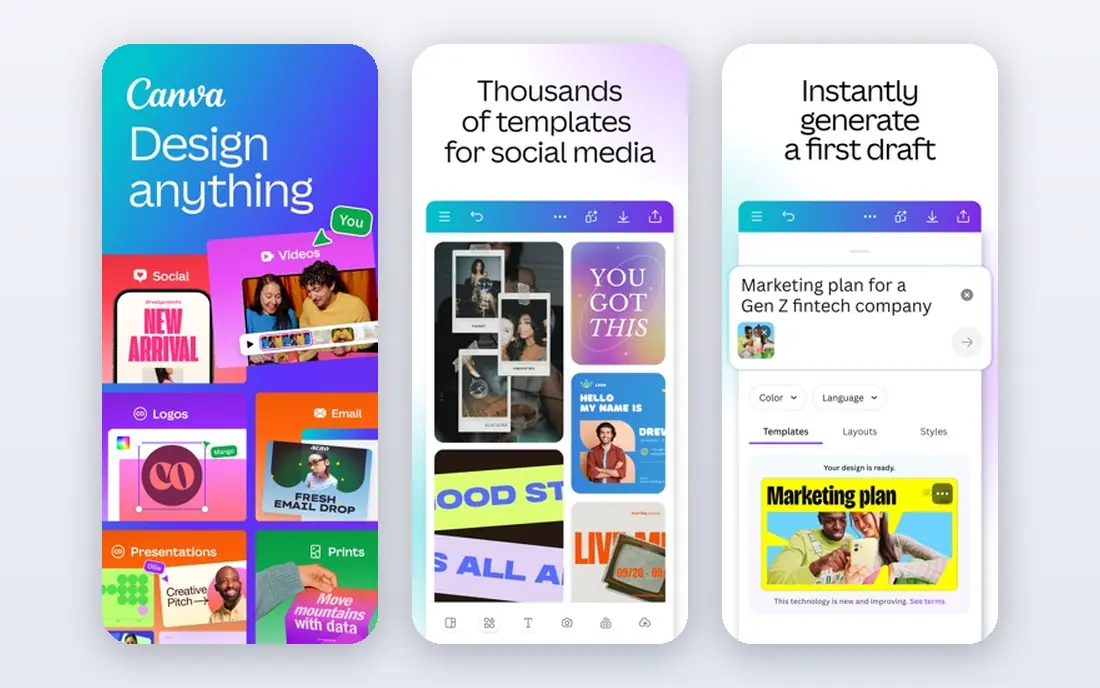
Canva targets AI-assisted moodboards with simple sharing and collaboration. Canva's AI features bring moodboarding to the masses: produce images from prompts, drop them into mood board templates, and collaborate in live.
Strengths: Familiar editor.
For marketing teams, this means AI-generated boards that stay within brand guidelines without manual policing. The presentation features also help: turn the board into a deck without leaving the product. Canva cost at the entry level: Free. You can start on Canva without paying.
Downsides: Generic without direction.
- Huge template library
- Excellent collaboration
- AI imagery less striking than Midjourney
Miro
Ideal for: Collaborative moodboarding with distributed teams

Miro is built with collaborative moodboarding with distributed teams in mind. Miro's infinite canvas is where teams build mood boards together: drop in images from anywhere, arrange freely, comment, and vote. From a buyer's view, remote design teams particularly benefit: the board becomes the shared visual language.
Downsides: Pricing per user.
What Miro does well: Huge template library.
From a buyer's view, the AI features help create and organize content, and the templates bundle dedicated mood board layouts. Miro does not produce the imagery itself. What you pay to start with Miro: Free. Miro has a free plan.
- Live collaboration
- Infinite canvas
- Can get messy
Midjourney
Ideal for: The most striking AI-generated concept imagery
Midjourney works best for the most striking AI-generated concept imagery. Interiors, textiles, and product shots all benefit from this realism: the boards feel like photography, not illustration. It creates images, not boards; you assemble them elsewhere.
And there is no free level. But as the visual engine behind plenty of designers' mood boards, Midjourney earns its place. For mood boards where emotional impact matters, fashion, interiors, branding, Midjourney's output sets the standard. Also, the v6 and v7 models understand material and light at a level that frequently fools professional photographers. The starting price for Midjourney: From $10/month. Midjourney has no free tier.
Where it is weaker: Less control for precise layouts; Discord-based workflow.
- Unmatched atmosphere and texture
- Huge creative community
- Not a board tool
Mock It AI
Ideal for: Generating cohesive moodboards from straightforward text prompts
Mock It AI works best for generating cohesive moodboards from straightforward text prompts. Interior designers and brand strategists also benefit: the tool takes care of the visual research whereas they focus on the concept. It is narrower than Canva or Adobe's suites.
But for the specific job of rapid visual direction, Mock It AI's focus provides speed that general tools cannot match. Also, the visuals align around a consistent aesthetic instead of feeling like random images. The drag-and-drop workspace lets you refine the arrangement as ideas evolve. Fashion designers and creative teams on tight deadlines get the most from the speed: rapid visual prototyping without the setup overhead. In practice, the export and sharing features also make it practical for client presentations, not just internal exploration. Pricing for Mock It AI is not stated here, so ask the vendor for current figures. Free options: Not stated.
Trade-offs to know: Narrower than full design suites.
- Simple layout editing
- Quick output
- Newer company
Platforms for AI Mood Boards: more detail
Mood boards used to mean hours of image hunting: stock sites, screenshots, and scattered references that never quite matched. For everyday use, the manual process rewarded patience more than taste.
How we compared the tools
Selection started from tools commonly considered for platforms for AI mood boards, then narrowed to 5 that have clear pricing information or a clear quote process. Where a vendor does not publish a price, the entry says quote. Where a price depends on seats or billing term, the entry says so. The sequence is a judgement call: typical use case first, then pricing transparency, then free access. Use the profiles to check fit.
A buyer's checklist
- Get a written quote from Adobe Firefly Boards and Mock It AI; the list shows no starting price for them.
- Look at free plan limits closely: Canva and Miro have one, and the caps decide whether it is usable for real work.
- Read the limits listed for Adobe Firefly Boards first: tied to Adobe ecosystem.
- Confirm you can export your data from Mock It AI, so leaving later does not mean losing records.
- Ask the daily users to test Miro on a live task before you roll it out to everyone.
Frequently asked questions
Which platforms for AI mood boards have a free plan?
On this list, Canva and Miro include a free plan. Caps on seats, usage or features are common, so test the free plan against your real workload.
What is the cheapest option for platforms for AI mood boards in this list?
On published monthly entry prices, Midjourney is the lowest here at $10/month. Entry price is only part of the cost, because seats, add-ons and billing terms can change the total.
Can I try these tools before paying?
Often, yes. Canva and Miro have a free plan. Use your own data and a real task during the test, and check what the free tier or trial limits before you rely on it.
Do these tools publish their prices?
Not all of them. Adobe Firefly Boards and Mock It AI publish no starting price, so expect a quote request for those. The rest, Canva included, show a starting price, though seats and billing terms still change the final cost.