Best Pool Chemical Calculator App in 2026: 8 Apps Compared

- 1
 Pool MathDosing, logs and cost trackingVisit
- 2
 OrendaLSI based water balancingVisit
- 3
 PooliCSI based balancingVisit
- 4
 Clorox Pool AppOwners who use Clorox productsVisit
- 5
 Pool Care by Swim UniversityLearning and dosing in one appVisit
- Pool Math by Trouble Free Pool is our pick for most owners because it combines dosing, logging and cost tracking in one app.
- Orenda is the best choice for owners who want LSI based balancing and precise dosing guidance.
- Pooli suits owners who prefer CSI based targets, while Clorox Pool App suits owners who use Clorox products.
- All of these apps are calculators, not testers, so you still need test strips, a liquid kit or a digital reader.
- Always follow product labels and safety guidance when handling pool chemicals, and store chemicals safely away from children.
Quick comparison
| Product | Ideal for | Price from | Free version | |
|---|---|---|---|---|
| Pool Math | Dosing, logs and cost tracking | Free | Yes | Visit |
| Orenda | LSI based water balancing | Free | Yes | Visit |
| Pooli | CSI based balancing | Free | Yes | Visit |
| Clorox Pool App | Owners who use Clorox products | Free | Yes | Visit |
| Pool Care by Swim University | Learning and dosing in one app | Free | Yes | Visit |
 Pool Pal | Simple logs and dosing | Free | Yes | Visit |
 Pool Doctor | Quick dosing checks | Free | Yes | Visit |
 Aqua Calculator | Web and app dosing calculations | Free | Yes | Visit |
The best pool chemical calculator app
A pool chemical calculator turns your test results into doses: how much chlorine, acid or alkalinity increaser to add for your pool volume. The apps below differ in balancing method, logging and product guidance, so pick the method you understand and will actually follow.
Pool Math
Ideal for: Dosing, logs and cost tracking
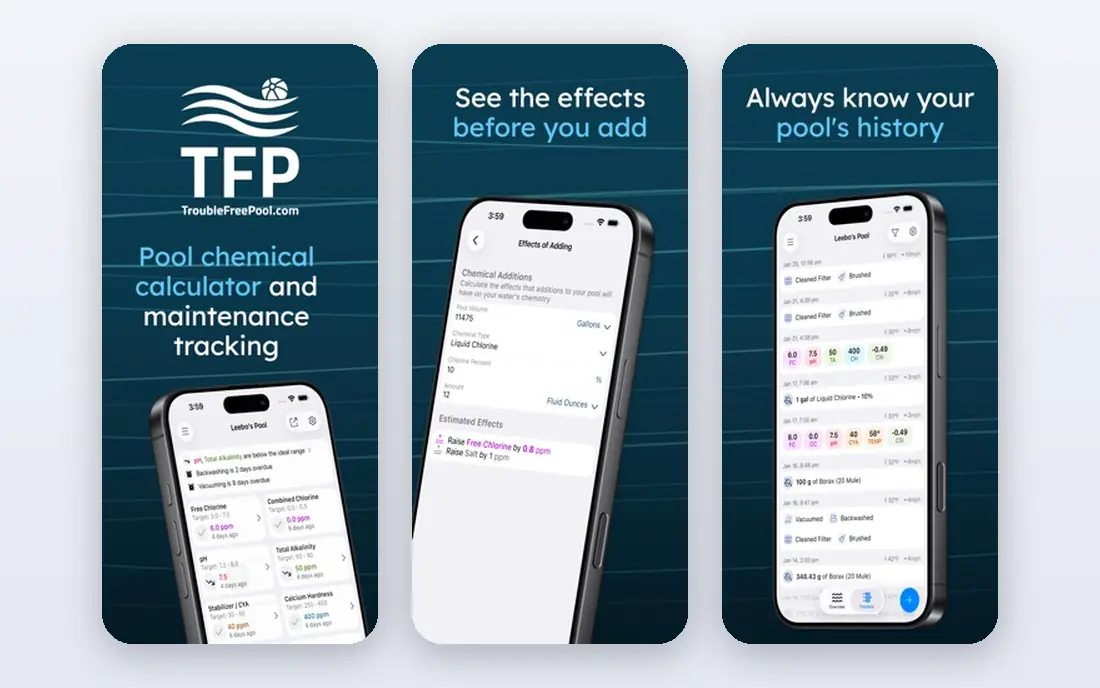
Pool Math, from Trouble Free Pool, is the most complete pool calculator for owners who follow the Trouble Free Pool method. Enter your test results and pool volume, and it calculates doses for chlorine, pH, alkalinity, calcium and stabilizer, while logging every result and tracking chemical costs over time.
The interface is functional rather than polished, and some advanced features need a subscription. The free tier covers core dosing and logging, which is enough for most owners. For an owner who wants dosing plus a real history of their water, Pool Math is our first pick.
- Dosing for many chemicals
- Detailed logs
- Cost tracking for chemicals used
- Interface is functional rather than pretty
- Advanced features need a subscription
Orenda
Ideal for: LSI based water balancing
Orenda takes a different approach to balance, using the Langelier Saturation Index to judge whether water will scale or corrode surfaces. Its calculator gives precise doses based on that index, with toggles for chlorine and acid types, and it explains the reasoning in educational content. For experienced owners and service pros, that precision is valuable.
The LSI approach takes learning if you are used to simple range based targets, and the app does promote Orenda products, though you can use it with other brands. The calculator itself is free. If you want to understand water balance deeply, Orenda is the best teacher in this list.
- Precise LSI dosing formulas
- Educational content
- Free calculator
- LSI approach takes learning
- App promotes Orenda products
Pooli
Ideal for: CSI based balancing

Pooli uses the Calcium Saturation Index, a more precise version of the saturation idea behind LSI, to guide balancing. Its interface is clean, dosing is straightforward, and it suits both owners and service professionals who want CSI targets without extra complexity.
The community is smaller than Trouble Free Pool, so peer help is thinner. Some features need a subscription. For an owner who prefers CSI guidance and a clean app, Pooli is a strong alternative to Pool Math and Orenda.
- CSI based targets
- Clean interface
- Good for service pros and owners
- Smaller community than Pool Math
- Some features need a subscription
Clorox Pool App
Ideal for: Owners who use Clorox products
Clorox Pool App is built for owners who buy Clorox pool products. Scan or enter your test results and it recommends Clorox products and doses to correct your water. The flow is simple, which suits new owners who want a clear next step rather than a chemistry lesson.
The trade off is flexibility: recommendations favor Clorox products, so owners using other brands get less value. If Clorox is your brand, the app is convenient and free. If you mix brands, Pool Math or Orenda gives you more freedom.
- Free
- Tailored to Clorox products
- Simple test and dose flow
- Recommends Clorox products
- Less flexible for other brands
Pool Care by Swim University
Ideal for: Learning and dosing in one app
Pool Care by Swim University pairs a dosing calculator with educational content that explains why each chemical matters. That teaching angle helps beginners, who often know their chlorine is low but not what else to check or why pH matters for chlorine effectiveness.
The calculator is less advanced than Pool Math or Orenda, and some features need a subscription. For a new pool owner who wants to learn while dosing, Pool Care is a friendly starting point. Move to Pool Math once you want deeper logs and cost tracking.
- Good educational content
- Dosing calculator
- Friendly for beginners
- Less advanced than Pool Math
- Some features need a subscription
Pool Pal
Ideal for: Simple logs and dosing
Pool Pal keeps pool care simple, with logs, reminders and dose calculations in a clean interface. It suits owners who want to record tests, get reminders to test again, and calculate a dose without learning saturation indexes.
Advanced balance tools are fewer than in Orenda or Pooli, and the user base is smaller. For an owner with a stable pool who mainly needs reminders and simple dosing, Pool Pal is enough, and its simplicity is a feature rather than a flaw.
- Simple interface
- Logs and reminders
- Easy dose calculations
- Fewer advanced balance tools
- Smaller user base
Pool Doctor
Ideal for: Quick dosing checks
Pool Doctor is a quick calculator for spot checks: enter your readings and volume, get a dose, and move on. It suits owners who already understand their water and just need a fast number before adding chemicals.
Logging and education are limited, so it works best as a second tool alongside a logging app such as Pool Math. For a fast dose check at the poolside, Pool Doctor is handy, but it will not teach you water balance or track your season.
- Quick dose calculations
- Simple design
- Useful for spot checks
- Limited logging
- Fewer educational resources
Aqua Calculator
Ideal for: Web and app dosing calculations
Aqua Calculator offers dosing calculations on web and mobile, covering common pool chemicals with a basic interface. It is useful when you want a quick calculation on a computer, or when you prefer a web tool to an installed app.
The interface is basic and features are fewer than dedicated apps, with no rich logging or educational library. For a free, no fuss calculator, Aqua Calculator does the job. For ongoing pool care, pair it with a logging app or move to Pool Math.
- Works on web and mobile
- Covers common chemicals
- Free to use
- Interface is basic
- Fewer features than dedicated apps
How we picked these
We compared official feature pages, app store listings and public reviews for each app, focusing on tools that are still maintained and work in October 2026. We favored apps with accurate dosing for common chemicals, a usable free tier, and a clear balancing approach. We left out discontinued apps, apps that only sold chemicals with no calculator, and tools with unclear dosing methods. Prices change, so check the store listing before you pay.
How to use a pool calculator safely
Always test before you dose. A calculator is only as good as your test result, so use fresh reagents, follow the test kit instructions, and retest if a result looks surprising. Enter your pool volume accurately, since an error there scales every dose.
Add chemicals one at a time, following the product label for safety, order and waiting times. Never mix chemicals, never add water to chemicals unless the label says so, and store chemicals in a cool, dry place away from children and pets. If your water is far out of balance, fix it in steps and retest, rather than adding a large dose at once.
Keep a log, even a simple one, of tests, doses and observations. A log shows trends, such as rising pH or falling chlorine, that a single test hides, and it helps a service professional diagnose problems faster. When in doubt, ask a local pool professional, especially for green water, equipment issues or chemical spills.
If your pool uses a salt chlorine generator, a heater, or a variable speed pump, tell the calculator about it, since equipment changes how chemicals behave and how fast they are used. Salt systems, for example, tend to push pH upward, which affects acid dosing, while a heater can change how quickly chlorine demand rises in warm water. Keep a note of your equipment settings alongside your test log, and retest after any equipment change. A calculator gives you a dose, but your knowledge of your own pool turns that dose into a result you can trust.
Winterizing and reopening are the two moments when pool calculators earn their keep most, since water chemistry shifts during months of disuse and needs careful correction in spring. Record your closing chemistry in autumn, and when reopening, test everything before adding chemicals, since a winter of rain, debris, and temperature change can move several readings at once. Correct in stages, retesting between steps, rather than adding every adjustment on the same day. Patience at reopening prevents a cloudy pool that takes weeks to clear.
Frequently asked questions
What is the best pool chemical calculator app?
Pool Math is the best all round choice for dosing, logging and cost tracking. Orenda is best for LSI based balancing, while Pooli suits CSI fans. Try the free tiers and keep the one whose method you understand.
Do pool calculator apps test the water?
No, these apps calculate doses from test results you enter. You still need test strips, a liquid test kit or a digital reader to measure chlorine, pH, alkalinity and other levels.
What is the difference between LSI and CSI?
Both measure whether water is balanced for surfaces and equipment. LSI is a simpler saturation index, while CSI is a more precise version that accounts for more factors. Orenda uses LSI, Pooli uses CSI, and both approaches work when followed consistently.
Are pool calculator apps free?
Most offer a free tier covering core dosing, with subscriptions for advanced logs, cost tracking or team features. Pool Math, Orenda and Pooli all have useful free tiers for a single pool owner.
How often should I test my pool water?
Test chlorine and pH at least twice a week in swimming season, and test alkalinity, calcium and stabilizer less often, such as monthly. Test more often after heavy use, storms or chemical adjustments.