Best Procurement Software for Distributed Teams

- Distributed teams need one intake point, clear approval chains, and budget checks that work across time zones and currencies.
- Precoro, Ramp, and Brex publish starting prices, while Coupa, Zip, Procurify, Airbase, and Spendesk sell by custom quote.
- Ramp and Brex start at $0 per user per month on entry tiers, which suits small remote teams that want cards and basic controls first.
- Precoro starts at $499 per month on its Core plan when billed annually, which gives mid-size teams a clear budget line before a sales call.
- Ask every vendor for the full quote in writing, including implementation, add-ons, transaction fees, and renewal terms.
Quick comparison
| Product | Ideal for | Price from | Free version | |
|---|---|---|---|---|
 Coupa | Large enterprises unifying source to pay | quote only | No | Visit |
 Zip | Intake-led procurement for large remote teams | quote only | No | Visit |
 Precoro | Mid-size teams that want clear monthly pricing | $499 per month (billed annually) | No | Visit |
 Procurify | Mid-market teams that want pre-spend budget control | quote only | No | Visit |
 Ramp | Small remote teams that want cards and bill pay | $0 per user/month | Yes | Visit |
 Airbase | Companies on Paylocity that want spend and HR together | quote only | No | Visit |
 Spendesk | European teams with multi-entity spend | quote only | No | Visit |
 Brex | Startups and growing teams that want global cards | $0 per user/month | Yes | Visit |
Best Procurement Software for Distributed Teams
Coupa
Ideal for: Large enterprises unifying source to pay
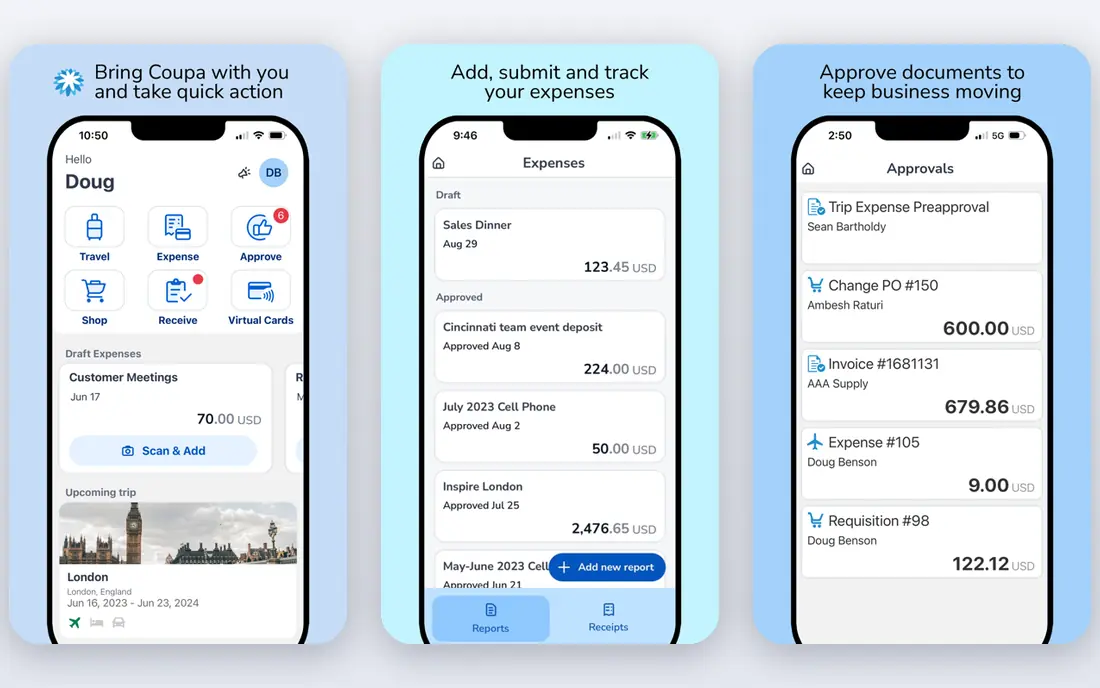
Coupa is the enterprise option on this list, and it fits distributed teams that already run complex buying across many countries, entities, and suppliers. One system holds the request, the approval, the purchase order, the invoice, and the payment, so a manager in London, a buyer in Singapore, and a finance lead in New York all see the same record. That shared record matters when a team never sits in one office, because it cuts the email threads and local spreadsheets that hide spend until month end.
The platform also covers sourcing and contracts, not just purchase orders, so procurement teams can run events, track supplier terms, and link contracts to the orders that draw on them. For a large distributed team, that breadth is the main draw, and the main cost is the time and budget needed to set it up well.
- Covers intake, sourcing, contracts, purchase orders, invoicing, and payments in one suite
- Strong analytics built on a large pool of community spend data
- No published price, so budgeting needs a sales quote
- Implementation can take months and needs dedicated change management
Zip
Ideal for: Intake-led procurement for large remote teams

Zip starts with the request, not the purchase order, which is why it suits distributed teams where anyone can ask for software, services, or equipment. An employee writes a plain-language request, and Zip turns it into a structured form, routes it to procurement, finance, legal, IT, and security as needed, and tracks it through to a purchase order or contract. That single front door stops requests from living in chat messages and inboxes across time zones.
The platform has grown from intake into full procure to pay, with supplier onboarding, contract orchestration, and payments on the same system. The trade-off is price transparency. Zip does not publish a price, and third-party buying data puts typical annual contracts in a high range, so smaller teams should get a written quote and check the minimum user count before they shortlist it.
- One intake front door for purchase requests across departments and regions
- AI agents that check pricing, contracts, and approvals during intake
- No published price, so cost only appears after a sales process
- No built-in vendor catalogs, so staff source items from any supplier
Precoro
Ideal for: Mid-size teams that want clear monthly pricing

Precoro is a clear pick for a mid-size distributed team that wants a published price and a fast start. Its pricing page lists Core from $499 per month, Automation from $999 per month, and Enterprise as custom, so a finance lead can budget the entry tier without a sales call. The Core plan covers purchase requisitions, purchase orders, approvals, budgets, supplier records, and three-way matching, with integrations for QuickBooks Online, Xero, Slack, and Microsoft Teams.
For teams spread across countries, the multi-currency and multi-location features carry weight. Precoro supports 300 major currencies in procurement documents, and it groups spend by department, project, and location, which helps a manager see what each office is buying. A mobile app lets approvers act from anywhere, and the vendor says implementation takes 2 to 8 weeks.
- Published Core price of $499 per month when billed annually
- Multi-currency support for 300 major currencies and multi-entity workflows
- Advanced automation starts at $999 per month, so the entry plan has limits
- Enterprise features need a custom quote
Procurify
Ideal for: Mid-market teams that want pre-spend budget control
Procurify is built around one idea that matters for distributed teams: a requester should see the remaining budget before they submit a request. Every purchase request checks against live budgets, so finance sees spend as it happens rather than at month end, and managers in different regions work from the same budget numbers. That pre-spend check cuts the surprise invoices that often appear when local teams buy on their own.
Every customer starts with Purchasing, which includes order requests, product catalogs, vendors, purchase orders, approval routing, budgets, spend insights, account codes, user roles, and accounting integrations. Accounts payable, expense and card, guided intake, and contracts layer on as products or add-ons. Pricing is modular and quote-based, built from the products, add-ons, users, and integrations a team takes, and Basic users are unlimited while Pro users drive the price. Get the quote in writing, with each add-on priced as a separate line.
- Budget checks happen before a request is approved, not after the money is spent
- Unlimited Basic users can request orders and receive items
- No published price, so every quote is custom and modular
- Guided Intake and Contracts cost extra as add-ons
Ramp
Ideal for: Small remote teams that want cards and bill pay
Ramp is a finance platform that starts with cards and bill pay, then adds procurement for teams that need it. The Free tier costs $0 per user per month and includes unlimited physical and virtual cards, expense management, bill pay, reimbursements, and integrations with QuickBooks Online and Xero. That entry point suits a small distributed team that wants to replace shared cards and manual expense reports without a large first bill.
Procurement sits as an add-on to Plus or Enterprise, and Plus costs $15 per user per month plus a platform fee based on team size, with 20 percent off for annual billing. The add-on covers automated purchase order creation and tracking, advanced intake and approval workflows, vendor compliance reviews, and three-way matching with Ramp purchase orders. Ask for the platform fee and the procurement add-on price in writing before you compare Ramp with a dedicated procurement tool.
- Free tier at $0 per user per month with cards, expense management, and bill pay
- Procurement add-on brings intake, purchase orders, and three-way matching
- Procurement is an add-on to Plus or Enterprise, not part of the Free tier
- Plus adds a platform fee based on team size that the pricing page does not print
Airbase
Ideal for: Companies on Paylocity that want spend and HR together
Airbase is now Airbase by Paylocity, and its homepage points buyers to Paylocity for Finance. Paylocity completed its acquisition of Airbase on 1 October 2024, and the pricing page now redirects to Paylocity, where the next step is a quote. That change matters for research, because older reviews and price lists describe a standalone product that no longer exists in the same form. A buyer should confirm the current module list and contract terms with Paylocity directly.
For teams already on Paylocity for HR and payroll, the link is the main reason to shortlist it. Cards, expenses, accounts payable, and procurement sit beside payroll data, so finance and HR work from one employee record and one set of approvals. The platform supports virtual and physical cards, bill pay, reimbursements, and procurement workflows, with integrations for NetSuite, QuickBooks Online, Xero, and Sage Intacct. If a team does not use Paylocity, the value of that link is lower, and a standalone procurement tool may fit better.
- Combines cards, expenses, bill pay, and procurement with Paylocity HR and payroll
- Guided approvals and audit trails suit multi-location finance teams
- No published price, and pricing now comes through Paylocity as a quote
- Older Airbase prices and reviews no longer describe the current offer
Spendesk
Ideal for: European teams with multi-entity spend
Spendesk suits distributed teams with a European base, because it was built around EU payment rails, SEPA transfers, French-issued IBANs, and local accounting links such as DATEV and SAP. Its Foundations package includes unlimited cards, users, and control settings, with single-use cards for one-off payments, recurring virtual cards for subscriptions, and multi-use cards for projects. That card range helps remote teams give each office or project its own budget without sharing one company card.
Pricing is quote-only. The pricing page describes two parts: a fixed monthly fee for platform access, and variable fees based on the number of transactions, including card purchases, invoice payments, and expense claims. Spendesk says it does not charge per-user fees or monthly card fees, which helps large remote teams, but the total bill still depends on transaction volume and add-ons. Procurement, accounts payable, and advanced workflows are add-ons, so ask for each one priced separately, and check the foreign exchange fee, which the vendor lists at 2.99 percent for card transactions in another currency.
- Unlimited users and cards with no per-user fee on its Foundations package
- Multi-entity workflows, multi-currency wallets, and EU payment infrastructure
- No published price, with a fixed monthly platform fee plus variable transaction fees
- Procurement, accounts payable, and multi-entity features can cost extra as add-ons
Brex
Ideal for: Startups and growing teams that want global cards
Brex is a card-led finance platform that fits distributed startups and growing teams that pay vendors in many countries. Essentials costs $0 per user per month for eligible companies and includes global card acceptance, AI-powered custom rules, up to two entities, accounting integrations, local currency wires, travel booking, real-time reporting, bill pay, and reimbursements. Cards are accepted in more than 210 countries and territories, which helps a remote team buy software and services wherever its staff sit.
Premium costs $12 per user per month and adds multiple customizable expense policies, dynamic approval chains, AI-powered compliance checks, multi-entity support, customizable ERP and HRIS integrations, VAT documentation, and live budgets. Enterprise is custom priced and adds unlimited entities, local card issuance, and a named account manager. For procurement specifically, Brex sells a Smart Card product with global cards, local-currency cards in more than 50 countries, merchant controls, and custom approvals, and that product is custom priced. Ask how Smart Card pricing relates to the Essentials and Premium tiers before you shortlist Brex as a procurement tool.
- Essentials costs $0 per user per month for eligible companies, with global cards and bill pay
- Premium at $12 per user per month adds multi-entity support and live budgets
- The Smart Card procurement product is custom priced, not part of the published tiers
- International card spend can carry a foreign exchange markup of up to 3 percent
How we chose
We compared vendor pricing pages, product pages, and help documentation read on 12 November 2026, and we kept only tools whose official homepage loaded that day. We checked where each vendor places procurement, intake, approvals, purchase orders, budgets, and accounting integrations, and we noted where a feature is an add-on rather than part of the entry plan. We also checked multi-currency support, multi-entity support, mobile approvals, and card controls, because those features decide whether a tool works for a team spread across countries and time zones.
We did not claim hands-on testing, and we did not use third-party review scores as a ranking. Where a vendor hides the price, we wrote quote only instead of repeating a third-party estimate as a fact. Prices can change, and a quote can vary by team size, entities, transaction volume, and add-ons, so the pricing page link in Sources is the place to confirm the current figure before a decision.
What to check before you buy
Check who approves what, and in which order, before you sign. A distributed team needs approval chains that route by department, location, amount, and category, with a clear backup approver when the first approver is offline. Check budget visibility too, and confirm whether a requester sees the remaining budget before they submit, or only after finance reviews the request. Check currency handling, including which currencies the tool supports for purchase orders, invoices, and reimbursements, and what foreign exchange fee applies to card spend.
Check the accounting link, and confirm whether the tool syncs purchase orders, invoices, and card transactions to your ledger without manual re-entry. Check the contract, including the term, the renewal notice period, the renewal price cap, and the cost of each add-on. Check support hours and time zone coverage, because a tool that only answers during one region's working day will slow approvals elsewhere. Use the decision table below to match team size and budget to a shortlist.
| Team size and budget | Best starting point | Why it fits | | Under 25 people, low budget | Ramp Free, Brex Essentials | Both start at $0 per user per month and cover cards, expenses, and bill pay | | 25 to 100 people, clear monthly budget | Precoro Core at $499 per month | Published price, multi-currency support, and a 2 to 8 week setup window | | 100 to 500 people, European entities | Spendesk, Procurify | Multi-entity workflows, budget control, and regional payment and accounting links | | 500 or more people, complex buying | Coupa, Zip, Airbase | Full source to pay coverage, intake at scale, and links to HR, payroll, or ERP systems |
Frequently asked questions
What is the best procurement software for a small distributed team?
Ramp and Brex are strong starting points for a small distributed team, because both start at $0 per user per month on entry tiers and include cards, expense management, and bill pay. Precoro is the next step when a team wants a dedicated procurement workflow with a published price, starting at $499 per month on Core when billed annually.
How much does procurement software cost for a remote team?
Costs range from $0 per user per month on entry tiers from Ramp and Brex to $499 per month for Precoro Core, and then to custom quotes for Coupa, Zip, Procurify, Airbase, and Spendesk. Add-on prices, platform fees, transaction fees, and implementation can change the total, so ask each vendor for a written quote with every line item.
Do these tools support multi-currency buying?
Most of the tools on this list support multi-currency buying, but the depth varies by plan. Precoro lists support for 300 major currencies, Ramp and Brex offer local currency cards and wires, and Spendesk offers multi-currency wallets. Confirm which currencies, exchange fees, and tax rules apply to your countries before you choose.
Can approvers work from different time zones?
Yes, if the tool offers mobile approvals, clear backup approvers, and approval chains that route by amount, department, and location. Precoro, Procurify, Ramp, Brex, and Spendesk all offer mobile or remote approval workflows. Test the approval flow with approvers in two time zones during a trial, and check how long a request waits when the first approver is offline.
Is procurement an add-on or part of the main plan?
It depends on the vendor. Precoro, Procurify, Coupa, and Zip treat procurement as a core product, while Ramp sells procurement as an add-on to Plus or Enterprise, Brex sells Smart Card as a custom priced product, and Spendesk sells procurement as an add-on. Check the plan page and ask the vendor to confirm in writing which procurement features each tier includes.
How long does setup take for a distributed team?
Setup time ranges from days for card-led tools to weeks for dedicated procurement platforms. Precoro lists 2 to 8 weeks, Procurify lists 4 to 8 weeks, and Coupa and Zip need longer enterprise projects. Allow extra time for approval chains, budget rules, supplier records, and accounting links across each location.