Best Redaction Software in 2026: 8 Options Compared

- 1
 Adobe Acrobat ProPDF redaction in most officesVisit
- 2
 Foxit PDF EditorPDF redaction at a lower price than AdobeVisit
- 3
 CaseGuardteams redacting video, audio, and documentsVisit
- 4
 iDox.aihigh-volume legal and government redactionVisit
- 5
 Nitro PDF ProPDF editing plus redaction for businessesVisit
- Adobe Acrobat Pro is the safest default for PDF redaction in most offices.
- CaseGuard suits teams redacting video, audio, and documents together.
- iDox.ai fits high-volume legal and government redaction with AI help.
- Always verify that redacted content is truly removed, not just hidden.
Quick comparison
| Product | Ideal for | Price from | Free version | |
|---|---|---|---|---|
| Adobe Acrobat Pro | PDF redaction in most offices | $19.99 per month | Free trial | Visit |
| Foxit PDF Editor | PDF redaction at a lower price than Adobe | See website | Free trial | Visit |
| CaseGuard | teams redacting video, audio, and documents | See website | Free trial | Visit |
| iDox.ai | high-volume legal and government redaction | See website | Free trial | Visit |
| Nitro PDF Pro | PDF editing plus redaction for businesses | See website | Free trial | Visit |
 Kofax Power PDF | PDF redaction in enterprise document workflows | See website | Free trial | Visit |
 PDFelement | affordable PDF redaction for small teams | See website | Free trial | Visit |
 Intradyn | redaction plus archiving for regulated teams | See website | No | Visit |
The best redaction software
Redaction software removes sensitive text, images, and hidden data from documents before they are shared, filed, or published. Proper redaction is different from covering text with a black box, since hidden text and metadata can still leak. We compared tools used by law firms, agencies, and companies that must share documents safely.
Privacy and security note: Verify that redactions are truly removed, not just visually hidden. Check the final file for recoverable text, hidden layers, comments, and metadata before sharing, and keep unredacted originals in a controlled location with limited access.
Adobe Acrobat Pro
Ideal for: PDF redaction in most offices

Adobe Acrobat Pro is the standard PDF redaction tool in most offices, with tools that find and remove text, images, and hidden data, then clean metadata. Its search-and-redact workflow handles repeated terms across long documents. Teams needing video or audio redaction need a second tool. That focus makes it a practical match for PDF redaction in most offices. On pricing, the starting point is $19.99 per month, and the free plan status is free trial. Its strengths include true pdf redaction; removes hidden text and metadata; widely available. The trade-off to weigh is subscription cost; pdf focus only. We suggest checking the current plan limits on the vendor site before you commit, since tiers and trial terms change, and confirming that the plan you pick covers the seats, storage, or usage your team actually needs.
- True PDF redaction
- Removes hidden text and metadata
- Widely available
- Subscription cost
- PDF focus only
Foxit PDF Editor
Ideal for: PDF redaction at a lower price than Adobe
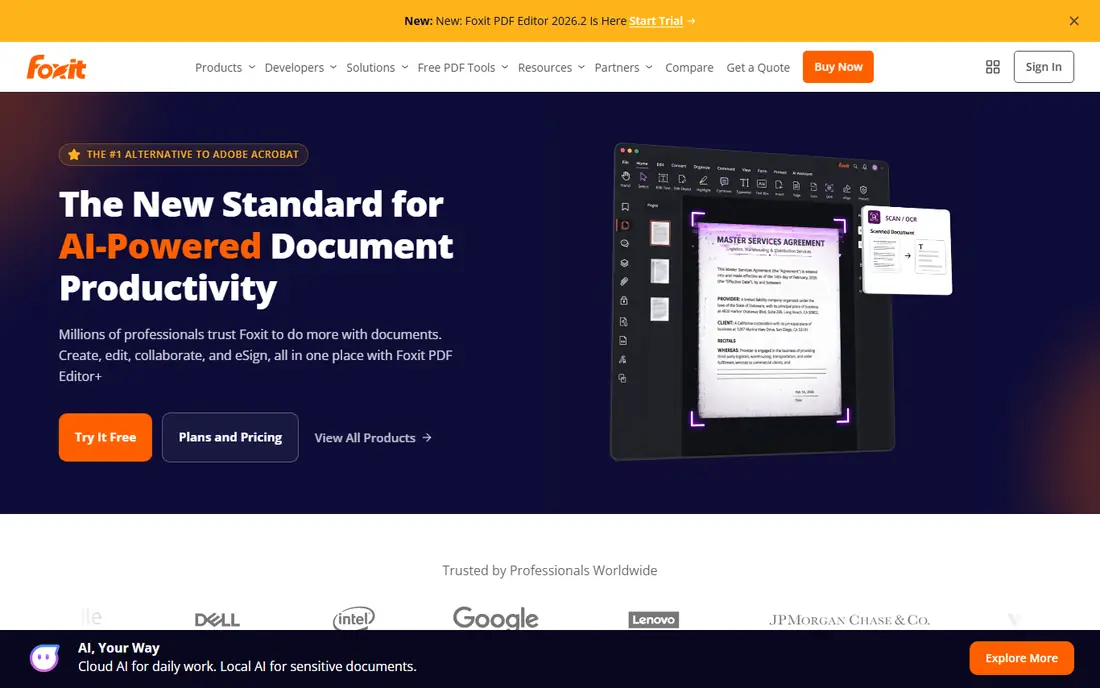
Foxit PDF Editor offers PDF redaction, including search and removal of sensitive text, at a price many offices find lower than Adobe. It suits teams that already use Foxit for PDF work. Check that the plan you buy includes the full redaction and sanitization features. That focus makes it a practical match for PDF redaction at a lower price than Adobe. On pricing, the starting point is see website, and the free plan status is free trial. Its strengths include true pdf redaction; good value; familiar pdf tools. The trade-off to weigh is smaller ecosystem than adobe; some features vary by plan. We suggest checking the current plan limits on the vendor site before you commit, since tiers and trial terms change, and confirming that the plan you pick covers the seats, storage, or usage your team actually needs.
- True PDF redaction
- Good value
- Familiar PDF tools
- Smaller ecosystem than Adobe
- Some features vary by plan
CaseGuard
Ideal for: teams redacting video, audio, and documents

CaseGuard covers documents, images, video, and audio in one platform, with AI detection for faces, plates, and sensitive text plus audit trails. It suits law enforcement, legal, and compliance teams with mixed media. Pricing is quoted, and video workflows take training. That focus makes it a practical match for teams redacting video, audio, and documents. On pricing, the starting point is see website, and the free plan status is free trial. Its strengths include video, audio, and document redaction; ai detection; audit logs. The trade-off to weigh is pricing by quote; learning curve for video workflows. We suggest checking the current plan limits on the vendor site before you commit, since tiers and trial terms change, and confirming that the plan you pick covers the seats, storage, or usage your team actually needs.
- Video, audio, and document redaction
- AI detection
- Audit logs
- Pricing by quote
- Learning curve for video workflows
iDox.ai
Ideal for: high-volume legal and government redaction
iDox.ai uses AI to find sensitive data across large document sets and redact it in bulk, with workflows for legal and government teams. It suits high-volume disclosure work where manual redaction would take weeks. AI output still needs human verification before release. That focus makes it a practical match for high-volume legal and government redaction. On pricing, the starting point is see website, and the free plan status is free trial. Its strengths include ai-assisted redaction; bulk processing; legal and government focus. The trade-off to weigh is pricing by quote; ai suggestions need human review. We suggest checking the current plan limits on the vendor site before you commit, since tiers and trial terms change, and confirming that the plan you pick covers the seats, storage, or usage your team actually needs.
- AI-assisted redaction
- Bulk processing
- Legal and government focus
- Pricing by quote
- AI suggestions need human review
Nitro PDF Pro
Ideal for: PDF editing plus redaction for businesses
Nitro PDF Pro combines PDF editing, conversion, and redaction for business users, with license options that some teams prefer over subscriptions. It suits offices that want a capable PDF suite with redaction included. Confirm the redaction features in the current version before buying. That focus makes it a practical match for PDF editing plus redaction for businesses. On pricing, the starting point is see website, and the free plan status is free trial. Its strengths include pdf editing and redaction; perpetual license options; business tools. The trade-off to weigh is redaction depth varies by version; check current features. We suggest checking the current plan limits on the vendor site before you commit, since tiers and trial terms change, and confirming that the plan you pick covers the seats, storage, or usage your team actually needs.
- PDF editing and redaction
- Perpetual license options
- Business tools
- Redaction depth varies by version
- Check current features
Kofax Power PDF
Ideal for: PDF redaction in enterprise document workflows
Kofax Power PDF, now under Tungsten Automation, offers PDF redaction with sanitization tools for enterprise document workflows. It suits organizations already using Tungsten capture and document tools. Buyers should confirm the current product name and packaging. That focus makes it a practical match for PDF redaction in enterprise document workflows. On pricing, the starting point is see website, and the free plan status is free trial. Its strengths include pdf redaction and sanitization; enterprise document tools; batch options. The trade-off to weigh is vendor branding changed to tungsten; pricing by plan. We suggest checking the current plan limits on the vendor site before you commit, since tiers and trial terms change, and confirming that the plan you pick covers the seats, storage, or usage your team actually needs.
- PDF redaction and sanitization
- Enterprise document tools
- Batch options
- Vendor branding changed to Tungsten
- Pricing by plan
PDFelement
Ideal for: affordable PDF redaction for small teams
PDFelement from Wondershare adds redaction to a full PDF editor at a price small teams can afford, with an interface that new users learn quickly. It suits small offices with occasional redaction needs. High-volume or regulated teams should test its sanitization workflow carefully. That focus makes it a practical match for affordable PDF redaction for small teams. On pricing, the starting point is see website, and the free plan status is free trial. Its strengths include pdf redaction plus editing; lower price; easy interface. The trade-off to weigh is advanced batch features are fewer than enterprise tools. We suggest checking the current plan limits on the vendor site before you commit, since tiers and trial terms change, and confirming that the plan you pick covers the seats, storage, or usage your team actually needs.
- PDF redaction plus editing
- Lower price
- Easy interface
- Advanced batch features are fewer than enterprise tools
Intradyn
Ideal for: redaction plus archiving for regulated teams
Intradyn combines redaction with archiving for regulated organizations that must retain and disclose documents under strict rules. Its audit trails help compliance teams show what was redacted and when. It is a niche choice, so check current product details before committing. That focus makes it a practical match for redaction plus archiving for regulated teams. On pricing, the starting point is see website, and the free plan status is no. Its strengths include document redaction plus archiving; compliance focus; audit trails. The trade-off to weigh is niche vendor; pricing by quote. We suggest checking the current plan limits on the vendor site before you commit, since tiers and trial terms change, and confirming that the plan you pick covers the seats, storage, or usage your team actually needs.
- Document redaction plus archiving
- Compliance focus
- Audit trails
- Niche vendor
- Pricing by quote
How we picked these
We compared official feature pages, pricing pages, app store listings, privacy policies, and public reviews for each option, and we kept only products that exist, work in October 2026, and fit the topic directly. We did not claim hands-on testing we did not do, and we left out products whose fit was weak even when they are well known in a nearby category. Price and plan details change often, so where a vendor does not publish a clear price we write See website rather than guessing. The notes below reflect what each vendor publishes about its own product, not a promise about results for any single team.
How to choose redaction software
Start with your document types: PDFs, Word files, images, video, or audio all need different tools, and a PDF-only tool will not help a team redacting body-camera video. Check whether the tool removes text layers, metadata, comments, and embedded files, not just the visible content. For legal and government work, ask about audit logs and batch processing. Test the tool on a real document and try to recover the redacted text by copying, searching, and inspecting the file, since that test catches tools that only hide content. Check collaboration features, since reviewers often need to approve redactions before release. For high volumes, AI-assisted suggestions save time but still need human review. Build a simple release checklist: redact, verify, remove metadata, check the final file in a fresh viewer, and keep an unredacted original in a controlled location. Never share the original by mistake, and train everyone who handles sensitive documents, since one missed file can undo careful work.
Frequently asked questions
What is redaction software?
It permanently removes sensitive information from documents, such as names, addresses, and account numbers, so the content cannot be recovered from the shared file. Good tools also remove hidden text and metadata.
Is covering text with a black box enough?
No, if the underlying text layer remains, since it can often be copied or extracted. True redaction deletes the content and cleans metadata, which is why dedicated tools matter.
Can redaction software handle video and audio?
Some tools can, including CaseGuard, by blurring faces, muting audio, and tracking moving subjects. PDF-focused tools do not cover video, so check media support if you need it.
Do I need AI redaction?
AI suggestions speed high-volume work by finding names, dates, and numbers automatically, but human review remains essential, since AI misses context and makes mistakes. Small volumes may not need AI at all.
How do I verify a redaction?
Open the final file in a fresh viewer, search for the redacted terms, try copying text around the redaction, and inspect metadata. If any redacted content is recoverable, the file is not safe to share.