Nutritionist Pro leads the list, best for Dietitians needing diet analysis and menu planning. Listed starting prices: Nutritionist Pro from $25 a month. Lose It. Is better for weight-focused calorie tracking, and DietMaster Pro is better for Diet and menu planning workflows. The remaining 2 options are covered below with prices and limits.
Choosing software for food nutrition analysis usually comes down to price, fit and limits. This Ainotely guide sets 5 tools side by side on those three points, with the facts kept short and checkable.
Key takeaways
This list starts with Nutritionist Pro, which is built for Dietitians needing diet analysis and menu planning.
A fair warning about Nutritionist Pro: less centred on large-scale food manufacturing.
None of the 5 tools, from Nutritionist Pro to ESHA Food Processor, has a free plan, so budget for a subscription or use a trial.
ESHA Food Processor is the one to check for Food and supplement formulation and labeling.
Best for: Dietitians needing diet analysis and menu planning
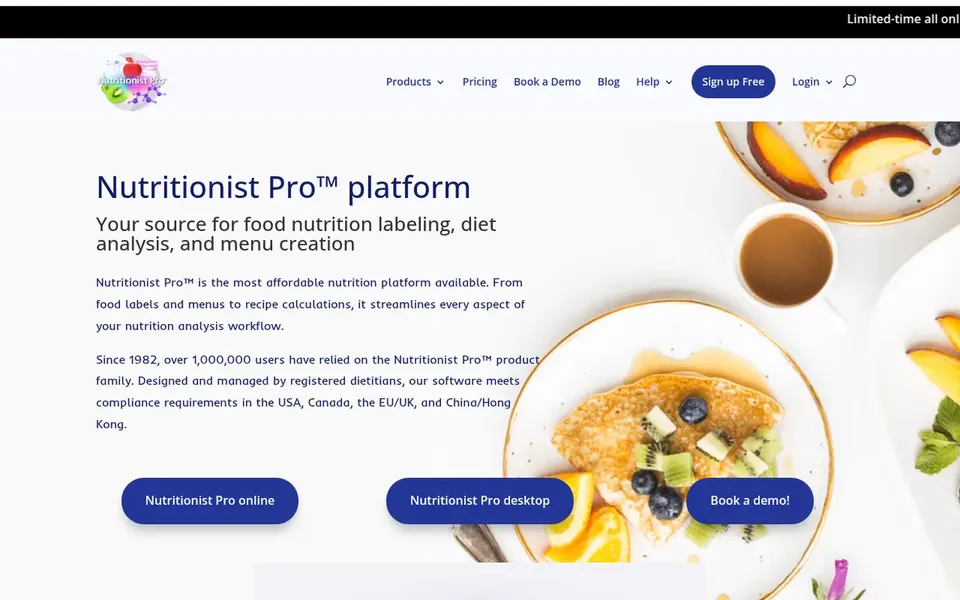
For Dietitians needing diet analysis and menu planning, Nutritionist Pro is a natural candidate. Nutritionist Pro is nutrition software targeted at dietitians and food firms, combining diet analysis, menu planning and a food label maker.
Where it falls short: Less concentrated on large-scale food manufacturing.
What works well: menu planning and label making in one. Its scope is broader than deep in any one area, so large manufacturers with complicated compliance needs may outgrow it. Consumers who only want to log meals will find a dedicated tracking app more straightforward. Nutritionist Pro starts at: $25 per month. Trial and free access: Free trial.
Lose It. Is a good fit for weight-focused calorie tracking. Lose It. Is a consumer app centered on calorie tracking and personal nutrition education, with a stated mission of helping people achieve a healthy weight. Confirm the current feature set and any subscription details in the app listing or on the vendor site.
Downsides: Weight-loss framing may not suit all users.
As for the details, the homepage flags its weight-loss focus and personal nutrition education. Its consumer, weight-loss framing means it is not aimed at dietitians doing clinical analysis, food companies creating labels or teams managing recipes. Pricing for Lose It. Is not stated here, so ask the vendor for current figures. As for free access: Not stated.
DietMaster Pro is designed for Diet and menu planning workflows. DietMaster Pro is widely known as software for diet and menu planning in nutrition and food service settings. It is generally used by dietitians, food service managers and wellness teams that build structured meal plans and need analysis alongside planning.
Limits to weigh: Restricted public detail on current features.
Teams comparing professional planning tools commonly bundle it on a shortlist when they want plan creation and nutrition analysis in one workflow. Organizations that primarily need formulation and labeling may prefer a manufacturer-focused product, and consumers are better served by a tracking app. Pricing for DietMaster Pro is not stated here, so ask the vendor for current figures. Free access: Not stated.
Best for: In-depth micronutrient tracking and analysis
Cronometer Pro was built for in-depth micronutrient tracking and analysis. Cronometer Pro is the professional edition of a nutrition tracking app that emphasizes accuracy. Its homepage describes counting calories and tracking macro and micronutrients, which makes it a fit for dietitians, coaches and researchers who require granular nutrient data instead of straightforward calorie totals.
Trade-offs to know: In-depth data entry takes effort.
Worth adding: confirm which professional features are included in the edition you are considering on the vendor site. Users who want to see vitamin and mineral intake alongside energy and macros will find the approach well aligned. Pricing for Cronometer Pro is not stated here, so ask the vendor for current figures. Free options: Not stated.
Best for: Food and supplement formulation and labeling
ESHA Food Processor is a good fit for Food and supplement formulation and labeling. Confirm current module details and system requirements on the vendor site before committing.
The main drawbacks: Geared toward professional business use.
For everyday use, since it is aimed at professional formulation and compliance, it is not the simplest choice for casual calorie counting or personal diet tracking. ESHA Food Processor does not show a starting price in this comparison, so check the vendor site for current pricing. As for free access: Not stated. What works well: Suited to food and supplement firms.
Ask Lose It., DietMaster Pro, Cronometer Pro and ESHA Food Processor for a written quote, since no starting price is shown.
Take the trial from Nutritionist Pro and push a live task through it before you pay.
Before choosing Nutritionist Pro, weigh its main limit: less concentrated on large-scale food manufacturing.
Total up the real monthly cost of Lose It., including add-ons, extra users and usage-based fees.
Pick one real project and run it in Cronometer Pro first; a small pilot shows fit faster than a checklist.
How we picked
Ainotely used vendor pricing pages and product documentation as the base, then compared plans, free access and documented limits for 5 tools. Plan names, prices and limits change often. Treat the figures here as a starting point and verify them with the vendor. Order on the page follows fit for the typical buyer first, then price transparency and free access. Your own requirements should decide the final pick. Keep it in mind while reading the 5 software for food Nutrition analysis profiles on this page.
Every price and plan detail on this page comes from the vendors’ own websites. We did not run hands-on tests unless the text says so, and we do not publish star ratings or review scores. See how we score and our disclosure.
Keep your shortlist in one place
Paste prices, trial dates and notes from this guide into Ainotely, our AI note app. It files them into a topic and pulls out tasks like “cancel trial by Friday”. Free 7-day trial, no card needed.
Does any tool for software for food nutrition analysis here have a free plan?
No tool in this list, Nutritionist Pro and ESHA Food Processor included, has a permanent free plan. Nutritionist Pro offer a trial. Trials and quotes are the usual route, so plan a short evaluation period.
Is Nutritionist Pro the right pick for everyone comparing software for food nutrition analysis?
No single tool suits every team. Nutritionist Pro comes first because it fits Dietitians needing diet analysis and menu planning, while Lose It. Suits weight-focused calorie tracking and DietMaster Pro suits Diet and menu planning workflows. Match the tool to your own size, budget and workflow before deciding.
Can dietitians use consumer tracking apps in practice?
Some dietitians use apps like Cronometer Pro for in-depth micronutrient tracking with clients since it emphasizes accuracy and macro and micronutrient data. That said, apps made for consumers may lack clinical reporting and plan-sharing features found in dietitian-focused tools like Nutritionist Pro.
What is the cheapest option for software for food nutrition analysis in this list?
On published monthly entry prices, Nutritionist Pro is the lowest here at $25 per month. Entry price is only part of the cost, because seats, add-ons and billing terms can change the total.
How are the tools for software for food nutrition analysis ordered?
Nutritionist Pro sits first and ESHA Food Processor last because the order follows typical fit for software for food nutrition analysis, then price clarity and free access. It is a judgement call, so read each profile for fit and limits.
Which tool is a good match for creating nutrition labels?
For most readers this guide would start with Nutritionist Pro, built for Dietitians needing diet analysis and menu planning. Lose It. Is the alternative for weight-focused calorie tracking, and DietMaster Pro for Diet and menu planning workflows. The right answer depends on budget and workflow.