Best Software for Managing Projects in Accounting in 2026: 8 Tools Compared

- 1
 KarbonAccounting firms that want workflow plus client workVisit
- 2
 Financial CentsSmall firms that want simple workflow and deadlinesVisit
- 3
 Jetpack WorkflowFirms that want straightforward recurring job trackingVisit
- 4
 CanopyTax and accounting firms that want practice managementVisit
- 5
 TaxDomeFirms that want an all-in-one practice platformVisit
- Karbon stands out for accounting firms that want workflow plus client work, which makes it a strong starting point for that need.
- Financial Cents stands out for small firms that want simple workflow and deadlines, which makes it a strong starting point for that need.
- Jetpack Workflow stands out for firms that want straightforward recurring job tracking, which makes it a strong starting point for that need.
- Canopy stands out for tax and accounting firms that want practice management, which makes it a strong starting point for that need.
- Prices and free plans vary widely across this list, so check the vendor pricing page for your team size or usage before you commit.
Quick comparison
| Product | Ideal for | Price from | Free version | |
|---|---|---|---|---|
| Karbon | Accounting firms that want workflow plus client work | See website | No | Visit |
| Financial Cents | Small firms that want simple workflow and deadlines | See website | No | Visit |
| Jetpack Workflow | Firms that want straightforward recurring job tracking | See website | No | Visit |
| Canopy | Tax and accounting firms that want practice management | See website | No | Visit |
| TaxDome | Firms that want an all-in-one practice platform | See website | No | Visit |
 Pixie | Small firms that want simple, modern workflow | See website | No | Visit |
 Aero Workflow | Firms that want workflow built around accountants | See website | No | Visit |
 Mango Practice Management | Firms that want practice management plus time and billing | See website | No | Visit |
The best software for managing projects in accounting
We compared official feature pages, pricing pages, app store listings, privacy policies, and public reviews to build this list, and we focused on tools that truly fit best software for managing projects in accounting rather than general tools with a passing connection. The eight options below cover different budgets, team sizes, and priorities, so start with the best-for notes and read the full write-up for any tool that matches your situation.
Karbon
Ideal for: Accounting firms that want workflow plus client work

Karbon is built for accounting firms, combining workflow, client tasks, email, and deadlines in one system. Work moves from intake to review with clear ownership, and client communication stays linked to the job. That firm-wide view suits practices juggling tax, bookkeeping, and advisory work.
Pricing is quote-based and Karbon is built for firms rather than solo bookkeepers. For practices that need workflow plus client management together, Karbon is the leading pick. Demo it with your busiest season workflow, not a quiet week.
Before you commit, check the current pricing page and trial terms for your team size, since plans change and the right tier depends on how many people will actually use the tool daily.
- Practice workflow, client tasks, and email in one system
- Built for accountants
- Quote-based pricing
- Best for firms, not solo bookkeepers
Financial Cents
Ideal for: Small firms that want simple workflow and deadlines
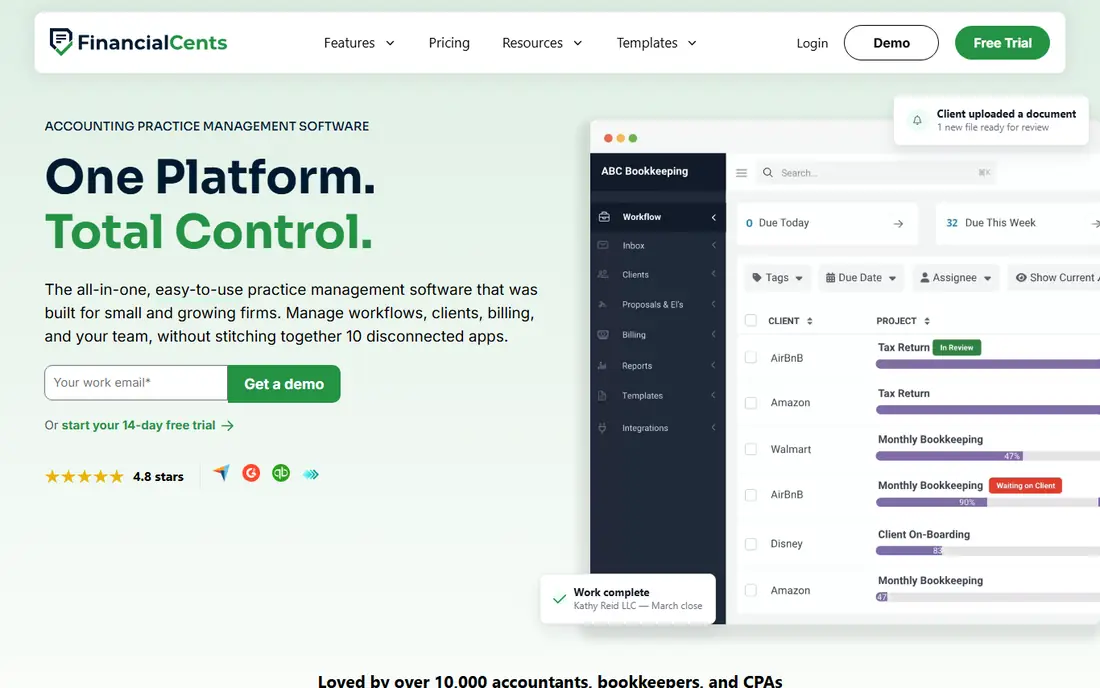
Financial Cents gives small accounting firms workflow, checklists, deadlines, and client management without enterprise complexity. Staff see what is due, who owns it, and what clients still owe, which cuts the chase work that eats tax season. Setup is quicker than larger platforms.
Enterprise features are thinner than Karbon, and pricing is quote-based. For small firms that want workflow clarity fast, Financial Cents is a practical choice. Test checklist templates for your service lines before buying.
Before you buy, run a short trial with your real data and your real workflow, since a demo with sample data hides the friction points that matter once the whole team is involved.
- Simple workflow, checklists, and client management for accounting firms
- Fewer enterprise features than Karbon
- Pricing is quote-based
Jetpack Workflow
Ideal for: Firms that want straightforward recurring job tracking

Jetpack Workflow focuses on recurring accounting jobs, with checklists, deadlines, and team assignments for bookkeeping, payroll, and tax work. Firms can template monthly and annual jobs so nothing slips, and managers see progress across all clients. That recurring focus fits firms with steady monthly work.
The feature set is simpler than Karbon, with fewer client portal tools. For firms whose main pain is tracking recurring jobs reliably, Jetpack Workflow covers it cleanly. Larger firms needing client collaboration may prefer Karbon or Canopy.
Before you decide, confirm integration with the tools you already use and check what support hours and onboarding help are included, since those details matter more than a feature list once you are live.
- Recurring workflow, checklists, and deadline tracking for accountants
- Simpler feature set
- Fewer client portal tools
Canopy
Ideal for: Tax and accounting firms that want practice management
Canopy offers practice management for tax and accounting firms, with client portals, document management, workflow, and billing. Clients upload documents through the portal, staff track jobs, and billing ties to work done. That combination suits tax firms with heavy document flow.
Pricing is quote-based and the tax focus may exceed pure bookkeeping needs. For tax firms that want portal plus workflow in one system, Canopy is a strong pick. Check document and e-signature tools against your current process.
Before you commit, ask for a quote that covers every user, module, and add-on you need, and compare that total against at least one other tool on this list for the same scope.
- Practice management, client portal, and workflow for tax firms
- Quote-based pricing
- Tax focus may exceed bookkeeping needs
TaxDome
Ideal for: Firms that want an all-in-one practice platform
TaxDome gives accounting firms CRM, workflow, client portal, documents, and billing in one platform, with automation for reminders and pipelines. Firms can run the whole client journey from lead to delivery without stitching tools. That breadth suits firms that want one system for everything.
The learning curve is real, since the platform covers so much, and pricing varies by firm size. For firms willing to invest in setup, TaxDome consolidation saves tool sprawl. Start with one service line and expand, rather than migrating everything at once.
Before you commit, check the current pricing page and trial terms for your team size, since plans change and the right tier depends on how many people will actually use the tool daily.
- CRM, workflow, portal, and billing for accounting firms
- Strong automation
- Learning curve
- Pricing varies by firm size
Pixie
Ideal for: Small firms that want simple, modern workflow
Pixie offers small accounting firms a simple, modern workflow tool with client management, deadlines, and task tracking. It suits firms that find larger platforms heavy and want a clean daily task view. Onboarding is quicker and the interface is approachable for small teams.
The vendor is smaller and advanced features are thinner than Karbon or TaxDome. For small firms that need workflow basics done well, Pixie is a calm choice. Growing firms should check whether it scales to their next stage.
Before you buy, run a short trial with your real data and your real workflow, since a demo with sample data hides the friction points that matter once the whole team is involved.
- Simple workflow and client management for small accounting firms
- Smaller vendor
- Fewer advanced features
Aero Workflow
Ideal for: Firms that want workflow built around accountants
Aero Workflow provides workflow, checklists, and capacity planning built for accounting firms. Managers can see who is overloaded during busy season and rebalance work, which prevents burnout and missed deadlines. Templates cover common accounting services.
Pricing is quote-based and the interface is functional rather than modern. For firms that care most about capacity and deadline control, Aero Workflow is a focused pick. Demo capacity views with your real team and season peaks.
Before you decide, confirm integration with the tools you already use and check what support hours and onboarding help are included, since those details matter more than a feature list once you are live.
- Workflow, checklists, and capacity planning for accounting firms
- Quote-based pricing
- Interface is functional
Mango Practice Management
Ideal for: Firms that want practice management plus time and billing
Mango Practice Management combines workflow, time tracking, billing, and client tools for accounting firms. Time and billing tied to jobs help firms see which services are profitable, not just which are busy. That insight suits firms moving toward value pricing or advisory work.
Pricing is quote-based and the vendor is smaller than Karbon or TaxDome. For firms that want time, billing, and workflow together, Mango is worth a demo. Check reporting for your service lines before deciding.
Before you commit, ask for a quote that covers every user, module, and add-on you need, and compare that total against at least one other tool on this list for the same scope.
- Practice management, time tracking, and billing for accounting firms
- Quote-based pricing
- Smaller vendor
How we picked these
We started from the topic itself and looked for products that genuinely serve it, not tools that mention it in passing. For each candidate we checked the vendor's own feature and pricing pages, app store listings where relevant, privacy and security pages, and public user reviews, and we dropped any product we could not verify as real and available in October 2026.
We then compared the remaining tools on fit for the stated need, pricing transparency, free or trial options, ease of adoption, and honest weaknesses. Every list below mixes well-known leaders with strong smaller options, and every write-up names a real trade-off, since no tool is best for every team.
Running an accounting firm without deadline chaos
Start with your recurring work. List monthly, quarterly, and annual jobs by client and service, then check how each tool templates and tracks them. A tool that handles one-off projects well but fumbles recurring jobs will fail in an accounting firm.
Next, test capacity views during a simulated busy week. Managers need to see overloads before deadlines hit, not after. Assign your real team and jobs in a trial and watch whether work balances or bottlenecks.
Finally, check the client side. Portals, document requests, and reminders decide whether clients deliver on time, which decides whether staff can finish on time. A workflow tool with weak client tools still leaves firms chasing documents by email.
Frequently asked questions
What is project management software for accounting firms?
It is practice workflow software that tracks client jobs, deadlines, checklists, and staff assignments across tax, bookkeeping, and advisory work. It keeps firm work visible so deadlines do not slip.
How is it different from general project tools?
Accounting tools use recurring jobs, tax deadlines, client portals, and document flows that general tools lack. Templates for monthly bookkeeping or annual tax work save setup time every season.
Do small firms need workflow software?
Once a firm handles dozens of clients with recurring deadlines, yes. Spreadsheets and memory fail during busy season, while workflow tools show exactly what is due and who owns it.
Should firms choose workflow or a full practice platform?
Firms that only need job tracking do well with Jetpack Workflow or Financial Cents. Firms that also need portals, documents, and billing should look at Karbon, Canopy, or TaxDome.
How long does setup take?
Simple tools can be live in days, while full platforms take weeks to template and migrate. Start with one service line, prove the workflow, then expand to the rest of the firm.