Best software for PDF translation in 2026: 8 Compared

- 1
 DeepLMost PDF translationVisit
- 2
 Google TranslateQuick free translationVisit
- 3
 Microsoft TranslatorMicrosoft usersVisit
- 4
 DocTranslatorSimple online translationVisit
- 5
 SmartcatTeam translationVisit
- DeepL is our pick for most PDF translation, since its quality for European languages and layout preservation are strong.
- Google Translate suits quick, free PDF translation when perfect layout matters less than speed.
- DocTranslator is best for simple online PDF translation without an account.
- Smartcat suits teams that need collaborative translation with human review.
Quick comparison
| Product | Ideal for | Price from | Free version | |
|---|---|---|---|---|
| DeepL | Most PDF translation | See website | Yes | Visit |
| Google Translate | Quick free translation | Free | Yes | Visit |
| Microsoft Translator | Microsoft users | Free | Yes | Visit |
| DocTranslator | Simple online translation | Free | Yes | Visit |
| Smartcat | Team translation | See website | Yes | Visit |
 Pairaphrase | Business document translation | See website | No | Visit |
 Reverso | Context and translation | Free | Yes | Visit |
 SYSTRAN | Enterprise translation | See website | No | Visit |
The best software for pdf translation
We compared official feature pages, pricing pages, app store listings, privacy policies and public reviews to build this list, focusing on products that fit the topic closely and are still available in October 2026.
DeepL
Ideal for: Most PDF translation

For buyers who want a clear fit, DeepL is aimed at most users. DeepL offers strong translation quality with layout preservation for PDF documents. Its European language quality is widely praised, and translated PDFs keep much of their formatting. In practice, that means the product earns its place by doing one job well for that audience, rather than trying to cover every possible use case at once. We compared its official feature page, pricing and public reviews against the other options here, and its best-for label reflects where it looked strongest, not where its marketing claims are loudest.
The trade-off is worth naming plainly. Free limits apply, and Pro is needed for full documents and larger files. On price, the starting point listed above is not published clearly, so check the vendor site, and the free plan entry is Yes. If that combination fits your budget and your main use case, DeepL is a sensible shortlist choice. If the catch above is a deal breaker, move to another entry in this list whose strength matches your priority instead.
- Strong translation quality
- Layout preservation
- Many languages
- Free limits
- Pro for full documents
Google Translate
Ideal for: Quick free translation
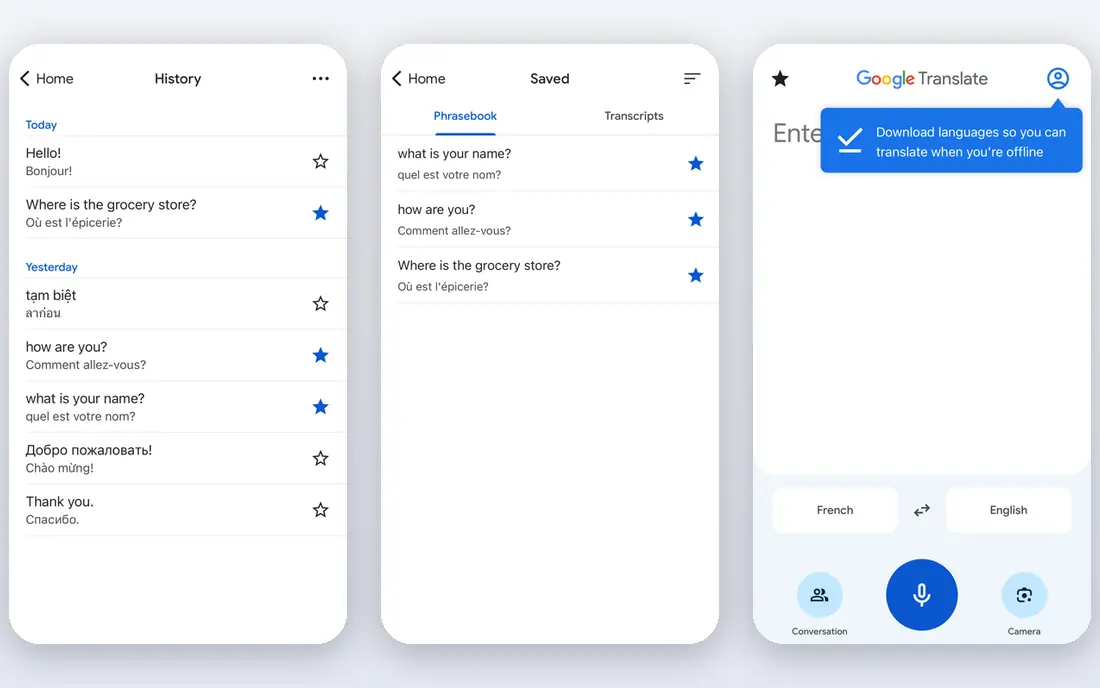
If that use case sounds familiar, Google Translate is aimed at quick users. Google Translate offers free document translation across many languages. Quick users can translate a PDF fast without an account or payment. In practice, that means the product earns its place by doing one job well for that audience, rather than trying to cover every possible use case at once. We compared its official feature page, pricing and public reviews against the other options here, and its best-for label reflects where it looked strongest, not where its marketing claims are loudest.
On the other side of that strength, Layout may change, and quality varies by language pair. On price, the starting point listed above is free, and the free plan entry is Yes. If that combination fits your budget and your main use case, Google Translate is a sensible shortlist choice. If the catch above is a deal breaker, move to another entry in this list whose strength matches your priority instead.
- Free
- Many languages
- Document upload
- Layout may change
- Quality varies by pair
Microsoft Translator
Ideal for: Microsoft users

Among the options here, Microsoft Translator is aimed at Microsoft users. Microsoft Translator offers document translation across many languages. Microsoft users can translate inside Office and other Microsoft tools. In practice, that means the product earns its place by doing one job well for that audience, rather than trying to cover every possible use case at once. We compared its official feature page, pricing and public reviews against the other options here, and its best-for label reflects where it looked strongest, not where its marketing claims are loudest.
Before you commit, weigh this part. Layout preservation is basic, and quality varies by pair. On price, the starting point listed above is free, and the free plan entry is Yes. If that combination fits your budget and your main use case, Microsoft Translator is a sensible shortlist choice. If the catch above is a deal breaker, move to another entry in this list whose strength matches your priority instead.
- Many languages
- Microsoft integration
- Document translation
- Layout preservation is basic
- Quality varies
DocTranslator
Ideal for: Simple online translation
For a team or household weighing this choice, DocTranslator is aimed at simple users. DocTranslator offers simple online PDF translation without an account. Simple users can upload a PDF and get a translated version quickly. In practice, that means the product earns its place by doing one job well for that audience, rather than trying to cover every possible use case at once. We compared its official feature page, pricing and public reviews against the other options here, and its best-for label reflects where it looked strongest, not where its marketing claims are loudest.
The honest catch comes next. Free limits apply, and layout may change on complex files. On price, the starting point listed above is free, and the free plan entry is Yes. If that combination fits your budget and your main use case, DocTranslator is a sensible shortlist choice. If the catch above is a deal breaker, move to another entry in this list whose strength matches your priority instead.
- Simple PDF translation
- No account needed
- Many languages
- Free limits
- Layout may change
Smartcat
Ideal for: Team translation
When the main need is the one above, Smartcat is aimed at translation teams. Smartcat offers collaborative translation with human review for teams. Translation teams can manage projects, translators and quality in one place. In practice, that means the product earns its place by doing one job well for that audience, rather than trying to cover every possible use case at once. We compared its official feature page, pricing and public reviews against the other options here, and its best-for label reflects where it looked strongest, not where its marketing claims are loudest.
Pricing and limits deserve a second look. Full features are paid, and it is complex for solo users. On price, the starting point listed above is not published clearly, so check the vendor site, and the free plan entry is Yes. If that combination fits your budget and your main use case, Smartcat is a sensible shortlist choice. If the catch above is a deal breaker, move to another entry in this list whose strength matches your priority instead.
- Collaborative translation
- Human review
- Many languages
- Paid for full features
- Complexity for solo users
Pairaphrase
Ideal for: Business document translation
For readers who put this factor first, Pairaphrase is aimed at business teams. Pairaphrase focuses on business document translation with secure handling. Business teams can translate files with human review options. In practice, that means the product earns its place by doing one job well for that audience, rather than trying to cover every possible use case at once. We compared its official feature page, pricing and public reviews against the other options here, and its best-for label reflects where it looked strongest, not where its marketing claims are loudest.
A smaller drawback can still matter. Paid plans are needed, and its language range is smaller than Google. On price, the starting point listed above is not published clearly, so check the vendor site, and the free plan entry is No. If that combination fits your budget and your main use case, Pairaphrase is a sensible shortlist choice. If the catch above is a deal breaker, move to another entry in this list whose strength matches your priority instead.
- Business document translation
- Secure handling
- Human review options
- Paid plans
- Smaller language range than Google
Reverso
Ideal for: Context and translation
In a crowded field, Reverso is aimed at language learners. Reverso offers translation with context examples that show how words are used. Language learners can check meaning in context, not just a single translation. In practice, that means the product earns its place by doing one job well for that audience, rather than trying to cover every possible use case at once. We compared its official feature page, pricing and public reviews against the other options here, and its best-for label reflects where it looked strongest, not where its marketing claims are loudest.
What to check before paying is simple. Document features are limited, and Pro is needed for full use. On price, the starting point listed above is free, and the free plan entry is Yes. If that combination fits your budget and your main use case, Reverso is a sensible shortlist choice. If the catch above is a deal breaker, move to another entry in this list whose strength matches your priority instead.
- Context examples
- Document translation
- Many languages
- Document features are limited
- Pro for full use
SYSTRAN
Ideal for: Enterprise translation
For a first purchase in this category, SYSTRAN is aimed at enterprises. SYSTRAN offers enterprise translation with secure deployment options. Enterprises with sensitive documents can run translation privately. In practice, that means the product earns its place by doing one job well for that audience, rather than trying to cover every possible use case at once. We compared its official feature page, pricing and public reviews against the other options here, and its best-for label reflects where it looked strongest, not where its marketing claims are loudest.
The limit to keep in mind is this. Enterprise pricing is quoted, and it is complex for solo users. On price, the starting point listed above is not published clearly, so check the vendor site, and the free plan entry is No. If that combination fits your budget and your main use case, SYSTRAN is a sensible shortlist choice. If the catch above is a deal breaker, move to another entry in this list whose strength matches your priority instead.
- Enterprise translation
- Secure deployment
- Many languages
- Enterprise pricing
- Complexity for solo users
How we picked these
We compared official feature pages, pricing pages, app store listings, privacy policies and public reviews for each product, and we kept only products that are still available in October 2026 and that fit the topic closely. Where a vendor did not publish a clear starting price on its own site, we wrote See website rather than guessing. Prices can change, so check the vendor page linked in each product block before you buy.
Translating a PDF without breaking its layout
Check layout first: tables, images and footnotes often break in translation, so test with a sample page. For important documents, use machine translation as a draft, then have a human review it, especially for legal, medical or technical content. Check language pairs, since quality varies a lot by pair. Finally, consider privacy: avoid uploading sensitive documents to free online tools without checking deletion and data terms.
Frequently asked questions
What is the best software for PDF translation?
DeepL is best for most users, Google Translate suits quick free translation, and DocTranslator suits simple online use. Smartcat suits team translation.
Can Google Translate translate a PDF?
Yes, Google Translate can translate PDF documents online, though layout and formatting may change. For layout-critical files, DeepL or a desktop tool works better.
Does DeepL preserve PDF layout?
DeepL aims to preserve layout in translated PDFs, with better results for standard documents than for complex tables or scanned images.
Is machine translation accurate enough for legal documents?
Machine translation is a useful draft, but legal, medical and technical documents need human review by a qualified translator. Do not rely on machine output alone for binding documents.
Can I translate a scanned PDF?
Scanned PDFs need OCR first to recognise text, then translation. Tools with OCR support handle this better than plain text translators.