Best Transcription Apps for Small Business

- Otter.ai is the best all round pick for small teams that live in meetings, with live notes, summaries and a free plan that covers 300 minutes a month.
- Fireflies.ai suits teams that want a searchable record of every call, with CRM sync and a free plan that includes unlimited transcription.
- Notta is the lowest cost entry point for multilingual work, at $8.17 per month on annual billing, with 120 free minutes each month.
- Descript is the pick when the transcript is raw material for editing, since it lets you cut audio and video by editing text.
- Pay as you go options such as Sonix and Temi beat monthly subscriptions when your volume is uneven or seasonal.
Quick comparison
| Product | Ideal for | Price from | Free version | |
|---|---|---|---|---|
 Otter.ai | Live meeting notes and summaries | $8.33 per user/month (billed annually) | Yes | Visit |
 Fireflies.ai | Searchable meeting history with CRM sync | $10 per seat/month (billed annually) | Yes | Visit |
 Descript | Creators who edit audio by editing text | $16 per person/month (billed annually) | Yes | Visit |
 Notta | Multilingual meetings on a budget | $8.17 per month (billed annually) | Yes | Visit |
 Rev | Human checked transcripts for interviews | $0.25 per minute (automated transcription) | No | Visit |
 Trint | Journalists and teams editing transcripts | $48 per user/month | Free trial (7 days) | Visit |
 Sonix | Pay as you go transcription | $10 per hour (pay as you go) | Free trial (30 minutes) | Visit |
 Temi | Quick low cost transcripts | $0.25 per minute | Free trial (one transcript) | Visit |
 TurboScribe | Bulk transcription of long files | $20 per month | Yes | Visit |
The best transcription apps for small business
Otter.ai
Ideal for: Live meeting notes and summaries
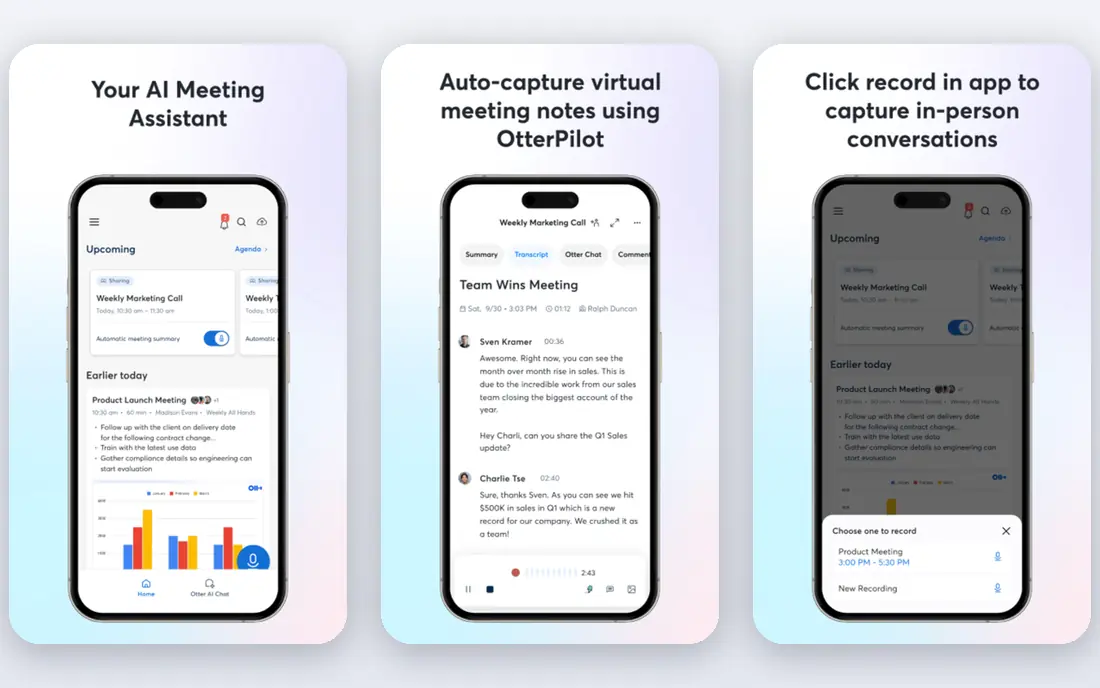
Otter.ai joins Zoom, Google Meet and Microsoft Teams calls and writes down what is said while the meeting is still running, with speaker labels and a live summary. After the call you get notes, action items and a searchable transcript, plus a chat tool that answers questions from your past meetings. For a small business this removes the job of taking notes by hand and gives everyone the same record of what was agreed.
The free Basic plan covers 300 transcription minutes a month, which is enough for a team that meets a few times a week. Pro at $8.33 per user per month on annual billing raises the limit to 1,200 minutes, allows 90 minute conversations and adds 10 file imports a month. The main limits are the 30 minute cap on free conversations and the fact that the deeper admin controls and unlimited meetings sit on the Business plan at $19.99 per user per month on annual billing.
- Live transcription with speaker labels
- Searchable notes with summaries and action items
- Free plan caps conversations at 30 minutes
- Advanced admin controls sit on the Business plan
Fireflies.ai
Ideal for: Searchable meeting history with CRM sync
Fireflies.ai sends a bot into your meetings, records and transcribes them, then files the notes where your team can search them later. Its AskFred assistant can answer questions across your whole meeting history, such as what was promised to a client last month, and the Pro plan syncs notes and action items into HubSpot, Salesforce and other CRMs. That makes it a strong pick for sales led small businesses that need a record of every customer conversation.
The free plan is generous on transcription itself, with unlimited transcription, but storage is limited to 400 minutes of team recordings, so older calls drop off unless you move up. Pro costs $10 per seat per month on annual billing and adds unlimited storage, AskFred and CRM sync. Watch the AI credit meter on the higher plans, since heavy use of the AI features can push the real monthly cost above the headline seat price.
- Unlimited transcription on the free plan
- AskFred answers questions across past meetings
- Free plan storage is limited to 400 minutes
- AI credits add cost on heavy use
Descript
Ideal for: Creators who edit audio by editing text
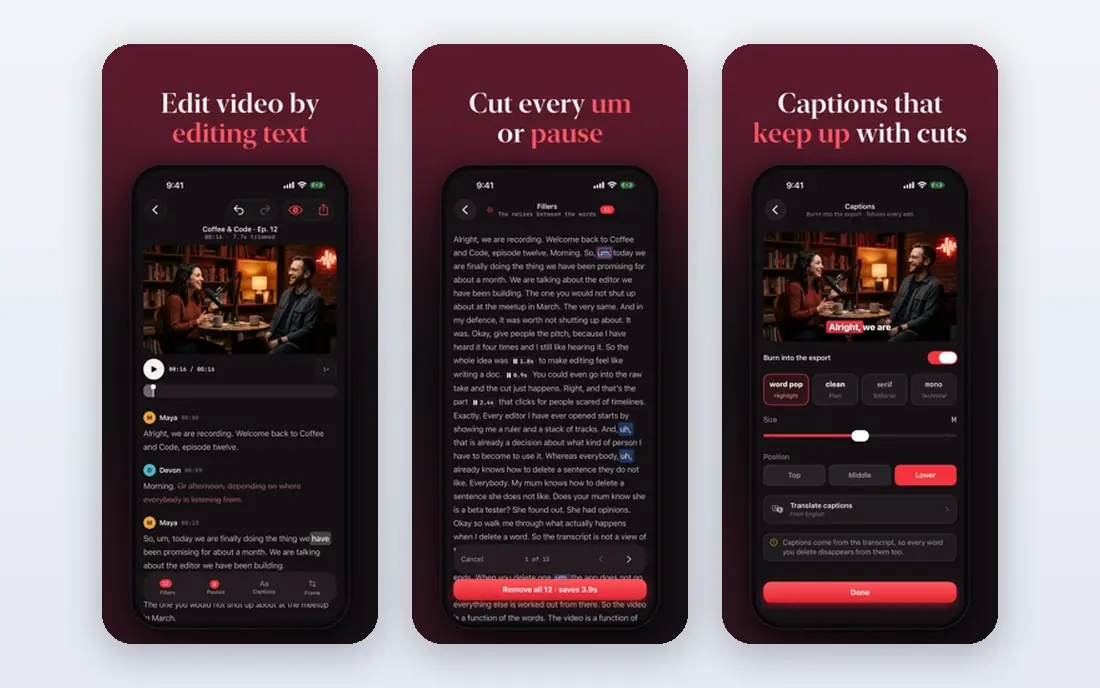
Descript is a different kind of transcription app. It transcribes your audio or video, then lets you edit the recording by editing the words on the page, deleting a sentence removes that part of the audio. It also includes Studio Sound to clean up noisy recordings, Overdub for fixing flubbed words, and captions for social clips. Small businesses that publish a podcast, a course or regular video content will get more from Descript than from a meeting only tool.
The free plan includes 60 media minutes a month, which is enough to test the editor. Hobbyist costs $16 per person per month on annual billing and adds 10 media hours a month. The catch is that Descript meters media minutes, not just transcription, so long raw recordings eat your allowance fast, and it has no meeting bot, so it cannot sit in on a live call and take notes for you.
- Text based editing for audio and video
- Studio Sound cleans up rough recordings
- Meeting transcription is not its main job
- Media hours cap monthly use
Notta
Ideal for: Multilingual meetings on a budget
Notta records live meetings and uploaded files and turns them into transcripts in 58 languages, with translation and a question and answer tool that works across your notes. It runs in the browser and on mobile, and it can import audio from YouTube and cloud drives. For a small business that talks to clients in more than one language, or that needs a cheap way to keep meeting records, Notta is hard to beat on price.
The free plan gives 120 transcription minutes a month, but each conversation is capped at 3 minutes, so it fits short check ins rather than long meetings. Pro at $8.17 per month on annual billing raises the limit to 1,800 minutes and removes the short conversation cap. Accuracy is solid on clear audio, though speaker labels can drift when several people talk over each other in a noisy room.
- 120 free minutes each month
- Transcription in 58 languages
- Free plan caps each conversation at 3 minutes
- Speaker labels can be less exact in noisy rooms
Rev
Ideal for: Human checked transcripts for interviews
Rev is the pick when accuracy matters more than speed, because it offers human transcription by a person who listens to the recording and types it out. Human transcripts run $1.50 per minute and reach about 99 percent accuracy, which is the right choice for legal interviews, research and published quotes. The automated service at $0.25 per minute gives you a fast rough draft you can search and edit yourself.
Rev has no free plan, so every minute is charged, and the subscription plans start at $20 a month for regular automated use. That makes it a poor fit as a daily meeting notes tool, where Otter.ai or Fireflies.ai cost less for the same job. Use Rev for the recordings that must be right, such as a client interview, a deposition or a research session, and use a cheaper tool for routine meetings.
- Human transcription option at $1.50 per minute
- Fast automated drafts for rough cuts
- No free plan, every minute is charged
- Human transcripts cost more and take longer
Trint
Ideal for: Journalists and teams editing transcripts
Trint is built for teams that treat a transcript as a working document. You upload audio or video, get a transcript back quickly, then edit it in a shared editor where colleagues can comment, highlight quotes and export the result to Word or your publishing tool. It supports dozens of languages and handles long files without fuss, which is why newsrooms and research teams use it.
The entry price is the problem for a small business. At $48 per user per month, Trint costs about six times what Notta charges, and there is no free plan beyond a 7 day trial. It earns that price only when several people edit the same transcripts every week. A solo owner who only needs a record of calls will find Otter.ai or Fireflies.ai far cheaper, while a team that publishes from interviews will value the shared editor.
- Collaborative transcript editor
- Fast upload and transcription for long files
- Entry price is high for a small team
- No free plan beyond the trial
Sonix
Ideal for: Pay as you go transcription
Sonix takes a different approach to pricing. Instead of a monthly subscription you can buy transcription by the hour at $10 per hour, which suits a business with uneven volume, such as a firm that records a batch of interviews one month and nothing the next. The browser editor shows timestamps, lets you search the transcript and export it in several formats, and it works in more than 40 languages.
The hourly model turns expensive fast if you transcribe every meeting, since 20 hours of calls a month costs $200, far more than a $10 or $16 subscription. Sonix also puts its AI summary and analysis features on the higher subscription plans, so hourly buyers get transcription and editing only. A 30 minute free trial lets you test accuracy on your own recordings before you spend anything.
- No monthly subscription needed on the hourly plan
- Browser based editor with timestamps
- Costs add up fast at high volume
- AI analysis features sit on higher plans
Temi
Ideal for: Quick low cost transcripts
Temi is the simplest tool on this list. You upload an audio or video file, it transcribes it at $0.25 per minute, and you download the result with speaker labels and timestamps. There is no app to install, no meeting bot to invite and no monthly commitment, which makes it a good pick for a one off job such as transcribing a single interview or a recorded training session.
The trade off is that Temi is a transcription service, not a meeting tool. It cannot join a live call, it has no AI summary or search across past recordings, and accuracy falls off on poor audio or heavy accents. For occasional files it is cheap and fast, since a 30 minute interview costs $7.50. For weekly meetings a subscription tool will cost less over a year.
- Simple upload and download flow
- Speaker labels included at no extra charge
- Accuracy drops on poor audio
- No live meeting recording
TurboScribe
Ideal for: Bulk transcription of long files
TurboScribe is built for volume. For a flat $20 a month you get unlimited transcription, with files up to 10 hours long, which suits businesses that sit on a backlog of recorded calls, lectures or interviews. It transcribes in many languages, exports to common formats and does not charge by the minute, so a heavy month costs the same as a light one.
The free tier allows 3 transcriptions a day, each up to 30 minutes, which is enough to test it on real work. The limits are on the collaboration side. TurboScribe has no meeting bot, no live recording and fewer shared workspace features than Otter.ai or Fireflies.ai. Pick it when you have a pile of files to clear, and pick a meeting tool when you need notes from calls as they happen.
- Flat monthly price for unlimited use
- Handles files up to 10 hours long
- Free tier limits files to 3 per day
- Fewer collaboration features than meeting tools
How we chose
We compared vendor pricing pages, plan pages and help centres for each tool, and checked the free plan limits, the per minute or per hour charges, and the transcription limits that decide the real monthly cost. We favoured tools with a published price and a free plan or trial, and we noted where the headline price hides a meter, such as storage minutes, AI credits or media hours. We did not run hands on tests and we did not accept vendor accuracy claims at face value, so test each tool with your own worst recording before you commit to a year.
What to check before you buy
Check how the tool charges you. A per minute price looks cheap until you multiply it by your real volume, and a per seat price looks dear until you count the meetings it replaces. Test accuracy on your own audio, with your accents, your room noise and your jargon, because a demo on clean speech tells you little. Confirm the export formats you need, such as Word, PDF or SRT, and confirm the tool works with your meeting platform, whether that is Zoom, Google Meet or Microsoft Teams. Finally, check the data policy for recordings, since transcripts of client calls can hold sensitive detail.
| Team size and volume | Best pick | Why it fits | | Solo, under 5 hours a month | Notta | Free 120 minutes, then $8.17 a month | | Small team, weekly meetings | Otter.ai | Live notes and summaries, $8.33 a user a month | | Sales team, every call on record | Fireflies.ai | Unlimited transcription free, CRM sync on Pro | | Creators editing recordings | Descript | Edit audio by editing text, $16 a month | | Occasional long files | TurboScribe | Flat $20 a month, files up to 10 hours | | One off interviews | Temi or Sonix | Pay per minute or per hour, no subscription |
Frequently asked questions
Which transcription app is cheapest for a small business?
Notta is the cheapest subscription pick, at $8.17 per month on annual billing, with 120 free minutes a month. Otter.ai is close at $8.33 per user per month on annual billing. For occasional use, Temi at $0.25 per minute is cheaper still, since a 30 minute interview costs $7.50 and there is no monthly charge.
Do these apps work with Zoom and Google Meet?
Most of them do. Otter.ai and Fireflies.ai send a bot into Zoom, Google Meet and Microsoft Teams calls and transcribe live. Notta records through its browser and mobile apps. Descript, Trint, Sonix, Temi and TurboScribe work from uploaded files instead, so you record the call another way and upload it after.
Is there a good free transcription app?
Yes. Otter.ai gives 300 free minutes a month, Fireflies.ai gives unlimited transcription with 400 minutes of storage, and Notta gives 120 free minutes a month. TurboScribe allows 3 free transcriptions a day. Each free plan has a limit, so check the minutes, the conversation cap and the storage before you rely on it.
How accurate is AI transcription?
On clear audio with one speaker at a time, the leading tools are accurate enough for meeting notes and search. Accuracy falls on poor audio, heavy accents, crosstalk and industry jargon. For anything that must be exact, such as a published quote or a legal record, use a human service such as Rev at $1.50 per minute.
Can I use these apps for client calls?
Yes, with two checks. First, tell the people on the call that it is being recorded, since consent rules differ by place. Second, read the data policy, since transcripts of client calls can hold sensitive detail, and check where the vendor stores recordings and how long it keeps them.