Best Weather App in 2026: 7 Apps Compared
- 1
 Apple WeatherFree weather built into iPhoneVisit
- 2
 AccuWeatherDetailed forecasts and MinuteCastVisit
- 3
 The Weather ChannelPopular app with radar and alertsVisit
- 4
 Carrot WeatherCustomisable weather with personalityVisit
- 5
 WindyBest maps for wind and outdoor useVisit
- Apple Weather suits most iPhone users for a free, simple daily forecast built into their phone.
- AccuWeather and The Weather Channel suit users who want detailed forecasts, radar, and severe weather alerts.
- Carrot Weather suits weather enthusiasts who want customisation and humour, while Windy suits outdoor users who need wind and map detail.
- No forecast is perfect. Check two sources before a major outdoor decision, especially for severe weather, and follow official warnings.
Quick comparison
| Product | Ideal for | Price from | Free version | |
|---|---|---|---|---|
| Apple Weather | Free weather built into iPhone | Free | Yes | Visit |
| AccuWeather | Detailed forecasts and MinuteCast | See website | Yes | Visit |
| The Weather Channel | Popular app with radar and alerts | See website | Yes | Visit |
| Carrot Weather | Customisable weather with personality | See website | No | Visit |
| Windy | Best maps for wind and outdoor use | See website | Yes | Visit |
 MyRadar Weather Radar | Best dedicated radar app | See website | Yes | Visit |
 Weather Underground | Local stations and detailed data | See website | Yes | Visit |
The best weather apps
We compared official feature pages, pricing pages, app store listings, privacy policies and public reviews to build this list, focusing on products that fit the topic closely and are still available in October 2026.
Apple Weather
Ideal for: Free weather built into iPhone

Apple Weather is the best free weather app for iPhone users, built into every iPhone, iPad, and Mac. It offers clean hourly and 10-day forecasts, precipitation maps, air quality in many areas, and severe weather alerts where available. That simplicity means most iPhone users need no other weather app for daily use.
Apple Weather is Apple only, and radar detail, custom alerts, and specialist data lag apps like Carrot Weather or Windy. Some features also vary by region. Apple Weather suits iPhone users who want a free, simple forecast, with a specialist app added for outdoor or severe weather needs.
- Free on iPhone, iPad, and Mac
- Clean hourly and 10-day forecasts
- Severe weather alerts in many areas
- Apple only
- Radar and detail lag specialist apps
- Some features vary by region
AccuWeather
Ideal for: Detailed forecasts and MinuteCast
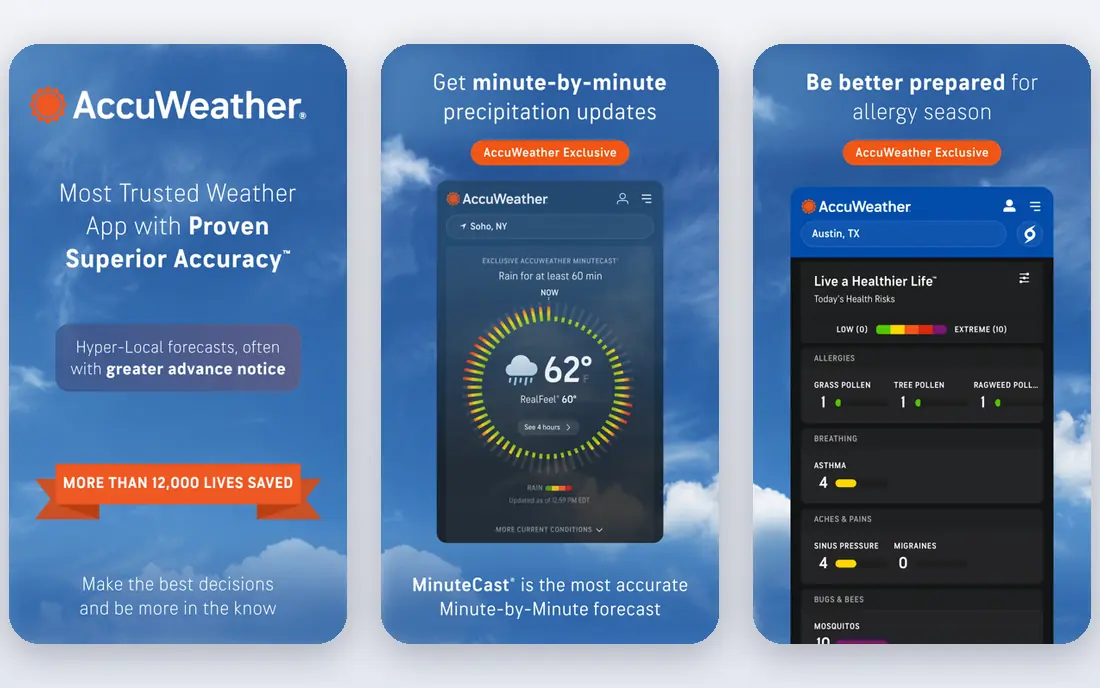
AccuWeather suits users who want detail, especially MinuteCast, which gives minute-by-minute precipitation forecasts for your location. Hourly forecasts, RealFeel temperature, severe weather alerts, and radar help you plan outdoor activities, commutes, and travel with more precision than a basic app.
The free tier has ads, and full features, including ad-free use and extended forecasts, need a Premium subscription. The interface can also feel busy. AccuWeather suits daily users who want detailed, location-specific forecasts and are willing to pay to remove ads.
- MinuteCast minute-by-minute precipitation
- Detailed hourly forecasts
- Severe weather alerts
- Ads in free tier
- Full features need Premium
- Interface can feel busy
The Weather Channel
Ideal for: Popular app with radar and alerts
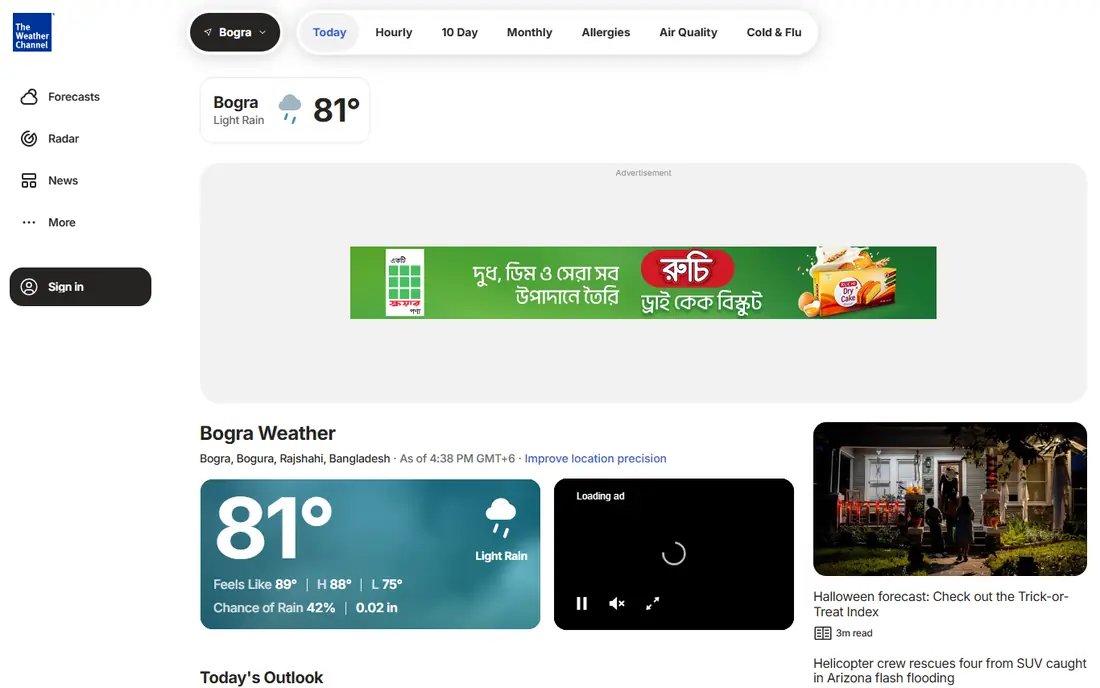
The Weather Channel app suits users who want radar, maps, and severe weather coverage in one popular app. Radar animations, storm tracking, and video forecasts help during severe weather, while hourly and 10-day forecasts cover daily planning. That breadth makes it a common default weather app in the US.
The free tier has ads, and Premium is needed for ad-free use and some advanced features. The interface has many sections, which can feel cluttered. The Weather Channel suits users who want radar and severe weather news alongside daily forecasts, especially in storm-prone areas.
- Strong radar and maps
- Severe weather alerts
- Video forecasts and news
- Ads in free tier
- Full features need Premium
- Interface has many sections
Carrot Weather
Ideal for: Customisable weather with personality
Carrot Weather suits weather enthusiasts who want control. You can customise the interface, choose data sources, set detailed alerts, and enjoy a sarcastic or friendly personality that comments on the forecast. That customisation, plus Apple Watch and widget support, makes it a favourite among power users.
A subscription is needed for full features, and the humour will not suit everyone, though it can be toned down. Setup also takes time to get the layout right. Carrot Weather suits enthusiasts who check weather often and want a personalised app, rather than a simple daily forecast.
- Highly customisable interface and alerts
- Multiple data sources
- Fun personality and humour
- Subscription needed
- Humour is not for everyone
- Setup takes time to customise
Windy
Ideal for: Best maps for wind and outdoor use
Windy is the best weather app for outdoor users who need maps, not just a daily forecast. It shows detailed wind, rain, temperature, and wave maps from multiple forecast models, which helps sailors, pilots, surfers, hikers, and photographers plan around wind and weather systems. That map depth is unmatched by general apps.
The interface is technical and can overwhelm a casual user who only wants tomorrow temperature. Windy suits outdoor enthusiasts, pilots, and sailors who understand forecast models and need wind detail. Casual users should use Apple Weather for daily forecasts and Windy for outdoor trips.
- Detailed wind, rain, and wave maps
- Multiple forecast models
- Excellent for sailing and flying
- Interface is technical
- Daily forecast simplicity lags Apple Weather
MyRadar Weather Radar
Ideal for: Best dedicated radar app
MyRadar suits users who mainly want radar, such as storm watchers, drivers, and outdoor planners. Radar animations are smooth and detailed, with storm tracks, warnings, and layers that help you see rain and storms moving in real time. That focus makes MyRadar faster for radar than a general weather app.
Forecast features, such as 10-day outlooks and detailed hourly data, are thinner than AccuWeather or The Weather Channel. Some advanced layers need a paid upgrade. MyRadar suits radar-first users, paired with Apple or AccuWeather for daily forecasts.
- Excellent radar animations
- Storm tracks
- Simple and fast radar view
- Forecast features are thinner than full weather apps
- Some features need a paid upgrade
Weather Underground
Ideal for: Local stations and detailed data
Weather Underground suits users who want hyperlocal weather from personal weather stations near their home, which can differ from a city forecast in hills, valleys, or coastal areas. Detailed history, graphs, and station data help gardeners, runners, and local planners understand microclimates.
The free tier has ads, the interface can feel dated, and full features need a Premium subscription. Weather Underground suits users who care about local station data and history, rather than a simple daily forecast. Pair it with a radar app for storm tracking.
- Hyperlocal data from personal weather stations
- Detailed history
- Good for local microclimates
- Ads in free tier
- Interface can feel dated
- Full features need Premium
How we picked these
We compared official feature pages, pricing pages, app store listings, privacy policies and public reviews for each option in this guide. We checked that each product is still offered in October 2026, that its homepage loads, and that its price or free tier could be confirmed or marked as See website when it could not. We did not claim hands-on testing. We favoured products that fit the topic closely, explain their limits clearly, and give readers a practical way to try them before paying. Where prices change often, we say so and point readers to the vendor page for the current figure.
How to choose a weather app
Start with Apple Weather on iPhone for daily forecasts, since it is free and simple. Add AccuWeather or The Weather Channel for detailed forecasts and severe weather alerts, Carrot Weather for customisation, Windy for outdoor wind and maps, or MyRadar for radar. For severe weather, follow official warnings from the National Weather Service, not just an app forecast.
Set up severe weather alerts for each place you care about, not only your home address. Add your work address, a school or care location, and any place you travel to often, and check whether alerts arrive as a push notification, a text, or only inside the app. Test the alert sound and the wording during a minor weather event, so you know what a real warning will look and sound like before a storm arrives. Also check whether the app shows radar, wind, and precipitation for the same location in one view, since switching between separate screens slows you down when conditions change fast. If an alert arrives late or without a clear location, switch to a second source for warnings and keep the first app for daily forecasts only.
Before you pay,try the free tier or trial first and check the exact limits that matter to you, such as device support, export options, or cancellation terms. Read the privacy policy for any app that handles personal, financial, or health data, and check whether your data can be exported or deleted. The cheapest option is not always the best value if it lacks a feature you will use every week, and the most expensive option is rarely worth it if you only need the basics.
Frequently asked questions
What is the best weather app overall?
Apple Weather is best free for iPhone users, and AccuWeather is best for detailed forecasts. Carrot Weather is best for customisation, while Windy is best for outdoor maps.
Are weather apps free?
Apple Weather is free, while AccuWeather, The Weather Channel, Windy, MyRadar, and Weather Underground offer free tiers with ads or limits. Carrot Weather requires a subscription for full features.
Which weather app is most accurate?
Accuracy varies by location, forecast model, and time horizon, and no app is most accurate everywhere. Check two sources before an important outdoor decision, and compare their forecasts for your exact location over time.
What is the best weather app for severe weather?
The Weather Channel, AccuWeather, and MyRadar all offer severe weather alerts and radar, but always follow official warnings from the National Weather Service for tornadoes, hurricanes, and other dangerous weather.
Do weather apps work offline?
Most weather apps need internet for fresh forecasts and radar, though some cache the last forecast. Download offline maps or check forecasts before entering areas with poor signal, especially for hiking or sailing.