8 Best Web Deployment Software for Developers

- 1
 VercelFrontend and Next.js apps with Git-based preview deploysVisit
- 2
 NetlifyMarketing sites, portfolios, docs, and full-stack apps deployed from GitVisit
- 3
 RenderFull-stack apps and APIs with managed PostgresVisit
- 4
 RailwayFull-stack apps and databases with usage-based billingVisit
- 5
 Fly.ioGlobally distributed apps and APIs on microVMsVisit
- Vercel and Netlify suit frontend work best, with Git-based deploys, preview URLs, and free tiers for personal projects.
- Render, Railway, and DigitalOcean App Platform suit full-stack apps, with managed databases and flat or usage-based entry prices from $5 per month.
- Fly.io and AWS Amplify suit apps that need global reach or a close link to AWS services, but both use metered pricing that needs care.
- Heroku remains the simplest git-push option for teams that want managed Postgres and little setup, with entry dynos from $5 per month.
- Free tiers have real limits, such as sleep after idle time, credit caps, and short expiry windows, so check them before you commit.
Quick comparison
| Product | Ideal for | Price from | Free version | |
|---|---|---|---|---|
| Vercel | Frontend and Next.js apps with Git-based preview deploys | $20 per deploying seat/month (Pro), Hobby $0 | Yes (Hobby) | Visit |
| Netlify | Marketing sites, portfolios, docs, and full-stack apps deployed from Git | $9 per month (Personal), Pro $20/month, Free $0 | Yes | Visit |
| Render | Full-stack apps and APIs with managed Postgres | $7 per month (web service, 512 MB), Hobby workspace $0, Pro $25/month flat | Yes (750 free instance-hours per workspace/month) | Visit |
| Railway | Full-stack apps and databases with usage-based billing | $5 per month (Hobby), Pro $20/month per workspace | Yes ($0 with $1 monthly usage credit; plus 30-day trial, $5 credit) | Visit |
| Fly.io | Globally distributed apps and APIs on microVMs | $2.19 per 30 days (smallest shared-cpu-1x Machine, 256 MB), pay as you go, no platform fee | Free trial ($1 credit, 7 days) | Visit |
 Heroku | Teams wanting ops-free git-push deploys with managed Postgres | $5 per month (Eco dyno), Basic $7/month | No | Visit |
 DigitalOcean App Platform | Predictable flat-rate hosting for full-stack apps and APIs deployed from Git | $5 per month (Basic container, 1 shared vCPU, 512 MiB) | Yes, static sites only (up to 3 free static apps) | Visit |
 AWS Amplify | Frontend and full-stack apps already on AWS, especially Next.js with SSR | $0 under the Free Tier for 12 months, then pay as you go ($0.01 per build minute, $0.15 per GB served) | Yes (AWS Free Tier, 12 months) | Visit |
The best web deployment software for developers
Vercel
Ideal for: Frontend and Next.js apps with Git-based preview deploys
Vercel connects to a Git repository and deploys on every push, with a preview URL for each pull request. That flow fits teams that review frontend changes in the browser before merging, and it fits solo developers who want a short path from commit to live URL.
The Hobby tier costs $0 and suits personal projects and learning, but its limits matter. Hobby is personal and non-commercial only, with hard caps of 100 GB transfer and 1M invocations, and there is no way to buy extra usage. A project that passes those caps needs to move to Pro, which costs $20 per deploying seat per month.
- Preview deploys for every pull request
- Strong fit for Next.js, with edge and serverless support
- Hobby is personal, non-commercial only, with hard caps (100 GB transfer, 1M invocations) and no way to buy extra usage
Netlify
Ideal for: Marketing sites, portfolios, docs, and full-stack apps deployed from Git
Netlify deploys from Git with a build step, a global content network, and a preview URL for each pull request. That setup suits marketing sites, portfolios, documentation, and small full-stack apps, where the team wants fast deploys and little server setup.
The Free tier costs $0 and works for personal sites and small projects, but its 300 monthly credits are a hard limit. Projects pause when credits run out, and the Free tier cannot buy more credits. The Personal tier costs $9 per month, and Pro costs $20 per month, with higher limits and team features.
- Simple Git-based deploys with preview URLs
- Broad support for static sites, serverless functions, and forms
- Free plan's 300 monthly credits are a hard limit
- Projects pause when credits run out and Free cannot buy more
Render
Ideal for: Full-stack apps and APIs with managed Postgres
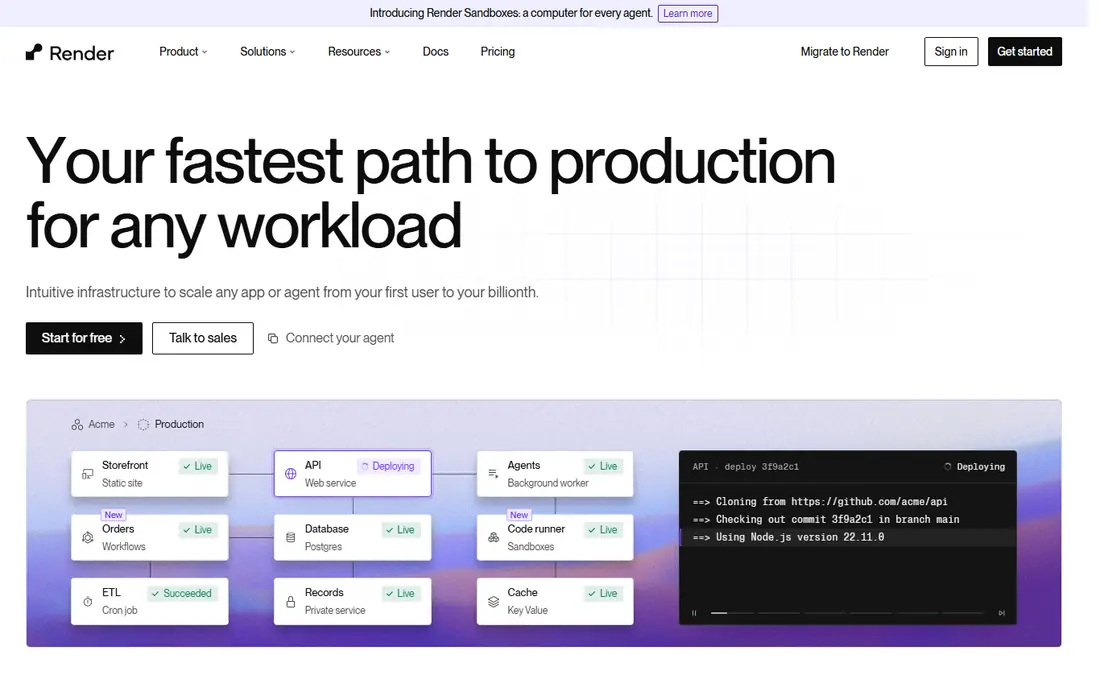
Render hosts web services, background workers, cron jobs, static sites, and managed Postgres from one dashboard. A developer can push from Git, set environment variables, and add a database without managing servers or containers by hand. The Hobby workspace costs $0, a web service with 512 MB costs $7 per month, and Pro costs $25 per month flat.
The free tier has two limits that shape how it can be used. Free web services spin down after 15 minutes idle, so the first request after a quiet period waits for the service to start again. Free Postgres expires 30 days after creation, so it suits a short test rather than a lasting database.
- Managed Postgres and other managed services in the same dashboard
- Clear flat pricing for workspaces and services
- Free web services spin down after 15 minutes idle, and free Postgres expires 30 days after creation
Railway
Ideal for: Full-stack apps and databases with usage-based billing
Railway runs apps, APIs, workers, and databases on one platform, with billing based on measured use per second. A developer can deploy from Git, pick a template, or add Postgres, Redis, MySQL, or MongoDB from the dashboard. The Hobby tier costs $5 per month, and Pro costs $20 per month per workspace.
The free tier costs $0 and includes a $1 monthly usage credit, plus a 30-day trial with a $5 credit. That is enough to test a small app and database, but it is not a lasting home for a production service. Because billing is metered per second with no fixed monthly cap, usage past the included credit bills on top, and totals are hard to predict.
- Usage-based billing for apps and databases together
- Quick deploys from Git or a template
- Per-second metered billing has no fixed monthly cap, so usage past the included credit bills on top and totals are hard to predict
Fly.io
Ideal for: Globally distributed apps and APIs on microVMs
Fly.io runs apps as Machines, which are small microVMs that can run in many regions around the world. A developer can deploy a Docker image, a Dockerfile, or a supported framework app, then scale Machines up or down and attach volumes for lasting storage. The smallest shared-cpu-1x Machine with 256 MB costs $2.19 per 30 days, with pay as you go billing and no platform fee.
There is no free tier for new organisations, only a free trial with a $1 credit for 7 days. There is also no built-in spend cap, so billing starts from the first running second and grows with the Machines that stay running.
- Runs apps close to users in many regions on microVMs
- Flexible Machine sizes and volumes
- No free tier for new organisations and no built-in spend cap, so billing starts from the first running second
Heroku
Ideal for: Teams wanting ops-free git-push deploys with managed Postgres
Heroku deploys with a git push, builds the app from the repository, and runs it on dynos, which are managed containers. Add-ons cover Postgres, Redis, logging, and monitoring, so a team can run a full app and database without managing servers. The Eco dyno costs $5 per month, and Basic costs $7 per month.
Heroku removed free dynos in November 2022, so there is no free tier. The Eco tier has a limit that matters for always-on use: Eco dynos sleep after 30 minutes idle, and the 1,000-hour pool is shared by all Eco dynos on the account. A project with several Eco dynos can use the pool faster than a single dyno would.
- Simple git-push deploys with add-ons for Postgres, Redis, and logging
- Little server setup
- Eco dynos sleep after 30 minutes idle and the 1,000-hour pool is shared by all Eco dynos on the account
DigitalOcean App Platform
Ideal for: Predictable flat-rate hosting for full-stack apps and APIs deployed from Git
DigitalOcean App Platform deploys apps from Git, builds them, and runs them in containers with a set monthly price. A Basic container with 1 shared vCPU and 512 MiB costs $5 per month, and larger containers cost more at fixed monthly rates. Managed databases, workers, and jobs can sit beside the app, and the platform handles HTTPS, rollbacks, and autoscaling settings.
The free tier covers static sites only, with up to 3 free static apps. Dynamic apps, workers, and databases are all priced from $5 per month, so a full-stack app needs a priced container from the start. That split is easy to plan around: a docs site or landing page can stay free, while an API or app with a database carries a known monthly cost.
- Flat monthly pricing per container, with autoscaling options
- Deploys from Git with managed databases available
- Free tier covers static sites only
- Dynamic apps, workers, and databases are all priced from $5/month
AWS Amplify
Ideal for: Frontend and full-stack apps already on AWS, especially Next.js with SSR
AWS Amplify hosts frontend and full-stack apps, builds from Git, and links to AWS services such as auth, storage, and data. It suits teams already on AWS, and it suits Next.js apps that need server-side rendering, since Amplify handles SSR hosting and routing. The Free Tier costs $0 for 12 months, then billing is pay as you go at $0.01 per build minute and $0.15 per GB served, with other rates for SSR requests and duration.
The Free Tier gives 12 months at $0, which suits a first project or a move from another host. After that, billing is pay as you go, so a month with few builds and light traffic costs little. Teams should watch the separate meters for build minutes, storage, transfer, and SSR use, and should check the pricing page before launch.
- Deep link to AWS services, with hosting, build, and backend features in one console
- Strong Next.js SSR support
- No flat monthly price
- Billing spans several separate meters (build minutes, storage, transfer, SSR requests and duration), making costs hard to forecast
How we chose
We compared the vendor pricing pages, docs, and feature pages for each tool, and we used only the facts and prices given in the research for this article. We did not claim hands-on testing, and we did not use third-party ratings or awards. Prices read directly from vendor pages on 12 Nov 2026 were Netlify, Fly.io, DigitalOcean App Platform, and AWS Amplify. Prices corroborated from earlier vendor-page reads, with the pages re-opened on 12 Nov 2026, were Vercel, from reads on 1, 5, and 10 Nov 2026; Render, from reads on 1 to 19 Oct 2026; Railway, from a read on 5 Nov 2026; and Heroku, from the Heroku help site and a vendor-page read on 5 Nov 2026.
What to check before you buy
Check the free tier first, and read the exact limits on the vendor page. Sleep after idle time, credit caps, and expiry windows change how a free tier behaves in practice. A free web service that sleeps after 15 or 30 minutes idle is fine for a demo, but it is a poor fit for an app that must answer at once. A credit-based free tier that pauses a project when credits run out needs a priced tier before traffic grows. Count the meters on a usage-based host, since build minutes, transfer, storage, and request counts can each add to the bill.
| Team or budget | Best pick from this list | Why it fits | Watch out for |
|---|---|---|---|
| Solo developer, personal site, $0 budget | Vercel Hobby or Netlify Free | Free tier, Git deploys, preview URLs | Vercel Hobby caps at 100 GB transfer and 1M invocations; Netlify Free pauses at 300 credits |
| Solo developer, small app with a database, about $5 to $10 per month | Render or DigitalOcean App Platform | Flat entry price from $5 to $7 per month, managed database option | Render free Postgres expires after 30 days; DigitalOcean free tier is static sites only |
| Small team, full-stack app, about $20 per month | Railway Pro or Vercel Pro | Team workspaces, usage-based or seat-based pricing | Railway has no fixed monthly cap; Vercel Pro is $20 per deploying seat |
| Team needing global reach or AWS services | Fly.io or AWS Amplify | Multi-region Machines or AWS link with SSR support | Fly.io has no free tier and no spend cap; Amplify bills across several meters |
| Team wanting the simplest git-push flow | Heroku | Git-push deploys with managed Postgres add-ons | Eco dynos sleep after 30 minutes idle; no free tier |
Frequently asked questions
Which web deployment software is best for a Next.js app?
Vercel is the most direct pick for a Next.js app, since it is built around that framework, with Git-based deploys and preview URLs for each pull request. AWS Amplify is also a strong pick for Next.js with server-side rendering, especially for teams already on AWS. Netlify supports Next.js as well.
What is the cheapest way to host a full-stack app from this list?
Fly.io has the lowest entry figure at $2.19 per 30 days for the smallest shared-cpu-1x Machine, and Render and DigitalOcean App Platform start at $7 and $5 per month for a small web service or container. Heroku Eco starts at $5 per month, and Railway Hobby also starts at $5 per month.
Do any of these tools have a free plan for a real app?
Yes, several do, but each free tier has limits that shape what it can run. Vercel Hobby and Netlify Free suit personal sites and small projects, while Render gives 750 free instance-hours per workspace per month. Railway gives a $1 monthly usage credit, and AWS Amplify gives a Free Tier for 12 months.
How do I avoid a surprise bill on a usage-based host?
Start by reading the pricing page for every meter, such as build minutes, transfer, storage, and request counts. Then set usage alerts where the platform offers them, and check the dashboard often during the first month. Stop test Machines and services when they are not needed, since metered hosts bill from the first running second.
Should I pick a flat-rate host or a metered host?
Pick a flat-rate host when the app has steady traffic and you want a known monthly figure, such as a $5 container on DigitalOcean App Platform or a $7 web service on Render. Pick a metered host when traffic varies a lot and quiet periods should cost less, such as Fly.io or AWS Amplify.