Best website analytics tools in 2026: 7 Options Compared

- 1
 Google AnalyticsFree all-round analytics for most sitesVisit
- 2
 Plausible AnalyticsPrivacy-friendly analytics without cookiesVisit
- 3
 MatomoSelf-hosted analytics with full data controlVisit
- 4
 Adobe AnalyticsEnterprise sites in the Adobe stackVisit
- 5
 MixpanelProduct analytics for apps and funnelsVisit
- Decide first whether you need deep marketing attribution or simple traffic counts.
- Privacy-first tools avoid cookies and personal data, which suits sites with strict privacy rules.
- Check data retention and sampling on free tiers, since both affect long-term reporting.
- Make sure the tool works with your consent setup and your region's privacy rules.
Quick comparison
| Product | Ideal for | Price from | Free version | |
|---|---|---|---|---|
| Google Analytics | Free all-round analytics for most sites | Free | Yes | Visit |
| Plausible Analytics | Privacy-friendly analytics without cookies | See website | Free trial | Visit |
| Matomo | Self-hosted analytics with full data control | Free | Yes | Visit |
| Adobe Analytics | Enterprise sites in the Adobe stack | See website | No | Visit |
| Mixpanel | Product analytics for apps and funnels | Free | Yes | Visit |
 Heap | Automatic event capture without tagging plans | Free | Yes | Visit |
 Fathom Analytics | Simple privacy-first traffic stats | See website | Free trial | Visit |
The best website analytics tools
Website analytics range from free all-rounders to privacy-first tools that skip cookies. We compared official feature pages and pricing to find tools that cover traffic, behavior, and reporting without inventing metrics.
Google Analytics
Ideal for: Free all-round analytics for most sites
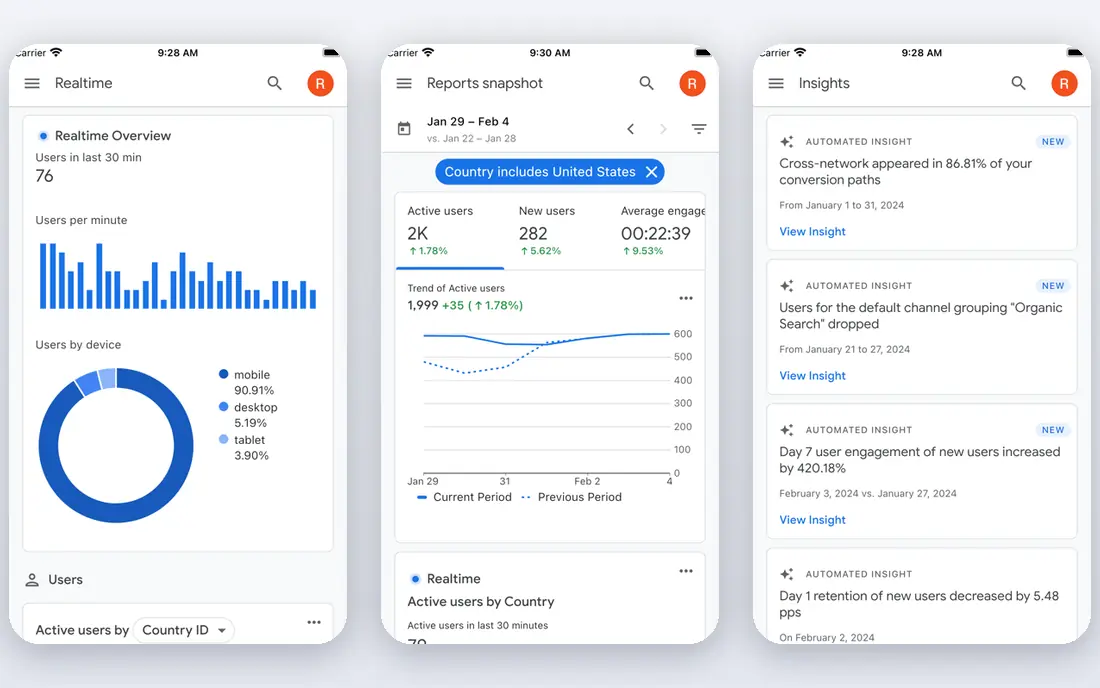
For readers weighing options, Google Analytics deserves a close look. Google Analytics fits most sites that want a free, capable analytics tool with wide support. Reports cover acquisition, behavior, and conversions, and integrations with Google tools are extensive.
On pricing, the starting point is listed as Free, with a free plan status of Yes. That pricing picture should be checked on the vendor site before you commit, since tiers and limits change. In daily use, the strengths above are what most buyers will notice first, and they explain why this option keeps appearing in comparisons of best website analytics tools.
The honest catch is this: The catch is privacy and complexity: consent setup needs care, and beginners face a large interface. Weigh that against the strengths before you sign up, and use a trial or free tier first when one is offered. Our pick for most people is not always the same as the best pick for you, so match the trade-off to your own budget, team size, and patience for setup.
- Free for most use
- Deep reports and integrations
- Widely supported
- Privacy setup needs care
- Interface can overwhelm beginners
Plausible Analytics
Ideal for: Privacy-friendly analytics without cookies
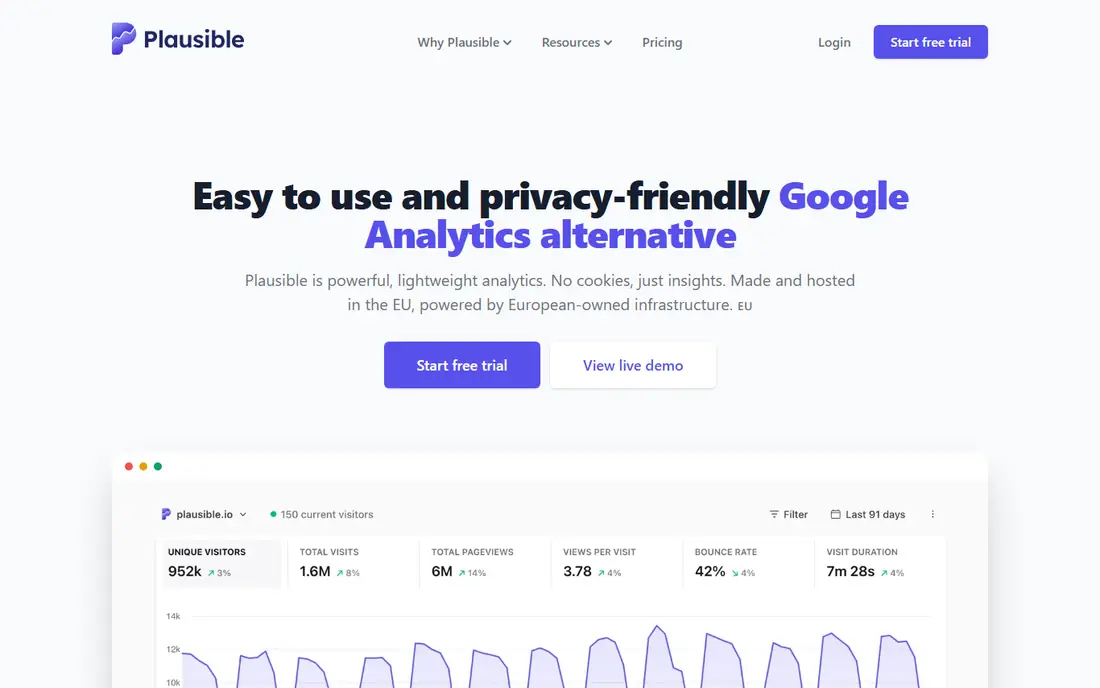
Plausible Analytics is the pick to consider first if privacy-friendly analytics without cookies is your priority. Plausible Analytics fits sites that want clean traffic numbers without cookies or personal data collection. The dashboard is simple, the script is light, and privacy compliance is easier to explain.
On pricing, the starting point is listed as See website, with a free plan status of Free trial. That pricing picture should be checked on the vendor site before you commit, since tiers and limits change. In daily use, the strengths above are what most buyers will notice first, and they explain why this option keeps appearing in comparisons of best website analytics tools.
The honest catch is this: The trade-off is depth: marketers needing deep attribution may still want a fuller tool alongside it. Weigh that against the strengths before you sign up, and use a trial or free tier first when one is offered. Our pick for most people is not always the same as the best pick for you, so match the trade-off to your own budget, team size, and patience for setup.
- Cookieless tracking
- Simple dashboards
- Lightweight script
- No free tier
- Less depth than Google Analytics for marketing attribution
Matomo
Ideal for: Self-hosted analytics with full data control

What sets Matomo apart is how well it handles self-hosted analytics with full data control. Matomo fits teams that want to own their analytics data outright, including on their own servers. Self-hosting gives full control, and privacy controls are a core feature rather than an add-on.
On pricing, the starting point is listed as Free, with a free plan status of Yes. That pricing picture should be checked on the vendor site before you commit, since tiers and limits change. In daily use, the strengths above are what most buyers will notice first, and they explain why this option keeps appearing in comparisons of best website analytics tools.
The honest catch is this: The catch is maintenance: running your own instance takes technical time, though a paid cloud option exists. Weigh that against the strengths before you sign up, and use a trial or free tier first when one is offered. Our pick for most people is not always the same as the best pick for you, so match the trade-off to your own budget, team size, and patience for setup.
- Self-hosting option
- Full data ownership
- Strong privacy controls
- Self-hosting needs technical care
- Cloud version is paid
Adobe Analytics
Ideal for: Enterprise sites in the Adobe stack
If enterprise sites in the adobe stack matters most to you, Adobe Analytics belongs on your shortlist. Adobe Analytics fits large sites already using Adobe tools that need deep analysis and segmentation. Analysis Workspace lets analysts slice data in ways simpler tools cannot match.
On pricing, the starting point is listed as See website, with a free plan status of No. That pricing picture should be checked on the vendor site before you commit, since tiers and limits change. In daily use, the strengths above are what most buyers will notice first, and they explain why this option keeps appearing in comparisons of best website analytics tools.
The honest catch is this: Small sites should look elsewhere: pricing and complexity are aimed at enterprise teams. Weigh that against the strengths before you sign up, and use a trial or free tier first when one is offered. Our pick for most people is not always the same as the best pick for you, so match the trade-off to your own budget, team size, and patience for setup.
- Deep segmentation and analysis
- Enterprise integrations
- Real-time data
- Enterprise pricing and complexity
- Overkill for small sites
Mixpanel
Ideal for: Product analytics for apps and funnels
Mixpanel earns its place here by doing product analytics for apps and funnels well. Mixpanel fits product teams that want to understand what users do inside an app, not just which pages they visit. Event funnels and retention reports answer product questions that pageview tools cannot.
On pricing, the starting point is listed as Free, with a free plan status of Yes. That pricing picture should be checked on the vendor site before you commit, since tiers and limits change. In daily use, the strengths above are what most buyers will notice first, and they explain why this option keeps appearing in comparisons of best website analytics tools.
The honest catch is this: The catch is setup: events must be planned and instrumented, and costs scale with event volume. Weigh that against the strengths before you sign up, and use a trial or free tier first when one is offered. Our pick for most people is not always the same as the best pick for you, so match the trade-off to your own budget, team size, and patience for setup.
- Event-based product analytics
- Funnels and retention reports
- Free tier
- Learning curve for event setup
- Pricing scales with events
Heap
Ideal for: Automatic event capture without tagging plans
Start with Heap when automatic event capture without tagging plans is the main job to be done. Heap fits teams that want to analyze user behavior without planning every event in advance. Automatic capture means you can ask new questions about past behavior, which planned tagging cannot do.
On pricing, the starting point is listed as Free, with a free plan status of Yes. That pricing picture should be checked on the vendor site before you commit, since tiers and limits change. In daily use, the strengths above are what most buyers will notice first, and they explain why this option keeps appearing in comparisons of best website analytics tools.
The honest catch is this: Costs scale with session volume, so high-traffic sites should check pricing tiers carefully. Weigh that against the strengths before you sign up, and use a trial or free tier first when one is offered. Our pick for most people is not always the same as the best pick for you, so match the trade-off to your own budget, team size, and patience for setup.
- Automatic capture of user actions
- Retroactive analysis
- Session replays on some plans
- Pricing scales with sessions
- Advanced analysis needs learning
Fathom Analytics
Ideal for: Simple privacy-first traffic stats
Fathom Analytics is worth your attention for anyone focused on simple privacy-first traffic stats. Fathom Analytics fits site owners who want honest traffic numbers and a privacy story they can stand behind. Reports are simple by design, the script is fast, and no cookies are used.
On pricing, the starting point is listed as See website, with a free plan status of Free trial. That pricing picture should be checked on the vendor site before you commit, since tiers and limits change. In daily use, the strengths above are what most buyers will notice first, and they explain why this option keeps appearing in comparisons of best website analytics tools.
The honest catch is this: The trade-off is depth: if you need funnels and cohorts, a product analytics tool will go further. Weigh that against the strengths before you sign up, and use a trial or free tier first when one is offered. Our pick for most people is not always the same as the best pick for you, so match the trade-off to your own budget, team size, and patience for setup.
- Cookieless and privacy-focused
- Simple reports
- Fast script
- No free tier
- Reporting depth is deliberately simple
How we picked these
We compared official feature pages, pricing pages, app store listings, privacy policies, and public reviews for best website analytics tools. We kept only products that exist and work in October 2026 and truly fit the topic, and we favored options with clear pricing, a usable free tier or trial where one is offered, and honest weaknesses we could name. We did not claim hands-on testing we did not do, and where a price could not be verified from the vendor, we wrote See website instead of guessing.
Choosing analytics that match your privacy stance
Start by writing down the one job this purchase must do well. For best website analytics tools, that job decides most of the choice, since the options above trade depth for simplicity in different ways. A tool that does everything may still be the wrong pick if its everyday workflow feels heavy for your team or household.
Next, test the shortlist in real conditions. Use a free tier or trial, invite the people who will use it daily, and run one realistic task end to end. Watch for friction in setup, billing, and support, since those are the costs that show up after the first week. Also check data export and cancellation terms before you build a habit around a tool.
Finally, compare total cost, not just the starting price. Seat counts, usage limits, add-ons, and renewal rates can move the monthly total well past the advertised figure. A slightly plainer tool at a fair price often beats a feature-rich option that nobody on your team enjoys using.
Frequently asked questions
Which best website analytics tools is best for most people?
There is no single winner for everyone, since the best pick depends on budget and needs. From this list, start with the options whose best-for notes match your main job, then test two or three on a free tier or trial before deciding. The comparison table above is a good place to narrow the field.
Is there a free best website analytics tools option?
Yes, several options in this list offer a free tier or a free trial, and the table shows which ones. Free tiers usually limit features, usage, or seats, so check those limits against your actual use before relying on a free plan for important work.
How much does best website analytics tools cost?
Costs vary widely across this list, from free tiers to enterprise pricing by quote. The starting price column gives the vendor position where we could state it plainly, and See website means you should check the vendor pricing page for current figures. Always check renewal rates as well as first-year prices.
Can I switch later if I pick the wrong best website analytics tools?
In most cases yes, but switching costs time and sometimes data migration work. Before committing, check export options and contract terms, and avoid storing everything in a format only one vendor can read. A short trial first reduces the chance you need to switch at all.
What should I check before signing up?
Check pricing tiers, free limits, support hours, privacy terms, and cancellation rules on the vendor site. For team tools, also check seat pricing and permission controls. Reading those pages takes minutes and prevents most common regrets.