Best Sora AI Alternatives (2026): 7 Options Compared

- 1
 InVideo AIVideo from a script or promptVisit
- 2
 KaiberMusic and stylized videoVisit
- 3
 PikaShort social clips and effectsVisit
- 4
 Veo 3.1Realistic clips with native audioVisit
- 5
 Luma Dream MachineQuick text and image to videoVisit
- InVideo AI sits first on this list: video from a script or prompt.
- The main caution on Kaiber: less suited to photorealistic scenes.
- Runway is the lowest-priced starter here at $12 per month.
- Hailuo AI suits budget-friendly short video generation.
Direct answer
For video from a script or prompt, InVideo AI is where this list starts. Look at Kaiber for music and stylized video, and at Pika for short social clips and effects. The other 4 tools in the list cover narrower or pricier cases.
Quick comparison
| Product | Ideal for | Price from | Free version | |
|---|---|---|---|---|
| InVideo AI | Video from a script or prompt | See website | Yes | Visit |
| Kaiber | Music and stylized video | See website | Free trial | Visit |
| Pika | Short social clips and effects | See website | Yes | Visit |
| Veo 3.1 | Realistic clips with native audio | $19.99 per month | Free trial | Visit |
| Luma Dream Machine | Quick text and image to video | See website | Yes | Visit |
 Runway | Editing control and video tools | $12 per month | Yes | Visit |
 Hailuo AI | Low-cost short video generation | $14.99 a month | Yes | Visit |
Sora AI, one by one
This Ainotely guide covers 7 options for Sora AI. Each profile lists a starting price, free plan details, strengths and drawbacks, so you can drop poor fits quickly.
InVideo AI
Ideal for: Video from a script or prompt

InVideo AI serves video from a script or prompt. A free plan lets you test the editor before paying.
Highlights: Script-to-video workflow.
In daily use, InVideo suits marketers and small teams who require complete videos quick, not only raw clips. AI-generated clips inside a bigger editor may not match the realism of a dedicated video model, and you may still have to edit scenes by hand. Pricing for InVideo AI is not stated here, so ask the vendor for current figures. InVideo AI includes a free tier. Trade-offs to know: Output quality varies by prompt.
- A decent match for explainers
- Stock media and voiceover choices
- AI video clips are part of a wider editor
Kaiber
Ideal for: Music and stylized video

Kaiber is a good fit for music and stylized video. Kaiber stands out for music videos and stylized visuals.
Where it falls short: Pricing needs a plan check.
Kaiber suits creative projects where style, rhythm, and mood matter more than realism. Check the vendor site for Kaiber pricing; none is listed in this comparison. Free plan details: Free trial.
- Capable for music visuals
- Stylized animation choices
- Less suited to photorealistic scenes
Pika
Ideal for: Short social clips and effects
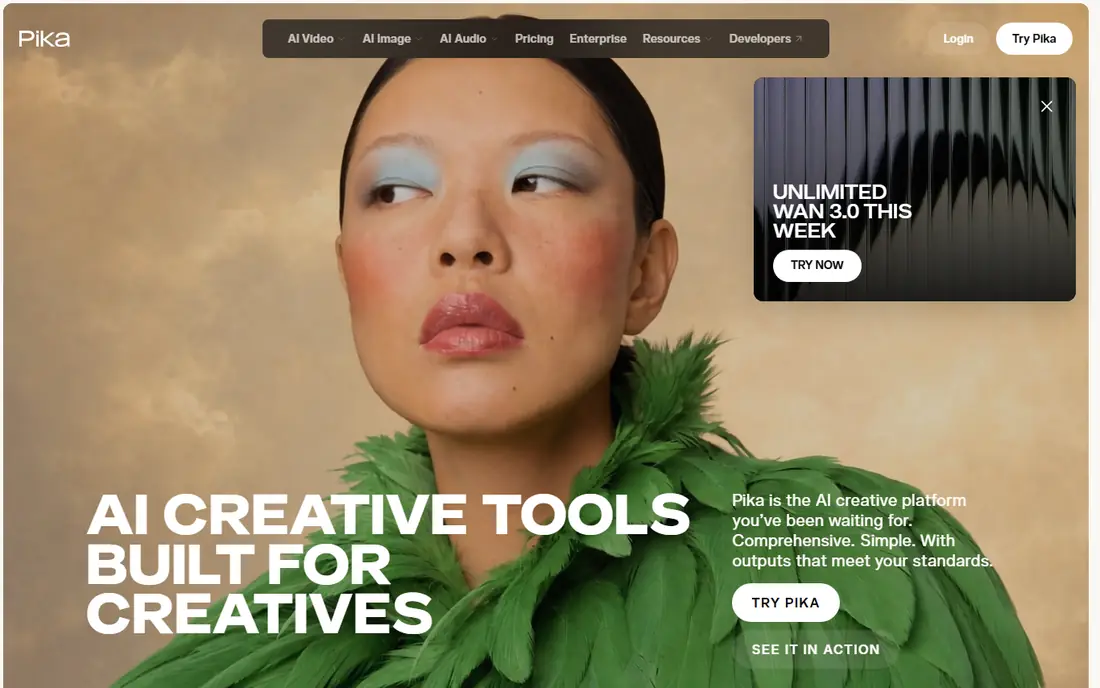
Pika is aimed squarely at short social clips and effects. Pika focuses on short, shareable video, with effects and templates that suit social creators.
That simplicity is the appeal for creators who post frequently and do not want a complicated production tool. Check the vendor site for Pika pricing; none is listed in this comparison. A free plan is available with Pika.
Honest limits: Credit limits apply.
- Effects and templates
- Image to video support
- Output can feel stylized instead of photorealistic
Veo 3.1
Ideal for: Realistic clips with native audio
Veo 3.1 was built for realistic clips with native audio. Quality levels and credit costs also vary a lot, so check whether you need Fast or Standard quality.
Honest limits: Clips are short per generation.
Veo 3.1, from Google, is the closest rival for realistic video with sound built in. Starting cost for Veo 3.1: $19.99 per month. Free access: Free trial.
- Capable realism
- Works through Gemini and Flow
- Higher quality levels cost much more
Luma Dream Machine
Ideal for: Quick text and image to video
Luma Dream Machine serves quick text and image to video. The free level lets you test the look before you pay, and premium plans add more generations and higher quality.
Luma Dream Machine does not show a starting price in this comparison, so check the vendor site for current pricing. Luma Dream Machine includes a free tier.
What to check first: Advanced control is less deep than Runway.
- Straightforward prompt workflow
- Quick generation
- Clip length is restricted
Runway
Ideal for: Editing control and video tools
Where Runway fits: editing control and video tools. The Standard plan is 12 dollars a month when billed yearly, with 625 credits, whereas monthly billing is higher.
Where it falls short: Best features sit on higher plans.
In daily use, at 12 credits per second for Gen-4.5, a 5-second clip costs 60 credits, so the entry plan handles only a restricted number of finished clips. What you pay to start with Runway: $12 per month. Free access exists with Runway.
- Access to other models in one workspace
- Video editing and upscaling tools
- Credits run out quick on the entry plan
Hailuo AI
Ideal for: Low-cost short video generation
Where Hailuo AI fits: low-cost short video generation. Check the checkout price carefully, since promotional prices have differed from published terms in recent months.
Downsides: Credit costs vary by model.
Also confirm credit cost for the exact model you plan to use. Hailuo AI pricing: $14.99 per month. Free access exists with Hailuo AI.
- Sound on newer models
- Image and text to video
- Promotional prices can differ from list terms
What to look for in Sora AI
Start by defining the clip you need: length, realism, audio, and where it will be published. Beyond that, AI video still struggles with complicated hands, quick action, and long dialogue, so test your hardest scene, not your easiest one. Save the prompts that work, since small wording changes can change the result a lot.
For everyday use, confirm whether you can use clips commercially, whether exports carry a watermark on your plan, and how long clips can be. Also confirm how credits are counted for failed or rejected generations, since that cost is simple to miss.
How these tools were picked
Selection started from tools commonly considered for Sora AI, then narrowed to 7 that have clear pricing information or a clear quote process. Plan names, prices and limits change often. Treat the figures here as a starting point and verify them with the vendor. Tools are placed by general fit for Sora AI, with price clarity and free access as tie-breakers. A different team can reasonably rank them differently.
A buyer's checklist
- Ask InVideo AI, Kaiber, Pika and Luma Dream Machine for a written quote, since no starting price is shown.
- Look at free plan limits closely: InVideo AI, Pika, Luma Dream Machine and others have one, and the caps decide whether it is usable for real work.
- Run a trial of Kaiber and Veo 3.1 with real work before paying for a year; your own workflow is the best test.
- Read the limits listed for InVideo AI first: AI video clips are part of a wider editor.
- Find out whether the entry plan of InVideo AI covers your must-haves or only a trimmed-down version.
- Ask whether Runway integrates with your current software, and whether that comes standard or as an add-on.
Frequently asked questions
Is InVideo AI the right pick for everyone comparing Sora AI?
No single tool suits every team. InVideo AI comes first because it fits video from a script or prompt, while Kaiber suits music and stylized video and Pika suits short social clips and effects. Match the tool to your own size, budget and workflow before deciding.
Do these tools publish their prices?
Not all of them. InVideo AI, Kaiber, Pika and Luma Dream Machine publish no starting price, so expect a quote request for those. The rest, Veo 3.1 included, show a starting price, though seats and billing terms still change the final cost.
How are the tools for Sora AI ordered?
The order follows typical fit for Sora AI, with InVideo AI first and Hailuo AI last, then price clarity and free access. It is editorial judgement, not a score, so another team could rank the tools differently.
How long can AI video clips be?
Most tools generate clips of about 5 to 10 seconds per generation, with some models offering longer choices. Longer videos are normally made by chaining clips and editing them together.
Can I try these tools before paying?
Often, yes. InVideo AI, Pika, Luma Dream Machine and others have a free plan and Kaiber and Veo 3.1 offer a free trial. Use your own data and a real task during the test, and check what the free tier or trial limits before you rely on it.