Top Analytics Software for Small Businesses in 2026: 8 Options Compared

- 1
 Google AnalyticsSmall businesses that want free, standard web analyticsVisit
- 2
 MixpanelBusinesses that want product and user behaviour analyticsVisit
- 3
 AmplitudeGrowing businesses that want deep product analyticsVisit
- 4
 PlausibleSmall businesses that want privacy-friendly analyticsVisit
- 5
 MatomoBusinesses that want self-hosted analytics controlVisit
- Our pick for most people is Google Analytics, thanks to its balance of features, ease of use and value for small businesses that want free, standard web analytics.
- Mixpanel is the strongest alternative when businesses that want product and user behaviour analytics matters more than a general all-round fit.
- Free and trial options exist, including Amplitude, so you can test the core experience before paying.
- We compared ease of setup, traffic and conversion tracking, reporting, dashboards, integrations and pricing.
- Check pricing, free plan terms and the exact features you need on the official site before you subscribe, since plans change.
Quick comparison
| Product | Ideal for | Price from | Free version | |
|---|---|---|---|---|
| Google Analytics | Small businesses that want free, standard web analytics | See website | Yes | Visit |
| Mixpanel | Businesses that want product and user behaviour analytics | See website | Yes | Visit |
| Amplitude | Growing businesses that want deep product analytics | See website | Yes | Visit |
| Plausible | Small businesses that want privacy-friendly analytics | See website | Free trial | Visit |
| Matomo | Businesses that want self-hosted analytics control | See website | Yes | Visit |
 Zoho Analytics | Small businesses that want dashboards across business data | See website | Free trial | Visit |
 Databox | Small businesses that want dashboards from many tools | See website | Yes | Visit |
 Looker Studio | Small businesses that want free, custom dashboards | See website | Yes | Visit |
The best analytics software for small businesses
Small business analytics should answer simple questions, such as where visitors come from, what they buy, and which campaigns work, without a data team. The tools below range from free web analytics to business dashboards that combine sales, marketing and operations.
Google Analytics
Ideal for: Small businesses that want free, standard web analytics
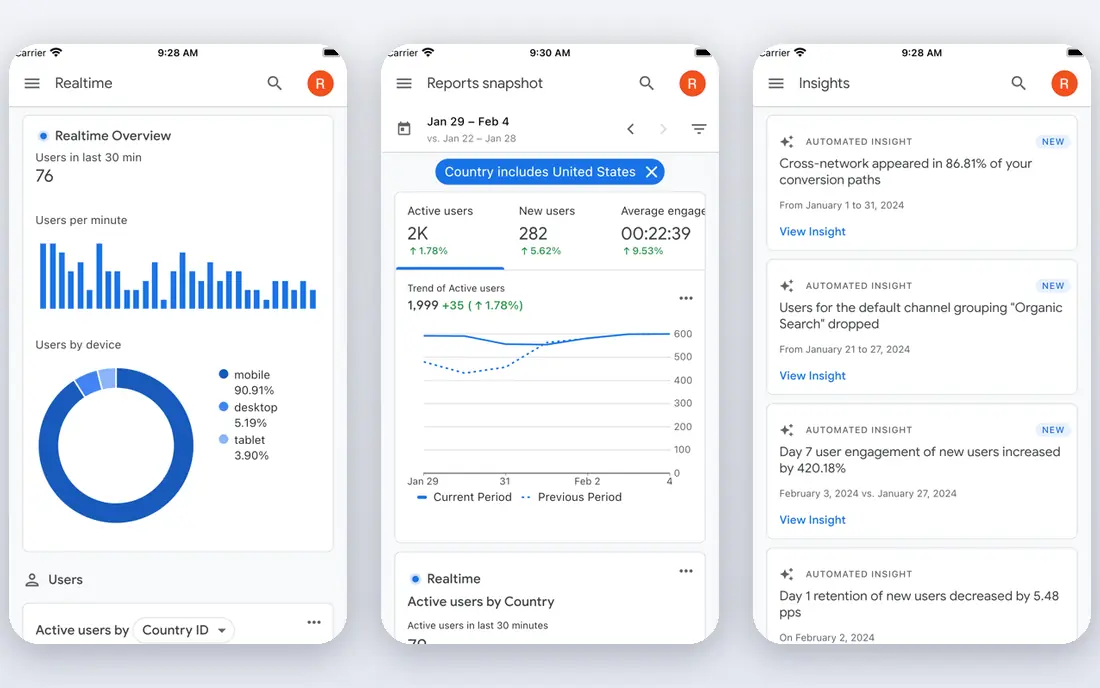
Google Analytics is the standard free web analytics tool, covering traffic, conversions, audiences and Google Ads integration. It suits small businesses that want a widely supported, no-cost starting point for understanding their website. Its reports cover the essentials, and its integration with Google tools is strong.
The trade-offs are setup complexity and privacy settings, since proper configuration and consent handling need care. For a small business willing to set it up properly, Google Analytics remains the most capable free option.
For readers who want small businesses that want free, standard web analytics, Google Analytics is a sensible shortlist pick, provided the limits above feel acceptable. Compare its pricing page and trial terms before you commit, and check that it covers the exact workflow you need on day one.
- Free web analytics
- Traffic and conversion reports
- Google integrations
- Setup and privacy settings need care
- Interface can overwhelm
Mixpanel
Ideal for: Businesses that want product and user behaviour analytics

Mixpanel provides event-based analytics, funnels, retention and user journey reports, which suit businesses that want to understand how users behave in a product or website. Its funnel reports show where users drop off, which helps improve signup and checkout flows. For a product-led business, that insight is valuable.
The limits are free plan event limits and the learning curve of designing events well. If you track the right events, Mixpanel gives clearer product insight than page-view analytics alone.
For readers who want businesses that want product and user behaviour analytics, Mixpanel is a sensible shortlist pick, provided the limits above feel acceptable. Compare its pricing page and trial terms before you commit, and check that it covers the exact workflow you need on day one.
- Event-based analytics
- Funnels and retention
- User journeys
- Free plan limits events
- Learning curve for event design
Amplitude
Ideal for: Growing businesses that want deep product analytics
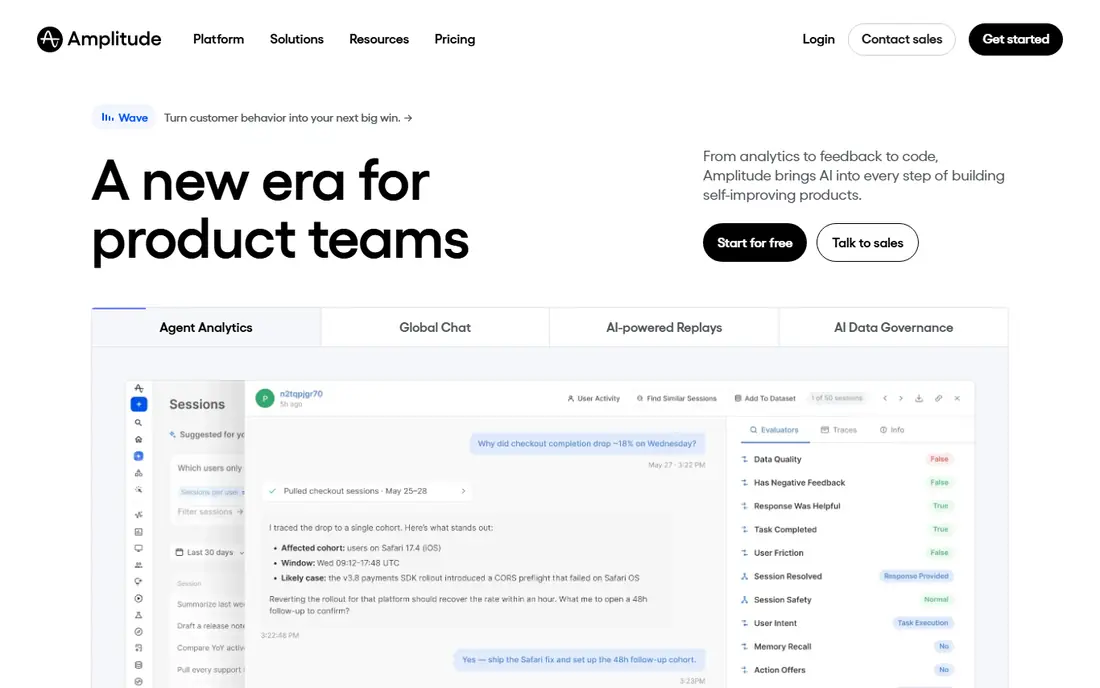
Amplitude offers deep product analytics, including funnels, cohorts, retention and experimentation, for growing businesses. It suits product teams that want to understand user behaviour in detail and test changes. Its cohort analysis helps show whether new users behave differently from older ones.
The trade-offs are free plan limits and setup planning, since good Amplitude data needs thoughtful event design. For a growing product business, though, its depth is a strong advantage over simpler tools.
For readers who want growing businesses that want deep product analytics, Amplitude is a sensible shortlist pick, provided the limits above feel acceptable. Compare its pricing page and trial terms before you commit, and check that it covers the exact workflow you need on day one.
- Product analytics
- Funnels and cohorts
- Experimentation
- Free plan limits
- Setup needs product data planning
Plausible
Ideal for: Small businesses that want privacy-friendly analytics
Plausible is a privacy-friendly analytics tool with simple reports and no cookies by default, which suits small businesses that want clear traffic insight without complex privacy setup. Its dashboard is easy to read, and its lightweight script does not slow a site much. For a small business website, its simplicity is appealing.
The limit is depth, since it offers fewer advanced product analytics features than Mixpanel or Amplitude. If you want simple, privacy-friendly web analytics, Plausible is an excellent choice, but product teams may need a deeper tool alongside it.
For readers who want small businesses that want privacy-friendly analytics, Plausible is a sensible shortlist pick, provided the limits above feel acceptable. Compare its pricing page and trial terms before you commit, and check that it covers the exact workflow you need on day one.
- Privacy-friendly tracking
- Simple reports
- No cookies by default
- Fewer advanced product features than Mixpanel
- Paid after trial
Matomo
Ideal for: Businesses that want self-hosted analytics control
Matomo provides web analytics with strong privacy controls and full data ownership, available self-hosted or in the cloud. It suits businesses that want control over their analytics data and compliance with strict privacy rules. Its reports cover traffic, conversions and behaviour in a familiar format.
The trade-offs are technical care for self-hosting and a functional interface. For a business that values data ownership, Matomo is a credible alternative to Google Analytics, with a free self-hosted option.
For readers who want businesses that want self-hosted analytics control, Matomo is a sensible shortlist pick, provided the limits above feel acceptable. Compare its pricing page and trial terms before you commit, and check that it covers the exact workflow you need on day one.
- Self-hosted or cloud analytics
- Privacy controls
- Full data ownership
- Self-hosting needs technical care
- Interface is functional
Zoho Analytics
Ideal for: Small businesses that want dashboards across business data
Zoho Analytics lets small businesses build dashboards across sales, marketing, finance and other data, with AI insights and Zoho integrations. It suits businesses that want one dashboard view of the whole company, not just website traffic. Its visual builder helps non-technical users create reports.
The limits are ecosystem fit and setup time, since its best value comes inside Zoho and building good dashboards takes effort. For a Zoho-using business, it is a natural analytics choice.
For readers who want small businesses that want dashboards across business data, Zoho Analytics is a sensible shortlist pick, provided the limits above feel acceptable. Compare its pricing page and trial terms before you commit, and check that it covers the exact workflow you need on day one.
- Dashboards across sales, marketing and finance
- AI insights
- Zoho integrations
- Best inside Zoho ecosystem
- Setup takes time
Databox
Ideal for: Small businesses that want dashboards from many tools
Databox pulls data from many tools into dashboards, with templates for marketing, sales and operations. It suits small businesses that want one screen showing website, ads, CRM and sales performance together. Its TV and mobile views help teams keep metrics visible.
The trade-offs are free plan source limits and lighter deep analysis than a product analytics tool. For a simple, visual business dashboard, Databox is easy to start with and pleasant to use daily.
For readers who want small businesses that want dashboards from many tools, Databox is a sensible shortlist pick, provided the limits above feel acceptable. Compare its pricing page and trial terms before you commit, and check that it covers the exact workflow you need on day one.
- Dashboards from many sources
- Templates
- TV and mobile views
- Free plan limits data sources
- Deeper analysis needs other tools
Looker Studio
Ideal for: Small businesses that want free, custom dashboards
Looker Studio, formerly Data Studio, lets small businesses build free, custom dashboards from Google and other data sources, with easy sharing. It suits businesses that want tailored reports without paying for a dashboard platform. Its Google connectors cover Analytics, Ads, Sheets and Search Console well.
The limits are setup and learning curve, since good dashboards need clean data sources and some report design skill. For a business already using Google tools, Looker Studio is a powerful free dashboard option.
For readers who want small businesses that want free, custom dashboards, Looker Studio is a sensible shortlist pick, provided the limits above feel acceptable. Compare its pricing page and trial terms before you commit, and check that it covers the exact workflow you need on day one.
- Free custom dashboards
- Google data connectors
- Sharing
- Needs data sources set up
- Learning curve for complex reports
How we picked these
We compared official feature pages, pricing pages, app store listings, privacy policies and public reviews for each option, and we focused on products that exist and work in October 2026 and truly fit the topic. We looked for a mix of well-known leaders and strong smaller options, rather than a list of near-identical tools. We compared ease of setup, traffic and conversion tracking, reporting, dashboards, integrations and pricing. We did not claim hands-on testing that did not happen, and where a price or free tier could not be verified from the vendor site, we wrote See website rather than guessing a number.
Choosing the right option for you
Start with one question, such as which marketing channel brings paying customers, and pick a tool that answers it clearly. A dashboard with fifty charts you never open is less useful than one report you check weekly.
Check privacy and consent requirements for your region, especially for web analytics that use cookies. Some tools here offer privacy-friendly tracking that avoids cookies, which can simplify compliance for a small business.
Set up conversion tracking early, including purchases, bookings or enquiries, because traffic alone does not show whether marketing works. A tool that connects visits to real business results will guide spending far better than page views alone.
Before you decide, make a short list of three must-have features and one deal-breaker, then test only the two or three options that meet that list. A focused trial will tell you more than a week of comparing feature tables, and it keeps the decision tied to your real work rather than to marketing claims.
Frequently asked questions
What are the best top analytics software for small businesses?
The best choice depends on your needs, but Google Analytics suits most people, while Mixpanel is stronger for businesses that want product and user behaviour analytics. Start with your must-have features, then trial the top two options before paying.
Is there a free option for top analytics software for small businesses?
Yes, several options here offer a free plan or a free trial, including Amplitude. Free plans usually limit advanced features, so check which tools you actually need before judging a free tier.
How much do top analytics software for small businesses cost?
Costs vary widely, and many vendors use quote-based pricing, so the pricing page is the reliable source. Where we could not verify a current price, we wrote See website rather than guessing, and you should get a written quote for team plans.
Which option is best for beginners?
Google Analytics is the easiest starting point for most beginners, thanks to its clear setup and guidance. If you want the simplest possible tool, look at the free or trial options first and choose the one whose interface feels clearest to you.
How should I choose between these options?
List your top three needs, check integrations and pricing for those needs, and run a short trial with real work. The option that handles your daily tasks smoothly, with support you can reach, is usually the right pick, even if a rival has a longer feature list.