Top Rated Board Meeting Software Reviews in 2026: 7 Tools Compared

- 1
 Diligent BoardsLarge and listed boardsVisit
- 2
 Nasdaq BoardvantageEnterprise governanceVisit
- 3
 BoardEffectMid-size boards and nonprofitsVisit
- 4
 OnBoardBoards wanting ease of useVisit
- 5
 AprioSecure board communicationVisit
- Diligent Boards and Nasdaq Boardvantage suit large or listed boards with strict security and compliance needs.
- BoardEffect and OnBoard suit mid-size boards that want strong governance tools without enterprise complexity.
- BoardPro and Boardable suit smaller boards and nonprofits that need simple agendas, minutes, and voting.
- Aprio stands out for boards that want a clean portal plus secure messaging and document control.
- Security, permission controls, and audit trails matter more than extra features, so test those first in a trial.
Quick comparison
| Product | Ideal for | Price from | Free version | |
|---|---|---|---|---|
| Diligent Boards | Large and listed boards | See website | No | Visit |
| Nasdaq Boardvantage | Enterprise governance | See website | No | Visit |
| BoardEffect | Mid-size boards and nonprofits | See website | No | Visit |
| OnBoard | Boards wanting ease of use | See website | No | Visit |
| Aprio | Secure board communication | See website | No | Visit |
 BoardPro | Small boards | See website | Free trial | Visit |
 Boardable | Nonprofit boards | See website | Free trial | Visit |
The best board meeting software
We compared official feature pages, pricing pages, security documentation, and public reviews for seven board meeting tools. Our pick for most boards is OnBoard for its balance of ease and governance features, with Diligent Boards close behind for large boards with heavier compliance needs.
Diligent Boards
Ideal for: Large and listed boards

Diligent Boards is the enterprise pick in this list. It handles board books, agendas, minutes, voting, and secure document sharing, with permission controls that limit who sees sensitive papers. Larger organizations can pair it with other Diligent governance tools for entity management and compliance tracking. That depth suits listed companies, banks, and large nonprofits with formal governance duties.
The cost and setup reflect that scale. Small boards will find it more than they need, and pricing is quoted rather than listed, so budget talks take longer. If your board handles sensitive deals, regulated filings, or many committees, Diligent gives the control and audit trail that cheaper tools cannot match.
- Strong security and permissions
- Board books and minutes
- Entity and governance tools
- Enterprise pricing
- Setup can take time
Nasdaq Boardvantage
Ideal for: Enterprise governance
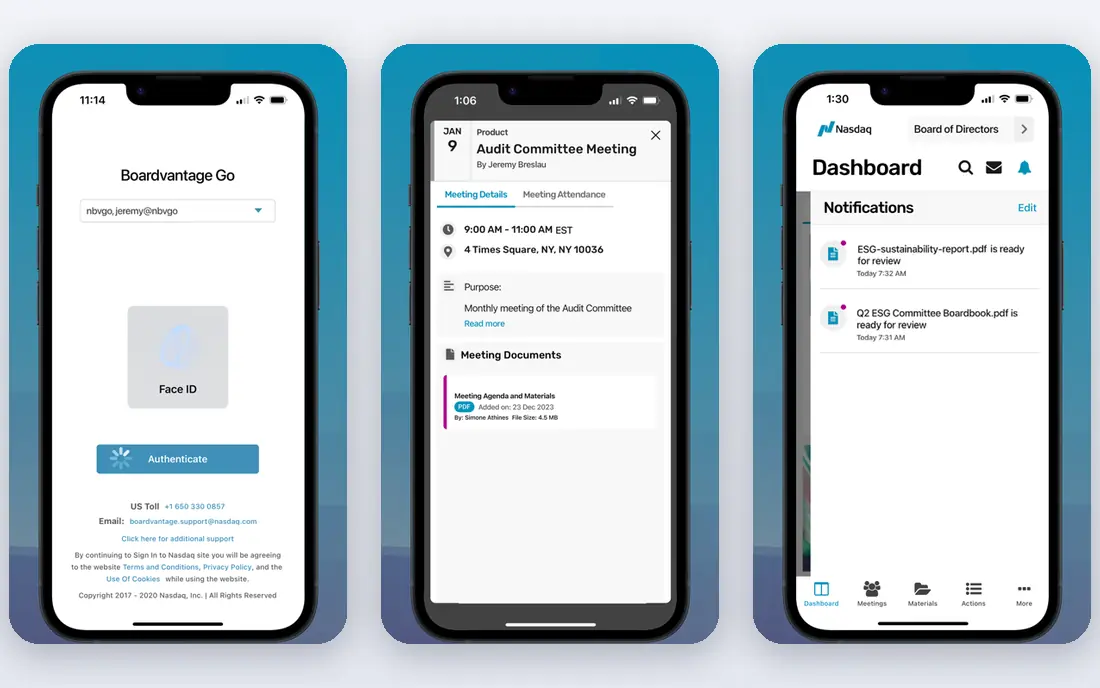
Nasdaq Boardvantage serves large boards that need a secure, reliable portal for papers, agendas, and decisions. Directors can annotate documents, vote, and sign approvals inside the portal, and administrators control access by committee and role. The platform is built for boards that meet often and handle confidential material, so uptime and support matter as much as features.
Pricing is quoted, and the tool is aimed at enterprises rather than small volunteer boards. A small nonprofit will likely find Boardable or BoardPro a better fit and a better price. For large companies that want a proven board portal with strong support, Boardvantage is a safe enterprise choice.
- Secure board portal
- Annotation and voting
- Strong support for large boards
- Quoted pricing
- Less suited to small boards
BoardEffect
Ideal for: Mid-size boards and nonprofits
BoardEffect combines board books, agendas, minutes, voting, and surveys in a portal aimed at mid-size organizations, healthcare boards, and nonprofits. Administrators can build books from documents, track tasks after meetings, and run surveys for board evaluations. Permission controls keep committee papers separate, which matters when a board handles both public business and confidential items.
New administrators may need training to use the full feature set well, and pricing is quoted rather than listed. The payoff is a portal that covers the full meeting cycle instead of just document sharing. For boards that have outgrown email and shared drives, BoardEffect is a natural next step.
- Board books and surveys
- Task tracking
- Good admin controls
- Quoted pricing
- Learning curve for new admins
OnBoard
Ideal for: Boards wanting ease of use
OnBoard is our pick for most boards because it pairs governance features with an interface directors actually enjoy using. Agendas, books, minutes, and votes sit in one place, and secure messaging keeps board discussion out of personal email. Directors can annotate papers on tablets, which helps in meetings where paper packs used to rule. Administrators get useful controls without a long training course.
The main limit is scale. Very large enterprises with complex entity needs may want Diligent or Boardvantage instead. Pricing is also quoted, so small boards should ask for a clear quote before committing. For mid-size companies, schools, and nonprofits that want a polished portal, OnBoard hits the best balance in this list.
- Clean interface
- Agenda builder and minutes
- Secure messaging and voting
- Quoted pricing
- Fewer enterprise extras than Diligent
Aprio
Ideal for: Secure board communication
Aprio focuses on keeping board talk secure. Alongside agendas, minutes, and document sharing, it offers a secure boardroom for messages and email so sensitive discussion does not drift into personal inboxes. That focus suits boards in healthcare, finance, and public service, where a leaked email can cause real harm. The document library and permission controls support committees and confidential papers.
Aprio is less well known than Diligent or Nasdaq, which can matter for boards that want the comfort of a large vendor. Its feature set also leans toward communication rather than broad governance suites. For boards whose main worry is secure discussion and clean document control, Aprio is a strong and focused option.
- Secure boardroom chat and email
- Document library
- Meeting tools
- Smaller brand than enterprise rivals
- Quoted pricing
BoardPro
Ideal for: Small boards
BoardPro is built for small and mid-size boards that want structure without enterprise weight. You can build agendas, record minutes, track actions, and store board papers in a simple portal. The interface is easy for volunteer directors who may not be technical, and action tracking helps boards follow through between meetings. That simplicity is the point: a small board should not need training to run a meeting.
Larger boards may miss deeper permission controls, entity tools, and audit features. BoardPro also lacks the brand weight of enterprise portals for listed companies. For startups, charities, and community boards that need order and accountability at a fair price, BoardPro is an excellent fit.
- Simple agendas and minutes
- Action tracking
- Affordable for small boards
- Fewer enterprise controls
- Less suited to listed companies
Boardable
Ideal for: Nonprofit boards
Boardable is designed around nonprofit boards, with tools for agendas, minutes, polls, votes, and a central document store. Board members can RSVP, vote, and find papers without digging through email, and administrators can manage committees and terms. The nonprofit focus shows in the pricing and onboarding, which suit volunteer boards and small staff teams.
Corporate boards with complex governance needs may want a more enterprise tool. Some features also sit on higher tiers, so check the plan that covers your committee structure. For nonprofits that want a friendly, affordable board portal, Boardable is our pick in this category.
- Built for nonprofits
- Meeting polls and votes
- Document center
- Less depth for corporate governance
- Some features need higher tiers
How we picked these
We compared official feature pages, pricing pages, security documentation, and public reviews for each tool, and we favored tools that still work in October 2026 and cover the full meeting cycle: agendas, papers, minutes, and votes. We did not claim hands-on testing, and we weighed security controls, ease of use for directors, and fit for different board sizes. Where pricing was quoted rather than listed we wrote "See website" rather than guessing, so ask vendors for a written quote.
What to check before you choose
Start with security. Ask how documents are encrypted, how permissions work by committee, and whether the vendor keeps an audit trail of who viewed what. A board portal that cannot answer those questions clearly is not ready for confidential papers. Next, test the director experience: if busy directors cannot open papers on a tablet and vote without help, adoption will fail no matter how good the admin tools are.
Match size to need. Small boards should not pay enterprise prices for features they will never use, and large boards should not squeeze governance into a tool built for volunteers. Check migration help too, since moving years of board papers takes planning. Finally, confirm support hours and training, because board meetings happen on fixed dates and a problem on meeting day needs a fast answer.
Also weigh how your board actually works between meetings. Some boards only need papers, agendas, and votes four times a year, while others run committees, evaluations, and approvals every month. A portal that handles committee papers, action tracking, and document versions will save your administrator real time, but only if directors open it. Ask vendors for a trial with your real agenda pack, not a demo pack, and watch how long it takes a director to find a paper, add a note, and cast a vote. If that flow feels awkward on a tablet, adoption will suffer, since many directors read papers on tablets the night before a meeting. Check offline access too, since directors travel and may read papers without reliable internet. Finally, confirm how the vendor handles departing directors: access should end cleanly, and their notes and votes should remain in the record where governance rules require it.
Budget conversations go better when you price the full picture. Ask for a quote that lists every director, administrator, and committee, plus storage, support, and training, so a low headline price does not hide later charges. Some vendors charge by board or by user, and those models suit different board sizes, so compare total yearly cost for your actual headcount. Also ask about contract length, renewal increases, and exit terms, including how you export papers and minutes if you leave. A board portal holds years of sensitive history, so export matters as much as entry. Plan a short pilot with one committee before a full rollout, and set a review date after the second full meeting cycle to judge whether directors actually use the portal or still fall back to email.
Frequently asked questions
What is the best board meeting software for nonprofits?
Boardable is our nonprofit pick for its friendly design and nonprofit-focused tools, with BoardPro close behind for small boards. BoardEffect also suits larger nonprofits with committees and formal governance needs. Compare free trials and check which plan covers your voting and document needs.
How much does board meeting software cost?
Most board portals use quoted pricing based on board size and features, so public prices are rare. Small board tools tend to cost less, while enterprise portals cost more and include deeper security and support. Always ask for a written quote that lists users, committees, and storage.
Is board meeting software secure?
Leading portals use encryption, permission controls, and audit trails to protect board papers, which is far safer than email attachments. Check the vendor security page, ask about data hosting and access controls, and train directors to use the portal instead of personal email for board business.
Can board software handle minutes and voting?
Yes. The tools here cover agendas, minutes, votes, polls, and action tracking as standard features. Check that minutes can be approved inside the portal and that vote records are kept for audit, since those details matter for governance records.
Do directors need training to use a board portal?
Most modern portals are easy for directors, especially OnBoard and Boardable, but administrators benefit from vendor training. Plan a short onboarding session before the first live meeting and keep a simple guide for common tasks like opening papers and voting.