For secure collaboration across project teams, Autodesk Construction Cloud is where this list starts. Listed starting prices: Fieldwire from $39 per user per month. Kahua fits owners and agencies managing capital programs; Procore fits connecting site and office workflows. The other 3 tools in the list cover narrower or pricier cases.
If you are comparing RFI tracking software for construction teams, this page covers 6 tools in one place: what each is best for, what it costs to start, whether it has a free plan, and the main limit to know about.
Key takeaways
The list opens with Autodesk Construction Cloud, aimed at secure collaboration across project teams.
For data-driven project decisions, InEight is worth a look.
Only Fieldwire offers a free plan among these 6 tools.
Starting prices begin at $39 per user per month with Fieldwire.
Before buying Fieldwire, weigh this: field focus may limit back-office depth.
Best for: Secure collaboration across project teams
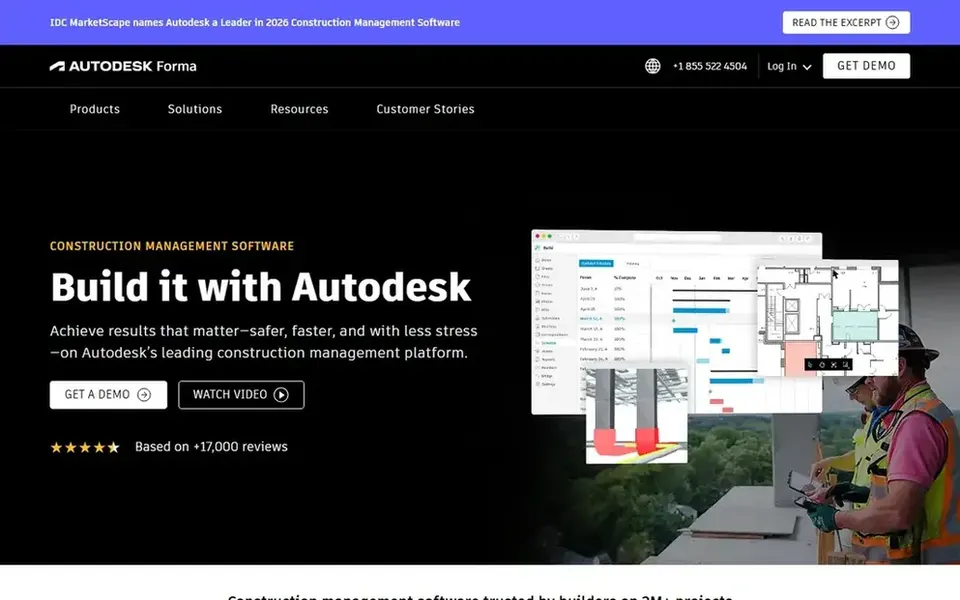
Autodesk Construction Cloud targets secure collaboration across project teams. RFI tracking benefits from that shared environment, where project information stays connected. Also, organizations outside the Autodesk ecosystem should weigh integration benefits before committing.
Where it falls short: Feature depth may need training.
The product is wide, so teams with narrow RFI needs may not use much of what it supplies. Beyond that, Autodesk Construction Cloud, now described by Autodesk as Autodesk Forma, is construction management software made for project teams that require to collaborate securely and rapidly. This comparison lists no price for Autodesk Construction Cloud; ask the vendor. Trial and free access: Not stated.
Best for: Owners and agencies managing capital programs
Think of Kahua for owners and agencies managing capital programs. Kahua is a construction project management system for owners, general contractors and agencies that want to control capital programs, cut risk and align teams.
Highlights: Capital program control focus.
Evaluation starts with a demo request, so plan time for that step. RFI tracking supports that program-level visibility, helping stakeholders follow up on open questions across projects. No starting price is listed for Kahua here; confirm pricing on the vendor site. Free plan details: Not stated.
Drawbacks to consider: Program orientation may not fit small businesses.
Procore serves connecting site and office workflows. RFI tracking sits within that wider project management context, which helps when questions have to link to drawings, tasks and schedules.
Watch-outs: Setup needs team coordination.
Pricing for Procore is not stated here, so ask the vendor for current figures. Free access: Not stated.
In daily use, teams with little field activity may not use its strengths. Fieldwire leans toward jobsite execution, so organizations needing deep back-office document control may want a broader product. On top of that, choose it when RFI tracking should stay close to tasks and drawings on active sites. Fieldwire pricing: $39 per user per month. A free plan is available with Fieldwire.
The main drawbacks: Field focus may limit back-office depth.
A good match for active jobsite teams Fieldwire if this describes you: field-first task and drawing tracking. Fieldwire by Hilti is live jobsite management software for tracking tasks, updating drawings and reducing expensive rework, used by owners, general contractors and subcontractors. For everyday use, RFI-related questions can be tracked alongside field tasks and current drawings, which helps crews resolve issues where the work happens.
Best for: Contractors linking job costing and workflows
Pick Trimble Viewpoint if this describes you: contractors linking job costing and workflows. Trimble Viewpoint gives you construction ERP and project management software made for contractors, with tools to handle projects, people and profits.
Watch-outs: Implementation involves several teams.
Choose it when RFI workflows should tie into job costing and reporting instead of stand alone. This comparison lists no price for Trimble Viewpoint; ask the vendor. As for free access: Not stated.
InEight serves data-driven project decisions. InEight gives you construction project management software that provides teams the data needed to make better decisions.
The main drawbacks: Wide scope may need configuration.
On top of that, pick a lighter choice when RFI tracking is the only workflow you have to run. Pricing for InEight is not stated here, so ask the vendor for current figures. Trial and free access: Not stated.
Get a written quote from Autodesk Construction Cloud, Kahua, Procore and others; the list shows no starting price for them.
Look at the free plan from Fieldwire closely: its caps decide whether it is usable for real work.
Before choosing Autodesk Construction Cloud, weigh its main limit: feature depth may need training.
The entry price of Kahua is only the starting point; model the full cost with seats and extras.
List the apps you already depend on and check that Trimble Viewpoint supports each one on the plan you would buy.
How we picked
Each tool was reviewed on what its vendor publishes: price, plan limits, core features and stated drawbacks. We did not run hands-on tests. Treat prices as a snapshot: vendors change plans often, so check the vendor site for the figure that applies today. The order reflects how well each tool fits the most common buying scenario for RFI tracking software for construction teams, then price clarity, then free plan access. It is a starting point, not a verdict.
Every price and plan detail on this page comes from the vendors’ own websites. We did not run hands-on tests unless the text says so, and we do not publish star ratings or review scores. See how we score and our disclosure.
Keep your shortlist in one place
Paste prices, trial dates and notes from this guide into Ainotely, our AI note app. It files them into a topic and pulls out tasks like “cancel trial by Friday”. Free 7-day trial, no card needed.
Fieldwire centers on jobsite tasks and drawings, so questions can stay close to where work happens. Teams needing deep document control may pair it with a broader system.
How are the tools for RFI tracking software for construction teams ordered?
The order follows typical fit for RFI tracking software for construction teams, with Autodesk Construction Cloud first and InEight last, then price clarity and free access. It is editorial judgement, not a score, so another team could rank the tools differently.
What is the cheapest option for RFI tracking software for construction teams in this list?
On published monthly entry prices, Fieldwire is the lowest here at $39 per user per month. Entry price is only part of the cost, because seats, add-ons and billing terms can change the total. Each of the 6 options in this RFI tracking software for construction teams guide has its own card above with the price, free plan and limits.
Is Autodesk Construction Cloud the right pick for everyone comparing RFI tracking software for construction teams?
No single tool suits every team. Autodesk Construction Cloud comes first because it fits secure collaboration across project teams, while Kahua suits owners and agencies managing capital programs and Procore suits connecting site and office workflows. Match the tool to your own size, budget and workflow before deciding.
Can I try these tools before paying?
Often, yes. Fieldwire has a free plan. Use your own data and a real task during the test, and check what the free tier or trial limits before you rely on it. All 6 picks in this RFI tracking software for construction teams comparison show their pricing, free plan details and main limits on the cards above.